> ## Documentation Index
> Fetch the complete documentation index at: https://clickflare.com/docs/llms.txt
> Use this file to discover all available pages before exploring further.
# Adding a Conditional Path
> Setting up a conditional path
This guide will walk you through setting up a conditional path.
When creating a Flow, you’ll have two options: **default paths** or **conditional paths**.
 #### Default Paths
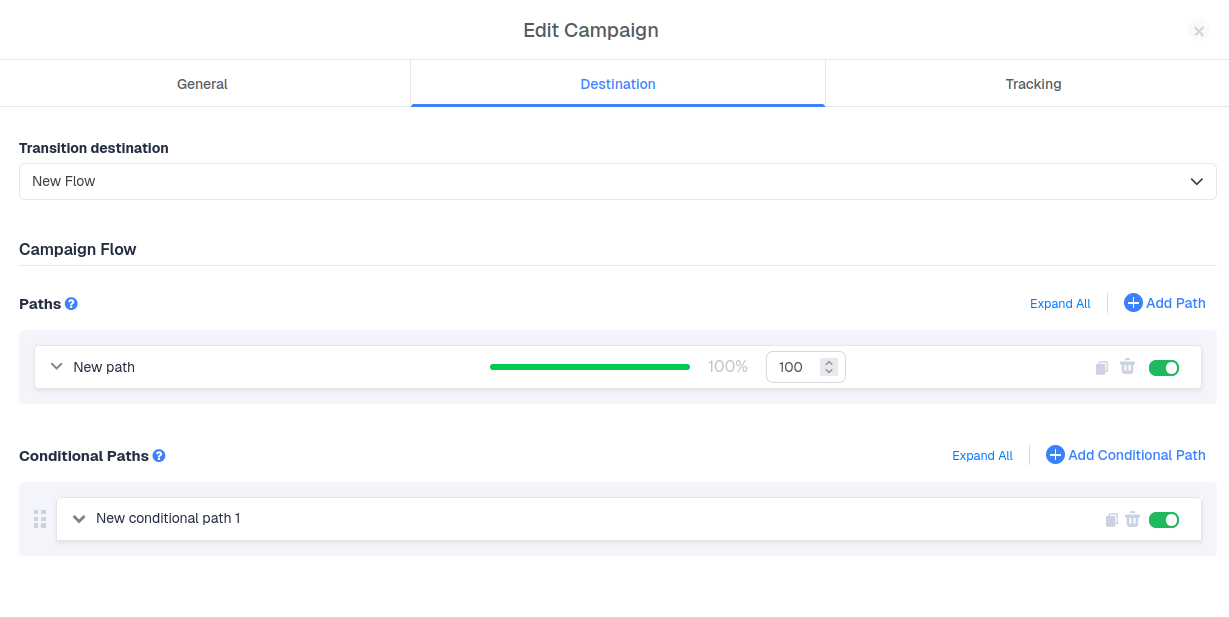
A **default path** is required in every Flow. By default, all traffic is distributed evenly among the available default paths when no conditional paths are applied.
#### Conditional Paths
A **conditional path** allows traffic to pass only if it meets specific conditions. For example, you can create a conditional path for all visits where Device Type = Tablet.
***
### Name Your Conditional Path
Start by giving your conditional path a clear name.
### Set Conditions
Next, define the conditions. You can choose from pre-existing conditions or create a new one on the spot.
**Note:** You can modify existing conditions.
When adding a new condition:
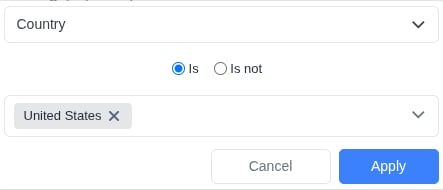
* Select a condition type from the list (e.g., **Country**)
* Choose the operator (is\*\*/**is** not\*\*)
* Specify the allowed or blocked value (e.g., **United States**)
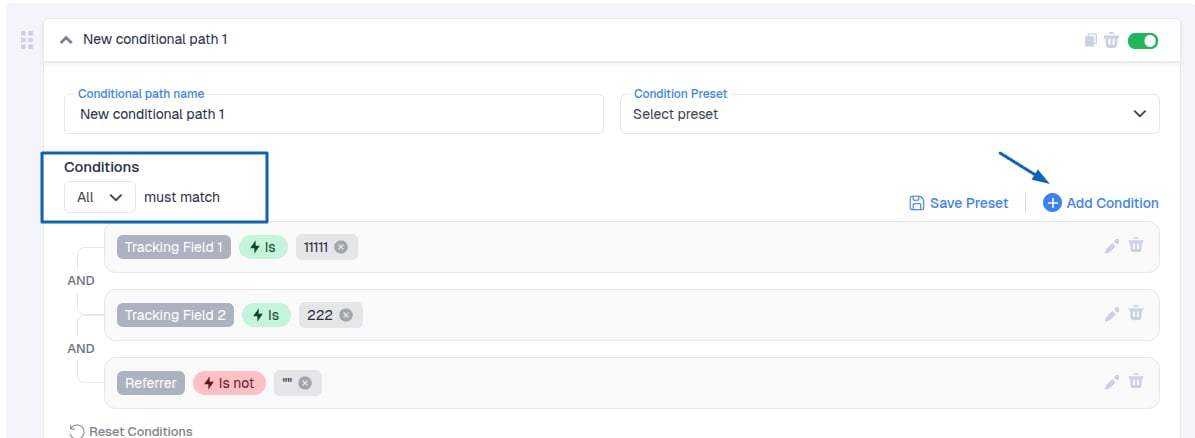
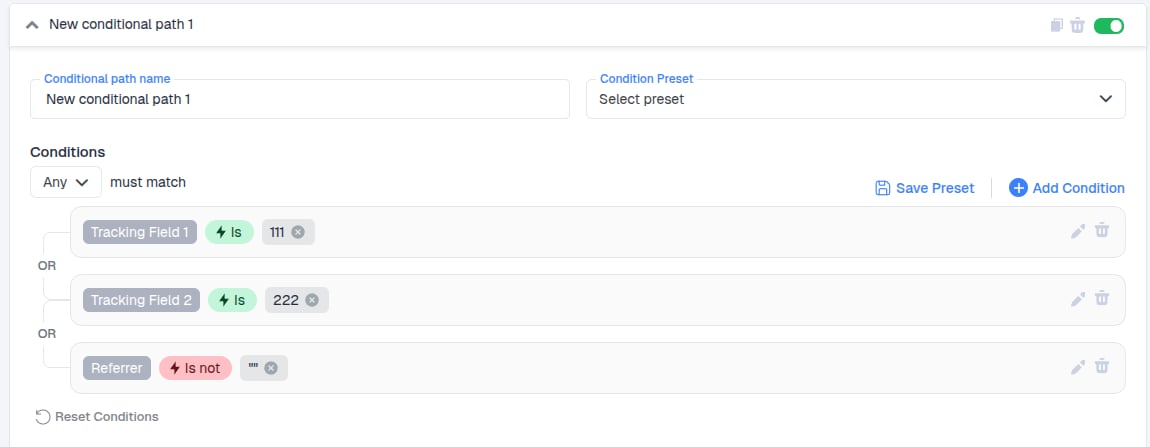
* With the new update, you can now choose how to evaluate conditions using **AND** or **OR** logic.
**AND**: All conditions must be true for the path to be followed and the redirection to occur.
#### Default Paths
A **default path** is required in every Flow. By default, all traffic is distributed evenly among the available default paths when no conditional paths are applied.
#### Conditional Paths
A **conditional path** allows traffic to pass only if it meets specific conditions. For example, you can create a conditional path for all visits where Device Type = Tablet.
***
### Name Your Conditional Path
Start by giving your conditional path a clear name.
### Set Conditions
Next, define the conditions. You can choose from pre-existing conditions or create a new one on the spot.
**Note:** You can modify existing conditions.
When adding a new condition:
* Select a condition type from the list (e.g., **Country**)
* Choose the operator (is\*\*/**is** not\*\*)
* Specify the allowed or blocked value (e.g., **United States**)
* With the new update, you can now choose how to evaluate conditions using **AND** or **OR** logic.
**AND**: All conditions must be true for the path to be followed and the redirection to occur.
 **OR**: At least one condition must be true for the path to be followed.
 This gives you more flexibility in controlling how traffic is routed based on multiple conditions.
1. Click **Apply** to confirm. For example, if you choose Country - Is not - United States, this path will not receive traffic from the U.S.
This gives you more flexibility in controlling how traffic is routed based on multiple conditions.
1. Click **Apply** to confirm. For example, if you choose Country - Is not - United States, this path will not receive traffic from the U.S.
 You can **reset** the rule or **Save Condition** to add it to your list for reuse.
2. Create the Path
After defining conditions, create a path to receive traffic that matches them:
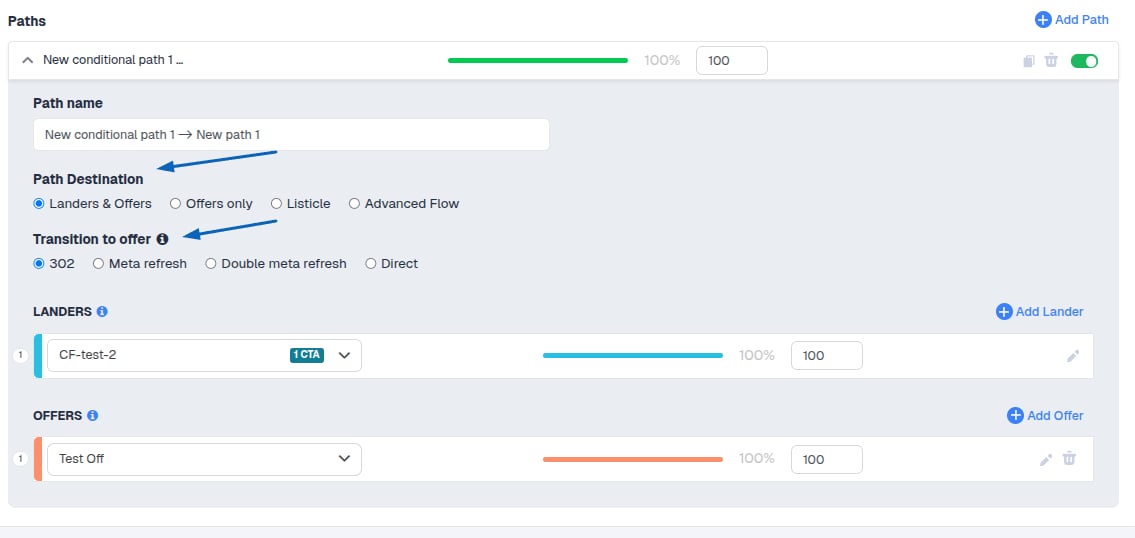
* Give the path a name
* Select the **Path Destination** and the **Transition to Offer**
***
**Path Destination Options:**
1. 1. Landers & Offers
2. Offers only
3. Listicle
4. Advanced Flow
**Note:** The **Listicle** option allows you to add an extra layer in your funnel. Visitors first see a pre-lander linking to subsequent landers, each containing different offers.
You can **reset** the rule or **Save Condition** to add it to your list for reuse.
2. Create the Path
After defining conditions, create a path to receive traffic that matches them:
* Give the path a name
* Select the **Path Destination** and the **Transition to Offer**
***
**Path Destination Options:**
1. 1. Landers & Offers
2. Offers only
3. Listicle
4. Advanced Flow
**Note:** The **Listicle** option allows you to add an extra layer in your funnel. Visitors first see a pre-lander linking to subsequent landers, each containing different offers.
 ***
### Traffic Distribution
Traffic distribution is controlled by **weight values**. The weight proportion determines the percentage of traffic each path receives. The total always sums to 100%.
**Important Notes:**
* Every Flow must include at least one default path.
* Each default path must contain at least one item.
***
### Traffic Distribution
Traffic distribution is controlled by **weight values**. The weight proportion determines the percentage of traffic each path receives. The total always sums to 100%.
**Important Notes:**
* Every Flow must include at least one default path.
* Each default path must contain at least one item.