> ## Documentation Index
> Fetch the complete documentation index at: https://clickflare.com/docs/llms.txt
> Use this file to discover all available pages before exploring further.
# SmartNews Conversion API
> Adding SmartNews Conversion API Integration
By using ClickFlare’s Conversion API for SmartNews Ads, you can report conversion events from ClickFlare back to SmartNews through SmartNews Conversions API (CAPI).
This works similarly to server-to-server postbacks, but is simpler to maintain and provides more reliable attribution.
***
## Why should I use the Conversion API for SmartNews Ads?
Due to increasing browser restrictions and privacy frameworks (GDPR, ITP, ad blockers, etc.), traditional client-side tracking (SmartNews pixel only) can miss a significant portion of conversions.
SmartNews Conversions API helps you overcome these limitations by sending events directly from ClickFlare’s servers to SmartNews, ensuring that the conversions tracked in ClickFlare are also reflected in SmartNews Ads reporting and optimization
With the SmartNews CAPI integration, you can:
* Improve conversion accuracy and reduce data loss
* Give SmartNews better data to optimize delivery and bidding
* Maintain attribution even if cookies or browser tracking fail
***
## What you'll need for the integration
* An Active **SmartNews** Ads account
* For web campaigns: SmartNews Pixel created in Event Manager
* An active ClickFlare account
* Your SmartNews **partner name** and **account name**
* Your SmartNews **Pixel** **ID** and **access token**
***
## Where to Find SmartNews Conversion API Information
### Implementation
* Create a Pixel in the Event Manager
* API Callpixel\_tag\_id. This includes adding the partner name and access token as common request parameters.
* Set up server-side event tracking.
### Downloading the authentication information
* Go to Business Manager ( [https://ads.smartnews.com/bm/](https://ads.smartnews.com/bm/) ) and select the business that will use the Conversion API. Then click on "Conversion API" in the "Developer Apps" tab. Follow the on-screen instructions to download your credentials.
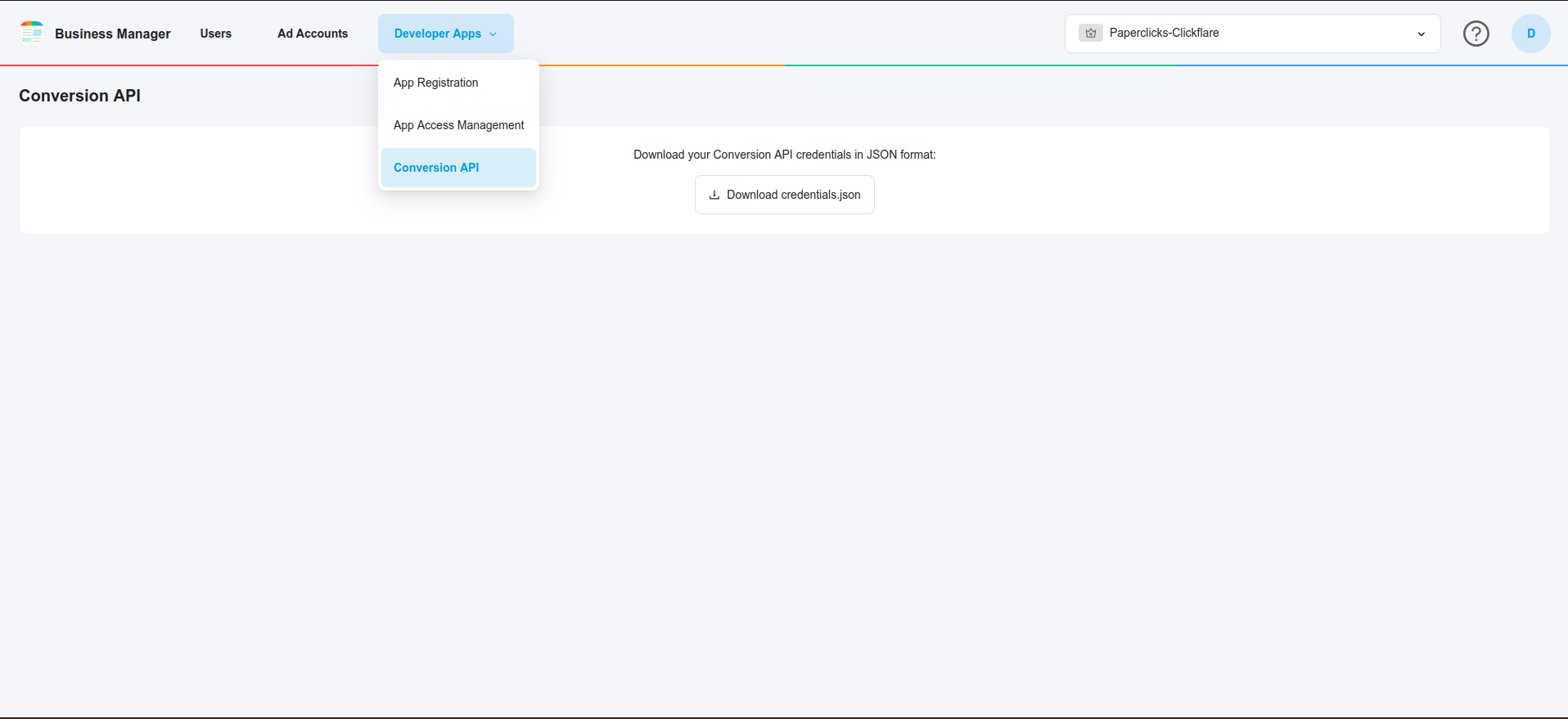
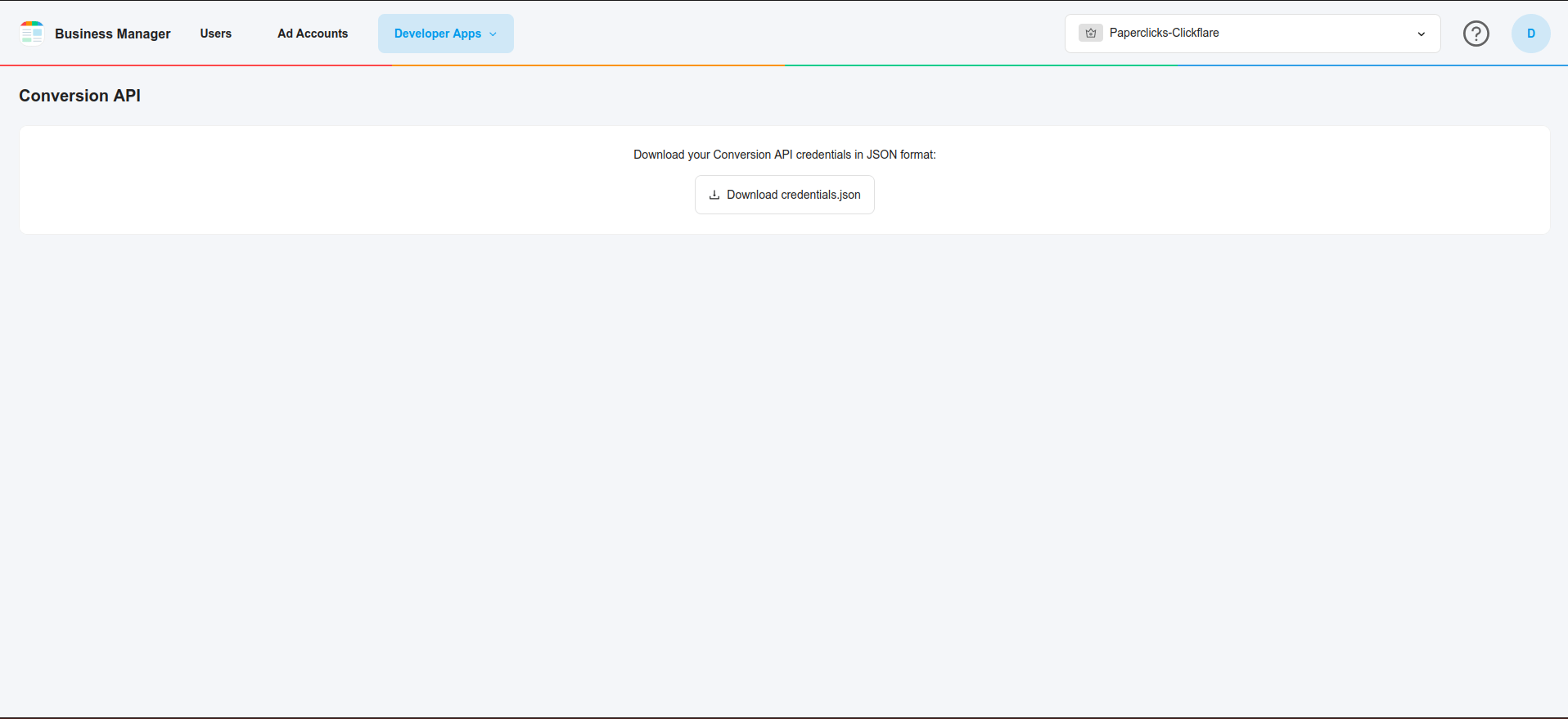 * From the downloaded file, obtain the **partner\_name** and **access\_token**.
***
## Integrating SmartNews Conversion API in ClickFlare
Follow the steps below to add your SmartNews CAPI integration in ClickFlare:
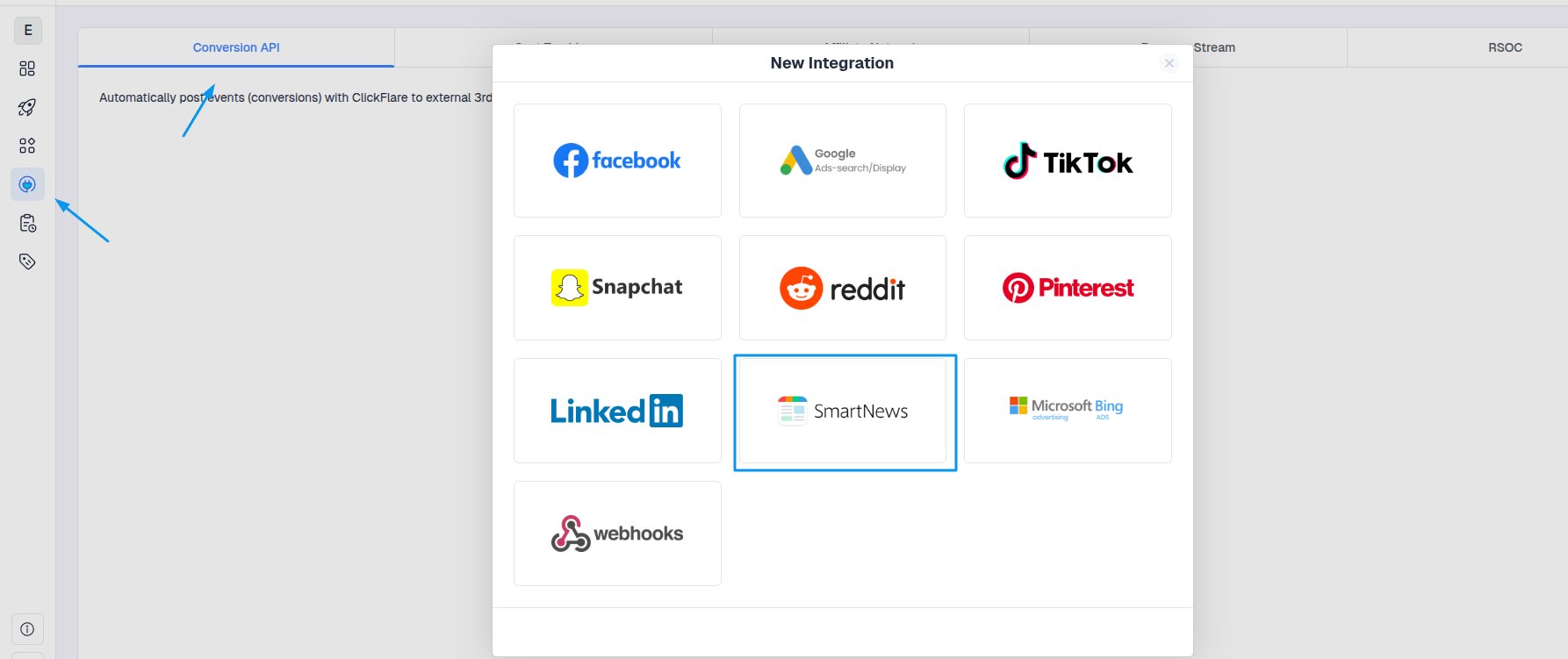
1. In ClickFlare, open the left-side menu and go to
**Integrations → Conversion API Integrations**
2. Click **Add Integration**
3. From the list of available integrations, select **SmartNews**
* From the downloaded file, obtain the **partner\_name** and **access\_token**.
***
## Integrating SmartNews Conversion API in ClickFlare
Follow the steps below to add your SmartNews CAPI integration in ClickFlare:
1. In ClickFlare, open the left-side menu and go to
**Integrations → Conversion API Integrations**
2. Click **Add Integration**
3. From the list of available integrations, select **SmartNews**
 ***
### Add a new SmartNews CAPI configuration
In the **SmartNews** integration setup window:
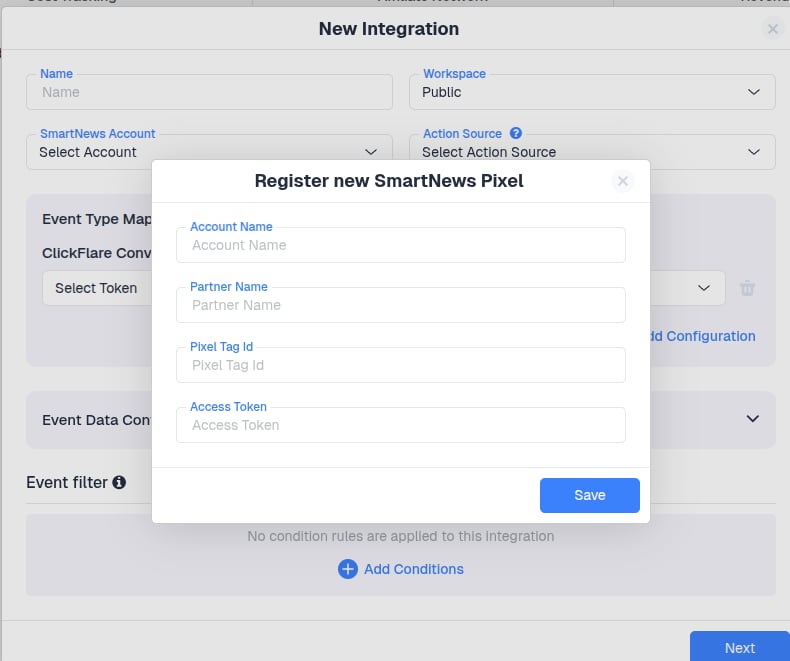
1. In the **SmartNews** integration screen, click **Add a new Pixel**.
2. Fill in the following details:
* **Account name:**
* **Partner Name**
* **Pixel Tag ID**
* **Access Token**
3. Click **Save**.
***
### Add a new SmartNews CAPI configuration
In the **SmartNews** integration setup window:
1. In the **SmartNews** integration screen, click **Add a new Pixel**.
2. Fill in the following details:
* **Account name:**
* **Partner Name**
* **Pixel Tag ID**
* **Access Token**
3. Click **Save**.
 ***
### Map ClickFlare Events to SmartNews Events
Next, specify which ClickFlare conversion events should be sent to SmartNews and how they map to **SmartNews** standard event names.
Common **SmartNews** events include:
* **Checkout** – completed purchase or transaction
* **Add To Cart** – item added to cart
* **Page Visit / View Content** – key landing/product page views
* **Lead** – lead or signup intent
* **Signup** – registration
* **Search** – on-site search
* **Purchase History** -
* **Custom** – any custom funnel action
Make sure that:
* Only relevant ClickFlare events are mapped
***
### Map ClickFlare Events to SmartNews Events
Next, specify which ClickFlare conversion events should be sent to SmartNews and how they map to **SmartNews** standard event names.
Common **SmartNews** events include:
* **Checkout** – completed purchase or transaction
* **Add To Cart** – item added to cart
* **Page Visit / View Content** – key landing/product page views
* **Lead** – lead or signup intent
* **Signup** – registration
* **Search** – on-site search
* **Purchase History** -
* **Custom** – any custom funnel action
Make sure that:
* Only relevant ClickFlare events are mapped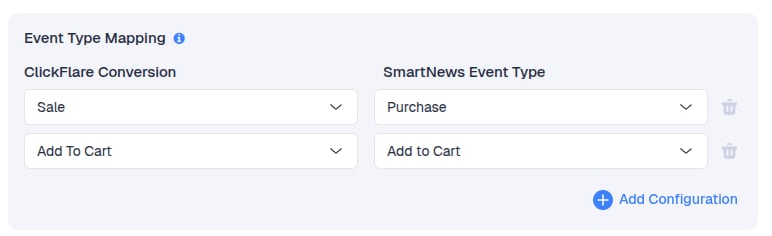 [Learn how to create custom events on ClickFlare](/docs/en/settings/custom-conversions)
***
### Configure Event Data and Additional Parameters
ClickFlare automatically includes required parameters in the SmartNews CAPI payload, such as:
* **SmartNews** Click ID when tracked properly
* Client IP Address
* Client User Agent
* Value & Currency (for purchase-related events)
[Learn how to create custom events on ClickFlare](/docs/en/settings/custom-conversions)
***
### Configure Event Data and Additional Parameters
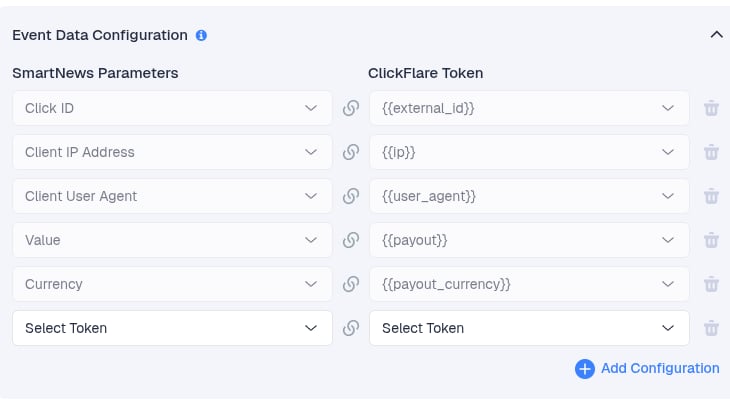
ClickFlare automatically includes required parameters in the SmartNews CAPI payload, such as:
* **SmartNews** Click ID when tracked properly
* Client IP Address
* Client User Agent
* Value & Currency (for purchase-related events)
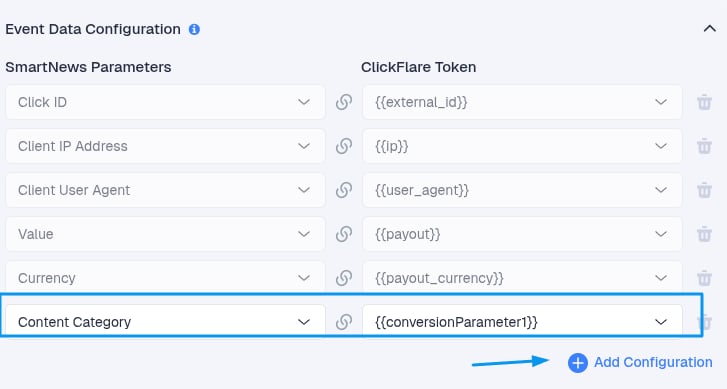
 You can optionally enrich events with additional match keys, e.g.
 **Note:**
Some fields are required for proper attribution and cannot be removed.
If you use the **SmartNews** **Traffic Source template**, ClickFlare automatically appends required parameters (including the **SmartNews** click ID) to the payload.
Finally, click **Save**.
**Note:**
Some fields are required for proper attribution and cannot be removed.
If you use the **SmartNews** **Traffic Source template**, ClickFlare automatically appends required parameters (including the **SmartNews** click ID) to the payload.
Finally, click **Save**.