> ## Documentation Index
> Fetch the complete documentation index at: https://clickflare.com/docs/llms.txt
> Use this file to discover all available pages before exploring further.
# SmartNews Cost Integration
> Adding SmartNews Cost Tracking Integration
Thanks to ClickFlare’s **API integration with SmartNews**, you can automatically pull the **cost data** of your SmartNews campaigns directly into ClickFlare.
This lets you centralize spend tracking, reporting, and optimization across platforms, without manual cost uploads or spreadsheets.
## What you'll need for the integration
* An active **ClickFlare** account
* Valid **SmartNews** Ads ad account
* Your SmartNews **Client Secret/Client ID**
***
## How SmartNews Cost Integration Works
ClickFlare connects to the official SmartNews **Ads API** and automatically retrieves your campaign spend.
Once connected, ClickFlare pulls cost data from SmartNews at the following levels:
* **Campaign level**
* **Ad group level**
* **Ad level**
Only **the data** is fetched directly from SmartNews.
Other performance metrics, such as **CPC, CPM, CTR, and ROI,** are calculated inside ClickFlare using:
* Cost data from SmartNews
* Clicks/impressions tracked by ClickFlare through your tracking URLs
This keeps all your key performance metrics consistent and up to date in a single dashboard.
***
## Follow the steps below to connect your SmartNews account to ClickFlare.
### 1. Setting Up the SmartNews Cost Integration
1. In ClickFlare, open the left-side menu and go to
**Integrations → Cost Tracking Integrations**.
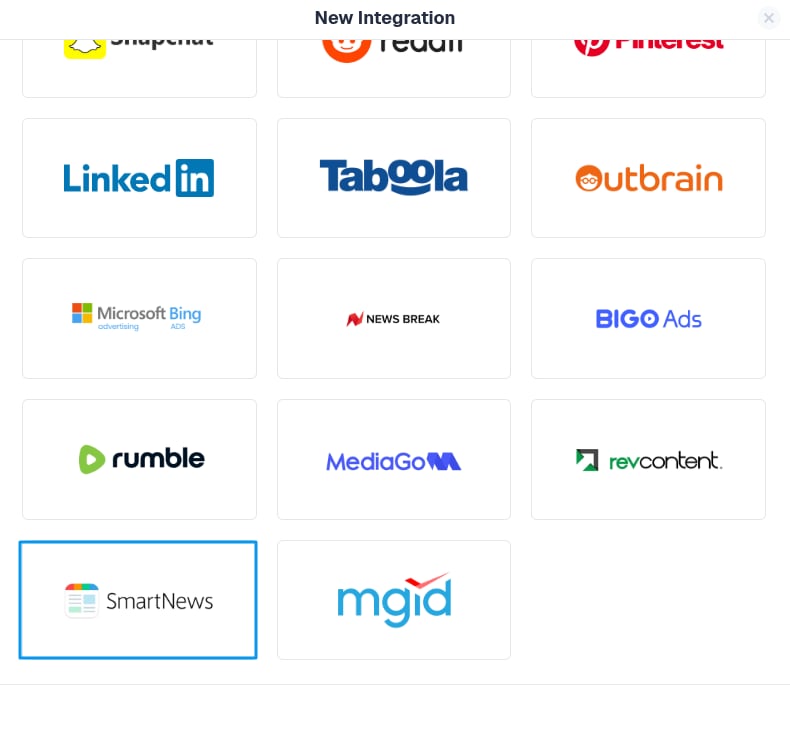
2. Click **Add Integration**.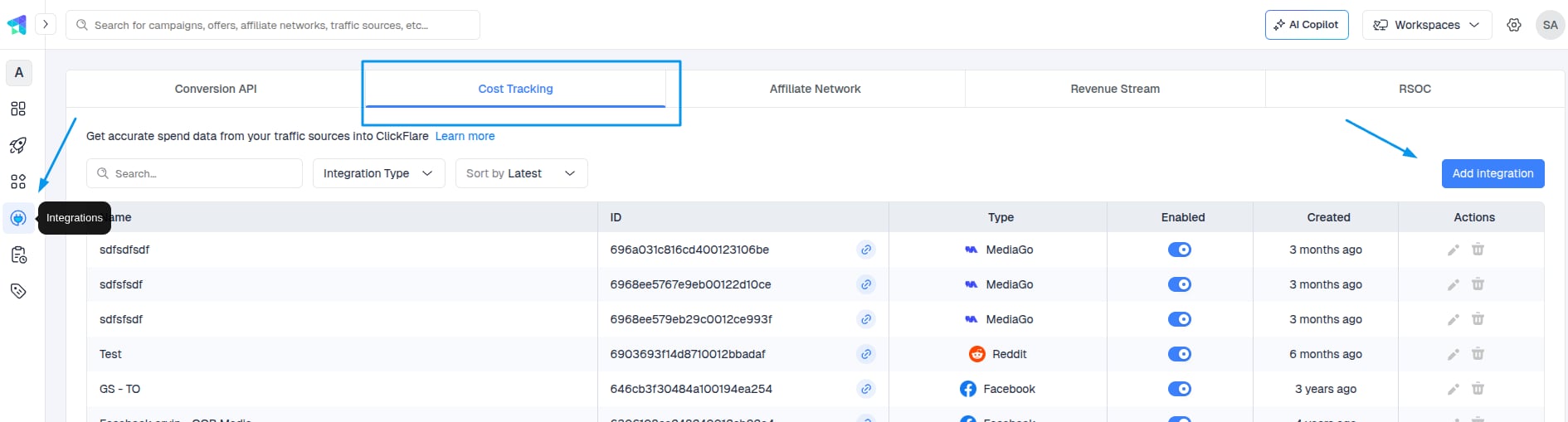 3. From the list of available integrations, select SmartNews.
 ### 2. Generating the client secret
* Log in to Business Manager
* Navigate to the \[Developer App Management] section and click \[Register Developer App Information]
* Enter the name you used in the developer application form for the app name
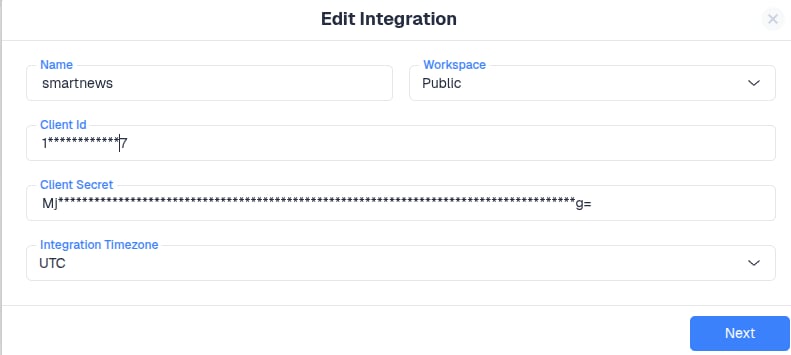
The client ID and secret will be provided in a secure file, ready for download.
The official guide: [SmartNews Guide](https://help-ads.smartnews.com/item-4207/)
### 2. Generating the client secret
* Log in to Business Manager
* Navigate to the \[Developer App Management] section and click \[Register Developer App Information]
* Enter the name you used in the developer application form for the app name
The client ID and secret will be provided in a secure file, ready for download.
The official guide: [SmartNews Guide](https://help-ads.smartnews.com/item-4207/)
 ***
### 3. Select Ad Accounts
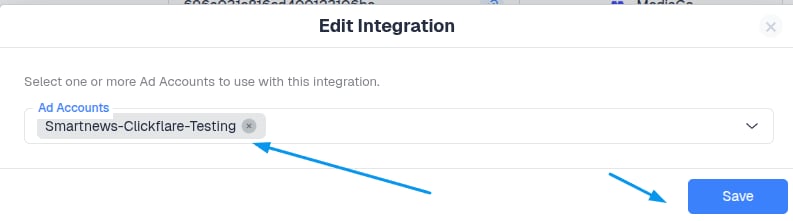
Once your SmartNews credentials placement is done, click **Next** and choose which **ad account(s)** you want ClickFlare to pull cost data from.
* You can select **one or multiple ad accounts** under the same SmartNews profile.
* ClickFlare will automatically sync campaign spend for each selected ad account.
***
### 3. Select Ad Accounts
Once your SmartNews credentials placement is done, click **Next** and choose which **ad account(s)** you want ClickFlare to pull cost data from.
* You can select **one or multiple ad accounts** under the same SmartNews profile.
* ClickFlare will automatically sync campaign spend for each selected ad account.
 **Tip:**
In most cases, you only need **one SmartNews cost integration per SmartNews login**. Within that integration, you can include multiple ad accounts that your user has access to.
### 4. Assign to a Traffic Source Configuration
You can optionally link your **SmartNews** cost integration directly to one or more **Traffic Source Configurations** in ClickFlare.
* If you do this here, ClickFlare will automatically use this cost integration whenever that **SmartNews** traffic source is selected in a campaign.
* If you skip this step, you can always assign the integration later inside the **Traffic Source** settings.
**Important:**
Make sure the Traffic Source template you select here is **SmartNews**.
Using a traffic source different from the template can prevent spend from being matched to your campaigns correctly.
When you’re done, click **Save**.
### 5. Verify Cost Data Sync
After saving the integration, ClickFlare will start syncing cost data from **SmartNews** automatically.
To verify everything is working:
1. Open any **active** **SmartNews** **campaign** in your ClickFlare reports.
2. Look at the **Cost** column.
3. Confirm that you see cost values that match what you see in **SmartNews** Ads Manager (after allowing for the sync delay).
**Sync Frequency**
The cost update frequency depends on your ClickFlare plan and whether you have a **faster cost-update add-on** enabled.
Cost pulls can range **from every 60 minutes down to every 5 minutes** for eligible plans and add-ons.
***
## How Cost Matching Works
ClickFlare matches SmartNews cost data to your campaigns based on:
* **Unique** **SmartNews** **campaign and ad identifiers**
* **Tracking parameters** passed through your campaign URLs
When you use the **SmartNews** **Traffic Source template** in ClickFlare:
* All required macros/parameters are automatically added to your tracking URLs.
* **SmartNews** campaign/ad IDs are captured by ClickFlare and used to align incoming cost data with the correct campaigns, paths, and reports.
This way, spend, clicks, and conversions stay perfectly in sync across both platforms without extra manual configuration.
***
**FREQUENTLY ASKED QUESTIONS**
Got questions? Find the answers below:
> **Q1:** Do I need to tag my SmartNews URLs differently for cost tracking?
**A1**: No additional tagging is required beyond using the **SmartNews** **traffic source template** in ClickFlare. That template already includes the parameters needed for cost matching.
> **Q2:** Does the integration pull impressions, clicks, or conversions from SmartNews?
**A2**: The SmartNews cost integration is focused on **spend**. Clicks, impressions, and conversions are tracked directly by ClickFlare (or via your conversion setup), and combined with SmartNews cost data for full performance reporting.
> **Q3:** Can I use multiple SmartNews integrations in the same account?
**A3**: Yes. For example, you might use separate integrations for different teams or business units. Just make sure each SmartNews integration is assigned to the correct **Traffic Source Configurations** and **Workspaces** (if you’re using Workspaces).
**Tip:**
In most cases, you only need **one SmartNews cost integration per SmartNews login**. Within that integration, you can include multiple ad accounts that your user has access to.
### 4. Assign to a Traffic Source Configuration
You can optionally link your **SmartNews** cost integration directly to one or more **Traffic Source Configurations** in ClickFlare.
* If you do this here, ClickFlare will automatically use this cost integration whenever that **SmartNews** traffic source is selected in a campaign.
* If you skip this step, you can always assign the integration later inside the **Traffic Source** settings.
**Important:**
Make sure the Traffic Source template you select here is **SmartNews**.
Using a traffic source different from the template can prevent spend from being matched to your campaigns correctly.
When you’re done, click **Save**.
### 5. Verify Cost Data Sync
After saving the integration, ClickFlare will start syncing cost data from **SmartNews** automatically.
To verify everything is working:
1. Open any **active** **SmartNews** **campaign** in your ClickFlare reports.
2. Look at the **Cost** column.
3. Confirm that you see cost values that match what you see in **SmartNews** Ads Manager (after allowing for the sync delay).
**Sync Frequency**
The cost update frequency depends on your ClickFlare plan and whether you have a **faster cost-update add-on** enabled.
Cost pulls can range **from every 60 minutes down to every 5 minutes** for eligible plans and add-ons.
***
## How Cost Matching Works
ClickFlare matches SmartNews cost data to your campaigns based on:
* **Unique** **SmartNews** **campaign and ad identifiers**
* **Tracking parameters** passed through your campaign URLs
When you use the **SmartNews** **Traffic Source template** in ClickFlare:
* All required macros/parameters are automatically added to your tracking URLs.
* **SmartNews** campaign/ad IDs are captured by ClickFlare and used to align incoming cost data with the correct campaigns, paths, and reports.
This way, spend, clicks, and conversions stay perfectly in sync across both platforms without extra manual configuration.
***
**FREQUENTLY ASKED QUESTIONS**
Got questions? Find the answers below:
> **Q1:** Do I need to tag my SmartNews URLs differently for cost tracking?
**A1**: No additional tagging is required beyond using the **SmartNews** **traffic source template** in ClickFlare. That template already includes the parameters needed for cost matching.
> **Q2:** Does the integration pull impressions, clicks, or conversions from SmartNews?
**A2**: The SmartNews cost integration is focused on **spend**. Clicks, impressions, and conversions are tracked directly by ClickFlare (or via your conversion setup), and combined with SmartNews cost data for full performance reporting.
> **Q3:** Can I use multiple SmartNews integrations in the same account?
**A3**: Yes. For example, you might use separate integrations for different teams or business units. Just make sure each SmartNews integration is assigned to the correct **Traffic Source Configurations** and **Workspaces** (if you’re using Workspaces).