> ## Documentation Index
> Fetch the complete documentation index at: https://clickflare.com/docs/llms.txt
> Use this file to discover all available pages before exploring further.
# Taboola As a Traffic Source
> A step-by-step guide on how to set up Taboola as A Traffic Source in ClickFlare
**Taboola** is one of the leading native advertising platforms, allowing you to promote content across premium publisher sites. This guide walks you through how to properly set up Taboola as a traffic source in **ClickFlare**, track clicks, and send conversion data ([including revenue](/docs/en/advanced-tracking-configuration/how-to-send-delayed-revenue-to-traffic-sources)) back to Taboola for accurate optimization and reporting.
## 1. Setting up Taboola as a Traffic Source:
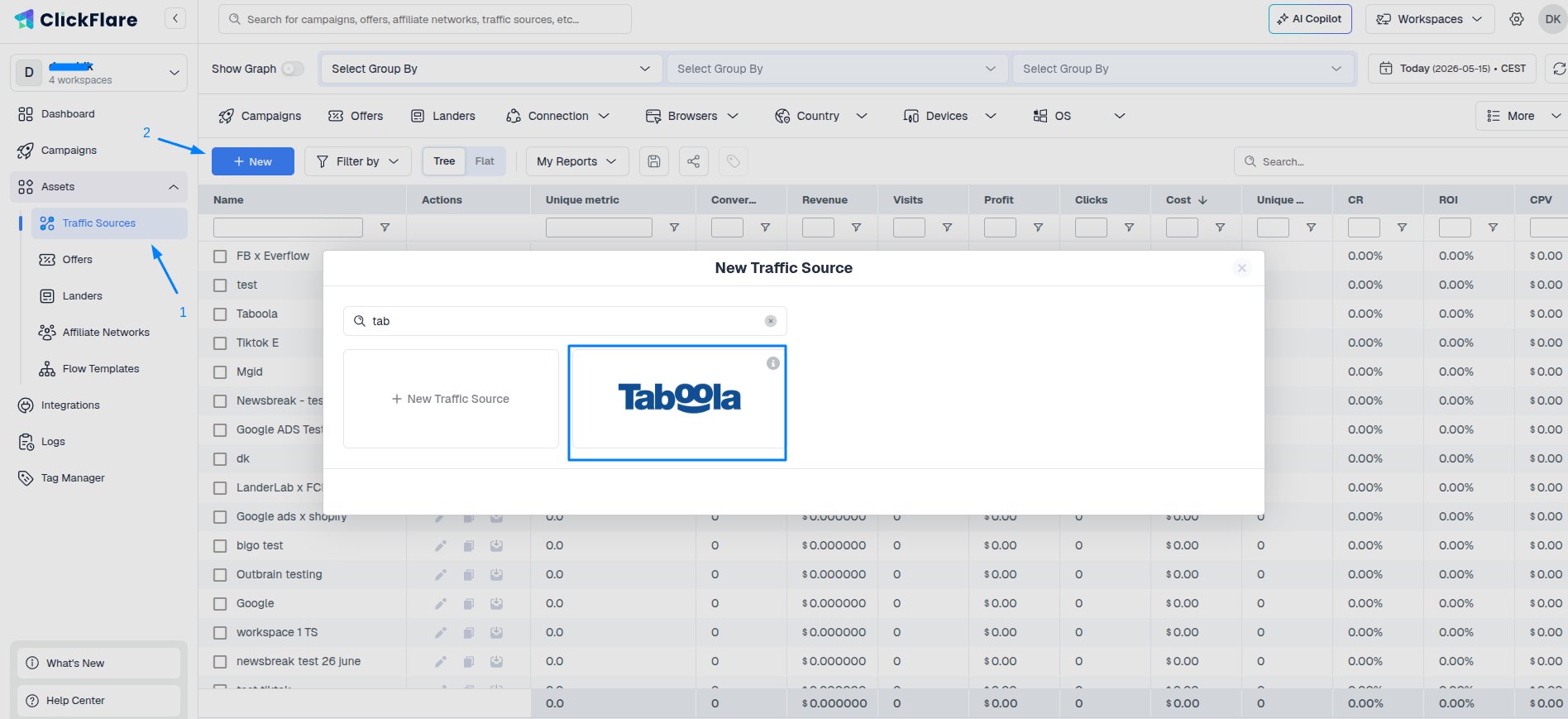
* Go to **ClickFlare > Traffic Sources**
* Click **“New”** to add a new traffic source.
* Search for and select the **Taboola** pre-built template.
 ***Why use the template?***
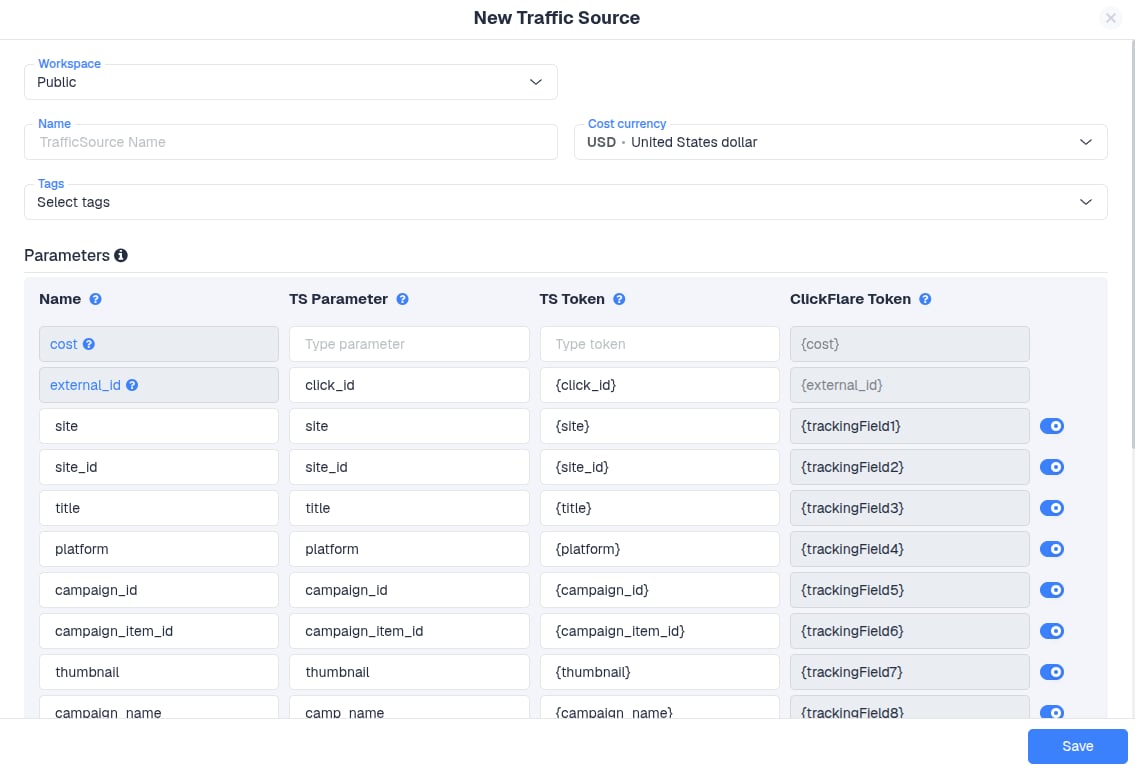
The Taboola template comes with all essential tracking tokens pre-filled, such as:
* \{click\_id} → Unique identifier for each click (required for postback)
* \{campaign\_id} → Taboola campaign ID
* \{ad\_id} → Ad creative ID
* \{site} → Publisher site
* \{utm\_source} → Defaults to Taboola (can help in filtering traffic)
*You don’t need to change these tokens unless you have a custom requirement.*
***Why use the template?***
The Taboola template comes with all essential tracking tokens pre-filled, such as:
* \{click\_id} → Unique identifier for each click (required for postback)
* \{campaign\_id} → Taboola campaign ID
* \{ad\_id} → Ad creative ID
* \{site} → Publisher site
* \{utm\_source} → Defaults to Taboola (can help in filtering traffic)
*You don’t need to change these tokens unless you have a custom requirement.*
 ## 2. Setting up the Postback URL and mapping
To send conversion data from ClickFlare back to Taboola, follow these steps:
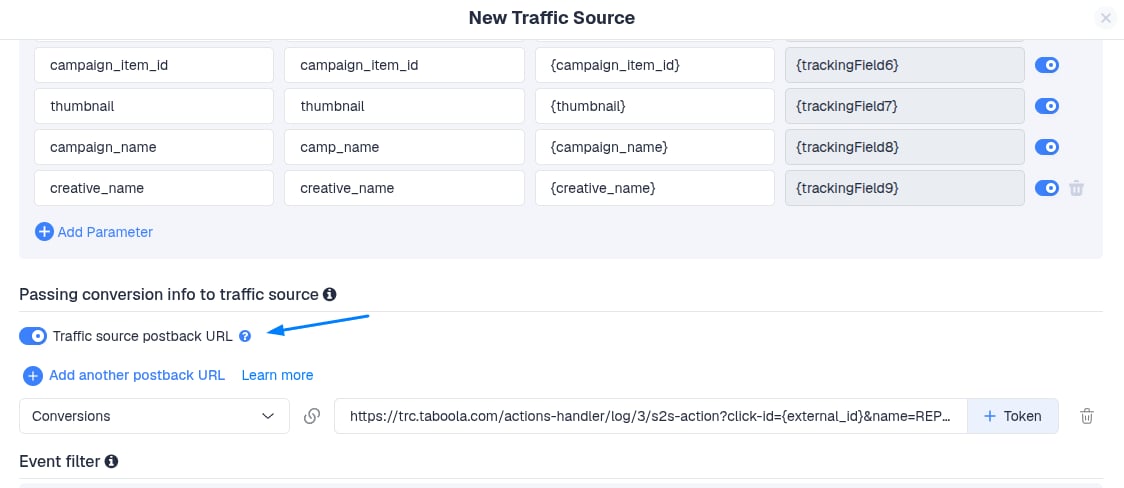
1\. Enable the Traffic Source Postback URL
* This automatically generates a postback that allows Taboola to receive conversion events.
2\. Map the ClickFlare Event
* On the **left-hand side**, map the ClickFlare event Conversions that you want to trigger the postback to Taboola.
If your final click action is a **custom conversion**, such as an **Ad Click**, you must select and map that custom event.
## 2. Setting up the Postback URL and mapping
To send conversion data from ClickFlare back to Taboola, follow these steps:
1\. Enable the Traffic Source Postback URL
* This automatically generates a postback that allows Taboola to receive conversion events.
2\. Map the ClickFlare Event
* On the **left-hand side**, map the ClickFlare event Conversions that you want to trigger the postback to Taboola.
If your final click action is a **custom conversion**, such as an **Ad Click**, you must select and map that custom event.
 ## 3. Postback URL Format For Taboola
The generated Taboola postback will look like this:
```
https://trc.taboola.com/actions-handler/log/3/s2s-action?click-id={external_id}&name=REPLACE_EVENT_NAME&revenue={payout}¤cy={payout_currency}
```
To complete the setup, simply replace the *REPLACE\_EVENT\_NAME* value in the **\&name** parameter with the exact event name you've configured in Taboola, in this example, `&name=make_purchase.`
## 3. Postback URL Format For Taboola
The generated Taboola postback will look like this:
```
https://trc.taboola.com/actions-handler/log/3/s2s-action?click-id={external_id}&name=REPLACE_EVENT_NAME&revenue={payout}¤cy={payout_currency}
```
To complete the setup, simply replace the *REPLACE\_EVENT\_NAME* value in the **\&name** parameter with the exact event name you've configured in Taboola, in this example, `&name=make_purchase.`
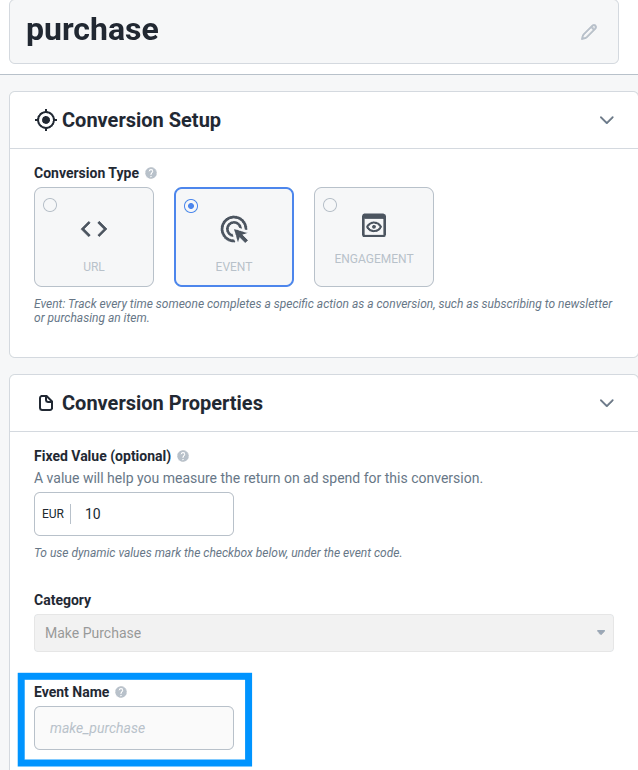 Taboola's Event Name should contain only alphanumeric characters, underscores, or dashes, without spaces.
 ## 4. Adding Multiple Postback URLs (Optional)
ClickFlare allows you to send **multiple conversions** to multiple events, each with its own postback URL. This is especially useful if you want to report **different conversion types** (e.g., Lead, Purchase, Ad Click) to your traffic source or other platforms separately.
To do this:
* Toggle on the Traffic source postback URL
* Assign a different ClickFlare event to each postback URL and a different event name for Taboola
***
### **Need to Track Delayed Revenue?**
If you work with feed providers like RSOC or AFD that report revenue **after** the initial conversion, you can use ClickFlare’s **Delayed Revenue Postback** feature. [Here’s how to set that up.»](/docs/en/advanced-tracking-configuration/how-to-send-delayed-revenue-to-traffic-sources)
***
**❓FREQUENTLY ASKED QUESTIONS**
Got questions? Find the answers below:
> **Q1:** Can I use the same setup for delayed revenue tracking?
**A1:** If you're working with feed providers like RSOC or AFD that report revenue after the conversion, you'll need to set up a **Delayed Revenue Postback** separately. This involves using a custom conversion and mapping it to the appropriate event. (See[Delayed Revenue Guide](/docs/en/advanced-tracking-configuration/how-to-send-delayed-revenue-to-traffic-sources) for details.)
> **Q2:** Do I need to manually build the postback URL for Taboola?
**A2:** No, when you enable the **Traffic Source Postback URL** toggle in ClickFlare, the correct postback URL is automatically generated. You only need to replace the \&name= value with the event name you've set in Taboola (e.g., make\_purchase).
> **Q3:** Can I track multiple types of conversions with Taboola?
**A3:** ClickFlare allows you to send **multiple conversions** to multiple events, each with its own postback URL. This is especially useful if you want to report **different conversion types**
> **Q4:** Can I use static values in the postback, like currency?
**A4:** Yes, you can hardcode values like currency if it's always the same (e.g., \¤cy=USD) or use dynamic tokens (e.g., \{payout\_currency}) if you need flexibility.
## 4. Adding Multiple Postback URLs (Optional)
ClickFlare allows you to send **multiple conversions** to multiple events, each with its own postback URL. This is especially useful if you want to report **different conversion types** (e.g., Lead, Purchase, Ad Click) to your traffic source or other platforms separately.
To do this:
* Toggle on the Traffic source postback URL
* Assign a different ClickFlare event to each postback URL and a different event name for Taboola
***
### **Need to Track Delayed Revenue?**
If you work with feed providers like RSOC or AFD that report revenue **after** the initial conversion, you can use ClickFlare’s **Delayed Revenue Postback** feature. [Here’s how to set that up.»](/docs/en/advanced-tracking-configuration/how-to-send-delayed-revenue-to-traffic-sources)
***
**❓FREQUENTLY ASKED QUESTIONS**
Got questions? Find the answers below:
> **Q1:** Can I use the same setup for delayed revenue tracking?
**A1:** If you're working with feed providers like RSOC or AFD that report revenue after the conversion, you'll need to set up a **Delayed Revenue Postback** separately. This involves using a custom conversion and mapping it to the appropriate event. (See[Delayed Revenue Guide](/docs/en/advanced-tracking-configuration/how-to-send-delayed-revenue-to-traffic-sources) for details.)
> **Q2:** Do I need to manually build the postback URL for Taboola?
**A2:** No, when you enable the **Traffic Source Postback URL** toggle in ClickFlare, the correct postback URL is automatically generated. You only need to replace the \&name= value with the event name you've set in Taboola (e.g., make\_purchase).
> **Q3:** Can I track multiple types of conversions with Taboola?
**A3:** ClickFlare allows you to send **multiple conversions** to multiple events, each with its own postback URL. This is especially useful if you want to report **different conversion types**
> **Q4:** Can I use static values in the postback, like currency?
**A4:** Yes, you can hardcode values like currency if it's always the same (e.g., \¤cy=USD) or use dynamic tokens (e.g., \{payout\_currency}) if you need flexibility.