> ## Documentation Index
> Fetch the complete documentation index at: https://clickflare.com/docs/llms.txt
> Use this file to discover all available pages before exploring further.
# Visymo Integration
> Visymo Integration with ClickFlare
### 1. Set Up the Integration
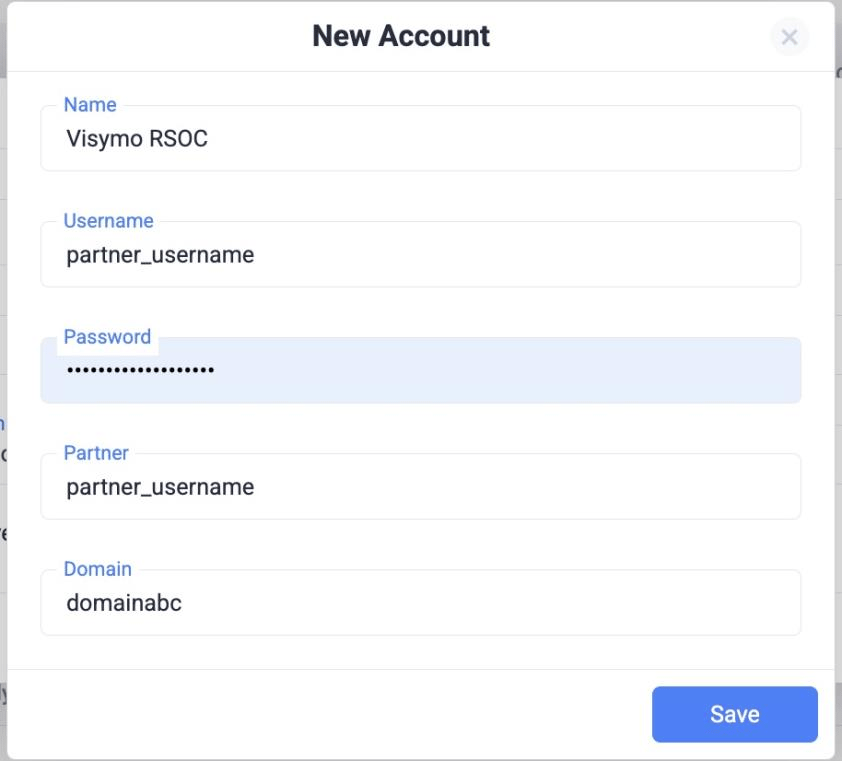
* Go to **RSOC Integrations → Visymo/JAMPROJECT → New Integration**.
* Fill in:
* **Name:** e.g., “Visymo RSOC”
* **Username, Password, Partner, Domain:** provided by JAM.
 ### 2. Add Custom Domain
* Go to **Domains** in ClickFlare → Add New.
* Use values from JAM:
* **Subdomain:** trk
* **Root Domain:** provided by JAM
* Select **Other** as DNS provider.
### 2. Add Custom Domain
* Go to **Domains** in ClickFlare → Add New.
* Use values from JAM:
* **Subdomain:** trk
* **Root Domain:** provided by JAM
* Select **Other** as DNS provider.
Domain will show “CNAME error” → safe to ignore (ClickFlare fixes in backend).
### 3. Parameter Retention (Critical)
Visymo requires these parameters to pass through:
* q → Search Query
* locale → Locale
* ctid → ClickFlare Click ID
If q or locale are missing/mismatched, redirects will fail.
#### Set up in ClickFlare
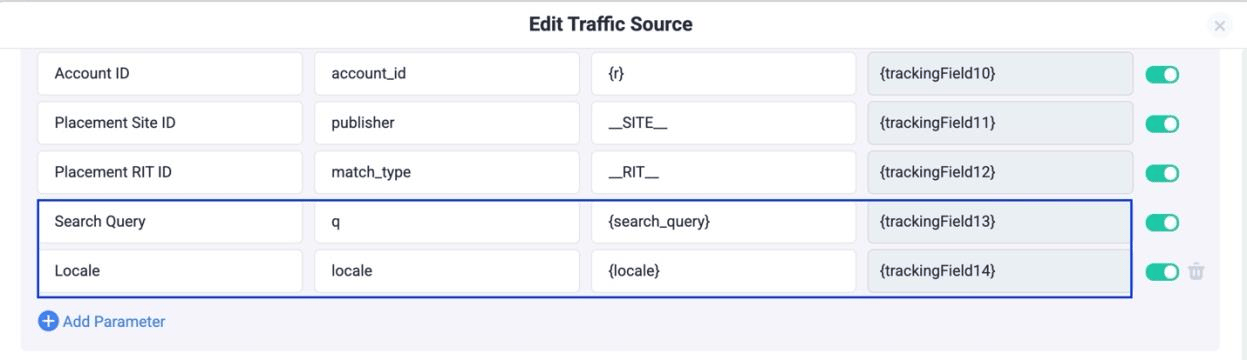
**Traffic Source Parameters**
* Add Search Query:
* Name: Search Query - TS Parameter: q - TS Token: \{search\_query}
* Add *Locale*:
Name: Locale TS Parameter: locale Token: \{locale}
 * **Append Parameters to the Offer URL**
```text theme={null}
&q=trackingField13&locale={trackingField14}&ctid={cf_click_id}
```
**Important:** For the exact tracking field numbers, refer to your traffic source template. In this setup, we are storing:
* q (Search Query) → **trackingField13**
* locale → **trackingField14**
These are the values you need to use when mapping the offer URL:
### Offer Templates, Facebook & TikTok
*Required Parameters:* **Facebook** `asid=REPLACE_VISYMO_CHANNEL&rac=CREATIVE_TEXT&de=m&pub=faceboo`
```text theme={null}
k&fbclid=external_id&ctid={cf_click_id}&q={trackingFieldXXX}
```
`&locale=trackingFieldXXX` • Replace \{trackingFieldXXX} with your tokens from Step 1. **TikTok** `asid=REPLACE_VISYMO_CHANNEL&rac=CREATIVE_TEXT&de=m&pub=tiktok&`
```text theme={null}
ttclid=external_id&ctid={cf_click_id}&q={trackingFieldXXX}&locale={trackingFieldXXX}
```
• Replace \{trackingFieldXXX} with your tokens from Step 1.
These templates ensure that all required parameters are dynamically passed from the tracking URL to the offer URL.
* **Append Parameters to the Offer URL**
```text theme={null}
&q=trackingField13&locale={trackingField14}&ctid={cf_click_id}
```
**Important:** For the exact tracking field numbers, refer to your traffic source template. In this setup, we are storing:
* q (Search Query) → **trackingField13**
* locale → **trackingField14**
These are the values you need to use when mapping the offer URL:
### Offer Templates, Facebook & TikTok
*Required Parameters:* **Facebook** `asid=REPLACE_VISYMO_CHANNEL&rac=CREATIVE_TEXT&de=m&pub=faceboo`
```text theme={null}
k&fbclid=external_id&ctid={cf_click_id}&q={trackingFieldXXX}
```
`&locale=trackingFieldXXX` • Replace \{trackingFieldXXX} with your tokens from Step 1. **TikTok** `asid=REPLACE_VISYMO_CHANNEL&rac=CREATIVE_TEXT&de=m&pub=tiktok&`
```text theme={null}
ttclid=external_id&ctid={cf_click_id}&q={trackingFieldXXX}&locale={trackingFieldXXX}
```
• Replace \{trackingFieldXXX} with your tokens from Step 1.
These templates ensure that all required parameters are dynamically passed from the tracking URL to the offer URL.
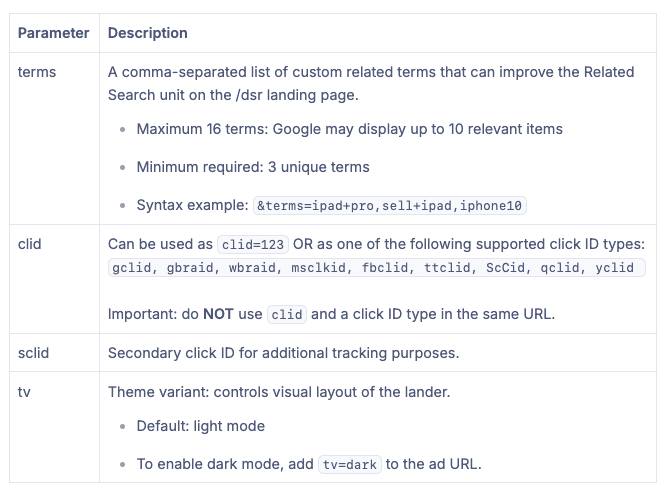
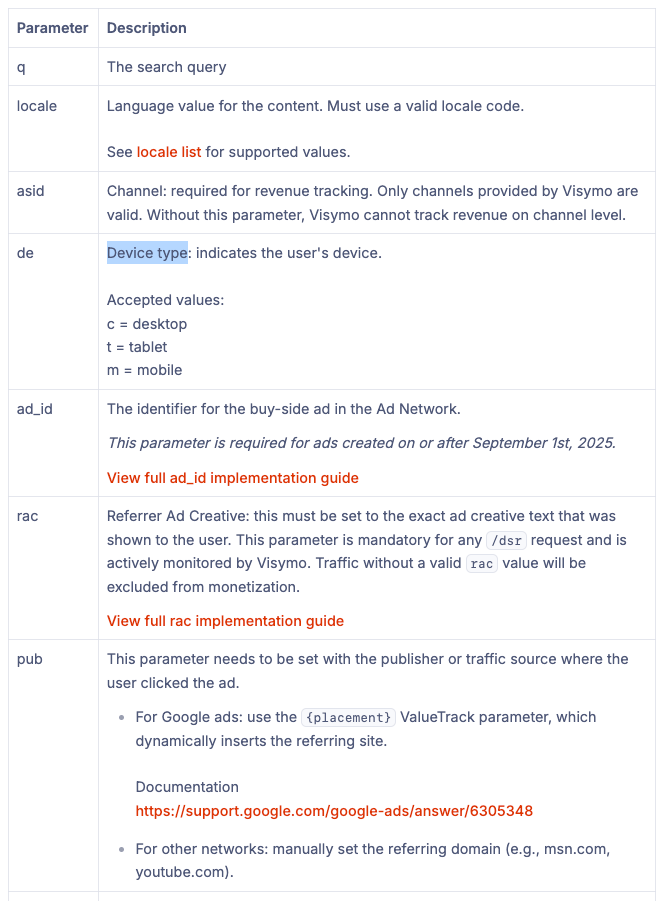 * **Optional Parameters:** Example: \&terms=ipad+pro,sell+ipad,iphone10\&tv=dark\*\*
 \*\*
* Facebook:
```text theme={null}
https://www.exampledomain.com/dsr?asid={channel_id}&de=m&pub=facebook&fbclid={external_id}&ctid={cf_click_id}&q={trackingField10}&locale={trackingField11}&rac=replace
```
* TikTok
```text theme={null}
https://www.exampledomain.com/dsr?asid={channel_id}&de=m&pub=tiktok&ttclid={external_id}&ctid={cf_click_id}&q={trackingField13}&locale={trackingField14}&rac=replace
```
### Postback URL
**Important Parameters:** These parameters must be included in the postback URL for proper tracking:
```text theme={null}
click_id=ctid¶m10={asid}¶m12={geo}&ct={type}
```
**Full Postback URL:**
```text theme={null}
https://flarequick.com/cf/cv?click_id=ctid&txid={oid}¶m1={pub}¶m2={sclid}¶m3={asid}¶m4={domain}¶m5={timestamp}¶m6={clid_source}¶m7={clid}¶m8={vid}¶m9={query}&ct={type}¶m10={asid}¶m12={geo}
```
Create these custom conversions in **Settings > Custom Conversions** on the ClickFlare dashboard.
\*\*
* Facebook:
```text theme={null}
https://www.exampledomain.com/dsr?asid={channel_id}&de=m&pub=facebook&fbclid={external_id}&ctid={cf_click_id}&q={trackingField10}&locale={trackingField11}&rac=replace
```
* TikTok
```text theme={null}
https://www.exampledomain.com/dsr?asid={channel_id}&de=m&pub=tiktok&ttclid={external_id}&ctid={cf_click_id}&q={trackingField13}&locale={trackingField14}&rac=replace
```
### Postback URL
**Important Parameters:** These parameters must be included in the postback URL for proper tracking:
```text theme={null}
click_id=ctid¶m10={asid}¶m12={geo}&ct={type}
```
**Full Postback URL:**
```text theme={null}
https://flarequick.com/cf/cv?click_id=ctid&txid={oid}¶m1={pub}¶m2={sclid}¶m3={asid}¶m4={domain}¶m5={timestamp}¶m6={clid_source}¶m7={clid}¶m8={vid}¶m9={query}&ct={type}¶m10={asid}¶m12={geo}
```
Create these custom conversions in **Settings > Custom Conversions** on the ClickFlare dashboard.
 In the Visymo integration, make sure to select **Visymo Ad Click** to track and report revenue.
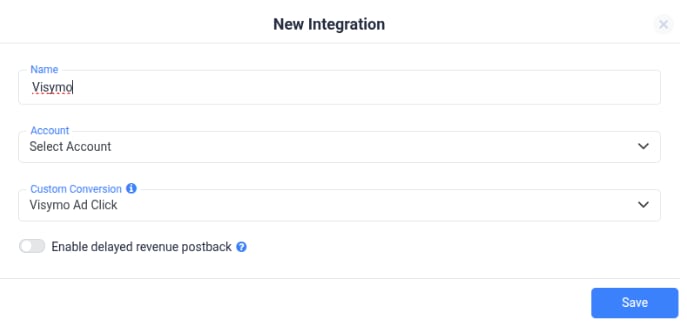 Visymo reports revenue in PST, so make sure to use the correct timezone when comparing between CF and Visymo