> ## Documentation Index
> Fetch the complete documentation index at: https://clickflare.com/docs/llms.txt
> Use this file to discover all available pages before exploring further.
# Campaign Naming Template
> Defining your campaign's name template
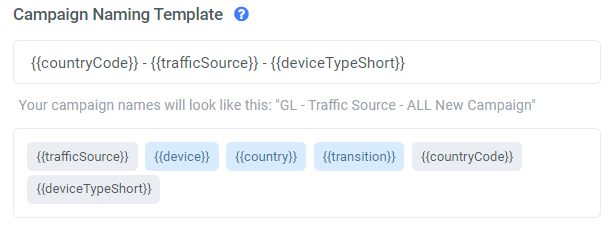 Modifying your campaign's naming template allows you to dynamically build a prefix structure (using the available tokens), that will automatically be added to the campaign's name when you create a new campaign in ClickFlare.
Note: If you do not want to use any prefixes, leave this field empty.
To do so, select the gear icon on the top right of your screen, from anywhere inside ClickFlare.
Modifying your campaign's naming template allows you to dynamically build a prefix structure (using the available tokens), that will automatically be added to the campaign's name when you create a new campaign in ClickFlare.
Note: If you do not want to use any prefixes, leave this field empty.
To do so, select the gear icon on the top right of your screen, from anywhere inside ClickFlare.
 You'll find **Campaign Naming Template** under **General Settings** at the bottom of the page.
[
You'll find **Campaign Naming Template** under **General Settings** at the bottom of the page.
[ ](https://downloads.intercomcdn.com/i/o/427940600/19a926e6ec38816984706b2f/Screenshot+%28228%29.png)
Select your preferred tokens. If you have chosen \{\{country}}, \{\{countryCode}} and \{\{deviceTypeShort}} (as in the example below), they will be added automatically to your new campaign's name.
Once you are done, click **Save**.
](https://downloads.intercomcdn.com/i/o/427940600/19a926e6ec38816984706b2f/Screenshot+%28228%29.png)
Select your preferred tokens. If you have chosen \{\{country}}, \{\{countryCode}} and \{\{deviceTypeShort}} (as in the example below), they will be added automatically to your new campaign's name.
Once you are done, click **Save**.
