> ## Documentation Index
> Fetch the complete documentation index at: https://clickflare.com/docs/llms.txt
> Use this file to discover all available pages before exploring further.
# Conversion Upload
> Uploading Conversion Manually
**Conversion Upload** allows you to manually upload conversions that, for any reason, were not properly reported by the affiliate network. This can happen due to technical issues or misconfiguration in the conversion postback URL.
**Tip:** To differentiate conversion types, you can add parameters such as **conversion type** or **transaction ID** to each upload. The logic behind uploading a conversion is the same as receiving a postback from an affiliate network; a valid **Click ID** is required.
**Note**: Make sure you are currently sending the unique Click IDs to the affiliate network or monetization platform. If not, arbitrary assignment may lead to unreliable optimization decisions.
## How to Upload Conversions
1. Go to the **Settings Menu** (gear icon at the top right).
 2. Select **Conversion Upload** (between Custom Conversions and Integrations).
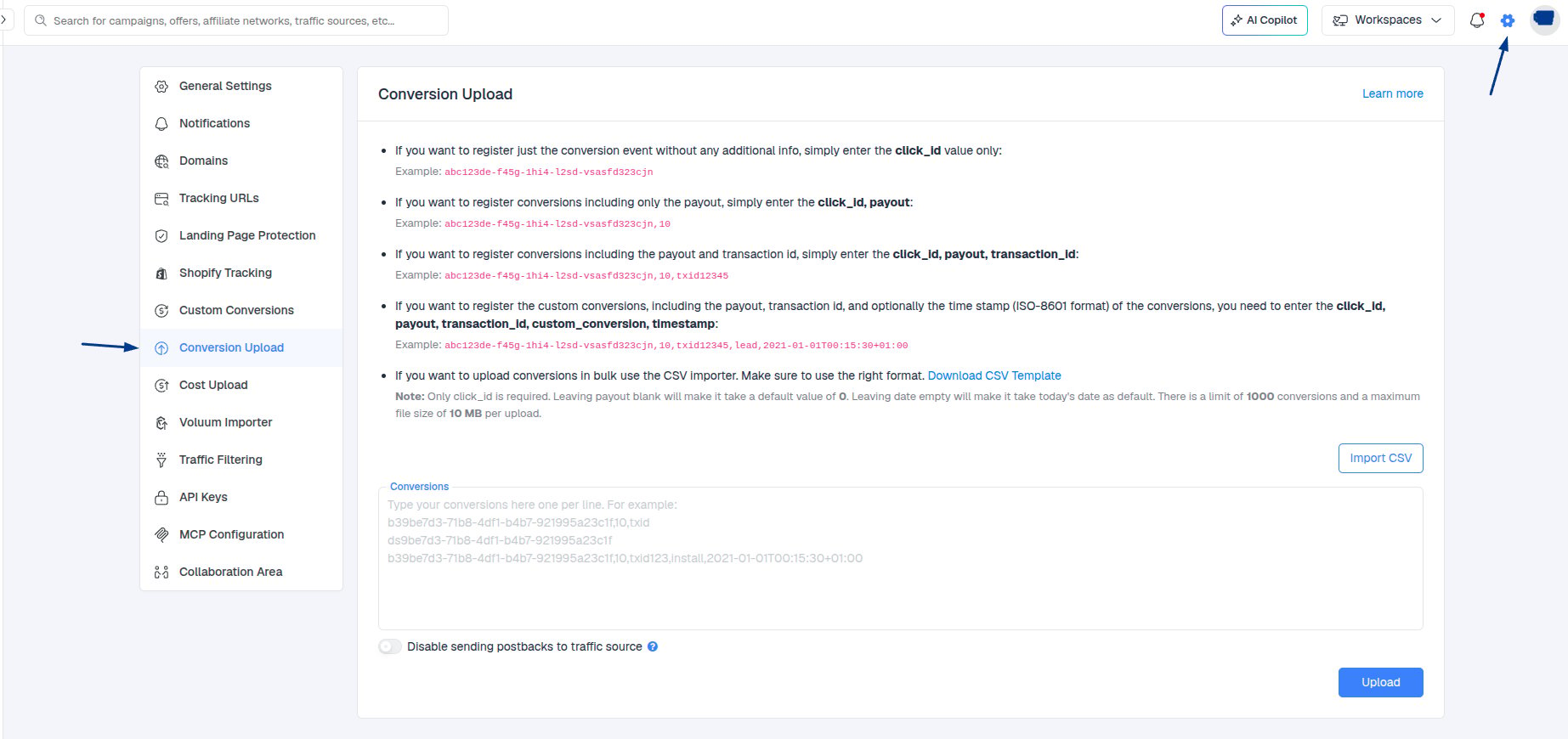 1. Enter one entry per line in the following format:
`click_id, payout,transaction_id,conversion_type,timestamp`
**Fields:**
* **click\_id** – Unique Click ID passed from ClickFlare to the affiliate network.
* **payout** – Revenue generated by the conversion (numerical, e.g., 3.9).
* **transaction ID** - Unique ID assigned to each tracked conversion by the network. Some networks may not provide this.
* **conversion type -** Value to distinguish different types of conversions (e.g., sale, upsell, cross-sell).
* **timestamp** - Time of conversion. If not specified, the upload time is used. Must follow ISO-8601 format,
e.g., 2025-10-02T14:30:00+02:00.
**Note:** All values should be separated by commas.
1. Enter one entry per line in the following format:
`click_id, payout,transaction_id,conversion_type,timestamp`
**Fields:**
* **click\_id** – Unique Click ID passed from ClickFlare to the affiliate network.
* **payout** – Revenue generated by the conversion (numerical, e.g., 3.9).
* **transaction ID** - Unique ID assigned to each tracked conversion by the network. Some networks may not provide this.
* **conversion type -** Value to distinguish different types of conversions (e.g., sale, upsell, cross-sell).
* **timestamp** - Time of conversion. If not specified, the upload time is used. Must follow ISO-8601 format,
e.g., 2025-10-02T14:30:00+02:00.
**Note:** All values should be separated by commas.
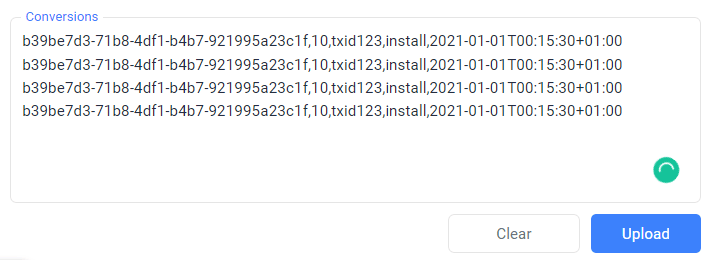 Once you are done, click **Upload**.
## Conversion Upload Examples
* Using Click ID only, without conversion revenue.
```
b39be7d3-71b8-4df1-b4b7-921995a23c1f
b39be7d3-71b8-4df2-b4b7-922995a23c2f
b39be7d3-71b8-4df3-b4b7-923995a23c3f
```
* Click ID + Revenue
```
b39be7d3-71b8-4df1-b4b7-921995a23c1f,5.2
b39be7d3-71b8-4df2-b4b7-922995a23c2f,3.9
b39be7d3-71b8-4df3-b4b7-923995a23c3f,6.05
```
* Click ID + Revenue + Transaction ID
```
b39be7d3-71b8-4df1-b4b7-921995a23c1f,5.2,txid1234
b39be7d3-71b8-4df2-b4b7-922995a23c2f,3.9,txid2345
b39be7d3-71b8-4df3-b4b7-923995a23c3f,6.05,txid3456
```
* Click ID + Revenue + Transaction ID + Conversion Type
```
b39be7d3-71b8-4df1-b4b7-921995a23c1f,5.2,txid1234,sale
b39be7d3-71b8-4df2-b4b7-922995a23c2f,3.9,txid2345,upsell
b39be7d3-71b8-4df3-b4b7-923995a23c3f,6.05,txid3456,crossell
```
* Click ID + Revenue + Transaction ID + Conversion Type + Timestamp
```
b39be7d3-71b8-4df1-b4b7-921995a23c1f,5.2,txid1234,sale,2021-01-01T00:15:30+01:00
b39be7d3-71b8-4df2-b4b7-922995a23c2f,3.9,txid2345,upsell,2021-01-01T00:15:35+01:00
b39be7d3-71b8-4df3-b4b7-923995a23c3f,6.05,txid3456,crossell,2021-01-01T00:15:38+01:00
```
**ISO-8601 Timestamp Example:**
```
2025-10-02T14:30:00+02:00
```
* 2025-10-02 → Date (YYYY-MM-DD)
* T → Separator between date and time
* 14:30:00 → Time (HH:MM:SS)
* +02:00 → Timezone offset from UTC
Once you are done, click **Upload**.
## Conversion Upload Examples
* Using Click ID only, without conversion revenue.
```
b39be7d3-71b8-4df1-b4b7-921995a23c1f
b39be7d3-71b8-4df2-b4b7-922995a23c2f
b39be7d3-71b8-4df3-b4b7-923995a23c3f
```
* Click ID + Revenue
```
b39be7d3-71b8-4df1-b4b7-921995a23c1f,5.2
b39be7d3-71b8-4df2-b4b7-922995a23c2f,3.9
b39be7d3-71b8-4df3-b4b7-923995a23c3f,6.05
```
* Click ID + Revenue + Transaction ID
```
b39be7d3-71b8-4df1-b4b7-921995a23c1f,5.2,txid1234
b39be7d3-71b8-4df2-b4b7-922995a23c2f,3.9,txid2345
b39be7d3-71b8-4df3-b4b7-923995a23c3f,6.05,txid3456
```
* Click ID + Revenue + Transaction ID + Conversion Type
```
b39be7d3-71b8-4df1-b4b7-921995a23c1f,5.2,txid1234,sale
b39be7d3-71b8-4df2-b4b7-922995a23c2f,3.9,txid2345,upsell
b39be7d3-71b8-4df3-b4b7-923995a23c3f,6.05,txid3456,crossell
```
* Click ID + Revenue + Transaction ID + Conversion Type + Timestamp
```
b39be7d3-71b8-4df1-b4b7-921995a23c1f,5.2,txid1234,sale,2021-01-01T00:15:30+01:00
b39be7d3-71b8-4df2-b4b7-922995a23c2f,3.9,txid2345,upsell,2021-01-01T00:15:35+01:00
b39be7d3-71b8-4df3-b4b7-923995a23c3f,6.05,txid3456,crossell,2021-01-01T00:15:38+01:00
```
**ISO-8601 Timestamp Example:**
```
2025-10-02T14:30:00+02:00
```
* 2025-10-02 → Date (YYYY-MM-DD)
* T → Separator between date and time
* 14:30:00 → Time (HH:MM:SS)
* +02:00 → Timezone offset from UTC