> ## Documentation Index
> Fetch the complete documentation index at: https://clickflare.com/docs/llms.txt
> Use this file to discover all available pages before exploring further.
# S2S Postback URLs
> Configuring Server-to-Server Postback URLs
Server-to-server Postback URLs are the most reliable method to count conversions. Through this mechanism, 3rd party platforms such as offer networks can notify ClickFlare about conversions or other customer events that need to be tracked.
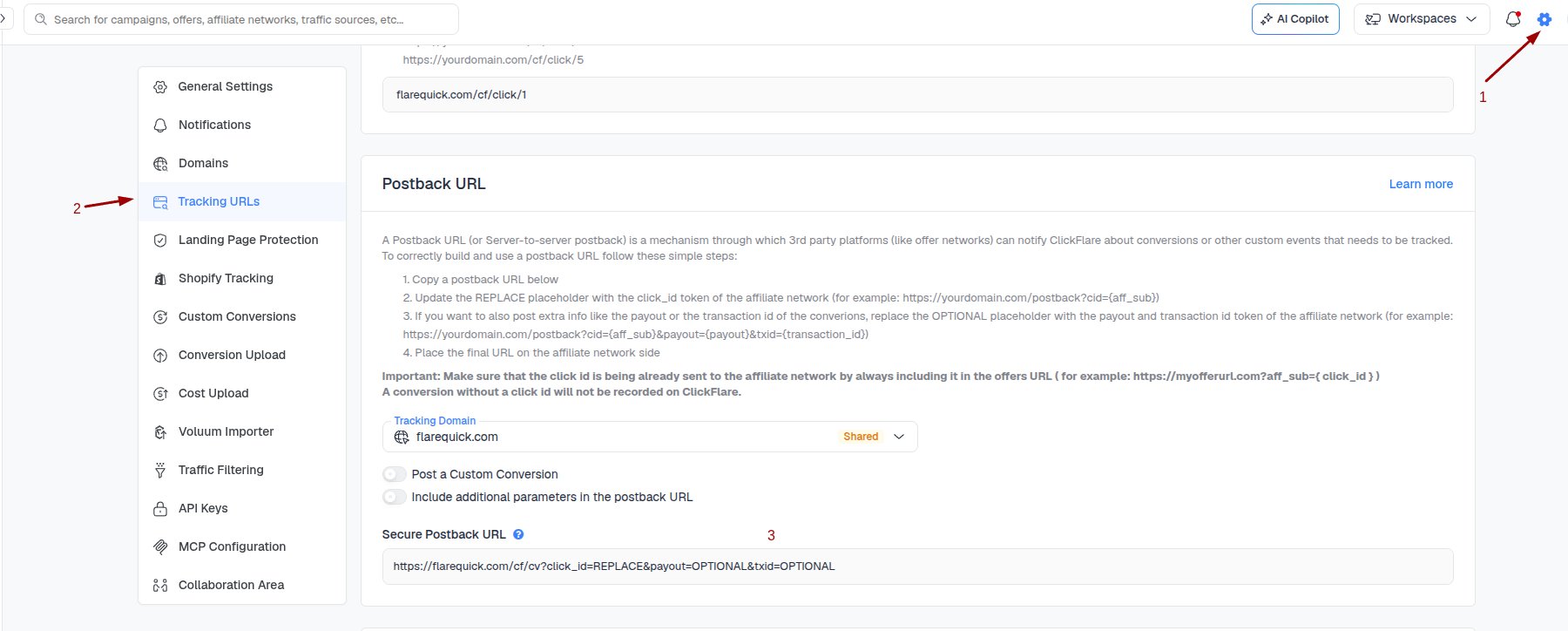
To access the **Postback URL**, open the **Settings Menu** by clicking the gear icon on the top right of your window from anywhere inside ClickFlare, and then select **Tracking URLs**.
 ## Setting up the postback URL
Follow the steps below in case you have difficulties setting up a postback URL.
* Copy the Postback URL (as shown in the above picture)
* Replace the **cid** parameter value with the click\_id token provided by your affiliate network (see example below).
* Replace the **payout** parameter value with the revenue token provided by your affiliate network.
```
https://your-tracking-domain.com/cf/postback?cid={aff_sub}&payout={amount}
```
**Important note:** The above postback URL example is used for demonstration purposes only. Always consult your affiliate network documentation for a correct list of tokens your network is using.
### Receiving Additional Tracking Parameters
Depending on your campaign-specific needs, sometimes you may need to keep track of more than just conversions and revenue generated from these conversions.
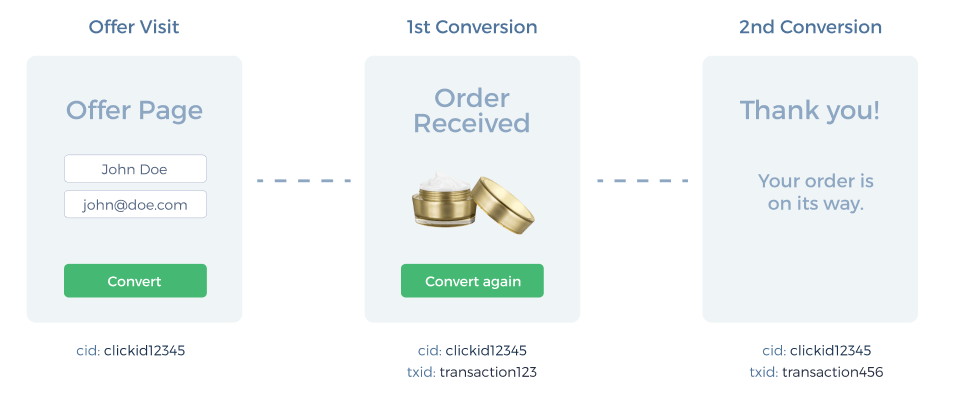
In case you are promoting an offer that has multiple conversion steps, the best way to distinguish multiple conversions coming from the same click ID (visitor) would be to utilize the transaction ID tracking parameter.
```
https://your-tracking-domain.com/cf/cv?cid={aff_sub}&payout={amount}&txid={transactionid}
```
**Example:** Tracking Product Up-Sells
## Setting up the postback URL
Follow the steps below in case you have difficulties setting up a postback URL.
* Copy the Postback URL (as shown in the above picture)
* Replace the **cid** parameter value with the click\_id token provided by your affiliate network (see example below).
* Replace the **payout** parameter value with the revenue token provided by your affiliate network.
```
https://your-tracking-domain.com/cf/postback?cid={aff_sub}&payout={amount}
```
**Important note:** The above postback URL example is used for demonstration purposes only. Always consult your affiliate network documentation for a correct list of tokens your network is using.
### Receiving Additional Tracking Parameters
Depending on your campaign-specific needs, sometimes you may need to keep track of more than just conversions and revenue generated from these conversions.
In case you are promoting an offer that has multiple conversion steps, the best way to distinguish multiple conversions coming from the same click ID (visitor) would be to utilize the transaction ID tracking parameter.
```
https://your-tracking-domain.com/cf/cv?cid={aff_sub}&payout={amount}&txid={transactionid}
```
**Example:** Tracking Product Up-Sells
 * Place the final URL on the affiliate network's side
**Important note**: Make sure that the click ID is already being sent to the affiliate network by always including it on the offer's URL. A conversion without a click ID will not be recorded in ClickFlare.
Example:
```
https://myofferurl.com?aff_sub={cf_click_id}
```
* Place the final URL on the affiliate network's side
**Important note**: Make sure that the click ID is already being sent to the affiliate network by always including it on the offer's URL. A conversion without a click ID will not be recorded in ClickFlare.
Example:
```
https://myofferurl.com?aff_sub={cf_click_id}
```