> ## Documentation Index
> Fetch the complete documentation index at: https://clickflare.com/docs/llms.txt
> Use this file to discover all available pages before exploring further.
# ClickFlare Parameters in Postback URLs
> Understanding the Data Passed in Your S2S Postback URL
When using **S2S postback tracking** in ClickFlare, specific parameters must be included in the postback URL to ensure conversions are accurately recorded. These parameters allow ClickFlare to match conversions to the correct click and track additional details such as payout, transaction IDs, and custom values.
Below is a breakdown of all available parameters in ClickFlare postback URLs.
***
## **1. Required Parameter in ClickFlare Postback URLs**
### **click\_id Parameter (Mandatory)**
The `click_id` parameter is required for tracking conversions in ClickFlare. It is used to pass the unique ClickFlare **click ID**, which identifies a specific visit and ensures the conversion is attributed to the correct campaign.
Note: ClickFlare accepts two macros for the click ID — \{cf\_click\_id} and \{click\_id} — in both the **offer URL** and the **postback URL**, and processes either correctly. **Use \{cf\_click\_id} in your offer URLs.** It is the documented standard, and every example in these guides uses it.
### **How Click ID Works in ClickFlare:**
1. When a visitor clicks on an ad, ClickFlare assigns a unique **click ID** and appends it to the offer URL.
2. The affiliate network captures this click ID and stores it during the conversion process.
3. Upon conversion, the network **sends the click ID back** to ClickFlare via the postback URL.
4. ClickFlare matches the click ID with the original visit and records the conversion.
**Example: Passing Click ID in the Offer URL**
```
https://www.offer_link.com?s2={cf_click_id}
```
In this example:
* \{cf\_click\_id} is the ClickFlare token that dynamically inserts the unique **click ID**.
* The affiliate network must pass the **same click ID** back in the postback URL.
**Example: Correct Postback URL with Click ID**
```
https://your_clickflare_domain.com/cf/cv?click_id={affiliate_network_clickid_token}
```
**Important:** If the click ID is missing or incorrect, ClickFlare will not be able to register the conversion
***
## **2. Optional Parameters in ClickFlare Postback URLs**
### **payout Parameter (Optional) – Tracking Revenue**
The payout parameter is used to track the revenue associated with each conversion. If your affiliate network provides a payout token, you can include it in the postback URL for automatic revenue tracking.
**Example: Postback URL with Payout**
```
https://your_clickflare_domain.com/cf/cv?click_id={clickid}&payout={payout_token}
```
* `payout_token` should be replaced with the network’s token for revenue.
* If omitted, ClickFlare will not automatically track revenue.
### **txid Parameter (Optional) – Unique Transaction ID**
The txid parameter is used to track **unique transaction IDs** for each conversion. It is helpful for tracking upsells, multiple conversions per user, or fraud prevention.
**Example: Postback URL with Transaction ID**
```
https://your_clickflare_domain.com/cf/cv?click_id={clickid}&txid={transaction_id}
```
* \{transaction\_id} should be replaced with the network’s unique transaction token.
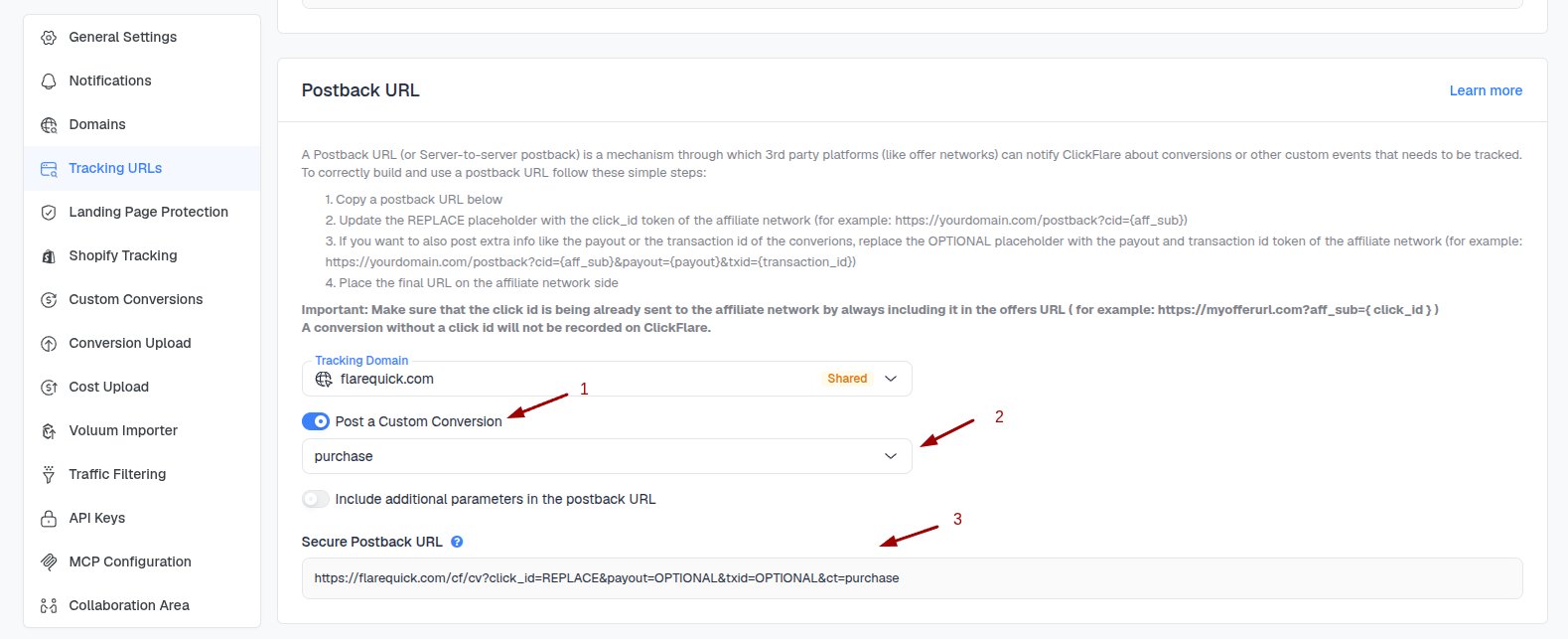
### **CT Parameter (Optional) – Tracking Custom Conversion Types**
ClickFlare allows tracking of **different types of conversions**, such as leads, purchases, or trial sign-ups, using the `ct` (custom conversion) parameter.
**Example: Postback URL with Conversion Type**
```
https://your_clickflare_domain.com/cf/cv?click_id={clickid}&ct=sale
```
 ### **currency Parameter (Optional) – Defining Payout Currency**
By default, ClickFlare uses the currency set at the **offer level**. However, if your affiliate network provides currency data, you can override this setting using the `payout_currency` parameter.
**Example: Postback URL with Currency**
```
https://your_clickflare_domain.com/cf/cv?click_id={clickid}&payout={payout_token}&payout_currency=USD
```
* Replace `USD` with the correct currency code.
* This ensures revenue is recorded in the right currency.
***
## **3. Additional Parameters for Custom Data**
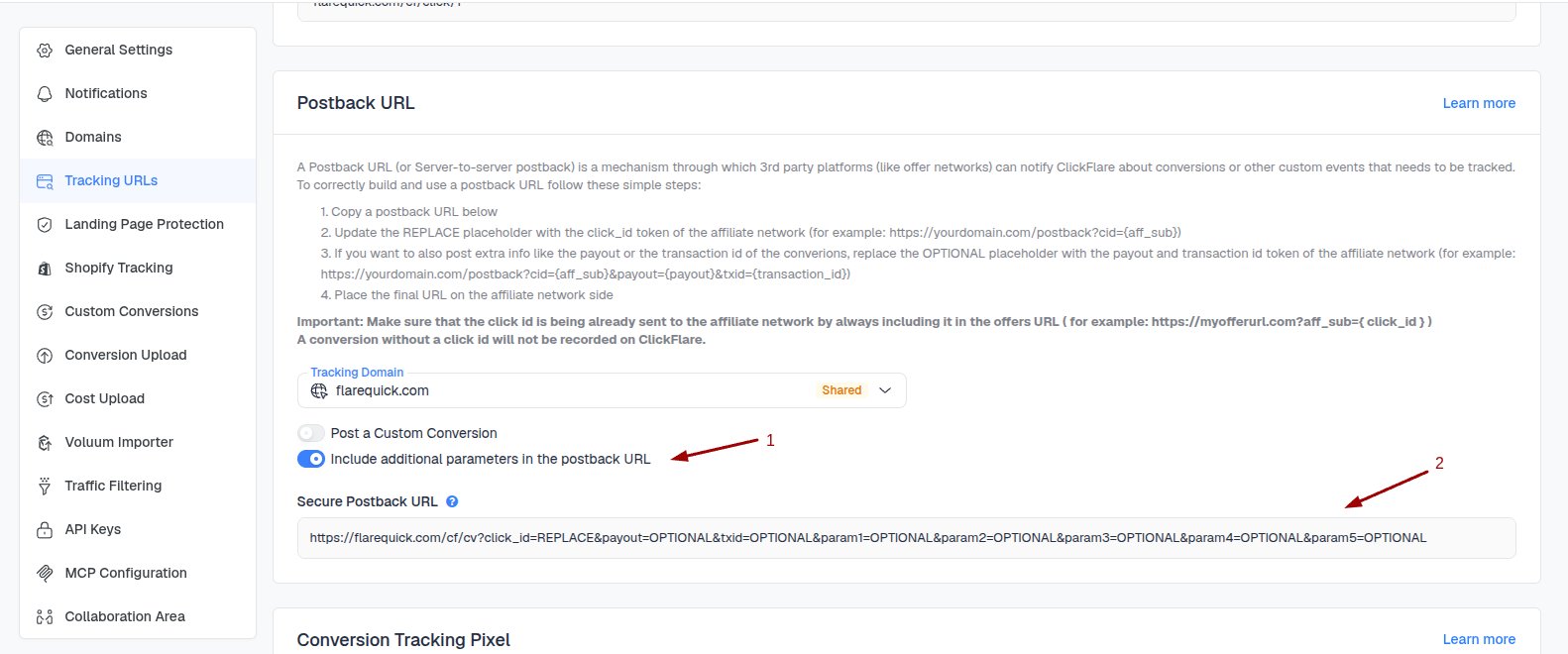
ClickFlare allows passing **custom values** using param1 to param20. These parameters can store **extra information** from the affiliate network, such as:
* Traffic source data
* Custom user attributes
* Affiliate subIDs
**Example: Postback URL with Custom Parameters**
```
https://your_clickflare_domain.com/cf/cv?click_id={clickid}¶m1={network_subid}¶m2={user_device}
```
* `network_subid` Stores an affiliate’s subID.
* `user_device` Captures the user’s device type.
To enable additional parameters, enable the **Include additional parameters in the postback URL** toggle.
### **currency Parameter (Optional) – Defining Payout Currency**
By default, ClickFlare uses the currency set at the **offer level**. However, if your affiliate network provides currency data, you can override this setting using the `payout_currency` parameter.
**Example: Postback URL with Currency**
```
https://your_clickflare_domain.com/cf/cv?click_id={clickid}&payout={payout_token}&payout_currency=USD
```
* Replace `USD` with the correct currency code.
* This ensures revenue is recorded in the right currency.
***
## **3. Additional Parameters for Custom Data**
ClickFlare allows passing **custom values** using param1 to param20. These parameters can store **extra information** from the affiliate network, such as:
* Traffic source data
* Custom user attributes
* Affiliate subIDs
**Example: Postback URL with Custom Parameters**
```
https://your_clickflare_domain.com/cf/cv?click_id={clickid}¶m1={network_subid}¶m2={user_device}
```
* `network_subid` Stores an affiliate’s subID.
* `user_device` Captures the user’s device type.
To enable additional parameters, enable the **Include additional parameters in the postback URL** toggle.
 ## **4. Summary Table of ClickFlare Postback Parameters**
| Parameter | Required? | Description | Example Value |
| ----------------- | ---------- | ---------------------------- | ---------------------------------- |
| `click_id` | ✅ Yes | Click ID to match conversion | \{clickid} |
| `payout` | ❌ Optional | Revenue per conversion | \{payout\_token} |
| `txid` | ❌ Optional | Unique transaction ID | \{transaction\_id} |
| `ct` | ❌ Optional | Conversion type | sale, lead |
| `payout_currency` | ❌ Optional | Conversion currency | USD, EUR |
| `param1-param20` | ❌ Optional | Custom data fields | \{network\_subid}, \{user\_device} |
**FREQUENTLY ASKED QUESTIONS**
Got questions? Find the answers below:
> **Q1**: What happens if I don't include the click\_id parameter in the postback?
**A1**: ClickFlare cannot track the conversion if the click\_id is missing. Make sure your affiliate network correctly stores and passes this value back.
> **Q2**: Can I use both \{cf\_click\_id} and \{click\_id} macros?
**A2**: Both are accepted in offer and postback URLs. Use \{cf\_click\_id} in offer URLs so your setup matches the examples in these guides.
> **Q3**: How can I verify if my postback URL is working?
**A3**: Check the **Conversion Logs** in ClickFlare to see if conversions are being registered.
## Related Resources
* [Overview of Conversion Tracking Methods in ClickFlare](/docs/en/tracking/conversion-tracking-methods-clickflare)
* [How Click and Conversion Data is Transferred in ClickFlare](/docs/en/tracking/click-conversion-data-transfer-clickflare)
* [How Conversion Payouts Are Tracked in ClickFlare](/docs/en/tracking/how-conversion-payouts-are-tracked-in-clickflare)
* [How to Submit an S2S Postback URL to an Affiliate Network in ClickFlare](/docs/en/tracking/how-to-submit-an-s2s-postback-url-to-an-affiliate-network-in-clickflare)
* [Custom Conversions](/docs/en/settings/custom-conversions)
* [Troubleshooting S2S Postback URL in ClickFlare](/docs/en/tracking/troubleshooting-s2s-postback-url-in-clickflare)
## **4. Summary Table of ClickFlare Postback Parameters**
| Parameter | Required? | Description | Example Value |
| ----------------- | ---------- | ---------------------------- | ---------------------------------- |
| `click_id` | ✅ Yes | Click ID to match conversion | \{clickid} |
| `payout` | ❌ Optional | Revenue per conversion | \{payout\_token} |
| `txid` | ❌ Optional | Unique transaction ID | \{transaction\_id} |
| `ct` | ❌ Optional | Conversion type | sale, lead |
| `payout_currency` | ❌ Optional | Conversion currency | USD, EUR |
| `param1-param20` | ❌ Optional | Custom data fields | \{network\_subid}, \{user\_device} |
**FREQUENTLY ASKED QUESTIONS**
Got questions? Find the answers below:
> **Q1**: What happens if I don't include the click\_id parameter in the postback?
**A1**: ClickFlare cannot track the conversion if the click\_id is missing. Make sure your affiliate network correctly stores and passes this value back.
> **Q2**: Can I use both \{cf\_click\_id} and \{click\_id} macros?
**A2**: Both are accepted in offer and postback URLs. Use \{cf\_click\_id} in offer URLs so your setup matches the examples in these guides.
> **Q3**: How can I verify if my postback URL is working?
**A3**: Check the **Conversion Logs** in ClickFlare to see if conversions are being registered.
## Related Resources
* [Overview of Conversion Tracking Methods in ClickFlare](/docs/en/tracking/conversion-tracking-methods-clickflare)
* [How Click and Conversion Data is Transferred in ClickFlare](/docs/en/tracking/click-conversion-data-transfer-clickflare)
* [How Conversion Payouts Are Tracked in ClickFlare](/docs/en/tracking/how-conversion-payouts-are-tracked-in-clickflare)
* [How to Submit an S2S Postback URL to an Affiliate Network in ClickFlare](/docs/en/tracking/how-to-submit-an-s2s-postback-url-to-an-affiliate-network-in-clickflare)
* [Custom Conversions](/docs/en/settings/custom-conversions)
* [Troubleshooting S2S Postback URL in ClickFlare](/docs/en/tracking/troubleshooting-s2s-postback-url-in-clickflare)