> ## Documentation Index
> Fetch the complete documentation index at: https://clickflare.com/docs/llms.txt
> Use this file to discover all available pages before exploring further.
# Listicle Landing Page Setup
> A step-by-step guide to creating a new flow
This feature lets you create more advanced visitor paths by adding an extra step to your campaign funnel with a lander. Before reaching an offer, a visitor will see two landing pages: first, a pre-lander, which links to additional landers, each containing links to different offers. This approach allows you to provide more content to visitors and potentially increase your conversion rates.
## How does it work?
When creating a new campaign in ClickFlare and selecting the Listicle tracking option, you need to choose a pre-lander from the list of existing ones. The number of CTAs in this pre-lander determines how many lander-offer pairs you can link to it.
Once you select your pre-lander, you must choose the appropriate number of landers, with each lander paired with a single, unique offer.
Meaning that you cannot rotate offers or use multi-offer click URLs in this setup.
## How It Works
* **Pre-Lander Selection**
When creating a new campaign and selecting the **Listicle tracking** option, choose a pre-lander from your existing list.
* The number of **CTAs** in the pre-lander determines how many lander-offer pairs you can link to it.
* **Landers & Offers**
After selecting your pre-lander, you need to add the corresponding number of landers, each paired with **one unique offer**.
* You **cannot rotate offers** or use multi-offer click URLs in this setup.
* **URLs Generated**
Once set up, you will get:
* **Standard campaign URL:** Redirects visitors from ads to the pre-lander.
* **Intermediate click URL:** Redirects visitors from the pre-lander to a lander.
* **Classic click URL:** Redirects visitors from a lander to the final offer.
## Rules to Keep in Mind
* A listicle can include **up to 20 landers**.
* Each **offer and lander can only be used once**.
* A lander cannot link to multiple offers.
* An offer cannot be linked from multiple landers.
* The maximum number of landers a visitor can go through is **two**.
### \*\*Step 1 - \*\*Pre-Lander Selection
* Go to the **Landers** section on the left-hand menu
* Select **+New**.
* \*Make sure to toggle the "**Is Prelander**" option (as seen in the pic below).
 \*
* Fill in:
* **Name** of the pre-lander.
* **URL** of the pre-lander.
* **Number of CTAs** (determines how many landers you can use).
* Select the number of **CTAs**. This number will define how many landers you'll be able to use. So if you have selected 3 CTAs, then you'll be able to use 3 landers.
* Copy all generated links into a document for reference.
* Once done, click **Save**.
### **Step 2 - Adding Landers & Offers**
* Add the same number of **landers** and **offers** as the number of CTAs you selected for the pre-lander.
* Ensure each lander is paired with a single, unique offer.
### **Step 3 - Creating a Listicle Campaign**
* Start creating a **new campaign**.
* Enter the **General Info** for your campaign.
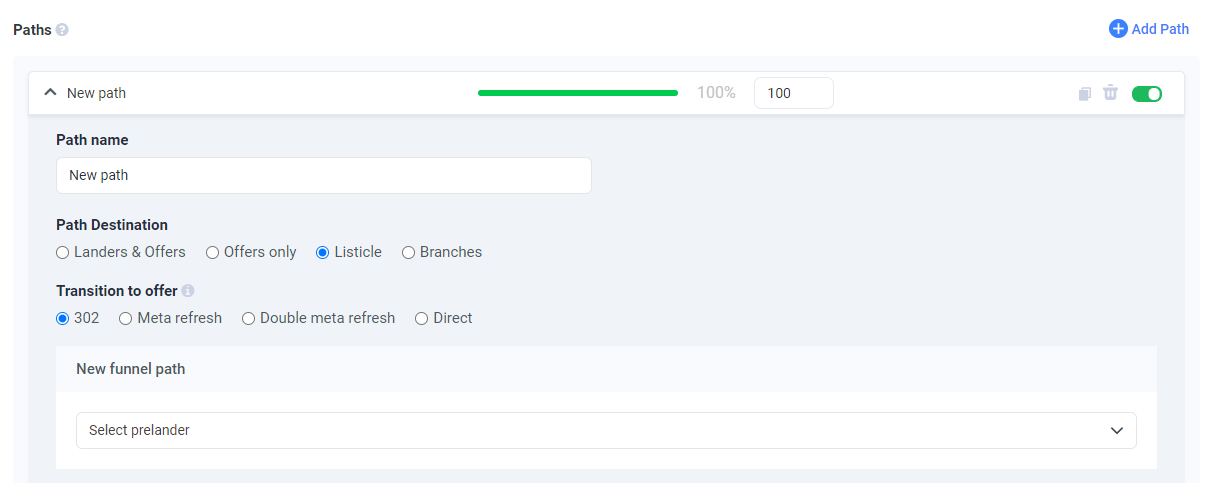
* * Choose the path for your listicle and give it a name.
* Select **Listicle** as the path destination.
* Select the **pre-lander** you created.
Move to **Destination Info**:
* * Example: If the pre-lander has 3 CTAs:
* Lander 1 → Offer 1
* Lander 2 → Offer 2
* Lander 3 → Offer 3
Pair landers with offers according to the number of CTAs:
\*
* Fill in:
* **Name** of the pre-lander.
* **URL** of the pre-lander.
* **Number of CTAs** (determines how many landers you can use).
* Select the number of **CTAs**. This number will define how many landers you'll be able to use. So if you have selected 3 CTAs, then you'll be able to use 3 landers.
* Copy all generated links into a document for reference.
* Once done, click **Save**.
### **Step 2 - Adding Landers & Offers**
* Add the same number of **landers** and **offers** as the number of CTAs you selected for the pre-lander.
* Ensure each lander is paired with a single, unique offer.
### **Step 3 - Creating a Listicle Campaign**
* Start creating a **new campaign**.
* Enter the **General Info** for your campaign.
* * Choose the path for your listicle and give it a name.
* Select **Listicle** as the path destination.
* Select the **pre-lander** you created.
Move to **Destination Info**:
* * Example: If the pre-lander has 3 CTAs:
* Lander 1 → Offer 1
* Lander 2 → Offer 2
* Lander 3 → Offer 3
Pair landers with offers according to the number of CTAs:
 * Once done, click **Save**.
* In the **Tracking** tab, copy the **campaign & click URLs**.
### **Step 4 - Setting up your landing pages**
To complete the setup, you also need to update your landing pages with the appropriate click URLs.
* For the prelander, place all intermediate click URLs that you have copied from the prelander's setup into the \ section of this landing page:
```
.
.
.
Click here to go to the lander 1!
.
.
Click here to go to the lander 2!
.
.
Click here to go to the lander 3!
.
.
.
```
Make sure to include the lander script on the first page the visitor is redirected to after clicking the ad (pre-lander). This ensures the visitor journey is tracked correctly.
* Once done, click **Save**.
* In the **Tracking** tab, copy the **campaign & click URLs**.
### **Step 4 - Setting up your landing pages**
To complete the setup, you also need to update your landing pages with the appropriate click URLs.
* For the prelander, place all intermediate click URLs that you have copied from the prelander's setup into the \ section of this landing page:
```
.
.
.
Click here to go to the lander 1!
.
.
Click here to go to the lander 2!
.
.
Click here to go to the lander 3!
.
.
.
```
Make sure to include the lander script on the first page the visitor is redirected to after clicking the ad (pre-lander). This ensures the visitor journey is tracked correctly.
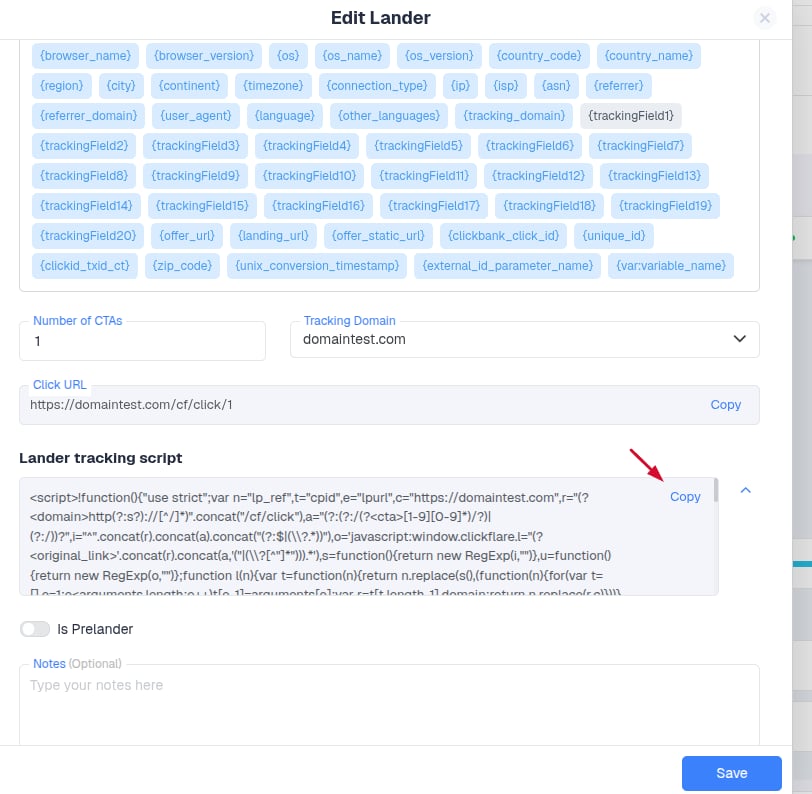 * For the landers, place the same click URL that you have copied from the campaign's setup into each of your landers' \ section:
```
.
.
.
Click here to go to the offer!
.
.
.
```
This structure ensures:
1. Correct tracking of the visitor journey.
2. Each visitor goes through the intended funnel (pre-lander → lander → offer).
3. Offers and landers are not reused incorrectly.
* For the landers, place the same click URL that you have copied from the campaign's setup into each of your landers' \ section:
```
.
.
.
Click here to go to the offer!
.
.
.
```
This structure ensures:
1. Correct tracking of the visitor journey.
2. Each visitor goes through the intended funnel (pre-lander → lander → offer).
3. Offers and landers are not reused incorrectly.