

tw_ parameters on the Shopify landing URL and ties orders back to Meta ads.
The two tools only agree when ClickFlare rebuilds the parameters on the way out. Meta sends its values to ClickFlare, not to your store. Anything Triple Whale or Shopify needs must be written into the ClickFlare offer URL with ClickFlare tokens.
This guide covers the full setup for Meta traffic, how to make every order traceable to a ClickFlare click, and how to debug orders whose UTMs do not match what ClickFlare sends.
How the data flows
- Meta → ClickFlare: Meta’s dynamic macros go in the Meta ad’s URL parameters field and land in ClickFlare’s tracking fields.
- ClickFlare → Shopify: the offer URL rewrites those tracking fields into the parameter names Shopify and Triple Whale read. If a parameter is not in the offer URL, it does not reach the store.
tw_ name, and “your token” is a ClickFlare tracking field.What the Meta template stores
ClickFlare’s Meta (Facebook) traffic source template maps Meta macros to these tracking fields. You need them to build the offer URL.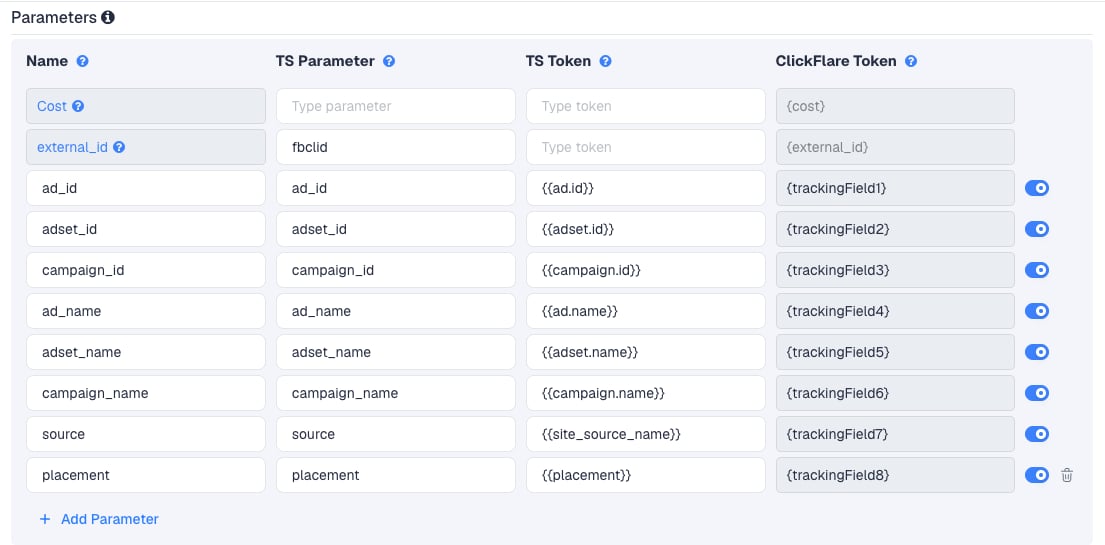
Setup
Everything below is done from inside the campaign editor. Create the traffic source and offer inline as you go.Set up your own tracking domain
track.yourbrand.com). Shared domains get flagged by Meta, and a domain on your own brand reads better in the ad preview. See Tracking domains.Create the campaign and pick redirect tracking
Create the Meta traffic source inline
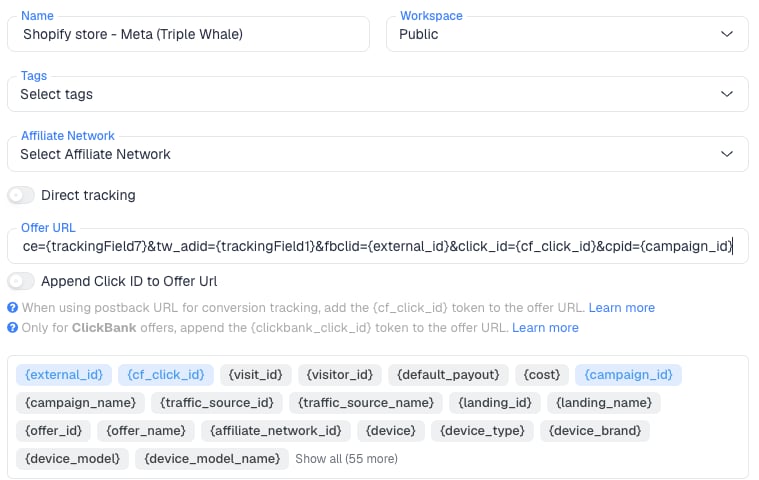
Create the Shopify offer inline and build the offer URL
Add a lander (optional)
Install the ClickFlare Shopify integration
theme.liquid and create the Checkout creation and Order creation webhooks. Full steps: Shopify integration. This is what turns Shopify orders into ClickFlare sale conversions on the original click.Save and copy the campaign URL
Configure the Meta ad
- Website URL: the ClickFlare campaign URL, with nothing appended.
- URL parameters: the parameter string from the ClickFlare Meta template:
tw_ parameters in Meta. ClickFlare adds them on the way to Shopify. Meta adds fbclid on its own.Send conversions back to Meta (optional)
Verify the setup
Click a real ad link
?ad_id=111&ad_name=Test-Ad&adset_name=Test-Set&campaign_name=Test-Campaign&source=fb&fbclid=test123.Read the Shopify landing URL
{trackingField4} or an empty value means the token is wrong or the incoming parameter is missing.Place a test order
Check all three systems
- ClickFlare: a
saleconversion on the test click. - Shopify: on the order page, the conversion summary shows the UTMs you sent.
- Triple Whale: the order is attributed to the Meta ad matching
tw_adid.
Trace every order back to ClickFlare
Theclick_id={cf_click_id} parameter does double duty. ClickFlare uses it to attribute the order, and you can use it as a marker: an order whose landing URL has no ClickFlare click ID did not arrive through ClickFlare.
Where to look:
In ClickFlare (most reliable)
In ClickFlare (most reliable)
sale conversion on that click. Reconcile the two lists for a date range: an order in Shopify with no matching ClickFlare conversion did not carry a ClickFlare click into checkout.For a single suspect order, look up its click ID in ClickFlare and check the recorded tracking fields: the ad_id and ad_name Meta actually sent on that click.In Shopify
In Shopify
click_id. Through the Admin API, the same URL is on the order’s landing site field.In Triple Whale
In Triple Whale
click_id, that visit came from somewhere other than the ClickFlare redirect.Troubleshooting: a UTM shows the ad ID instead of the ad name
ClickFlare writes exactly what the offer URL says. If the offer hasutm_content={trackingField4} and manual tests send the ad name, ClickFlare cannot put an ad ID there on a real click. So when Shopify shows an ID, either the visit did not go through that offer URL, or it was attributed to a different visit. Work through these in order:
1. The click bypassed ClickFlare
1. The click bypassed ClickFlare
click_id on the order’s landing URL (see above). If it is missing, the visitor reached the store through another link. Common sources on Meta:- Meta’s automatic UTMs. Meta is reported to add its own UTMs to ads that link straight to a site, with the ad ID in
utm_contentand the campaign ID inutm_campaign. An ad ID inutm_contentis the signature of this. - Catalog and Advantage+ catalog ads. Clicks go to the product URL in the catalog feed, not the ad’s website URL.
- Extra destinations on the ad. Site links, product extensions and similar Advantage+ creative options can send clicks to store URLs directly.
- Instagram and Facebook surfaces outside the ad. Profile links, shop tabs, link-in-bio pages.
- Older or duplicated ads whose website URL is still the store, not the ClickFlare link.
2. The campaign uses direct tracking
2. The campaign uses direct tracking
{{ad.id}} for the UTM, Shopify shows the ID. Fix it in Meta, or switch to redirect tracking.3. A different offer or path has a different URL
3. A different offer or path has a different URL
{trackingField1} (ad ID) where the others use {trackingField4} (ad name). Open every offer in the campaign and compare.4. Shopify attributed the order to another visit
4. Shopify attributed the order to another visit
5. The traffic source mapping was edited
5. The traffic source mapping was edited
ad_name may no longer map to {trackingField4}. Compare it to the table at the top of this page.{{ad.name}} macro does not produce an ID. It produces an empty value or the literal macro text. An ID always means one of the causes above.Using another traffic source
The setup carries over to any traffic source that allows redirects: the ad points to ClickFlare, and the offer URL rebuilds the parameters for Shopify and Triple Whale. Three things change per platform.{trackingField8} and the ad name in {trackingField7}. Built from the TikTok fields, the offer URL looks like this, followed by the Triple Whale parameters TikTok requires:
gclid itself. ClickFlare does not rewrite that URL, so the UTMs and Triple Whale parameters are set in Google Ads (in the final URL suffix or tracking template), not in the ClickFlare offer.FAQ
Should Triple Whale's own Meta parameters stay in the ad?
Should Triple Whale's own Meta parameters stay in the ad?
tw_source and tw_adid into the store URL. If Triple Whale’s parameters are also in Meta’s URL parameters field, they reach ClickFlare, not Shopify, and only add noise. If you use Triple Whale’s option to add its parameters to ads automatically, check the ads afterwards and keep the ClickFlare template string in place.Can I send traffic straight to checkout?
Can I send traffic straight to checkout?
Why pass fbclid if ClickFlare already stores it?
Why pass fbclid if ClickFlare already stores it?
Will ClickFlare and Triple Whale report the same revenue?
Will ClickFlare and Triple Whale report the same revenue?