

At a glance
How it works
1
Outbrain sends the click
A visitor clicks your ad. Outbrain opens your ClickFlare campaign URL and fills in its macros: the click ID in
ob_click_id, plus the publisher, section, ad and other details.2
ClickFlare stores the Outbrain click ID
ClickFlare saves the value of
ob_click_id as the visit’s External ID and redirects the visitor to your lander or offer.3
The conversion reaches ClickFlare
Your affiliate network, store or feed posts the conversion back to ClickFlare, matched on the ClickFlare click ID.
4
ClickFlare posts it back to Outbrain
ClickFlare fires the Outbrain postback, replacing
{external_id} with the stored Outbrain click ID, {payout} with the revenue and {payout_currency} with its currency. Outbrain matches it to the original click and records it under the conversion name you set.The mirror to keep straight: in the campaign URL you write ClickFlare’s parameter (
ob_click_id) and Outbrain’s macro (ob_click_id in double curly braces). The template does this for you. In the postback URL you write Outbrain’s parameter (ob_click_id) and ClickFlare’s token ({external_id}). Here the parameter has the same name on both sides.Before you start
- Set up your own tracking domain. Run the campaign and the postback on your own custom domain. Shared domains get flagged by networks and blocked by browsers. See Custom Domains.
- Have an offer ready in ClickFlare, and its affiliate network set up to post conversions back to ClickFlare. See Creating an Offer and Adding an Affiliate Network.
- Create the event-based conversion in Outbrain first. You need its exact name for the postback. See Create the conversion in Outbrain.
- Decide which conversions Outbrain should receive. Outbrain optimizes on what you send it. If your funnel has several steps (lead, then sale), decide now whether to send one event or several. See Tracking several events.
Step 1 – Create the campaign and the Outbrain traffic source
- Go to Campaigns and click New.
- In Traffic Source, open the dropdown and click + New Traffic Source.
- Type
outbrainin the search box and select the Outbrain template. - Enter a Name, for example
Outbrain. - Leave Cost currency on USD unless your Outbrain account is billed in another currency.
ob_click_id is the macro name wrapped in two pairs of braces. The table lists the macro names:
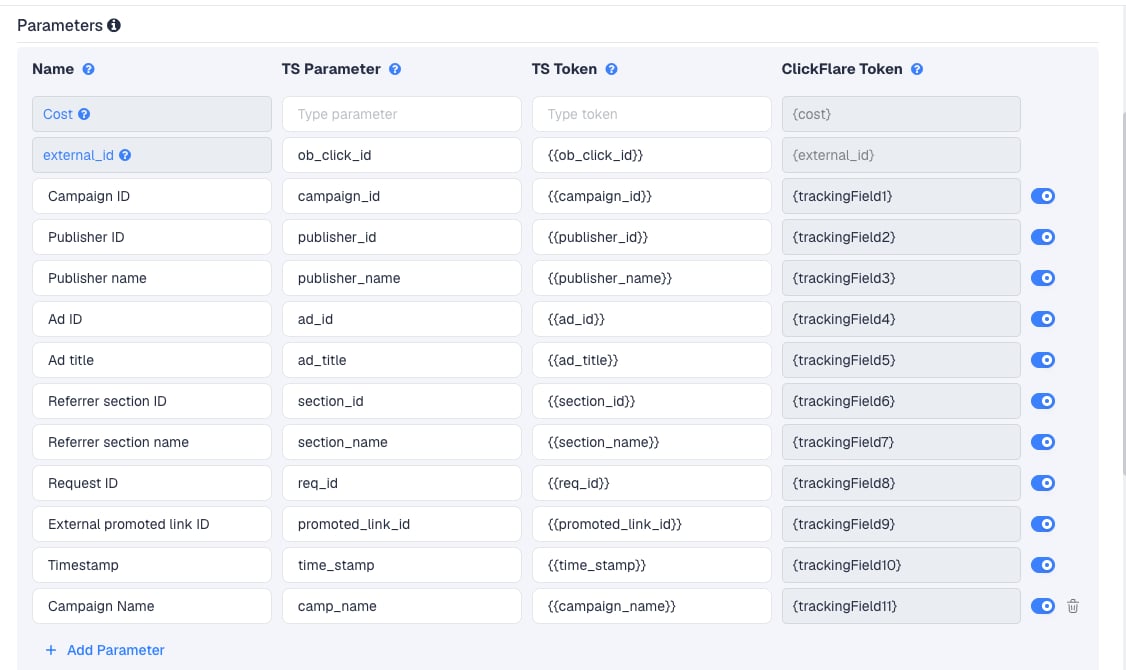
publisher_name and section_name are the ones you will use most: Outbrain bids and blocks at publisher and section level, so these show you which placements convert. ad_id and ad_title tell you which creative won.
To pass more Outbrain data, click Add Parameter, give it a name and parameter, and enter the Outbrain macro, in double curly braces, as the TS Token. ClickFlare assigns the next free tracking field. Outbrain lists its macros in its UTM tracking help. Some of them work only in impression pixels, not in click URLs, so check before adding.
Step 2 – Set up the postback
The postback is what sends conversions to Outbrain. It lives on the traffic source, so every campaign that uses this Outbrain traffic source sends conversions the same way.Create the conversion in Outbrain
- In Outbrain, click the Pixels tab, then Conversions.
- Click Add Conversion.
- Choose Event-Based Conversion, not URL-Based Conversion.
- Enter a unique event name, for example
purchase. This is the value the postback must send. - Set the Window, the time from click to conversion that Outbrain counts.
- Set a Value. ClickFlare sends the real revenue with each conversion.
- Click Save.
Purchase and purchase are two different events to Outbrain.
Add the postback to the traffic source in ClickFlare
- Back in the New Traffic Source form, scroll to Passing conversion info to traffic source.
- Turn on Traffic source postback URL. The template’s postback appears:
- Replace
REPLACEin the&name=parameter with the exact event name from Outbrain. With the event above, the result is:
- In the dropdown on the left, choose the ClickFlare event that should fire the postback. Keep Conversions to send every conversion. If your final action is a custom conversion (for example
purchase), choose that instead. - Click Save. You are back in the campaign editor with the Outbrain traffic source selected.
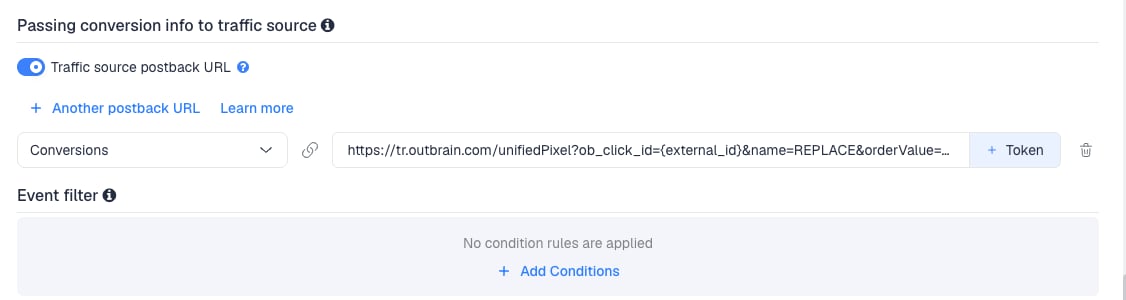
{payout_currency} sends the currency of each conversion’s payout. If every offer pays in the same currency, you can hardcode it instead, for example ¤cy=USD. See Multicurrency in ClickFlare.
Outbrain also accepts optional orderId and timestamp parameters. The template doesn’t send them.
To learn what each postback token does, see How to Configure a Traffic Source S2S Postback URL.
Step 3 – Finish the campaign and copy its URL
- Name the campaign.
- Set the Cost Model. See Cost.
- Choose Redirect or Direct tracking. Redirect is the usual choice.
- Click Next and, on Destination, add your lander (optional) and your offer.
- Save, open Tracking, select your own tracking domain and copy the campaign URL.
Step 4 – Create the campaign in Outbrain
Outbrain wants the landing page URL and the tracking parameters in separate fields. Split the ClickFlare campaign URL at the?.
- In Outbrain, create a campaign, or open an existing one with the pencil icon.
- Enter the part of the campaign URL before the
?as the ad’s landing page URL. Don’t end it with a/and don’t add parameters to it. - Paste the part after the
?, without the?itself, into the campaign’s Tracking section. - Choose targeting, budget and bid as usual, and submit.
Step 5 – Test the integration
- Click your ad, or wait for the first live clicks, and complete the offer the way a real visitor would.
- In ClickFlare, check the visit. The External ID should hold an Outbrain click ID, not the literal macro text.
- Go to Logs → Postback Status and filter by the campaign. A successful request to
tr.outbrain.comconfirms ClickFlare sent the postback. - In Outbrain, open Pixels → Conversions and check the status of your conversion. Outbrain updates it about once an hour.
Outbrain doesn’t troubleshoot server-side setups. If the status stays empty, check the postback in ClickFlare first.
Tracking several events
ClickFlare can send multiple conversions to multiple events, each with its own postback URL. Outbrain needs one event-based conversion per event.- In Outbrain, create an event-based conversion for each step, for example
leadandpurchase. - In ClickFlare, create a custom conversion for each step.
- On the Outbrain traffic source, click + Another postback URL once per extra event.
- Map each postback to its ClickFlare event and give each a different
&name=:
- Test each event. Each Outbrain conversion shows its own status.
Choosing the conversion Outbrain optimizes on
Choosing the conversion Outbrain optimizes on
Outbrain’s conversion-based bidding optimizes toward the conversion goal you choose for the campaign. Pick the event closest to revenue, usually the sale. Earlier steps can still be sent for reporting.
Sending only one event
Sending only one event
If Outbrain should only learn from your final sale, keep a single postback and map it to that event. Earlier steps (leads, add to carts) still show in ClickFlare. They just don’t reach Outbrain.To send a postback only for some conversions, for example only those above a certain payout, use Event filter under the postback to add conditions.
Cost
The template’s Cost row is empty, so the campaign URL doesn’t carry Outbrain’s cost per click. The best option is ClickFlare’s Outbrain cost integration. It pulls actual spend from Outbrain’s API at campaign, content, publisher and section level. You need access to Outbrain’s API, which you request from your account manager or through Outbrain’s API form. Approval takes 2–5 business days. Once the integration exists, select it under Cost Integration on the Outbrain traffic source, and set the campaign’s Cost Model to Not Tracked so ClickFlare uses the spend it pulls. Set the integration’s timezone to match your Outbrain account. See Outbrain Cost Integration. Outbrain also documents a cost-per-click macro,cpc in double curly braces, in USD. You can try it in the Cost row: set TS Parameter to cpc and TS Token to the macro. Test it before relying on it. The API integration is more accurate.
Until then, set the Cost Model on the campaign to CPC and enter your bid. Correct past days with a manual cost upload. See Cost Models and Traffic Source Cost Tracking.
Delayed revenue
If you run search arbitrage (RSOC or AFD) behind Outbrain, the feed reports revenue hours or days after the click. To pass that revenue to Outbrain once it arrives, see Sending Delayed Revenue to Traffic Sources.Troubleshooting
Outbrain shows no conversions
Outbrain shows no conversions
REPLACEis still in the postback, or the name doesn’t match the Outbrain event name exactly, including letter case.- The conversion in Outbrain is URL-based. S2S needs an event-based conversion.
- The conversion happened more than the conversion Window after the click.
- Check Logs → Postback Status: a failed request shows the status code Outbrain returned.
Conversions show in ClickFlare but not in Outbrain
Conversions show in ClickFlare but not in Outbrain
- Traffic source postback URL is off on the Outbrain traffic source.
- Disable sending postbacks to traffic source is on in the campaign.
- The postback is mapped to a different event than the one the conversion logged. Check Logs → Event Logs to see which event was recorded.
- The External ID is empty, so the postback has no click ID. See the next item.
External ID or publisher columns are empty
External ID or publisher columns are empty
The macros were not replaced. Usual causes: the parameters were added to the landing page URL instead of the Tracking section, a macro lost one of its braces, or the Tracking section starts with
?. Paste the parameters from ClickFlare unchanged. See Traffic Source Tokens Arriving Empty.Campaign name column is empty
Campaign name column is empty
Outbrain’s documentation lists its campaign name macro for impression pixels. If it doesn’t fill in click URLs on your account, rely on the Campaign ID column.
FREQUENTLY ASKED QUESTIONS
Q1: Can I use the same Outbrain traffic source for all my Outbrain campaigns?A1: Yes, as long as they report the same events. The postback is set once on the traffic source. Create a second Outbrain traffic source only if a campaign needs different event names.
Q2: Why is the click ID parameter called ob_click_id on both sides?
A2: Outbrain uses the same name in its macro and in its postback. ClickFlare reads the click ID from ob_click_id in the campaign URL. Outbrain expects it back in ob_click_id in the postback, with ClickFlare’s {external_id} as the value.
Q3: Do I need to install Outbrain’s pixel as well?A3: No. The S2S postback replaces it. Outbrain shows a code snippet when you create the conversion, but you don’t need it.
Q4: Can I use static values in the postback, like currency?A4: Yes. Hardcode values that never change, for example
¤cy=USD, or keep {payout_currency} if your offers pay in different currencies.
Q5: Should I use Redirect or Direct tracking with Outbrain?A5: Redirect is the usual choice. Use Direct only if Outbrain must see your lander’s domain as the destination. See Direct Campaign Tracking.
Related
Outbrain cost integration
Pull actual spend from Outbrain’s API.
Traffic source postbacks
Every token you can use in a postback.
Custom conversions
Split leads and sales into separate events.
Conversions not showing
The general checklist when postbacks don’t arrive.