

Black Friday came early. Early-access prices until Nov 8.Black Friday: early-access prices until Nov 8.Early-access price ends in0d00h00m00sClaim the deal



If you are running affiliate campaigns without affiliate link tracking, you are basically flying blind. You can see that clicks are happening and that commissions are landing, but you have no reliable way to connect the two, so you cannot tell which link, placement, or traffic source actually drove the sale. That gap is where budget gets wasted and winning campaigns get killed by mistake.
This guide breaks down what affiliate link tracking is, the main methods you can use, and a step-by-step walkthrough for setting it up properly so every click and conversion is tied back to its source.
Quick Summary
Affiliate link tracking is the process of recording what happens after someone clicks an affiliate link, from the click itself to the final conversion, and tying that action back to the exact link, campaign, and traffic source that produced it. In practice, a unique identifier is attached to each click, and your tracker logs what that identifier does next.
That identifier is what turns a vague "we got some sales this week" into "this specific link, in this specific placement, generated this specific commission." Without it, you are left comparing numbers across your affiliate network, your ad platform, and a spreadsheet, hoping they roughly agree.
For affiliates and media buyers, accurate tracking is the difference between scaling a profitable campaign and quietly burning money on one that only looks like it is working.
Every tracking setup follows the same basic sequence. The details change depending on the method you use, but the flow is consistent:
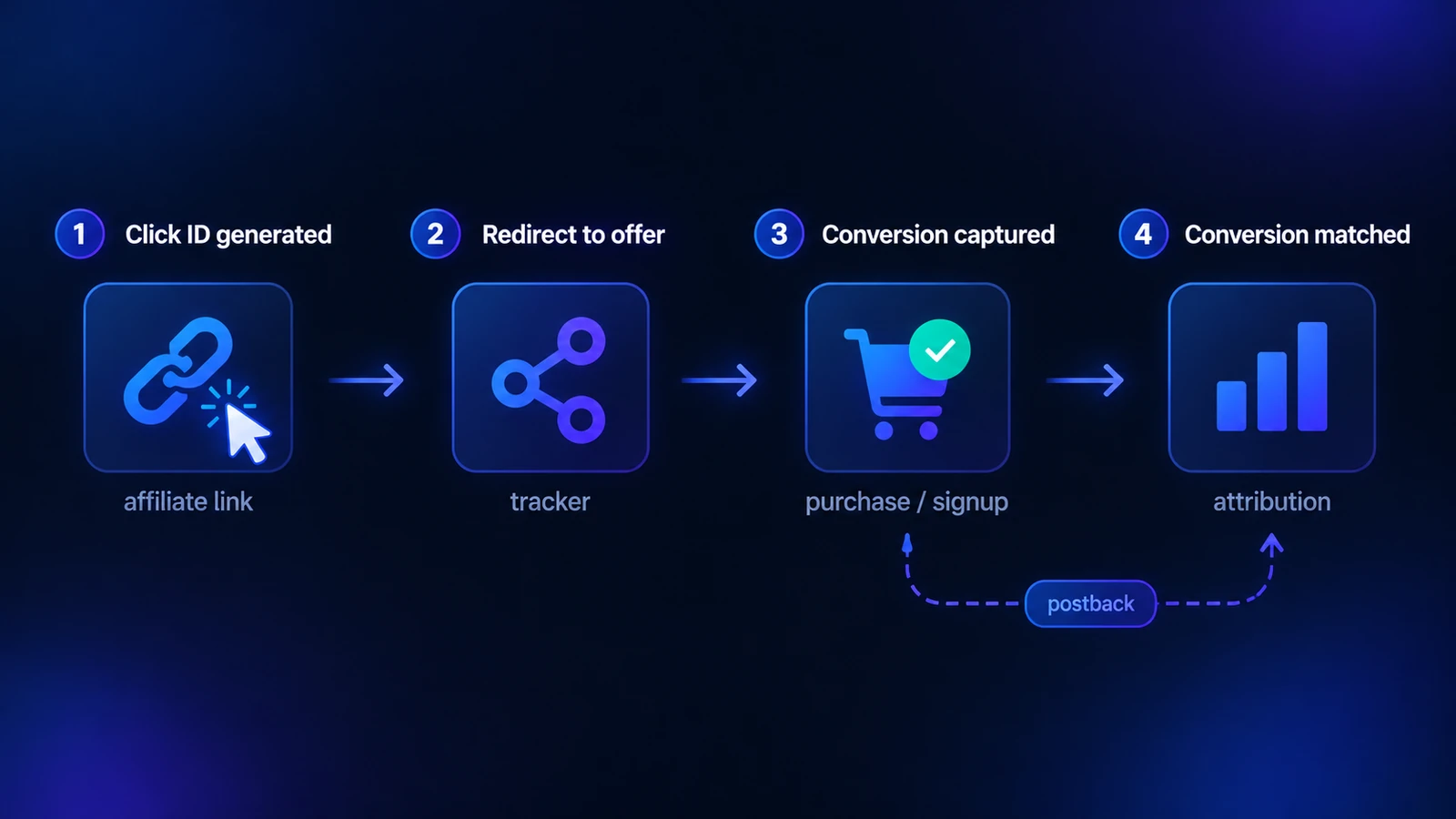
The click ID is the thread that holds the whole thing together. If it does not get passed correctly at any step, the conversion either lands on the wrong campaign or disappears entirely, which is why most affiliate tracking problems trace back to a broken click ID handoff.
There is no single way to track affiliate links. Most serious setups combine a few of the methods below, because each one captures a different part of the journey and has its own weak spots.
| Method | How It Works | Best For |
|---|---|---|
| Tracking URLs / UTMs | Tags added to the link tell your tracker which campaign, placement, or ad sent the click | Content links, email, and cross-channel source tracking |
| Cookies | A small file stored in the browser remembers the click so a later conversion can be attributed | Multi-session attribution and basic browser-based tracking |
| S2S postbacks | Conversion data is passed server-to-server using the click ID, with no browser involved | Affiliate offers, paid traffic, and privacy-restricted environments |
| Conversion APIs | Conversions are sent directly to an ad platform's servers to improve optimization | Feeding clean signals back to Meta, Google, and TikTok |
A tracking URL is a normal link with extra tags added to the end, usually UTM parameters. When someone clicks it, those tags tell your analytics or tracking tool exactly which campaign, source, or placement sent the click. This is the simplest way to start tracking affiliate links, and it works well for content, email, and any channel where you control the link.
The limitation is that UTMs only describe where the click came from. On their own, they do not confirm that a conversion happened, so they are best paired with a method that actually captures the sale. If you want to build consistent, correctly formatted tags, Google's guide to custom campaign URLs is a solid reference.
Cookies are small files saved in the user's browser. In affiliate tracking, a cookie remembers that someone clicked your link so that a purchase made minutes or days later can still be credited to you. Cookies are also what make attribution windows possible, since they store the click for a set period.
The catch is that browsers have been phasing out third-party cookies, and users can block or clear them at any time. Relying on cookies alone means quietly losing conversions, which is a big reason server-side tracking has become the more dependable option.
Postback tracking, also called server-to-server or S2S tracking, passes conversion data directly from the affiliate network's server to your tracker using the click ID, with no cookie involved. Because it never touches the browser, it is not affected by ad blockers, cookie restrictions, or cross-device journeys.
This is the standard method for affiliate offers and the most reliable way to track affiliate links today. If you are new to the concept, our complete guide on what a postback URL is explains it from the ground up, and our postback tracking guide for affiliates walks through how the server-to-server handoff actually works.
A conversion API sends conversion events straight from your server to an ad platform like Meta or Google Ads, bypassing the browser. This matters less for crediting the affiliate and more for optimization: when you feed clean conversion data back to the ad platform, its algorithm can target people who are actually likely to convert, instead of guessing from incomplete browser signals.
For affiliates buying paid traffic, pairing S2S postbacks with a conversion API is often the strongest setup, because one keeps your attribution accurate and the other keeps your ad platform optimizing toward real results.
Methods are easier to understand once you see them applied. Here is how affiliate link tracking comes together in practice using ClickFlare, which is built around server-side tracking. The same logic applies to most dedicated trackers.
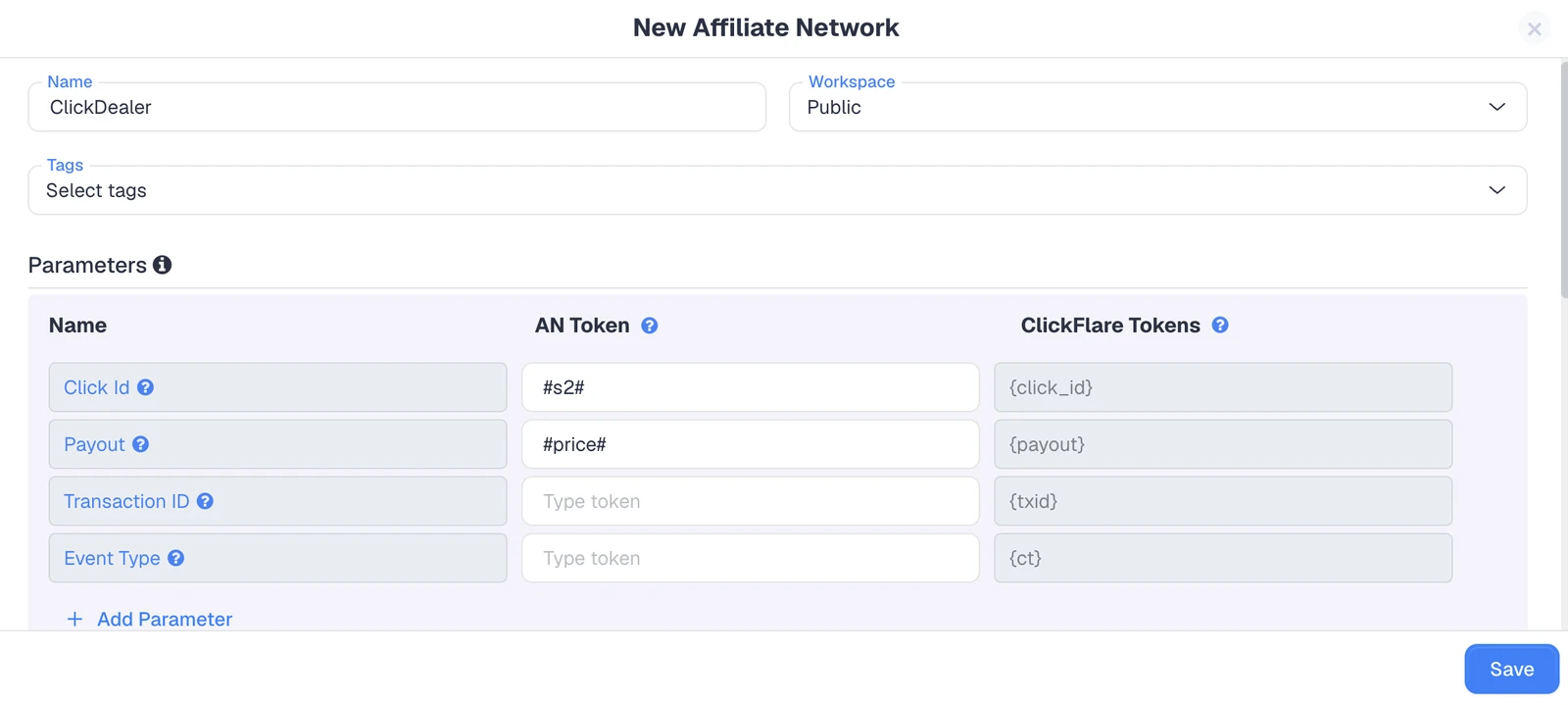
In ClickFlare, go to the Affiliate Networks section and click + New. ClickFlare has templates for hundreds of affiliate networks, including most of the big ones. If your network has a template, just select it and you are done here: the Click ID, Payout, and Transaction ID placeholders are already pre-filled for you, so there is nothing to configure.
You only need to enter those placeholders manually if your network has no template and you set it up through the Other affiliate network option. In that case, give it a name and fill in the Click ID Placeholder, Payout Placeholder, and Transaction ID Placeholder tokens that your specific network uses to pass data back to ClickFlare.
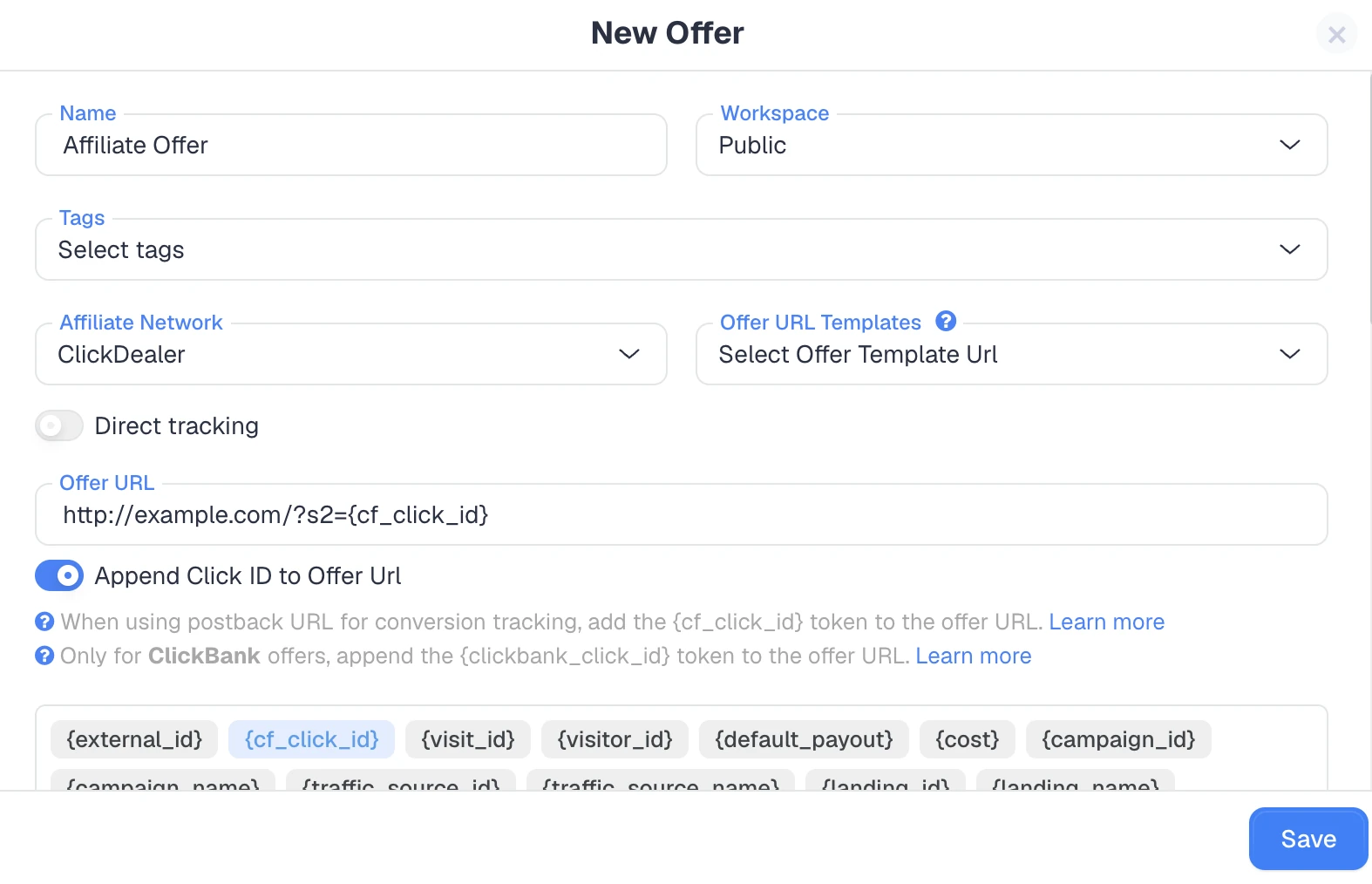
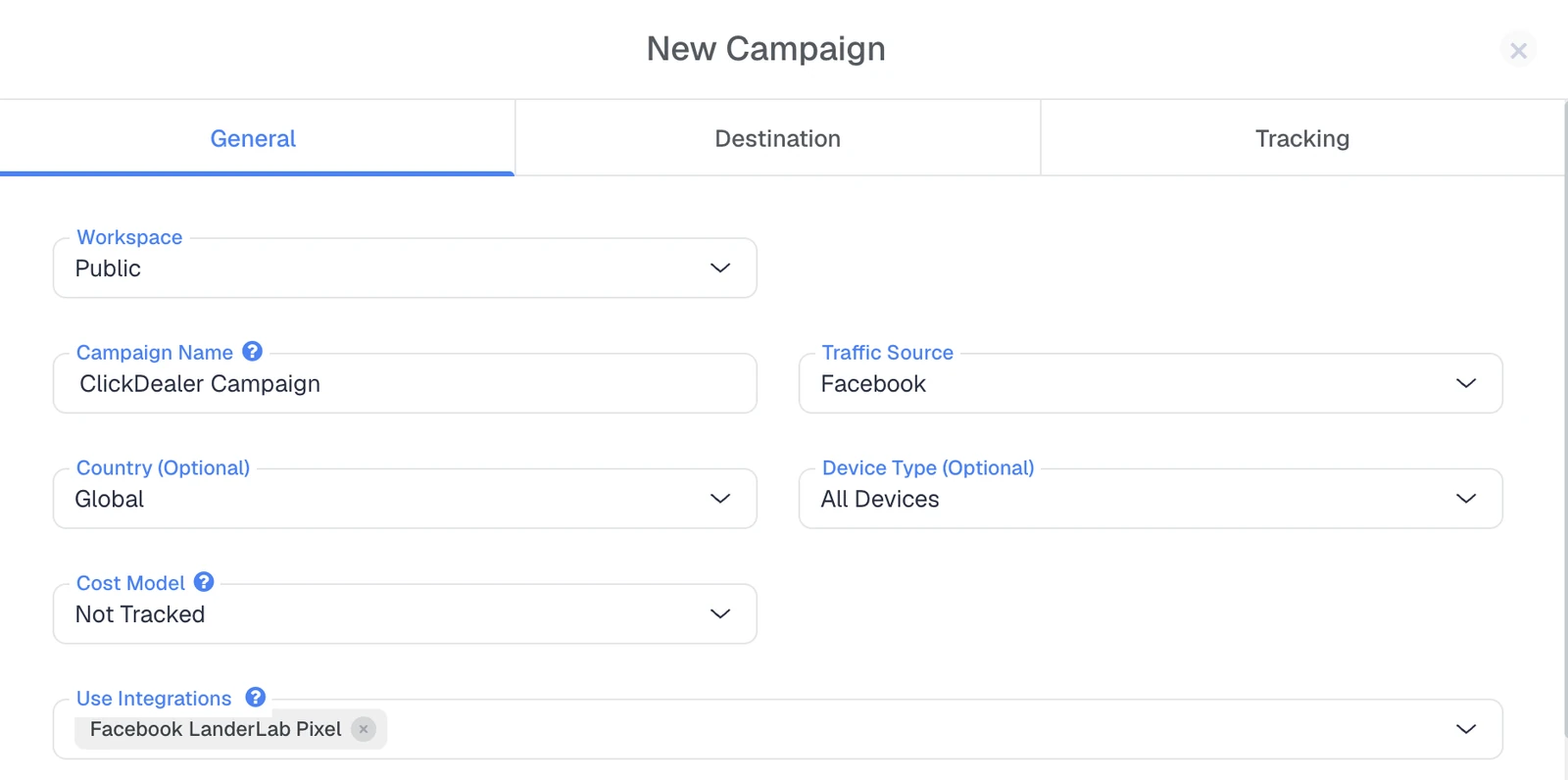
Add the affiliate offer you are promoting, making sure the offer URL carries ClickFlare's click ID parameter so the click can be tracked through to conversion. Then build your campaign and connect your traffic source, whether that is a paid ad network or another channel. This is where the unique click ID gets generated for every visitor.
There is no need to dig into any settings for this. Once you have created your affiliate network and chosen its template, ClickFlare automatically generates a postback URL for you right there on the network. Just copy it.
If your network is not covered by a template, the postback is still generated automatically once you have entered the affiliate network tokens from Step 1, so you copy it from the same place. A ClickFlare postback URL looks like this:
https://your_clickflare_domain.com/cf/cv?click_id=REPLACE&payout=OPTIONAL&txid=OPTIONAL
The click_id is mandatory, since it is what ties the conversion back to the original click. The payout (conversion amount) and txid (transaction ID) are optional and are already built into the URL when your template or tokens include them.

Log in to your affiliate network, open its tracking or postback settings, and paste the postback URL you copied into the correct field. Some networks apply the postback account-wide, while others require it per offer or per campaign.
Grab a test click ID from ClickFlare and fire the postback manually, for example by adding payout=10 to the URL. If the conversion shows up in your ClickFlare reports, tracking is working and you can start sending real traffic. Skipping this test is how affiliates end up discovering a broken setup only after they have spent on ads.
Tracking the click is only half the job. Affiliate conversion tracking is about reliably capturing the sale and crediting it to the right source, and this is where most reporting discrepancies come from.
If your tracker shows 50 conversions but your network shows 45, the usual culprits are a click ID that is not being passed back correctly, a postback that fires inconsistently, or different attribution windows on each side. A tracker counting conversions at click time and a network counting them after a hold or approval period will naturally disagree.
The fix is almost always to confirm the click ID is flowing end to end, verify the postback fires on every conversion, and check that both systems are measuring the same window. Getting affiliate conversion tracking right is what makes your numbers trustworthy enough to actually make spending decisions on.
If you are promoting more than one offer or buying paid traffic, a dedicated affiliate link tracking tool will save you far more time than stitching data together manually. A few things worth checking before you commit:
For a side-by-side look at the options, our rundown of the best affiliate tracking software compares features and pricing, and our list of the best affiliate networks and how to track them is a good starting point if you are still choosing offers.
Affiliate link tracking is what turns guesswork into decisions. By attaching a unique click ID to every click and connecting it to the conversion through tracking URLs, cookies, postbacks, or conversion APIs, you get a clear view of which links and sources are genuinely profitable. Server-side methods like S2S postbacks are the most reliable way to do this as privacy restrictions tighten. Set it up properly once, test it before you scale, and you will never have to guess which campaign is actually making you money.
Affiliate link tracking is the process of recording what happens after someone clicks an affiliate link, from the click to the conversion, and attributing that action to the correct link, campaign, and traffic source using a unique click ID.
You can track affiliate links using tracking URLs with UTM parameters, cookies, server-to-server postbacks, or conversion APIs. Most reliable setups combine a tracking URL to identify the source with a postback to confirm the conversion server-side.
Server-to-server (S2S) postback tracking is the most accurate method. Because it passes conversion data between servers using the click ID instead of relying on a browser cookie, it is not affected by ad blockers, cookie restrictions, or cross-device journeys.
Mismatches usually come from a click ID not being passed correctly, a postback that fires inconsistently, or different attribution windows on each side. Confirm the click ID flows end to end and that both systems measure the same window.
Yes. Server-side methods like postback tracking and conversion APIs work without cookies because they pass data between servers rather than storing it in the browser, which makes them more durable as third-party cookies are phased out.
Need a hand with affiliate link tracking?
Try out ClickFlare for free and book a call with one of our tracking specialists who will guide you through the entire setup process.





