Track every sale from ad click to checkout to repeat purchase

See your true ROAS per ad and per product, not the inflated number your pixel reports. ClickFlare captures every purchase server-side and sends the real revenue back to your ad platforms.
Clickflare for ecommerce
Server-side purchase tracking
True ROAS per ad and product
No theme code editing
CAPI revenue passback

E-commerce tracking is harder than it looks

Your store, your ad platforms, and your analytics all report different numbers. Without one accurate source, you scale on guesses.
Missed sales

Your ad platform misses sales

Meta reports 12 purchases. Your store actually had 18. Ad blockers and iOS hide the rest, so you're optimizing on incomplete data and over-paying for every sale.
Three sources

Your numbers never match

Google says 3.9x. Meta says 4.8x. Shopify says something else again. With no single source of truth, you can't tell which campaigns to scale with confidence.
No product view

You can't see what's working

Which ad drives sales? Which pre-sell page converts? Which checkout makes the most per order? Without product-level answers, you're scaling blind.


What the e-commerce integration does

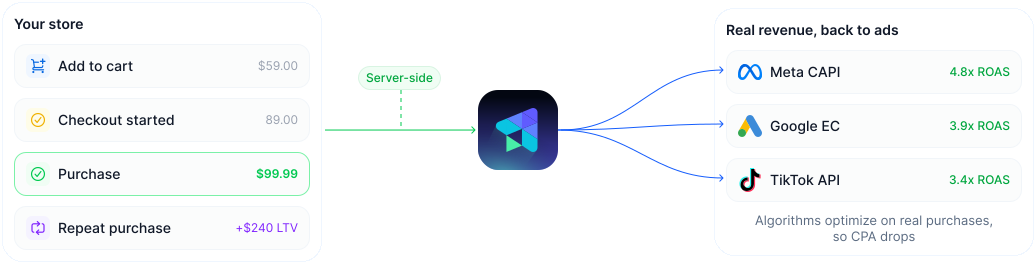
Capture every purchase from your store server-side, then send the real revenue back to your ad platforms so they optimize on the truth.
Capture

Never miss a sale, even with ad blockers on

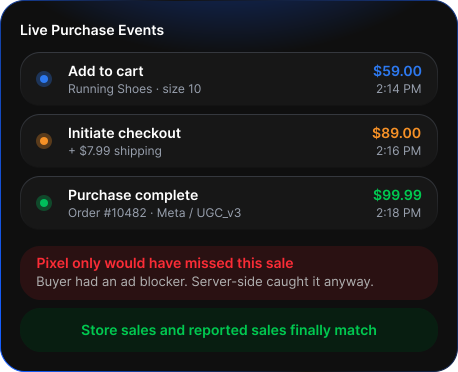
ClickFlare captures every add-to-cart, checkout, and purchase straight from your store, server-side. iOS, Safari, and ad blockers can't hide your real sales, so your reported revenue finally matches what your store actually made.
Add-to-cart, checkout, and purchase events captured server-side
Shopify, WooCommerce, or custom store, via the built-in Tag Manager
Works with standard and one-page checkouts, no theme code editing
Order value, shipping, and product data attached to every sale
Clickflare - live purchase events
Attribute

Know which ads and products make money

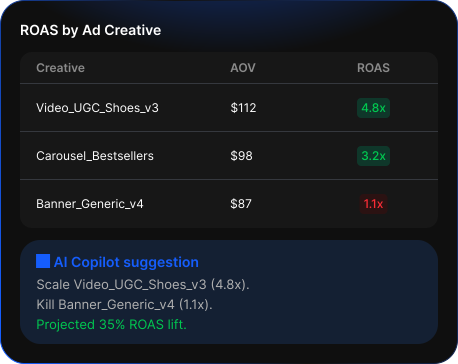
Every sale traces back to the exact ad, audience, and pre-sell page that drove it, down to the product SKU. You see your real ROAS and product-level profit after ad spend, not the inflated top-line number your ad platform reports.
True ROAS per ad, audience, creative, and landing page
Product-level attribution so you know which SKUs are profitable
AOV, conversion rate, and ROAS side by side per campaign
LTV by traffic source for subscription and repeat-purchase brands
Clickflare - Know which ads and products make money
Test & Rotate

Find your winning page and checkout automatically

Test advertorials and checkout flows against each other. ClickFlare rotates traffic and quietly shifts more of it to whichever combination produces the highest revenue per visitor.
Rotate advertorial and pre-sell pages, auto-optimize the winner
Test Shopify vs SamCart vs Funnelish vs CheckoutChamp
See CR, AOV, and ROAS per page and checkout combination
Passback

Lower your cost per sale automatically

ClickFlare sends your real purchases back to Meta, Google, and TikTok via CAPI, with hashed email, event ID, value, and product category attached. With accurate data, the algorithms find more buyers like yours.
Real purchase events sent server-side via CAPI
Hashed email, event ID, value, and product category attached
Automatic deduplication with your existing pixel

Works with your store and your checkouts

Connect any store platform and checkout flow. ClickFlare captures the purchase data and sends it where it needs to go.
Shopify
Server-side purchase and checkout events.
Purchase events
WooCommerce
Track cart, checkout, and purchase events.
Purchase events
Funnelish
Checkout and funnel conversion tracking.
Checkout tracking
SamCart
Checkout tracking with AOV and CR.
Checkout tracking
CheckoutChamp
Checkout, upsell, and rebill tracking.
Checkout tracking
ClickFunnels
Funnel and checkout conversion tracking.
Checkout tracking
Cartpanda
Checkout, upsell, and rebill tracking.
Checkout
Custom stores
Full purchase event capture, no theme code.
Tag Manager
Browse all integrations ->

Live on your
store in minutes

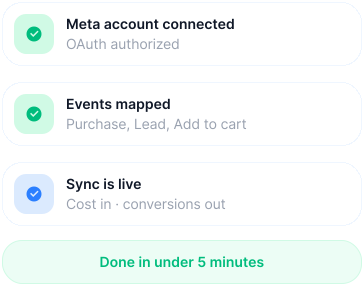
No theme code, no developer. Drop in the ClickFlare tag through the Tag Manager, map your store events once, and purchases start tracking immediately.
Add the ClickFlare tag via the built-in Tag Manager, no theme editing.
Map your store events (add-to-cart, checkout, purchase) once.
Go live. Sales track server-side and flow back to your ad platforms.
Clickflare connect ad accounts in minutes
8
Store and checkout platforms
20
Custom event types
30 – 40%
More purchases recovered
No code
To go live on your store