Conversions API vs Meta Pixel: 6 Key Differences Explained
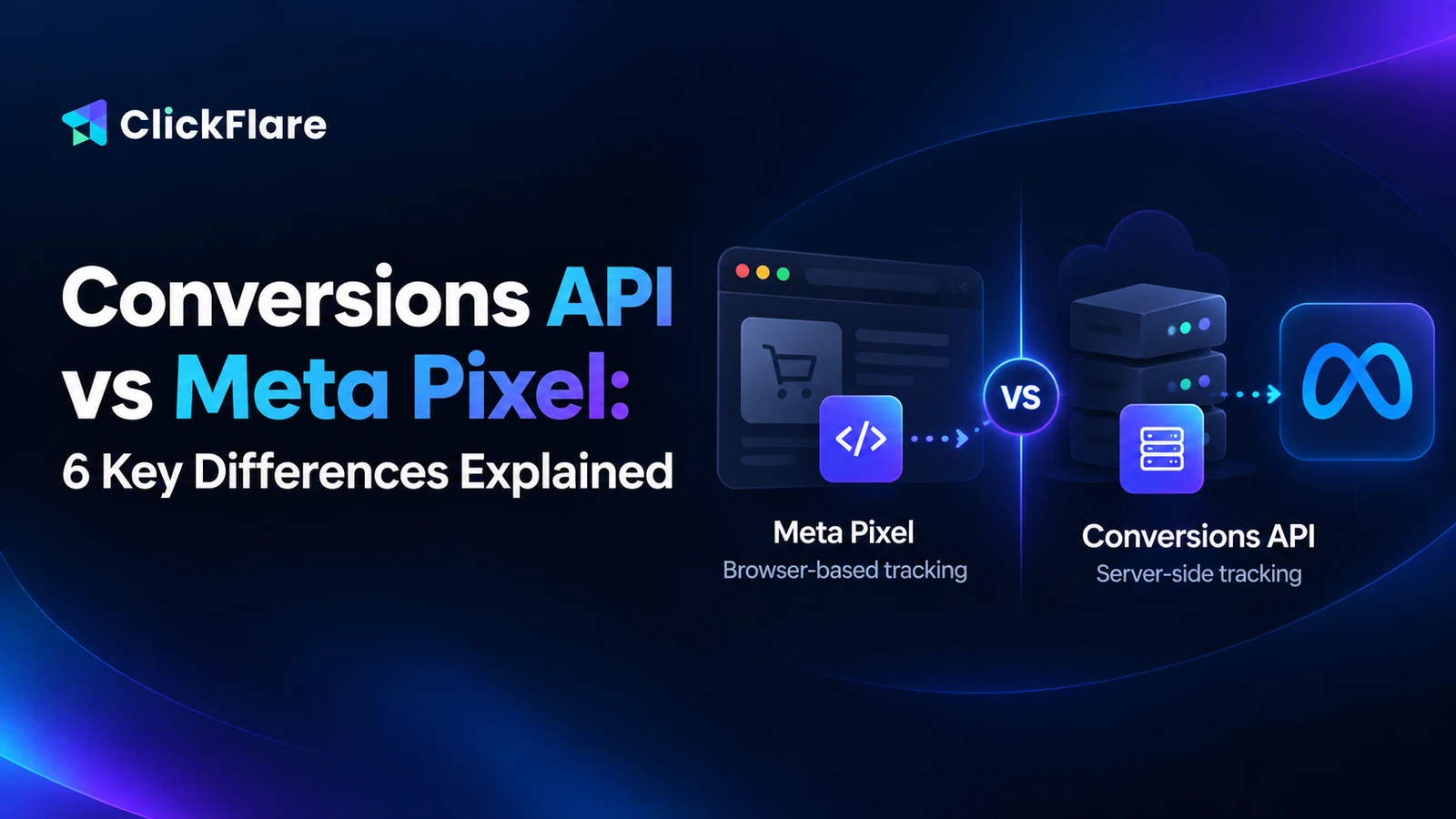
The Meta Pixel tracks from the browser, the Conversions API from a server. Here's how they differ, why most advertisers run both, and how to avoid double-counting.
If you run Meta ads, you've probably been told to "set up CAPI" at some point, usually right after noticing that Ads Manager is reporting fewer sales than your store or affiliate network. That's where the Conversions API vs Meta Pixel question comes in.Both tools send conversion events to Meta, but they do it from completely different places. One runs in your visitor's browser. The other runs on a server.In this guide, we'll break down how each one works, where each falls short, and why most advertisers end up running both.
Quick Summary
The Meta Pixel is JavaScript code that sends events to Meta from the visitor's browser.
The Conversions API (CAPI) sends events to Meta from a server, so ad blockers and browser restrictions can't stop it.
Meta recommends using both together, but if both send the same conversion, they must share an Event ID or Meta counts it twice.
The Pixel is best for on-site browsing signals. CAPI is best for the conversions you actually optimize toward.
ClickFlare gives you both: Tag Manager deploys the Meta Pixel, and the Conversion API integration sends conversions server-side, with Event ID mapping for deduplication.
Conversions API vs Meta Pixel: What's the Difference?
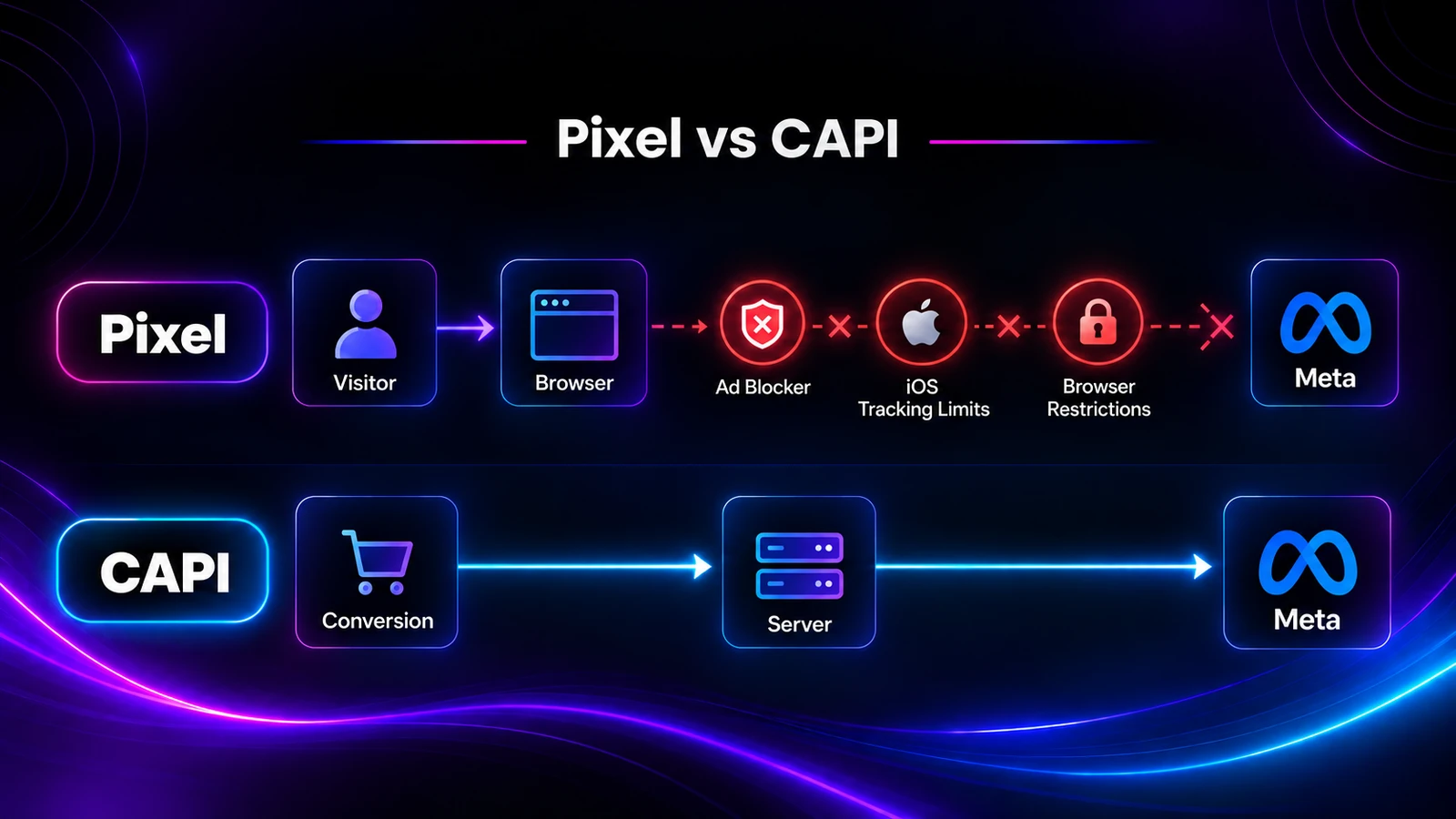
The main difference between the Conversions API and the Meta Pixel is where the data is sent from. The Meta Pixel sends events from the visitor's browser. The Conversions API sends events from a server you control, directly to Meta's servers.That one difference shapes everything else: how reliable each method is, what data it can include, and how much setup it takes.Here's how they compare side by side.
Aspect
Meta Pixel
Conversions API
Where it runs
In the visitor's browser
On a server (yours or your tracking platform's)
How it's installed
JavaScript snippet on your site
Server-to-server connection using a Pixel ID and access token
Affected by ad blockers and browser privacy settings
Yes
No
Events it can send
On-site actions while the page is open
Website, app, and offline events, including conversions confirmed later
Purchases, leads, and other conversions you optimize toward
What Is the Meta Pixel?
The Meta Pixel (formerly the Facebook Pixel) is a piece of JavaScript code you add to your website. Once installed, it records what visitors do on your pages and sends those actions to Meta as events.Typical events include PageView, ViewContent, AddToCart, Lead, and Purchase. Meta uses them to attribute conversions to ads, build audiences, and optimize delivery.If you want a broader look at how pixels work across ad platforms, our guide on what a tracking pixel is covers the mechanics in more detail.
How the Meta Pixel Works
When someone lands on a page with the Pixel installed, their browser loads the Pixel script. Each time a tracked action happens, the browser sends that event straight to Meta.Meta then tries to match the event to a person who saw or clicked one of your ads. If it finds a match, the conversion gets credited to that ad.
Strengths of the Meta Pixel
Quick to install. You paste a snippet into your site or use a plugin or tag manager. No server work is needed.
Captures browsing behavior. Page views, product views, and add-to-carts happen in the browser, which is exactly where the Pixel lives.
Real-time events. Events fire the moment the action happens on the page.
Limitations of the Meta Pixel
Because the Pixel depends on the browser, anything that interferes with the browser interferes with your data.
Ad blockers. Many ad blockers and privacy extensions stop the Pixel script from loading at all.
Browser tracking prevention. Privacy-focused browsers limit cookies and third-party scripts.
iOS restrictions. Apple's App Tracking Transparency framework, introduced with iOS 14 and 14.5, limited what website pixels can track.
Page dependency. If the visitor closes the tab early, or the conversion happens on a page you don't control, the event never fires.
The result is under-reporting. Meta sees fewer conversions than actually happened, and its algorithm optimizes on an incomplete picture.
What Is the Meta Conversions API?
The Meta Conversions API (CAPI) is a server-side connection that sends events directly from your server to Meta. According to Meta's Conversions API documentation, it can carry website events, app events, business messaging events, and offline conversions from your server, website platform, app, or CRM.Since nothing runs in the browser, ad blockers and browser privacy settings can't block it.
How the Conversions API Works
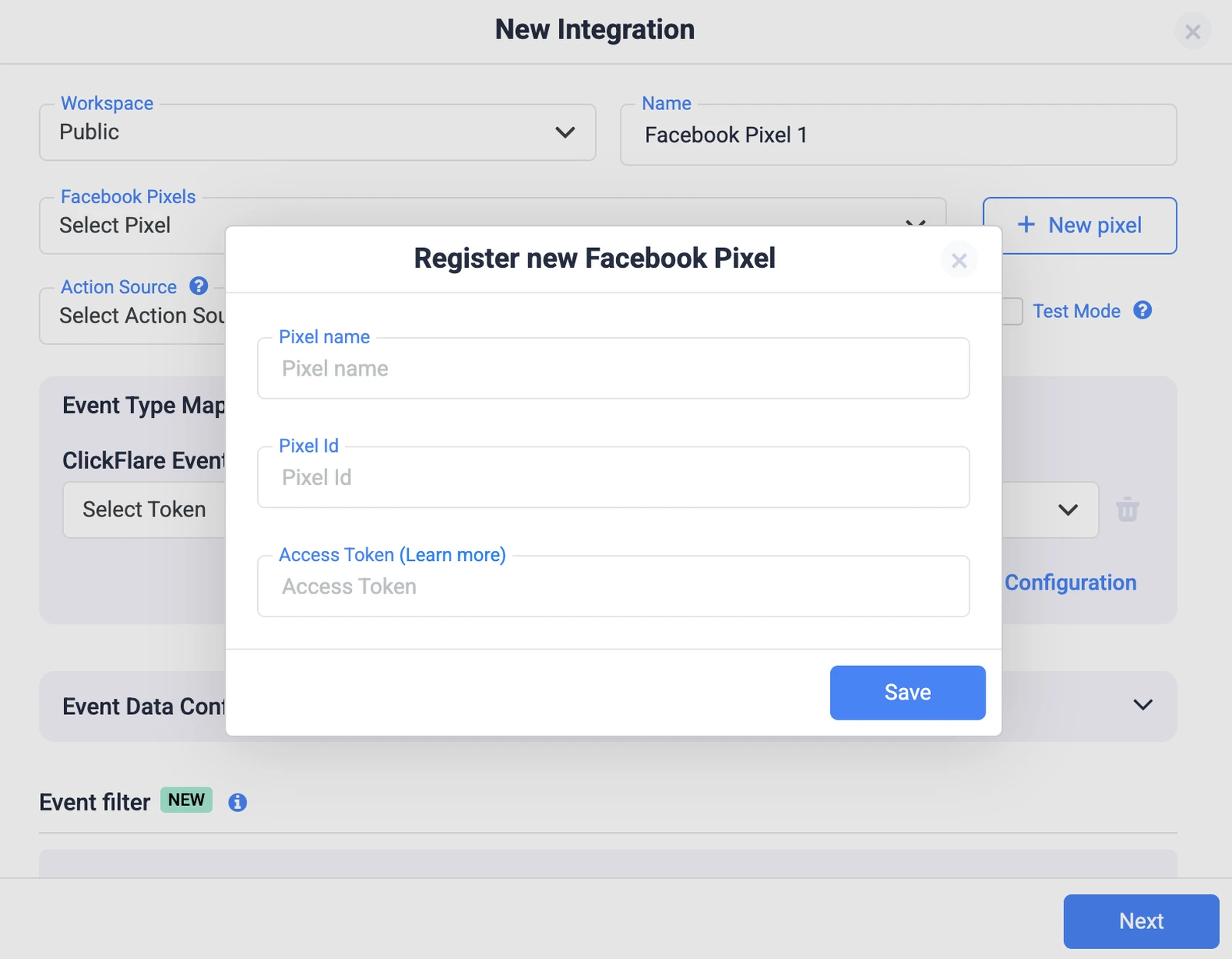
A conversion happens, such as a purchase in your store or a lead confirmed by an affiliate network. Your server, or a tracking platform acting on your behalf, records it.The server then sends that event to Meta through an API request. The request includes the event name, the time, an action source (website, email, app, and so on), and identifiers that help Meta match the event to a user, such as the click ID and hashed customer data.To connect, you need your Pixel ID and an access token generated in Meta Events Manager.
Strengths of the Conversions API
Not affected by the browser. Ad blockers, cookie limits, and closed tabs don't stop a server-to-server request.
Covers conversions that happen off-site. Affiliate conversions, phone sales, CRM-qualified leads, and delayed revenue can all be sent.
More control over the data. You choose which events go to Meta and what information each one includes.
Better signals for optimization. More complete conversion data gives Meta's algorithm more to learn from.
Limitations of the Conversions API
More technical setup. A direct integration means building and maintaining server code, unless a platform does it for you.
Event mapping matters. If your events are mapped to the wrong Meta event names, Meta receives data it can't use.
Needs identifiers. Without a click ID or customer data, Meta can receive the event but can't attribute it to an ad.
Still subject to privacy rules. Server-side doesn't remove the need for consent and a clear legal basis for the data you share.
CAPI is one form of server-side tracking. Our complete guide to server-side tracking explains how it fits alongside S2S postbacks and server-side tag managers.
Conversions API vs Meta Pixel: Which Should You Use?
For most advertisers, the honest answer is both. Meta itself recommends running the Conversions API alongside the Meta Pixel, and the two cover different parts of the journey.The Pixel is good at capturing what happens in the browser while someone browses. CAPI is good at reliably delivering the conversions that matter, even when the browser drops them or the conversion happens somewhere else entirely.That said, the right mix depends on your setup.
When the Meta Pixel Alone Might Be Enough
You're testing Meta ads on a very small budget.
Every conversion happens on a page you control, and you can live with some data loss.
When You Need the Conversions API
You're spending enough that missed conversions change your bidding and scaling decisions.
Conversions happen off your site, such as on an affiliate network's offer page or over the phone.
Revenue is confirmed after the fact, like refunds, upsells, or delayed payouts.
A large share of your traffic comes from iOS or privacy-focused browsers.
When to Use Both
If you control your landing pages and want Meta to see both browsing behavior and complete conversion data, run both. Use the Pixel for upper-funnel events like PageView and ViewContent, and send your key conversions through CAPI.The important part is deciding which method owns each event. If the Pixel and CAPI both report the same purchase, you'll need deduplication. More on that next.
The Pixel's eventID must match the Conversions API's event_id.
The Pixel's event name must match the Conversions API's event_name (for example, Purchase and Purchase).
Both events must go to the same Pixel ID. If Meta receives a matching pair within 48 hours, it discards the later one.
Meta doesn't deduplicate when you only use one source, browser-only or server-only.
For events with a natural ID, like an order number, use that as the event ID. For events without one, any unique value works, as long as the browser and server send the same one.The simplest way to avoid duplicates is to not send the same event twice. If the Pixel only fires browsing events and CAPI only sends conversions, there's nothing to deduplicate. We'll show how this works in ClickFlare below.
Common Mistakes With Meta Pixel and Conversions API Setups
Sending the same conversion twice without matching IDs. This inflates conversions in Ads Manager and makes your ROAS look better than it is.
Mapping conversions to the wrong event. If you expect a value on Meta's side, map the conversion to an event that carries one, like Purchase.
Not passing the click ID. Server events need identifiers to be matched to an ad. An empty click ID usually means the event arrives but gets no credit.
Using an account without write access. In agency setups, the account that can see a pixel isn't always the one allowed to send events to it.
Placing the Pixel on the wrong page. A conversion event has to fire on the page the visitor reaches after converting.
Judging the setup from campaign reports too soon. Check Events Manager first. Campaign reporting updates more slowly than the events view.
Even with a clean setup, Meta's numbers won't match every other platform exactly. Different attribution windows and counting rules mean some gap is normal.
How ClickFlare Gives You Both the Meta Pixel and the Conversions API
You don't have to pick between the Conversions API vs Meta Pixel when your tracker handles both. ClickFlare covers the browser side and the server side from one platform.
Deploy the Meta Pixel With ClickFlare Tag Manager
ClickFlare's Tag Manager lets you add one tracking script to your site, then manage your pixels from the ClickFlare dashboard. You can deploy Meta pixels alongside Google Ads, TikTok, Snapchat, and GA4 tags from the same interface.Tags fire on triggers you define, such as page views, clicks, form submissions, page close, or mouse out. You can enable, disable, or swap pixels without editing your site code.
Send Server-Side Conversions With ClickFlare's Conversion API Integration
On the server side, ClickFlare's Conversion API integration reports the conversions ClickFlare tracks back to Meta. You connect it with your Pixel ID and access token.
From there, you configure what gets sent:
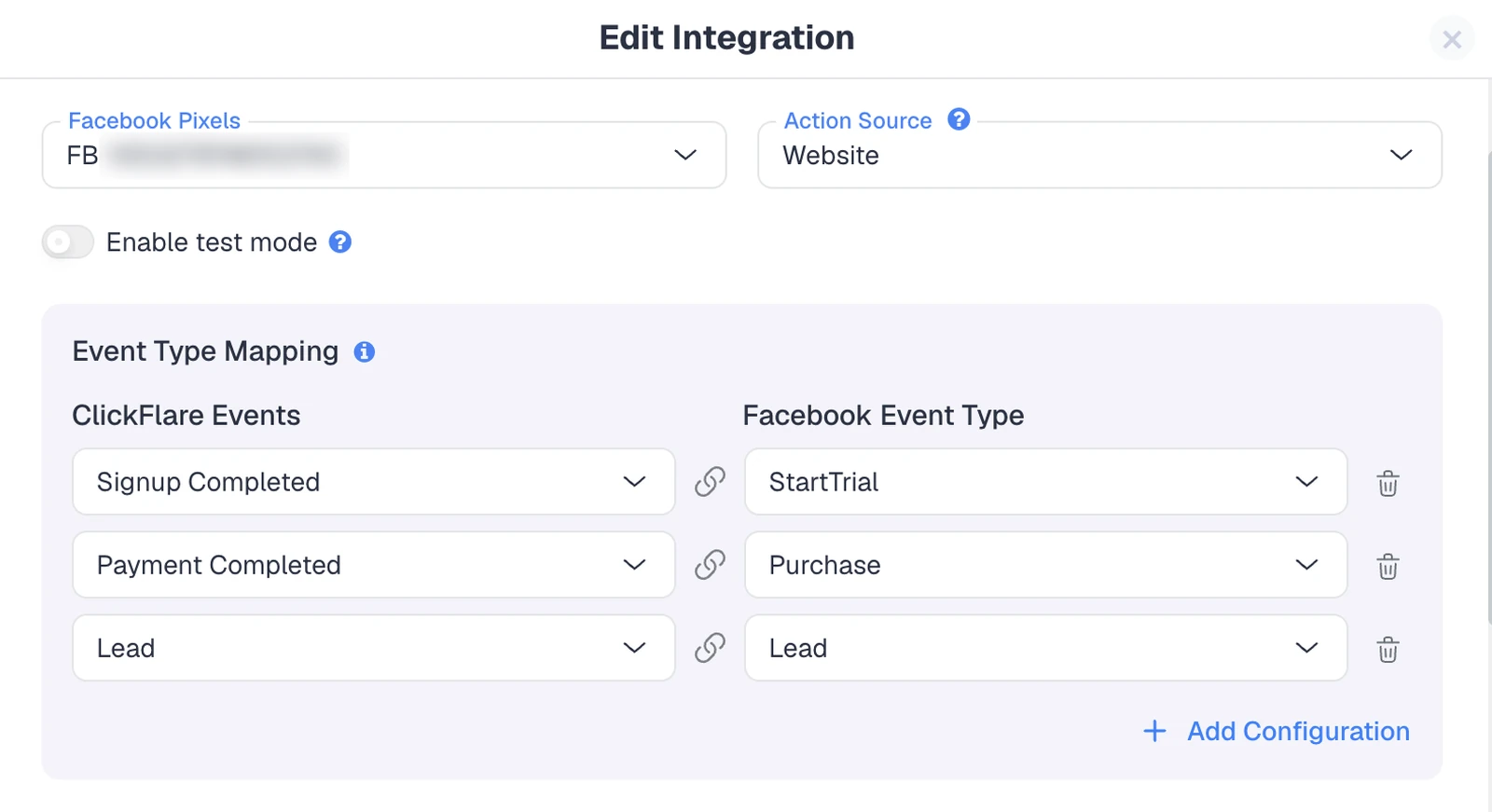
Event type mapping. Map each ClickFlare conversion event to a standard Meta event or a custom one.
Action source. Tell Meta where the data came from, such as a website or email, as Meta requires.
Event data configuration. Add extra parameters to each event on top of the defaults ClickFlare sends.
Event filters. Only send the conversions worth optimizing toward, filtered by country, payout, or other tracked values.
Campaign assignment. Choose which ClickFlare campaigns send conversions through each integration.
Events go to Meta with the fbclid and hashed customer data to help matching. You can also monitor delivery from the dashboard, with per-event success or failure status and alerts when a token expires.For the full connection walkthrough, including where to find your Pixel ID and access token, see our step-by-step Facebook Conversion API setup guide.
How to Deduplicate Meta Pixel and CAPI Events in ClickFlare
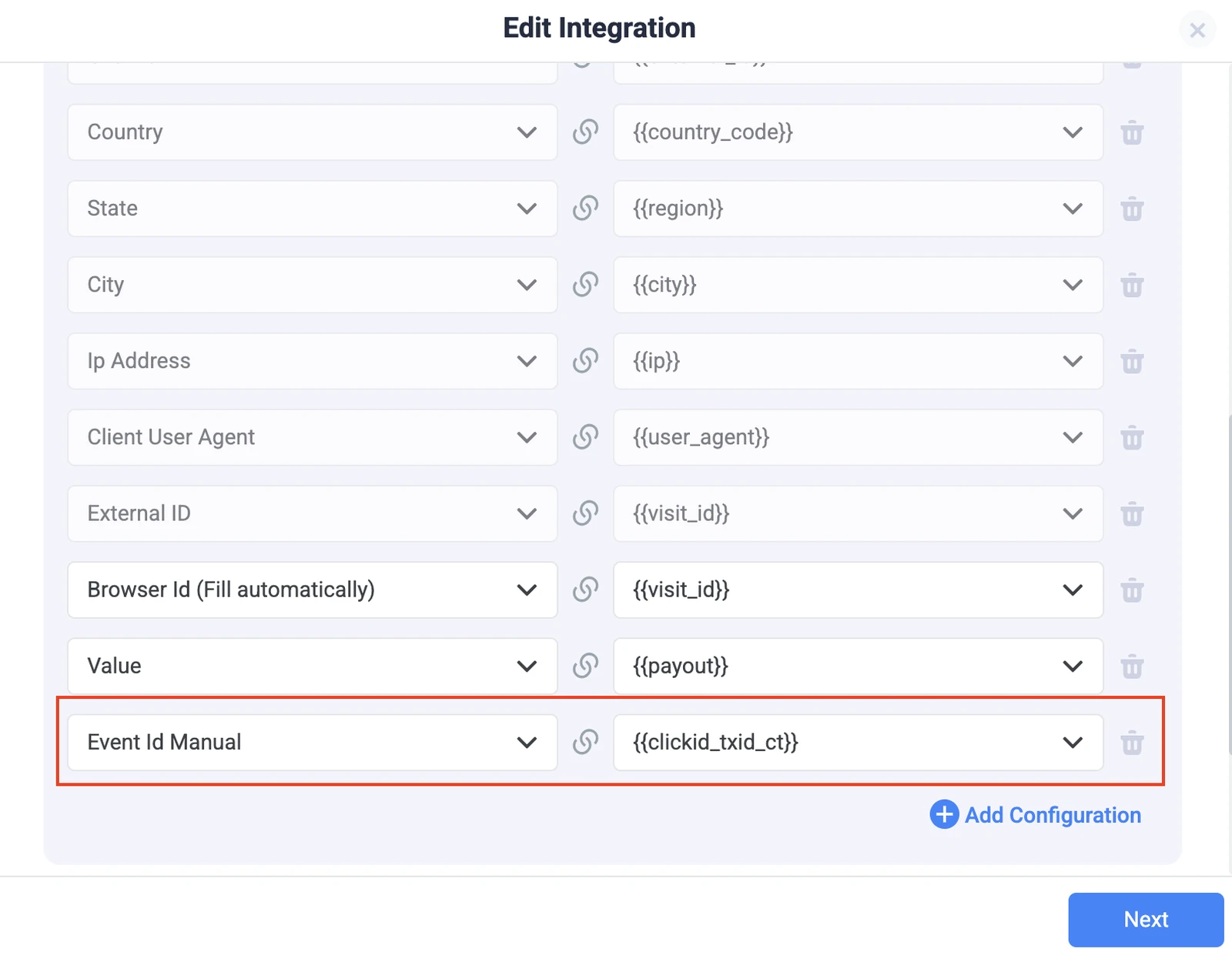
In ClickFlare, deduplication is set at the CAPI integration level. In your Facebook integration's Event Data Configuration, add a configuration that maps the Event ID Manual parameter to the ClickFlare token {{clickid_txid_ct}}. This token combines the Click ID, Transaction ID, and conversion event name, giving Meta a unique ID for every conversion.
If a browser Pixel also reports conversions (through Shopify, GTM, or CartPanda, for example), you have two options:
Option A (recommended): CAPI only. Remove the Pixel from the offer or thank-you page and let ClickFlare send conversions through CAPI. The Pixel can still fire browsing events on your landing pages.
Option B: Sync Event IDs. Keep the Pixel, but make sure it passes the exact same event ID ClickFlare sends server-side.
For upsells and other repeat sales from one click, have your network pass a unique txid so each conversion gets its own ID (more on that in our guide to conversion mismatches). Also avoid mapping two ClickFlare events to the same Meta event, or attaching two integrations with the same Pixel ID to one campaign, since both send duplicate requests.
How the Pieces Fit Together
ClickFlare first needs to record the conversion. For that, it recommends S2S postbacks whenever your affiliate network or platform supports them, since they don't depend on the browser. A conversion pixel or thank-you page script is available as a fallback.Once ClickFlare records a conversion, the Conversion API integration forwards it to Meta. Recording a conversion in ClickFlare and sending it to Meta are two separate steps, so it's worth checking both when you test a new campaign.If you're new to how this works across platforms, our guide to CAPI tracking covers the setup beyond Meta, including Google Ads and TikTok.
Final Thoughts on Conversions API vs Meta Pixel
The Conversions API vs Meta Pixel debate isn't really a contest. The Pixel captures what happens in the browser, and CAPI makes sure your conversions reach Meta even when the browser doesn't cooperate.Run both, decide which events each one sends, and give every conversion a unique Event ID. With ClickFlare, the Pixel runs through Tag Manager, conversions go to Meta through the Conversion API integration, and the {{clickid_txid_ct}} token keeps duplicates out of your Meta reporting.
Frequently Asked Questions
What is the difference between the Conversions API and the Meta Pixel?
The Meta Pixel sends events to Meta from the visitor's browser using JavaScript. The Conversions API sends events from a server directly to Meta's servers. Because CAPI doesn't depend on the browser, ad blockers, cookie limits, and closed tabs don't stop it from reporting conversions.
Does the Conversions API replace the Meta Pixel?
No. Meta recommends running the Conversions API alongside the Meta Pixel. The Pixel captures on-site browsing behavior, while CAPI reliably delivers conversions, including ones that happen off-site or are confirmed later. Together they give Meta a more complete view of your funnel than either one alone.
Can I use the Conversions API without the Meta Pixel?
Yes. CAPI works on its own as a server-to-server connection, though you still need a Pixel ID to set it up. Running server-only means you lose browser-based signals like page views, so most advertisers keep the Pixel active for upper-funnel events.
How do I stop the Pixel and CAPI from double-counting conversions?
Either send each conversion through only one method, or give both versions the same event name and a matching event ID, sent to the same Pixel ID. Meta discards the duplicate if both arrive within 48 hours. In ClickFlare, map the Event ID to {{clickid_txid_ct}}.
Does ClickFlare support both the Meta Pixel and the Conversions API?
Yes. ClickFlare's Tag Manager deploys Meta pixels on your pages from one script, and its Conversion API integration sends the conversions ClickFlare tracks to Meta server-side. To avoid double-counting, ClickFlare recommends reporting conversions through CAPI only and keeping the Pixel for browsing events.
Need a hand with Meta tracking?
Try out ClickFlare for free and book a call with one of our tracking specialists who will guide you through the entire process.