




Most Facebook ads optimization advice stops at analysis: read the numbers, spot the winners, cut the losers. The problem is the gap between spotting a losing campaign and actually doing something about it. You see the loser in your tracker, then you log into Meta, hunt for the right campaign, and pause it, if you get to it before it burns another day of budget.
This guide walks through how to close that gap, with practical moves you can make in seconds instead of tabs. We will also show how ClickFlare's new Ads Manager lets you pause, scale, and edit Meta and Google campaigns without leaving the tool where you already trust the numbers.
Quick Summary
Facebook ads optimization is the continuous process of adjusting your Meta campaigns, ad sets, and ads so more of your budget lands on what converts profitably and less on what does not. In practice, that means three repeating actions: reading performance data, cutting or reducing spend on underperformers, and moving budget toward the ads that are actually making money.
The word 'actually' is doing a lot of work there. Optimization is only as good as the numbers behind it, and the numbers Meta reports on its own are often incomplete.
Since iOS privacy changes and cookie restrictions, the browser-based pixel misses conversions, which leaves Meta's algorithm optimizing toward a partial picture. That is why serious optimization starts with accurate, server-side data and ends with fast action on it.
Ask any media buyer where their optimization time goes, and it is rarely the thinking. The decision to kill a campaign at negative ROI is easy. The friction is everything around it.
You spot a loser in your tracker, where your true cost and revenue live. Then you switch to Meta Ads Manager, find the matching campaign by name, and pause it. Repeat that across ten campaigns spread over three ad accounts and you have lost twenty minutes and, more importantly, let losing ads run while you clicked around.
Meanwhile the numbers you were reacting to inside Meta may not even match your tracker, because platform-reported conversions and your server-side data count different things. If you have ever seen one figure in Meta and another in your tracker for the same campaign, our breakdown of why conversions don't match across platforms explains what is usually going on.
So the real bottleneck in Facebook ads optimization is not insight. It is the distance between the screen where you see the truth and the screen where you can act on it. Closing that distance is the whole point of what comes next.
Until now, ClickFlare could show you a losing campaign. Now it can pause it.
Ads Manager brings the familiar Meta layout, Campaigns to Ad sets to Ads, directly into ClickFlare, with one important difference: every row shows your ClickFlare profit, not just platform-reported metrics. No custom reports, no tracking fields to configure first.
You click through from the campaign that is making or losing you money straight to the ad responsible for it.
It works like Meta Ads Manager, so there is nothing new to learn, but it sits on top of the data you already trust.
Ads Manager is live for Meta and Google Ads today, and it is included free on every ClickFlare plan while the feature rolls out. Here is how to put it to work.
Each of these is a standard optimization principle paired with the fast way to execute it. The principle is what matters; the speed is what makes you actually do it often enough.
| Optimization Move | The Slow Way | In ClickFlare Ads Manager |
|---|---|---|
| Cut losers | Spot in tracker, log into Meta, pause one by one | Tick every campaign in the red, pause in one click |
| Scale winners | Switch tabs, edit each budget manually | Edit the budget in the table, or many at once |
| Adjust bids | Open each ad set in Meta separately | Change many at once by amount or percentage |
| Check creative | Hunt for the ad preview in Meta | Preview in feed and Story before you act |
| Judge performance | Trust platform-reported ROAS | Read real ClickFlare profit on every row |
Meta's reported ROAS is a starting point, not a verdict. It counts conversions the pixel happened to catch, on Meta's attribution terms, and it does not know your true costs or your real payout timing.
Optimizing on that number alone means you sometimes scale an ad that looks profitable and is not, and cut one that looks weak but is quietly winning.
Say Campaign 3 shows a 2.4 ROAS in Meta. In ClickFlare, once real revenue and full cost are accounted for, it is barely breaking even, while Campaign 7, which Meta reports at 1.6, is your most profitable line of the week.
Ads Manager puts that ClickFlare profit on the same row as the campaign, so the ranking you act on is the honest one. The engine behind that accuracy is your server-side setup, which leads to the next move.
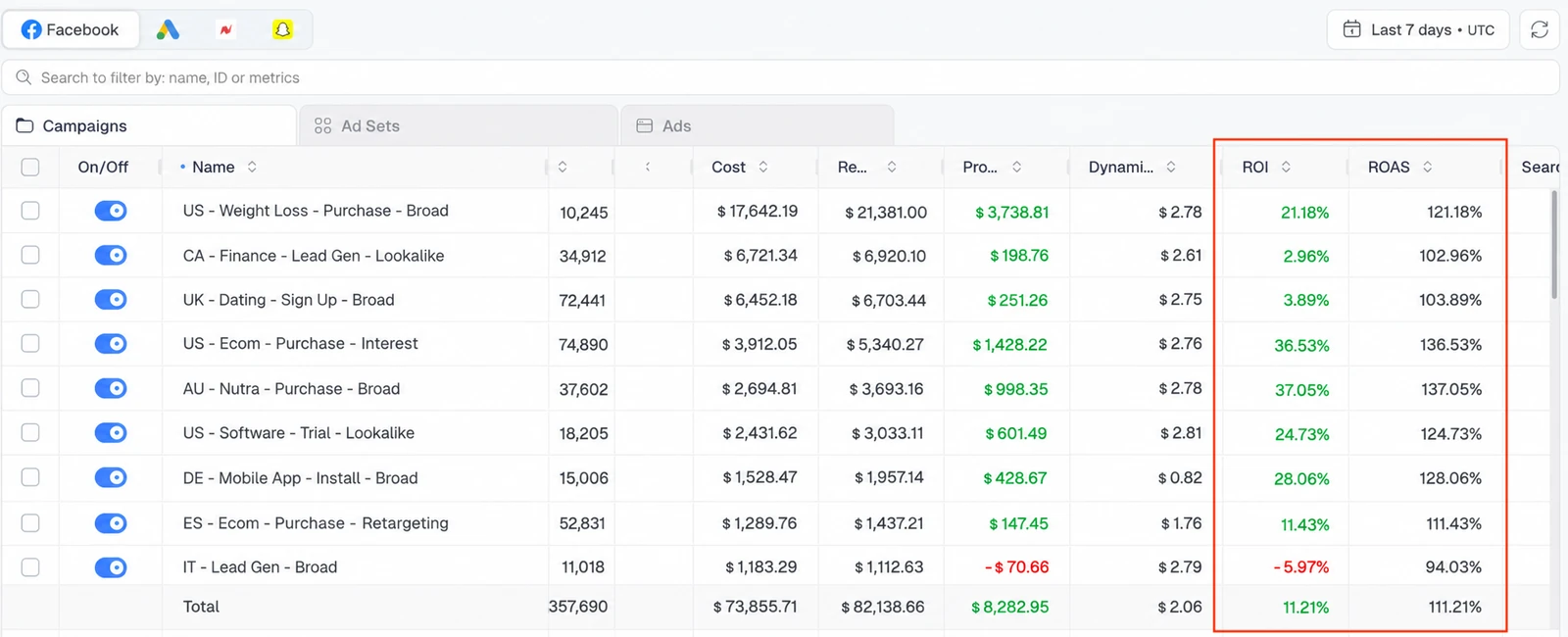
The quickest way to lift your ROI is usually to cut what is losing money. A few bad campaigns will drag down an otherwise healthy account, and every hour they keep running is budget you will not get back.
Instead of pausing them one by one inside Meta, set a simple line for what counts as a loser. For most buyers that is any campaign in the red, which usually means a ROAS under about 1.2 to 1.3, since you rarely break even at 1.0 once fees, refunds, and payout timing are taken out.
Just give each campaign a little spend before you judge it, around 50 dollars, so you are not cutting one that has only had a few clicks. Then select every losing campaign and pause them all at once, or switch off a single one.
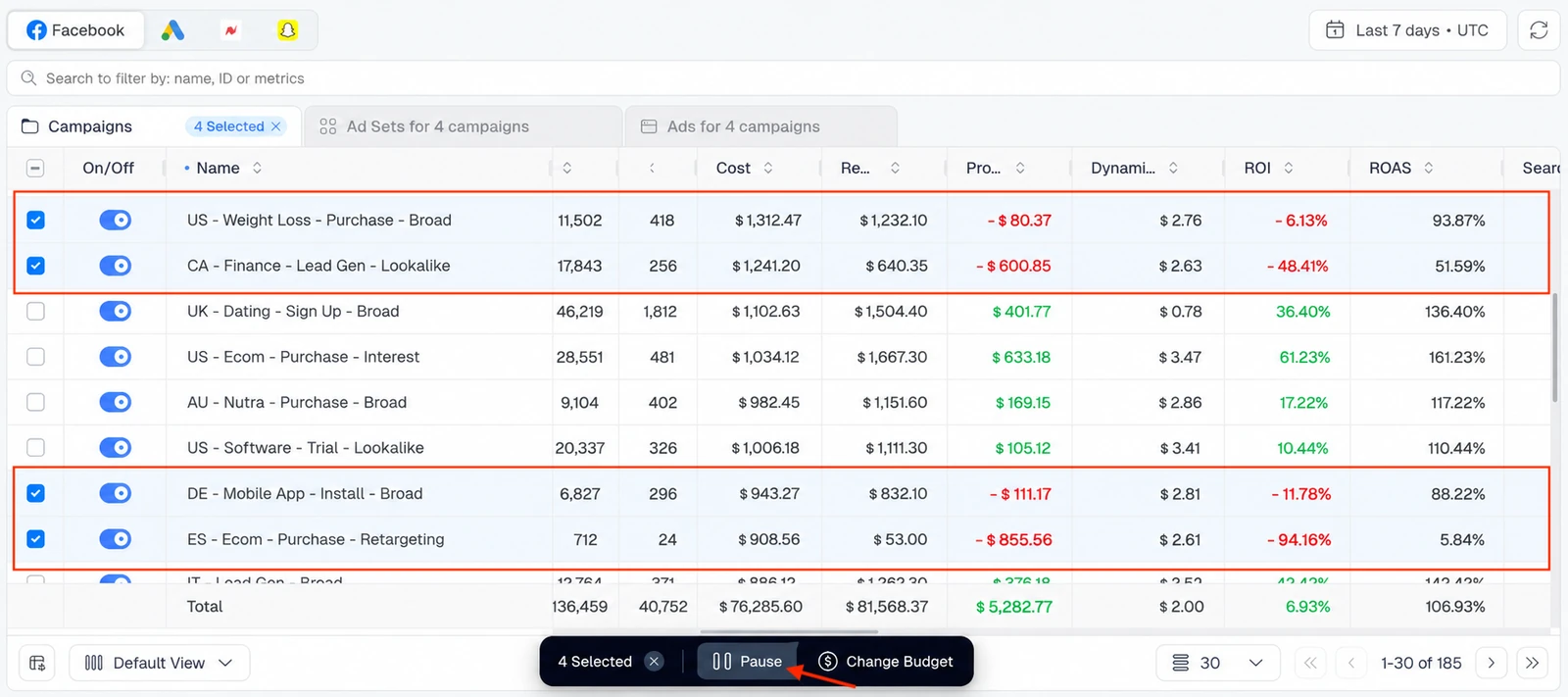
The point is that acting takes seconds, so you do it the moment you see the problem rather than adding it to a mental to-do list that costs money while it waits.
Scaling Facebook ads is where a lot of profit gets left on the table, or set on fire. Knowing how to scale Facebook ads without breaking delivery is a skill in itself.
Raise a winner's budget too aggressively and you can throw its ad set back into the learning phase, spike your cost per result, and lose the very performance you were trying to grow.
First, pick the right winners to scale. Aim at ad sets that are clearly profitable with margin to spare, have already left the learning phase, and have enough data behind them to trust, think 50 or more conversions or several days of stable results, not one lucky afternoon.
Then scale gently. A widely used rule of thumb is raising the budget by around 20 percent every two to three days rather than doubling it overnight, so delivery can re-stabilize between steps.
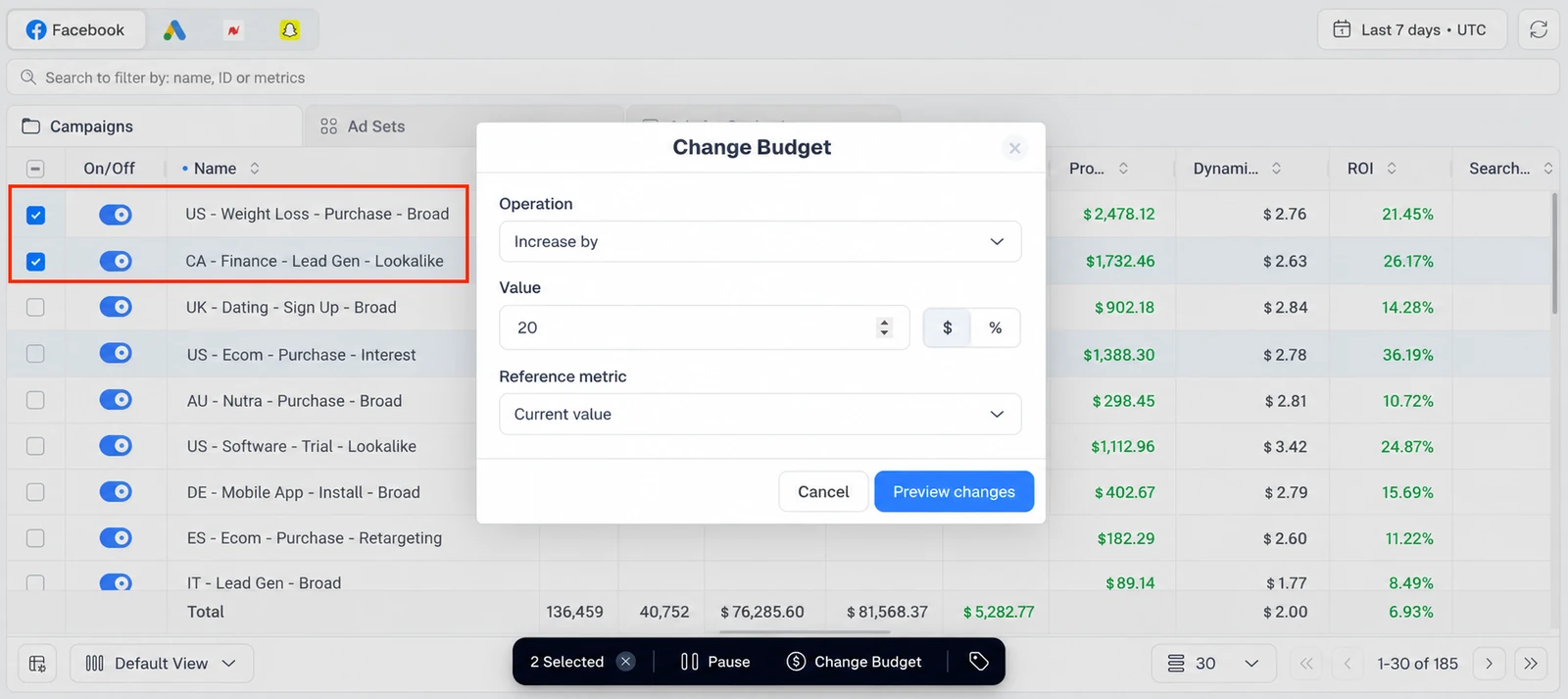
With the budget field editable right in the Ads Manager table, you nudge a winner up the moment ClickFlare confirms real profit, then come back and repeat once it holds. Small, frequent, data-backed increases beat one dramatic jump almost every time.
Scaling up is only half of it. Just as often you want to pull a whole group back at once, like trimming every mid-tier ad set by 15 percent, or taking a flat 10 dollars off each campaign that is underdelivering, without opening them one by one.
In Ads Manager you select the campaigns or ad sets you want and change their budgets or bids together, by a set amount or by a percentage. It is one edit instead of a dozen, done right where you can already see your real ROI and ROAS, so you never switch over to Meta to make the change.
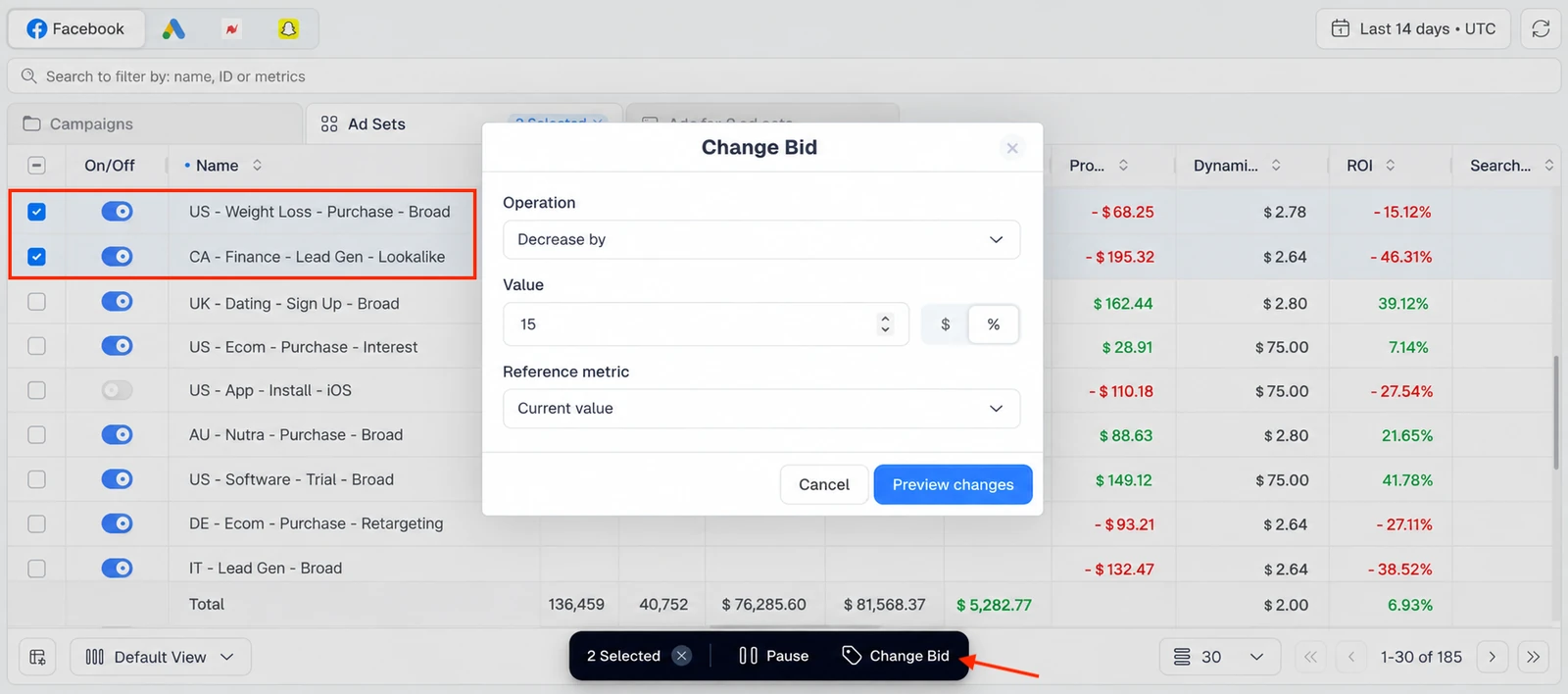
And those numbers are the reason this matters. Meta only counts the conversions its pixel caught, so the ROAS it shows you is incomplete. ClickFlare reports your real revenue and collects first-party data that browser limits do not block, so every budget call you make here is made with the full picture in front of you.
Numbers tell you which ad to pause or scale. They do not tell you what that ad actually looks like, and acting blind is how you accidentally kill the creative that was carrying the account.
Before you pause or scale, preview the ad in feed and Story right inside Ads Manager, with its details pulled straight from Meta. You see exactly which creative you are about to change.
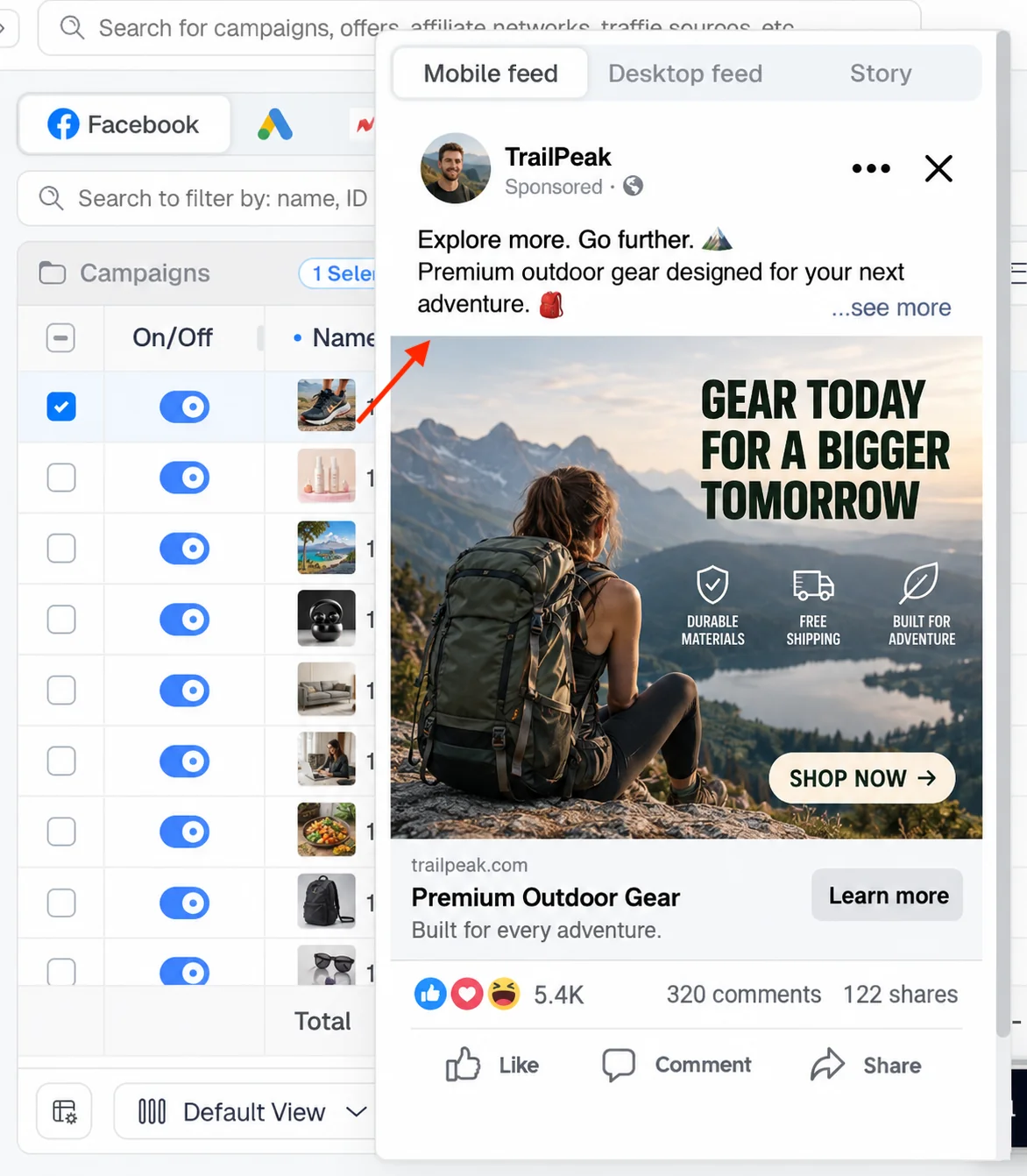
That extra second of context prevents the expensive mistake of cutting a winning hook because it shared a name with a losing test.
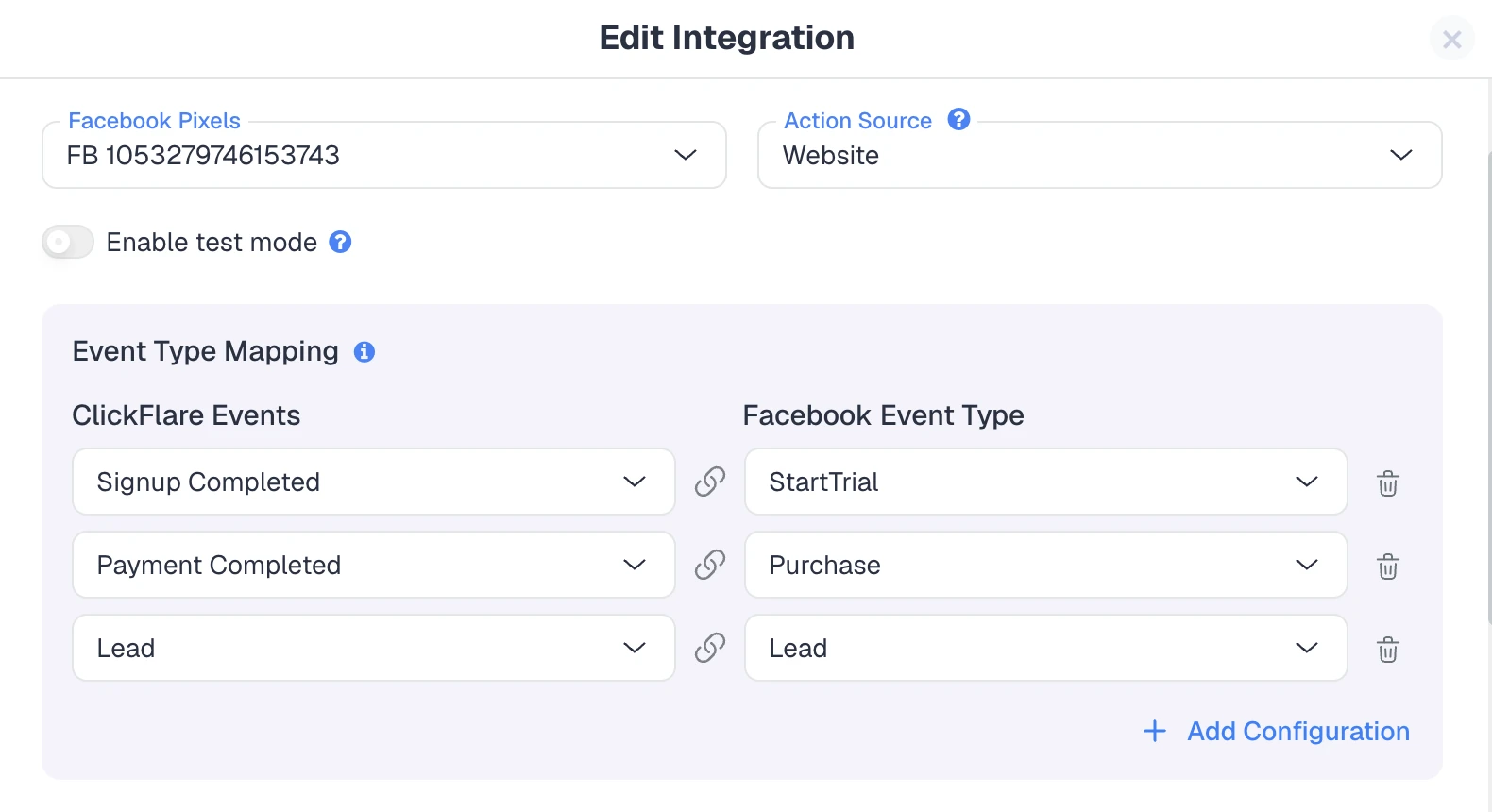
Every action above depends on the data underneath it. Pixels are table stakes now; the accuracy layer is server-side conversion data sent back to Meta through the Conversion API, which still uses your Pixel ID as the identifier but does not depend on the browser to fire.
Better signals in means Meta's algorithm optimizes toward your real buyers, which quietly improves performance before you touch a single budget.
ClickFlare's Conversion API also lets you control which events you send back and how they map, so you feed Meta only the signals that matter for your funnel. If you have not tightened this up yet, our guide to the Facebook Conversion API walks through the setup step by step.
Ads Manager gives you fast manual control, which is exactly what you want for judgment calls and daily review. Once a rule becomes obvious and repetitive, though, like 'pause any campaign under a set ROI after it has spent a defined amount,' you do not want to be the one clicking it at midnight.
That is where automation comes in. ClickFlare does not run rules-based automation itself, but its sister platform TheOptimizer syncs ClickFlare's data and executes those rules for you, often at a lower total cost than bolt-on automation from other tools.
The workflow is clean: use Ads Manager for hands-on optimization, then hand the repetitive triggers to automation. Our roundup of the best affiliate marketing tools in 2026 covers how that automation layer fits alongside your tracker.
The tools make execution fast, but a few principles keep you pointed in the right direction. Whatever dashboard you work in, good Facebook ads optimization tends to follow the same habits:
Once your data is clean and flowing, you can lean on AI to speed up the analysis itself. Our piece on using AI ad tracking software shows how to surface scaling candidates and wasted spend faster.
Ads Manager is included on every ClickFlare plan, with no limits, while the feature rolls out.
It will become a paid feature later, and when that happens you will get plenty of notice and see the pricing first. Nothing changes on your account without a heads-up.
What comes next is partly your call. TikTok, NewsBreak, Taboola, and Outbrain are on the way.
You can open their tab in Ads Manager and join the waitlist, and the platforms with the most votes get built first.
Facebook ads optimization has never really been about lacking insight. Media buyers usually know which campaigns to cut and which to grow.
The cost has always been in the distance between seeing the problem and fixing it, and in acting on platform numbers that do not tell the whole story. Bringing the familiar Campaigns to Ad sets to Ads view into ClickFlare, with real profit on every row and the controls to pause, scale, and edit right there, removes both problems at once.
The view you know, the numbers you trust, and the controls to act on them, in one place.
Facebook ads optimization is the ongoing process of adjusting your Meta campaigns, ad sets, and ads based on performance data. The goal is to reduce spend on underperformers and shift budget toward profitable ads, so more of your budget produces real results.
Start with accurate, server-side data through the Conversion API, judge campaigns on true profit rather than platform-reported ROAS, pause losers quickly, and scale winners in small steps. Feeding cleaner conversion signals back to Meta also helps its algorithm improve delivery on its own.
A short daily review works well for active accounts, with deeper analysis weekly. The key is acting quickly on what you find. When pausing and scaling take seconds instead of tabs, frequent check-ins become realistic rather than a chore you postpone.
Yes. With ClickFlare Ads Manager you can pause losers in bulk, edit budgets and bids, and preview ads for Meta and Google campaigns directly inside ClickFlare, using your real profit numbers, without switching over to Meta Ads Manager to act.
It handles the core optimization actions, pausing, scaling, and editing budgets and bids, from inside ClickFlare with your profit data attached. You still use Meta for tasks like building new campaigns and audiences, but day-to-day optimization no longer requires tab-switching.
Need a hand with Facebook ads optimization?
Try out ClickFlare for free and book a call with one of our tracking specialists who will guide you through the entire process.





