You launch a Pinterest campaign, sales start rolling in, and then you open Pinterest Ads Manager only to see it crediting a fraction of the conversions you know actually happened. That gap is exactly what proper Pinterest conversion tracking is meant to close. As browsers tighten privacy rules and the Pinterest tag quietly drops events, leaning on a browser pixel alone leaves you optimizing on incomplete data. In this guide, we will break down how Pinterest conversion tracking really works, why the pixel is no longer enough on its own, and how to set up accurate server-side tracking with the Pinterest Conversions API and cost integration inside ClickFlare.
Quick Summary
- Pinterest conversion tracking connects the actions people take after seeing or clicking your ads back to the exact campaign, ad group, and Pin that drove them.
- The Pinterest tag (pixel) is the table-stakes browser layer, but privacy changes, ad blockers, and cross-device journeys cause it to miss conversions on its own.
- The Pinterest Conversions API (CAPI) sends events server-to-server, restoring the accuracy the browser layer loses.
- ClickFlare lets you run both the Pinterest CAPI and an automatic cost integration, so spend, clicks, and conversions all live in one dashboard.
- Pinterest recommends using the tag and CAPI together for the best deduplication and attribution accuracy.
What Is Pinterest Conversion Tracking?
Pinterest conversion tracking is the process of recording the actions people take after they view or click your Pinterest ads, such as purchases, sign ups, and leads, and tying each of those actions back to the specific campaign, ad group, and Pin that produced them. It is what turns a vague sense that "Pinterest is working" into hard numbers you can actually optimize against.
In practice, Pinterest conversion tracking happens across two layers. The first is the browser layer: the Pinterest tag, a pixel that fires from the visitor's browser when they land on a page or complete an action. The second is the server layer: the Pinterest Conversions API, which sends those same events directly from your server to Pinterest, without depending on the browser at all.
Modern, accurate tracking uses both layers together, and that is the setup this guide walks through.
How Pinterest Conversion Tracking Works
At a basic level, every conversion tracking setup follows the same pattern: a click gets a unique identifier, and the system logs whatever that identifier does next.
When someone clicks your Pinterest ad, Pinterest attaches a click identifier (the epik click ID) to the visit. If that same person later completes a purchase or fills out a form, the tracking system connects that action back to the original click using the click ID, along with signals like IP address and user agent.
That connection is what lets you say "this exact Pin, in this exact campaign, generated this exact sale," instead of guessing from platform totals.
The tricky part is that browsers, apps, and privacy regulations increasingly restrict how much of this journey can be tracked directly in the browser. That is why the most reliable Pinterest conversion tracking setups combine a browser method with a server-side method rather than relying on one alone.
The Pinterest Tag (Pixel): The Table-Stakes Layer
The Pinterest tag is the browser-based pixel that most advertisers start with. It fires when a page loads or an action happens, and it reports that event back to Pinterest. It is essential groundwork, and you should absolutely have it in place.
The catch is that a browser pixel is exposed to everything working against client-side tracking today: ad blockers, cookie restrictions, consent choices, and privacy features baked into modern browsers and devices. The tag is necessary, but on its own it is no longer sufficient.
The Pinterest Conversions API (CAPI): The Accuracy Layer
The Pinterest Conversions API (CAPI) sends conversion events directly from your server to Pinterest's servers, bypassing the browser entirely. Because the events do not have to survive a cookie or a browser restriction, CAPI recovers conversions the tag alone would miss. It works much like a traditional server-to-server postback, but it is simpler to maintain and gives Pinterest cleaner data to optimize delivery and bidding against.
If you want the full background on how server-to-server tracking operates, our guide on what a postback URL is covers it step by step. For the official reference, Pinterest also documents the approach in its getting started with the Conversions API help article.
Server-Side Tracking and Why It Matters
Server-side tracking is the broader shift that CAPI is part of. Instead of trusting a fragile browser pixel to capture and report every event, you move the reporting to your own server, which then talks directly to the ad platform.
This matters because the data holds up regardless of what happens on the browser or device side. Consent banners, third-party cookie deprecation, and mobile tracking limits all chip away at client-side data, but server-side events sail past most of that. For Pinterest specifically, this is what keeps your reported conversions close to what actually happened, which keeps Pinterest's optimization pointed at the right people.
Why the Pinterest Pixel Alone Falls Short
If the Pinterest tag captured everything, none of this would be necessary. But several forces work against browser-only tracking at the same time:
- Privacy frameworks. Regulations like GDPR require explicit consent before non-essential tracking cookies can fire, so any visitor who declines is effectively invisible to the pixel.
- Browser restrictions. Intelligent Tracking Prevention and the phase-out of third-party cookies shorten or block the identifiers the tag relies on.
- Ad blockers. A meaningful share of users run extensions that stop pixels from firing at all.
- Cross-device journeys. Someone can discover a Pin on their phone and convert later on a laptop, a path a single browser pixel struggles to stitch together.
The result is under-reported conversions and, worse, an optimization algorithm learning from partial data. This is also a common reason platform numbers disagree with each other. If you have ever seen three different conversion counts for one campaign, the accuracy layer is usually what is missing.
Pinterest Conversion Tracking With ClickFlare
ClickFlare brings both sides of accurate Pinterest conversion tracking into one place. On the measurement side, its Pinterest Conversions API integration reports your tracked conversions back to Pinterest server-to-server. On the reporting side, its Pinterest cost integration pulls your ad spend in automatically, so you can read true ROI without exporting spreadsheets.
Set up together, they give you spend, clicks, and conversions side by side for every campaign. The same two-part approach powers our guide to Reddit conversion tracking, so if you run traffic on more than one platform the workflow will feel familiar.
Setting Up the Pinterest Conversions API in ClickFlare
Before you begin, make sure you have an active Pinterest Business account, an active ClickFlare account, your Pinterest Ad Account ID, and a Pinterest Conversion Access Token. You will find both the Ad Account ID and the token inside Pinterest Ads Manager under Conversions, on the Set Up API page, where you can generate a new token. Treat that token like a password and store it securely.
With those in hand, the setup inside ClickFlare runs as follows:
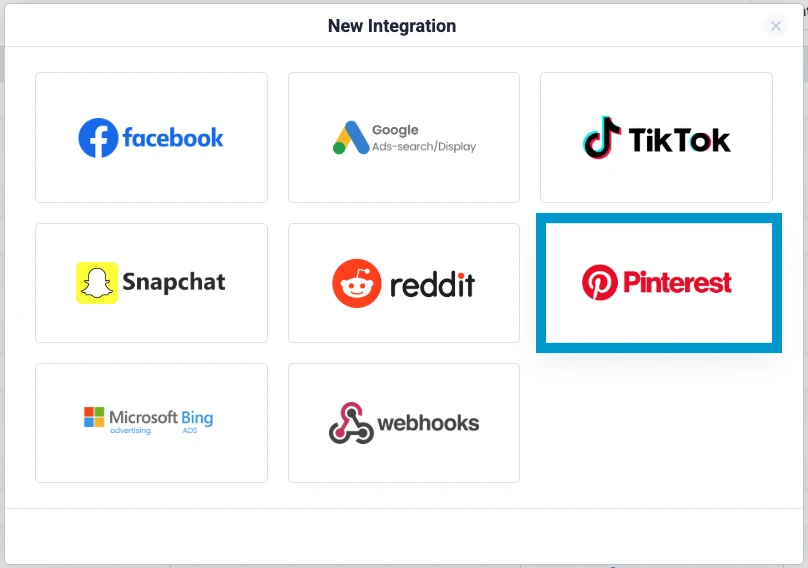
- Open the integration. In ClickFlare, go to Integrations, then Conversion API Integrations, and click Add Integration. Select Pinterest from the list.
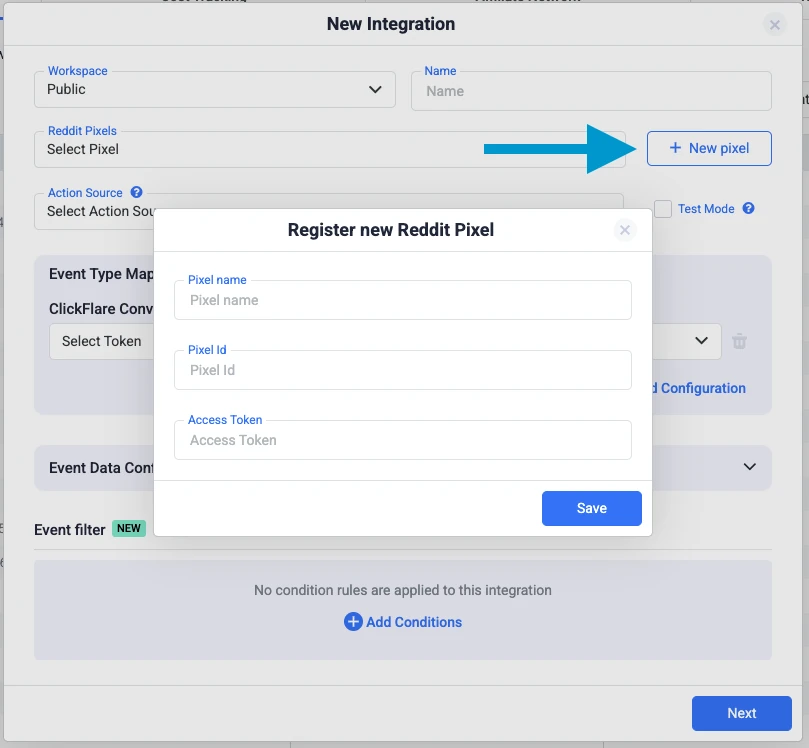
- Add your configuration. Click Add a new Pixel, then enter a recognizable name, paste in your Pinterest Ad Account ID, and paste the Conversions API access token you generated. Click Save.
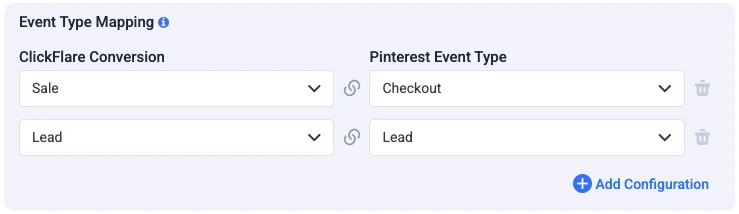
- Map your events. Tell ClickFlare which of your conversion events should be sent to Pinterest and how they map to Pinterest's standard event names, such as Checkout, Add To Cart, Page Visit, Lead, Signup, Search, and View Category. Map only the events that are relevant to your funnel.
- Configure event data. ClickFlare automatically includes the parameters Pinterest needs for attribution, including the Pinterest click ID (epik), IP address, user agent, event timestamp, and value and currency for purchases. You can optionally enrich events with additional match keys like a hashed email or phone number, and ClickFlare hashes all sensitive data before it is sent.
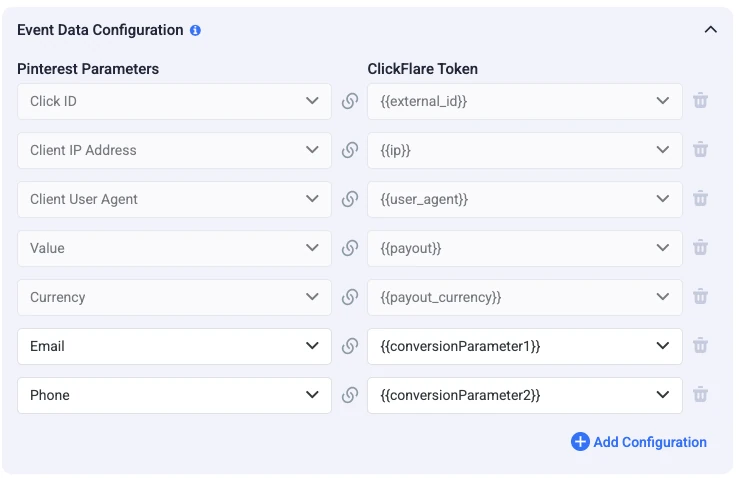
- Save and verify. Trigger a test conversion in your funnel, then open Pinterest Ads Manager and check the Conversions event history. If the event appears with its source listed as the Conversions API, your integration is live.
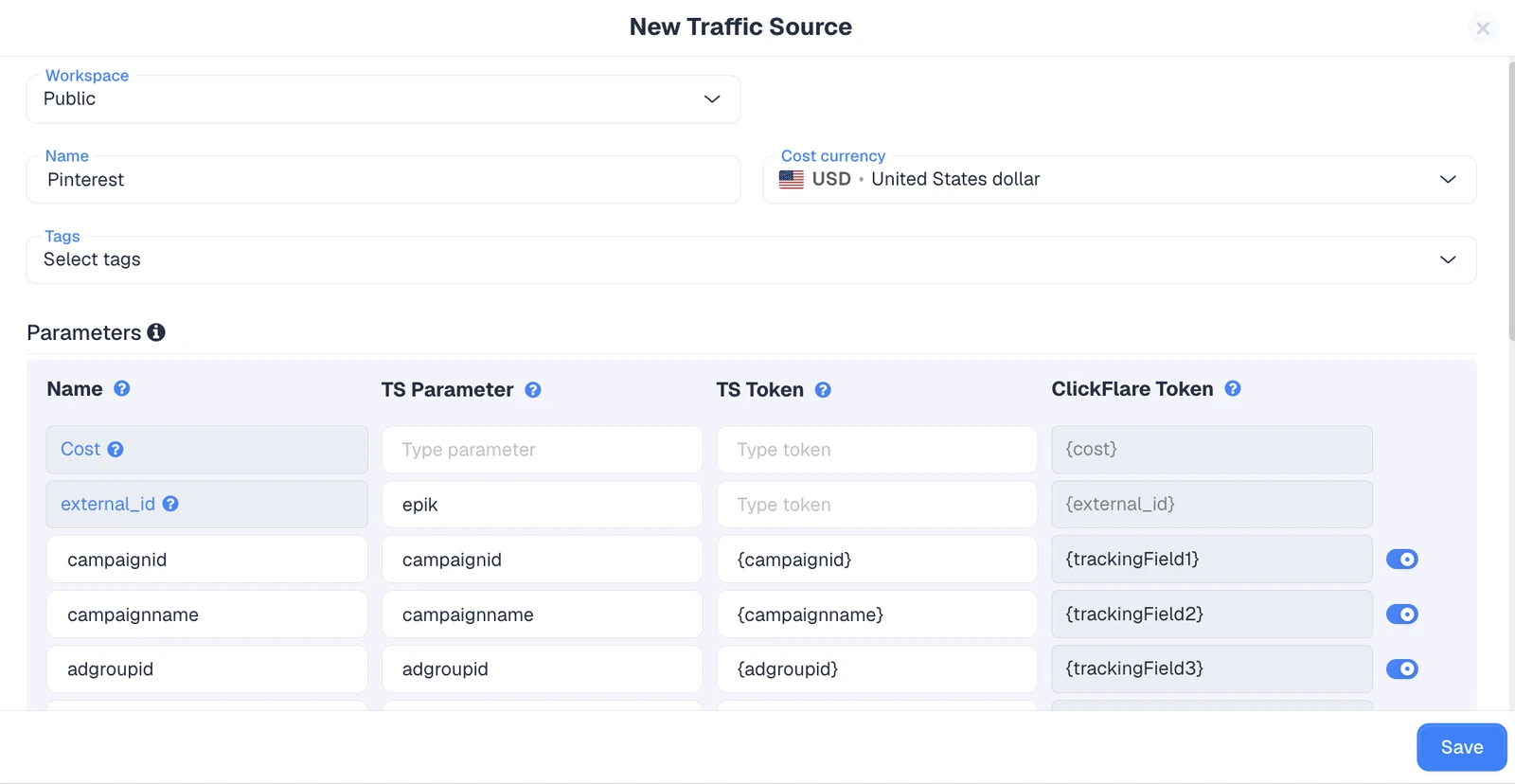
One convenience worth noting: when you use the Pinterest traffic source template in ClickFlare, the required parameters, including the Pinterest click ID, are appended to your campaign URLs automatically, so you do not have to tag links by hand.
Connecting the Pinterest Cost Integration
Accurate conversions are only half the ROI picture; you also need to know what you spent. ClickFlare's Pinterest cost integration connects to the official Pinterest Ads API and pulls your campaign spend in automatically, at the campaign, ad group, and ad (Pin promotion) levels.
Here is how to set it up:
- Open the integration. In ClickFlare, go to Integrations, then Cost Tracking Integrations, click Add Integration, and select Pinterest.
- Authorize your account. Connect through Pinterest's own sign-in screen, or pick a Pinterest login you have already linked to ClickFlare.
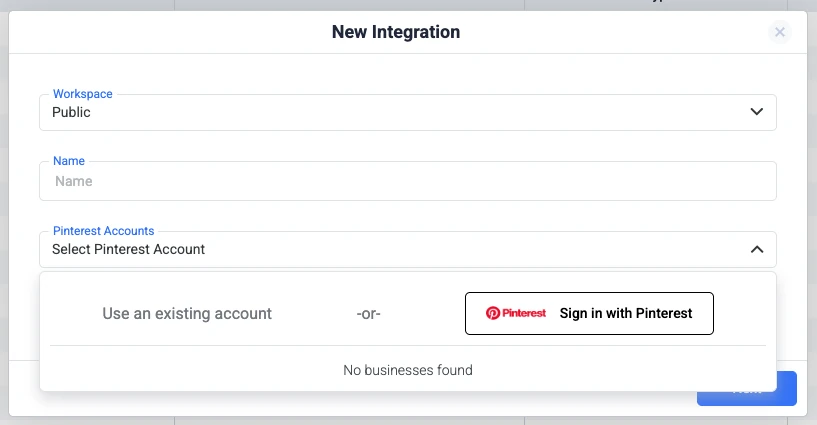
- Select your ad accounts. Choose which ad account or accounts ClickFlare should pull cost from. You can include several under the same login.

- Link a traffic source (optional). Tie the integration to a Pinterest traffic source configuration so it is applied automatically whenever that source is used.
- Verify the sync. Open an active Pinterest campaign in your reports and confirm the Cost column matches Pinterest Ads Manager, allowing for the sync delay.
It helps to know what does and does not get pulled:
- Only spend is fetched. ClickFlare pulls cost data from Pinterest, nothing else.
- Other metrics are calculated in ClickFlare. CPC, CPM, CTR, and ROI come from that spend combined with the clicks and impressions ClickFlare already tracks.
- Cost is matched automatically. Pinterest's campaign and ad identifiers, plus the parameters the traffic source template adds to your URLs, align spend with the right campaigns.
- Refresh frequency varies. How often cost updates depends on your plan and whether the faster cost-update add-on is enabled, ranging from roughly every hour down to every few minutes on eligible plans.
For the bigger picture on centralizing spend across networks, our complete guide to ad spend tracking is a useful companion read.
Pinterest Tag vs. Conversions API (And Why You Need Both)
It is tempting to treat the tag and the Conversions API as an either-or decision. They are not. Each covers for the other's blind spots, and using them together produces the most complete and accurate picture. The table below shows how they compare.
| Aspect |
Pinterest Tag (Pixel) |
Conversions API (CAPI) |
| Where it fires |
In the visitor's browser |
From your server |
| Affected by ad blockers |
Yes |
No |
| Affected by cookie and browser limits |
Yes |
Largely no |
| Captures cross-device conversions |
Limited |
Stronger with added match keys |
| Best role |
Baseline coverage |
Accuracy and recovery layer |
Running both is also Pinterest's own recommendation. When the tag and CAPI send the same events, Pinterest deduplicates them so nothing is double counted, and the combined signal is stronger than either source alone. Pinterest reports that brands using the Conversions API and the tag together see an average lift of around 24% in attributed conversions, which is a meaningful difference when you are optimizing spend. You can read Pinterest's own breakdown on its official Conversions API page. The takeaway is simple: keep the tag as your table stakes, and add CAPI as the layer that makes your numbers trustworthy.
Best Practices for Accurate Pinterest Conversion Tracking
Once both layers are live, a few habits keep your Pinterest conversion tracking clean and dependable:
- Use the Pinterest traffic source template. It appends the required parameters, including the Pinterest click ID, to your URLs automatically, which is what makes both conversion attribution and cost matching work.
- Map only the events that matter. Send the conversions that reflect real funnel milestones rather than mapping everything, so Pinterest optimizes toward outcomes you care about.
- Add match keys where you can. Enriching events with hashed email or phone data improves match rates and helps recover conversions the click ID alone might miss.
- Align currency and timezone. ClickFlare displays costs in your ad account's currency, so keep your Pinterest Ads account and ClickFlare on the same timezone and currency to avoid discrepancies.
- Verify with test events. After any change, fire a test conversion and confirm it lands in Pinterest Ads Manager with the Conversions API as its source before you trust the reporting.
Final Thoughts on Pinterest Conversion Tracking
Reliable Pinterest conversion tracking is no longer about installing a pixel and hoping for the best. The tag is still the necessary foundation, but privacy changes, ad blockers, and cross-device behavior mean it will always leave gaps.
The Conversions API closes those gaps by moving your events server-side, and pairing it with automatic cost tracking gives you the full ROI picture in one dashboard. With ClickFlare handling both the Pinterest CAPI and cost integration, you get accurate conversions and accurate spend feeding the same reports, which is what you need to scale Pinterest campaigns with confidence. If you are still weighing platforms, our roundup of the best ad tracking software in 2026 puts these capabilities in context.
Frequently Asked Questions
Do I Need the Pinterest Tag if I Use the Conversions API?
Technically the Conversions API can run on its own, but Pinterest recommends using the tag and CAPI together. The tag provides baseline browser coverage while CAPI recovers events it misses, and Pinterest deduplicates shared events so nothing is double counted.
What Is the epik Click ID?
The epik is Pinterest's click identifier, attached when someone clicks your ad. It lets Pinterest match a later conversion back to the original click. ClickFlare captures and passes it automatically when you use the Pinterest traffic source template.
Does the Pinterest Cost Integration Pull Conversions Too?
No. The cost integration fetches only spend data from Pinterest. Clicks, impressions, and conversions are tracked by ClickFlare, and metrics like CPC, CPM, CTR, and ROI are calculated inside ClickFlare by combining that data with Pinterest cost.
How Often Does ClickFlare Update Pinterest Cost Data?
Cost refreshes automatically, with the frequency depending on your ClickFlare plan and whether the faster cost-update add-on is enabled. Updates can range from roughly every hour down to every few minutes on eligible plans.
Why Do My Pinterest and ClickFlare Numbers Not Match Exactly?
Small differences are normal and usually come from attribution windows, sync delays, or a timezone or currency mismatch between the two platforms. Aligning timezone and currency, and allowing for the sync window, resolves most discrepancies.
Need a hand with Pinterest conversion tracking?
Try out ClickFlare for free and book a call with one of our tracking specialists who will guide you through the entire process.
TRY CLICKFLARE FREE FOR 14 DAYS →