




Postback tracking is a reliable method of server-to-server (S2S) conversion tracking that gives affiliate marketers accurate performance data without relying on browser cookies or pixels.
Unlike traditional tracking methods that can fail when cookies are blocked or scripts don’t fire, postback tracking sends conversions directly from one server to another. This process ensures that every lead, sale or signup is properly attributed. With the ongoing privacy regulations, this method helps affiliates scale their campaigns with confidence.
In this guide, we’ll break down how postback tracking works and how to implement it effectively for your affiliate marketing campaigns.
Postback tracking is a server-to-server tracking method, commonly used in affiliate marketing to record conversions events (e.g., sales, leads) by passing data directly between the affiliate network’s and the tracking platform’s server.
As mentioned in the introduction, this backend tracking method is not reliant on cookies or browser limitations, making it more accurate.
In affiliate marketing, postback tracking is especially important because it ties each conversion back to the correct click and affiliate partner.
A postback URL is a server-to-server endpoint that receives information about a conversion event. When a conversion happens, the affiliate network’s server sends a request to this URL with parameters such as click ID and payout.
Postback tracking works by sending conversion data directly from one server to the other.
For example, when a visitor clicks an affiliate link, a unique click ID is generated and recorded by the tracker. When the user converts (either by completing a form or making a purchase etc), the affiliate network’s server sends the conversion details back to the tracker using a postback URL. This server-to-server communication basically ensures that the conversion is linked to the original click.
As explained above, a postback URL is the web address that is used to pass conversion data. It typically includes parameters that carry key identifiers and performance data, allowing the tracking platform to attribute conversions correctly. Here are the most common parameters passed through the postback URL:
These parameters are sent as part of the URL’s query string. Below, we will show an example of a postback URL.
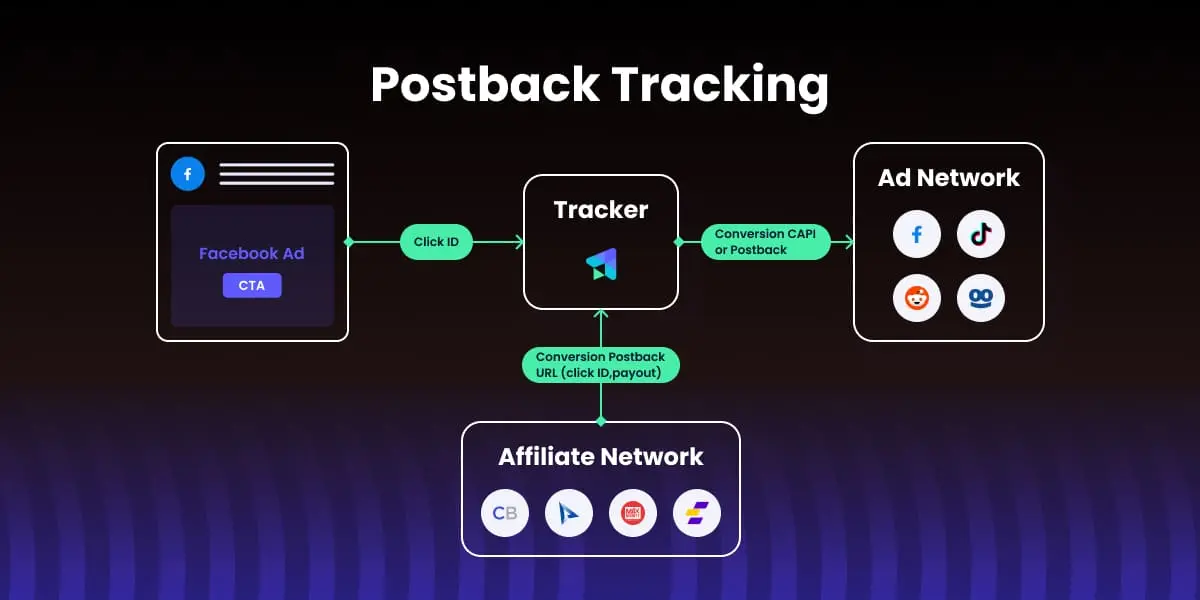
The flow generally starts with a visitor clicking on the affiliate link (usually from an ad on social or native ad platforms). Their unique click ID is generated. This ID is stored in the tracker (along with other metadata), and it will be used to attribute the initial click to the eventual conversion.
Once the visitor converts, this conversion will be recorded on the affiliate network’s server (i.e., advertiser platform). From their server, the postback URL is triggered to the tracker platform, including parameters such as click ID, payout, event type etc.
The tracking platform extracts the click ID and other data from this postback request, and it records the conversion in real time.
For better results, most affiliates also send these conversions from their tracker to the ad platform, either through conversion API or postback (more on this later).
The core benefit of using postback tracking is that it does not rely on browser cookies and privacy limitations, so affiliates can reliably attribute conversions. As explained before, the conversion data is sent directly from the affiliate network to the tracking platform. Attribution also remains reliable when visitors switch devices, preventing any data loss.
This server-to-server approach is especially important in affiliate campaigns, where accurate attribution determines not only how much an affiliate gets paid but also how you optimize and scale campaigns. With postbacks, every conversion is tied directly to the original click ID, giving you clean, real-time insights into campaign performance rather than estimates or partial data. This helps affiliate marketers identify top-performing ads and traffic sources, and reduce wasted ad spend.
Another reason postback tracking is essential is that it protects you against future browser privacy changes. With modern privacy regulations and major browsers increasingly limiting third-party cookies, server-side tracking is no longer optional but necessary to ensure full visibility into user behaviour and conversions.
Unlike postback tracking, pixel tracking is fully dependent on browser cookies. It tracks conversions by loading a script or image (pixel) on the user’s browser after they take certain actions (usually placed in the Thank You page).
As explained throughout the article, its dependency on browser cookies poses a problem for data accuracy because it can lose conversions due to blocked cookies, JS errors, or page load issues.It’s a popular tracking method because it’s very simple to set up, but it comes with many limitations.
The most important limitation for affiliates is that since the advertiser usually owns the Thank You page, you might not be able to place the pixel at all.
Conversion API shares more similarities with postback tracking because they are both server-side, and thus independent of browser limitations.
Conversion API works through two servers directly integrating and communicating with each other. In simple terms, a conversion API acts like a direct link between your backend system and the ad platform’s servers. Most affiliate marketers use Conversion API alongside postback tracking. For example, you use postback tracking to receive conversion events from your affiliate network in your tracker, and then you use the Conversion API to send these conversions directly to your ad platform for better campaign optimization.
Setting it up on your own can be technical, which is why most affiliates use a tracking platform with built-in Conversion API integrations, such as ClickFlare. These tracking platforms connect to major ad networks for you, so you can enable server-side tracking with minimal effort and no custom code.
ClickFlare makes working with postbacks very simple for affiliates, so you only need to copy and paste the postback URL without having to worry about the technical setup.
ClickFlare has more than 150 ready-made tracking templates for top affiliate networks, so you only need to select your network from this list:
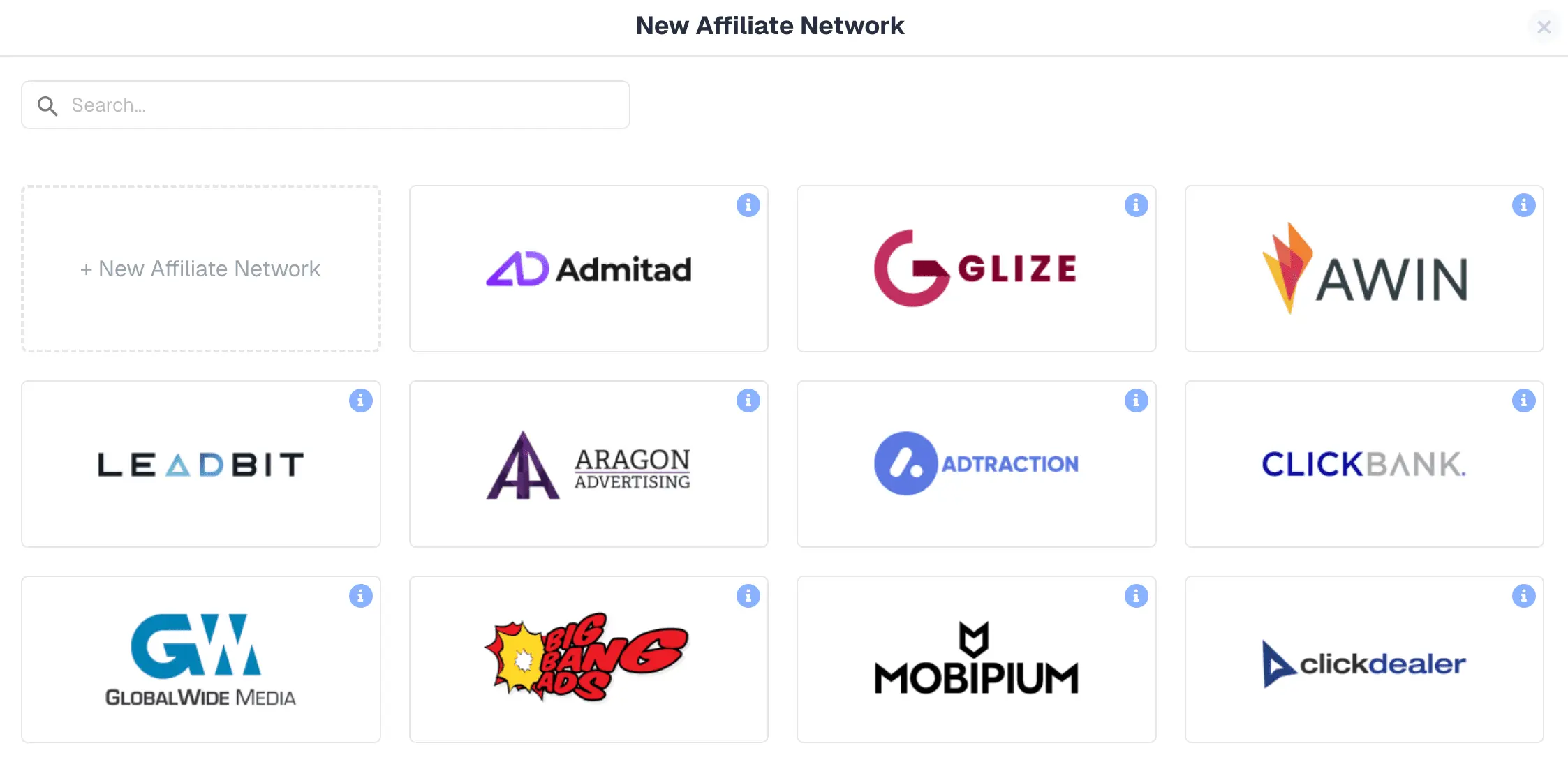
Note: If your affiliate network is not on this list, don’t worry. We only need the documentation from your network, and we can create a custom template for you. Once you click on one of the options, for example ClickDealer, you will see this screen, already pre-filled in with the required parameters from your network:
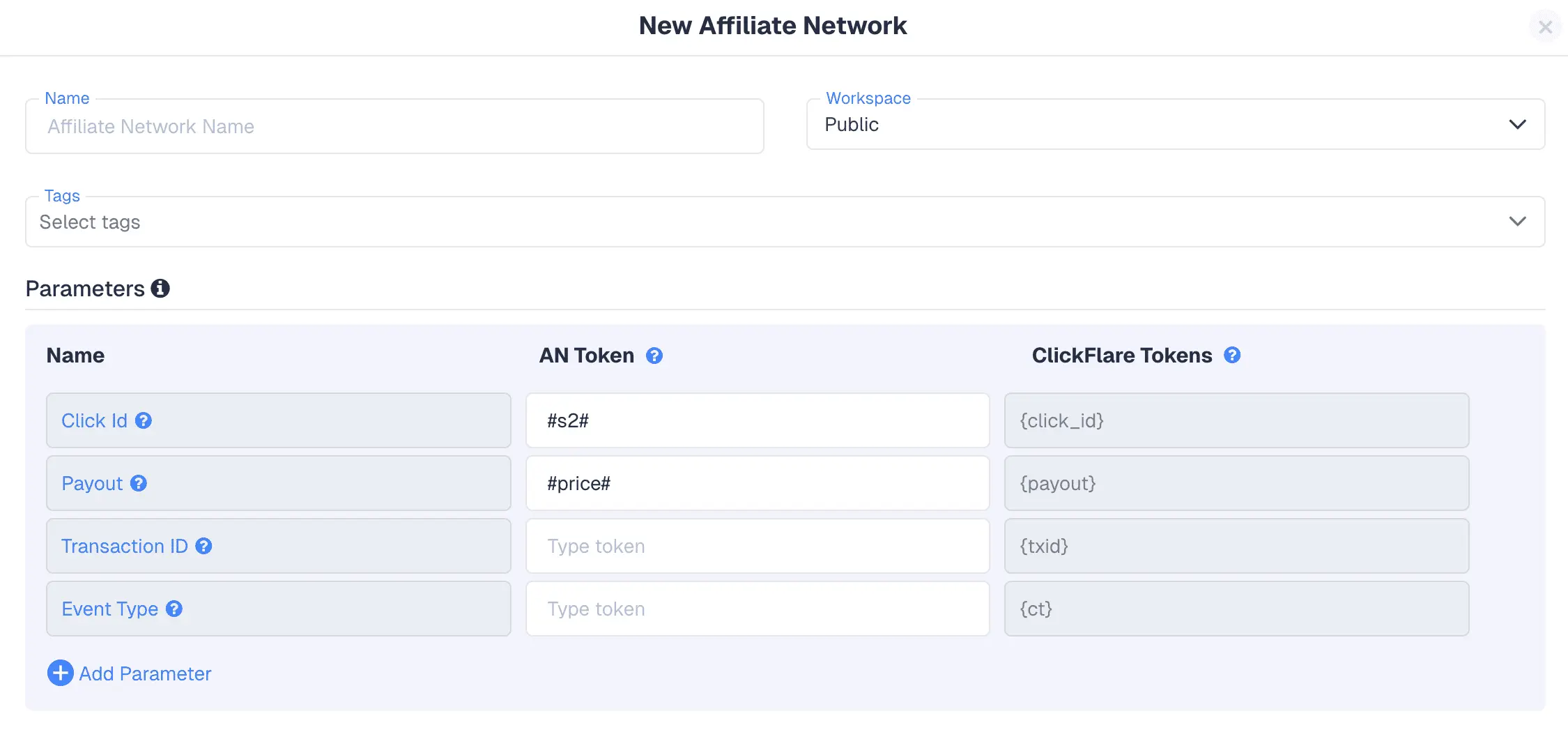
You can add additional parameters, but in most cases the setup above would work. If you scroll below, you will find the postback URL (which is automatically generated by ClickFlare).
You simply need to copy it and paste it in your affiliate network. This will ensure that conversions are posted from your network to ClickFlare.

Note: Some affiliate networks allow you to set a global postback, which means you only need to set this once and it will be applicable for all your campaigns. If this option is not available, you will need to set this postback for each campaign.
Before running large-scale tests, we recommend going over the following steps to ensure your postback tracking setup works:
Due to the benefits of postback tracking we mentioned before, this method is heavily used in the affiliate marketing space:
Postback tracking is a server-to-server (S2S) way of sending conversion data from an affiliate network or advertiser directly to a tracking platform, bypassing browser-dependent methods like cookies or pixels. This makes conversion attribution more accurate and reliable.
When a user clicks an affiliate link, the system generates a unique identifier (click ID). If the user converts later, the network’s server sends conversion details, including the click ID, back to the tracker through a postback URL. The tracker then matches it to the stored click to log the conversion.
Postback tracking doesn’t rely on browser limitations, so it isn’t affected by ad blockers or privacy restrictions. This means affiliates get cleaner, more reliable conversion data with fewer lost events than with pixel tracking.
Postbacks can record many types of conversions, including lead form submissions, sales, app installs, trial sign-ups, and multi-step funnel events.
Yes. Because it requires backend configuration and support from the affiliate network, postback tracking can be more technical to implement than a simple browser pixel. However, many affiliates use tracking platforms with ready-made postback integrations.
Affiliates typically use a tracking platform because it collects all campaign data in one place and handles the server-to-server postback process for you. Rather than building your own backend integration, a tracker already has ready-made postback integrations with major affiliate networks and traffic sources, so it makes setup much easier and accurate.
Postback tracking is widely regarded as the gold standard of tracking in affiliate marketing due to its high accuracy and independence of browser-based tracking. Most affiliate marketers use a tracking tool like ClickFlare to avoid having to set up their own server solution. Instead, they rely on the tracker’s ready-made postback integrations with major affiliate networks. Using a tracker makes postback tracking simple and straightforward to implement. You can use postback tracking across all types of affiliate offers, including lead generation, pay-per-call, CPL-models, and cross-device conversions.






