Black Friday came early.Early-access pricesuntil Nov 8.Black Friday: early-access prices until Nov 8.Early-access price ends in0d00h00m00sClaim the deal
Set up PropellerAds conversion tracking in ClickFlare with S2S postbacks. Pull cost and conversions server-side and attribute every click to the right zone and creative.
Running pop, push, or interstitial traffic on PropellerAds and still guessing which zones actually make money? PropellerAds conversion tracking is what turns that guesswork into real numbers. Once it is set up, you can see exactly which campaign, zone, and creative drove each conversion, and you can read true profit instead of raw spend.The cleanest way to do this is with ClickFlare, where both your cost and your conversions are pulled in through server-to-server (S2S) postbacks. In this guide, we will walk through the full setup, step by step, so your data stays accurate even when cookies and pixels fall short.
Quick Summary
PropellerAds conversion tracking connects your PropellerAds campaigns to ClickFlare so every click and conversion is attributed to the right zone and creative.
In ClickFlare, both cost and conversions flow through S2S postbacks, so you track real spend and revenue server-side without relying on the browser.
Cost is captured automatically through PropellerAds' {cost} macro, which is already mapped in ClickFlare's PropellerAds setup.
Conversions are sent back to PropellerAds using its postback URL and the ${SUBID} click ID, so the network can optimize toward what converts.
The whole setup takes about six steps and a single test conversion to confirm it works.
What Is PropellerAds Conversion Tracking?
PropellerAds conversion tracking is the process of recording what happens after someone clicks one of your PropellerAds ads, from the first click through to a lead, deposit, or sale, and tying that action back to the exact campaign and zone that produced it.PropellerAds is a self-serve network built around pop, push, in-page push, and interstitial traffic. That traffic moves in high volume and across a lot of zones, so without proper tracking you only see totals: clicks in, spend out. You cannot tell which zone, creative, or audience is actually profitable.A tracker like ClickFlare sits between PropellerAds and your offer. It logs every click, matches each conversion back to its source, and gives you one dashboard where cost, clicks, and revenue sit side by side. That is the difference between scaling blindly and scaling the zones that make money.
How PropellerAds Conversion Tracking Works With ClickFlare
ClickFlare tracks PropellerAds using server-to-server postbacks for both directions of the data flow. Nothing here depends on a cookie surviving in the user's browser, which is exactly why this method holds up on pop and push traffic.Here is the loop in plain terms:
Click in. PropellerAds sends a visitor to your ClickFlare tracking link. It passes its unique click ID through the ${SUBID} token, and it passes the price of that click through the {cost} macro. ClickFlare stores the click ID as the external ID and records the cost automatically.
Conversion out. When the visitor converts, your offer or affiliate network fires a postback into ClickFlare. ClickFlare then fires PropellerAds' own postback URL, passing the stored click ID back through visitor_id=${SUBID}, so PropellerAds knows that click converted.
The important part for PropellerAds specifically is that cost and conversions are both pulled through S2S postbacks. Your spend is read from the {cost} value on every click rather than typed in by hand, and this mapping already comes configured in ClickFlare's PropellerAds setup. You get accurate, zone-level cost data without touching a spreadsheet.If you are new to the concept behind this, our guide on what a postback URL is breaks it down from scratch, and the postback tracking guide for affiliates covers how server-to-server attribution works end to end.
What You Need Before You Start
Setting up PropellerAds conversion tracking goes faster when everything is ready in advance. Before you begin, make sure you have:
An active ClickFlare account.
An active PropellerAds advertiser account with access to the Tracking tab.
The offer you plan to promote, plus its affiliate network or offer postback settings so you can fire conversions into ClickFlare.
Your conversion goals mapped out, including any multi-step events such as a first-time deposit or a redeposit.
How to Set Up PropellerAds Conversion Tracking in ClickFlare
The full setup breaks into six steps. Work through them in order, and leave the test conversion for last so you can confirm the whole loop before you scale spend.
Step 1: Add PropellerAds as a Traffic Source
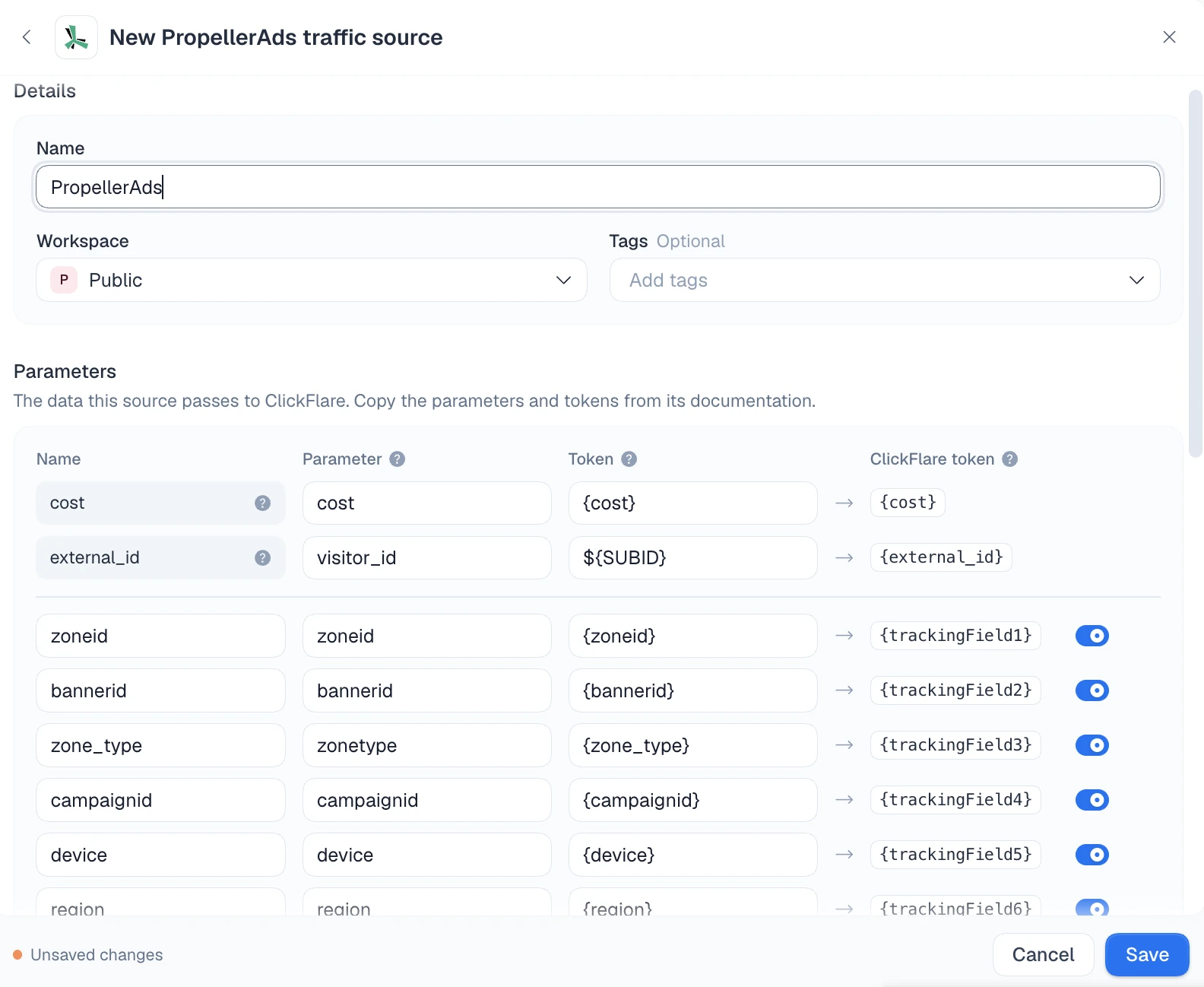
In ClickFlare, open Traffic Sources and create a new one using the PropellerAds setup. The tokens that matter are already mapped for you, including the ${SUBID} click ID stored as the external ID and the {cost} macro that captures your spend. This is what lets ClickFlare pull cost straight from PropellerAds instead of asking you to enter it manually.Save the traffic source. ClickFlare now knows how to read the click ID and cost that PropellerAds will send on every visit.
Step 2: Create Your Campaign and Tracking Link
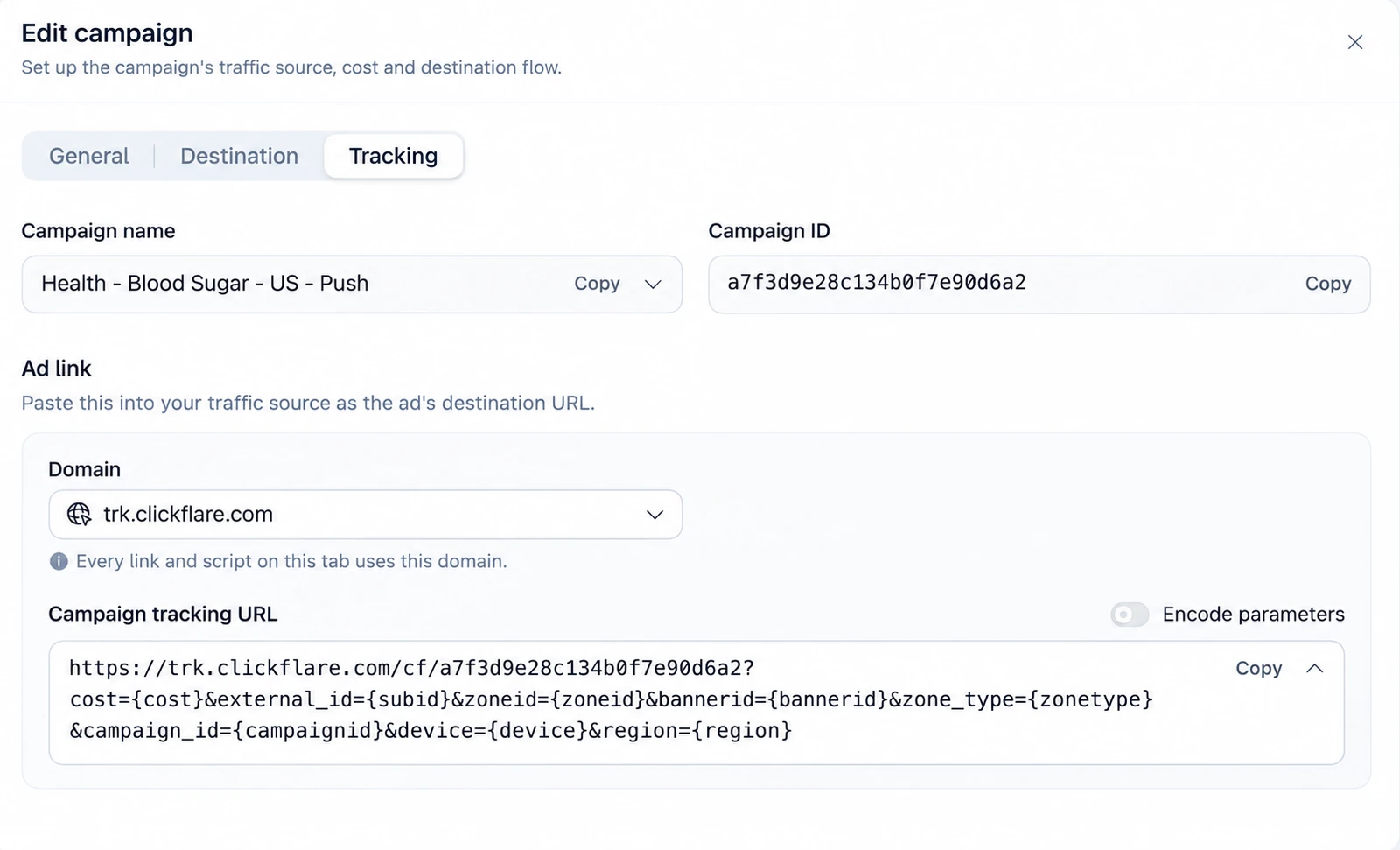
Create a new campaign in ClickFlare, select PropellerAds as the traffic source, and attach your landing page and offer, or your direct-link offer. ClickFlare generates a campaign tracking link that already carries the tokens for the click ID and cost.Copy that tracking link. It is the address PropellerAds will send traffic to.
Step 3: Set Your Target URL in PropellerAds
In PropellerAds, create or edit your campaign and paste the ClickFlare tracking link into the Target URL field. PropellerAds automatically appends its own values, so the ${SUBID} click ID and the {cost} of each click get passed into ClickFlare as traffic flows.This single link is doing two jobs at once: routing the visitor to your offer and feeding click-level data back to your tracker.
Step 4: Configure the S2S Postback Back to PropellerAds
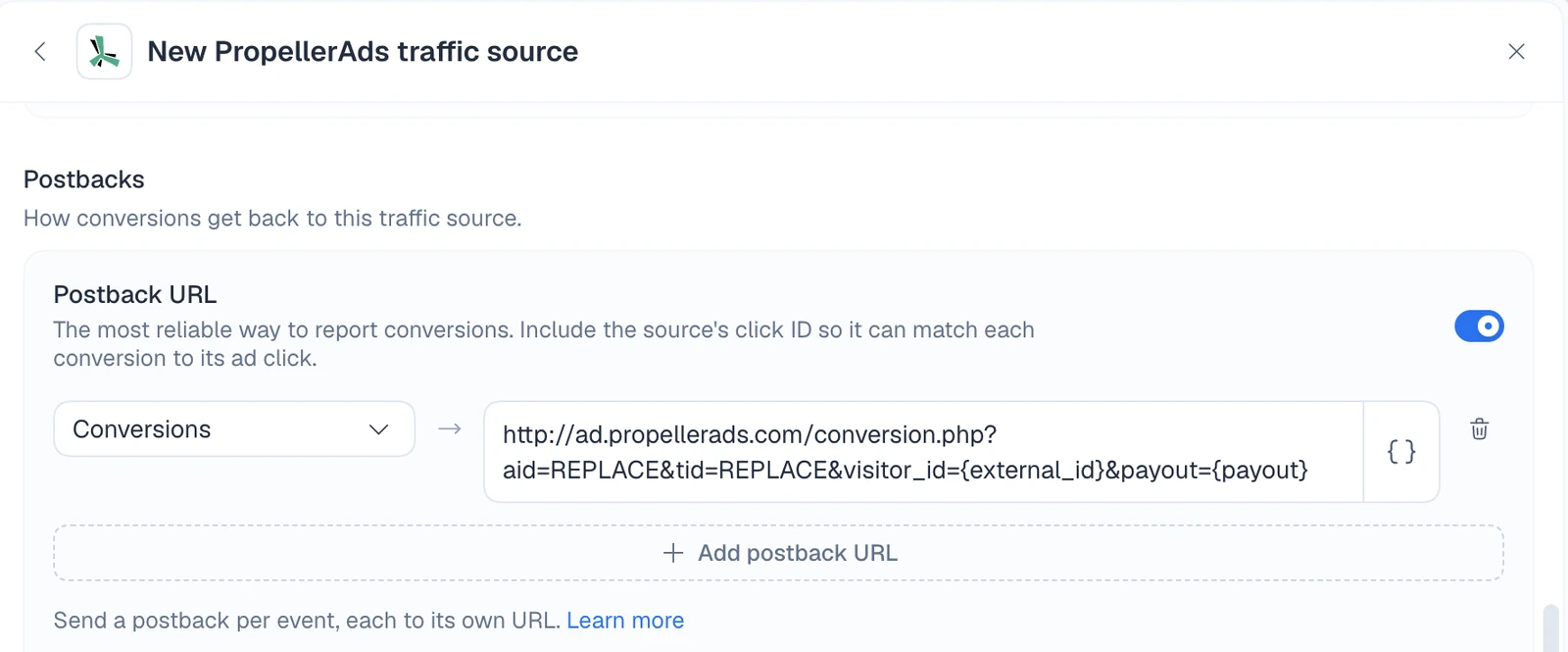
Now set up the return trip so PropellerAds learns which clicks converted. Open the Tracking tab in PropellerAds and copy its ready-made postback URL, following PropellerAds' S2S tracking documentation. The URL looks like this:
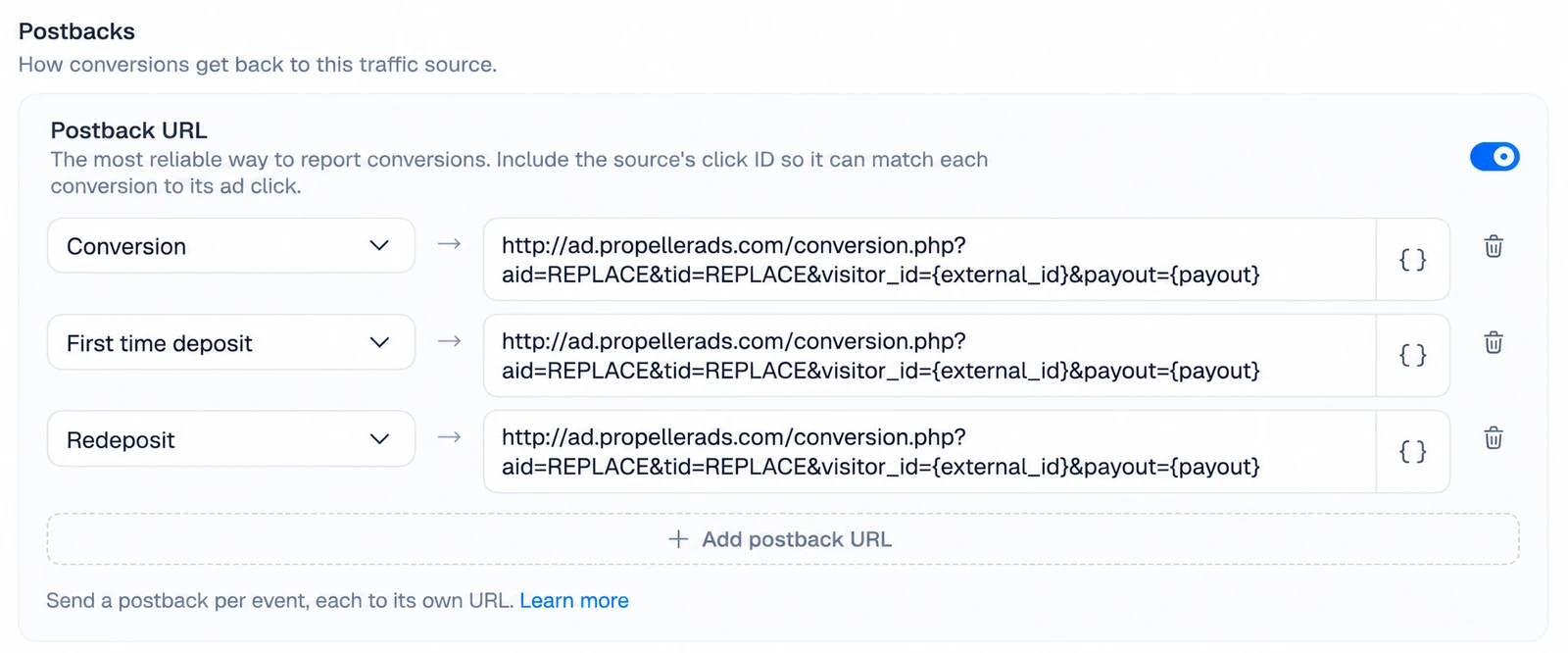
In ClickFlare, open your PropellerAds traffic source, enable the postback URL option, and paste that URL in. Use ClickFlare's token menu to replace the click ID value with {external_id}, since that is where ClickFlare stored the PropellerAds ${SUBID}. The final postback tells PropellerAds exactly which click to credit.
Step 5: Fire Conversions Into ClickFlare
For the loop to work, your offer needs to report conversions to ClickFlare first. Grab your ClickFlare conversion postback URL and add it to your affiliate network or offer settings, so each conversion fires with the ClickFlare click ID attached.If your offer runs on your own site or landing page, you can use a ClickFlare pixel or a direct postback instead. Either way, the conversion has to reach ClickFlare before it can be relayed on to PropellerAds.
Step 6: Run a Test Conversion
Send a test click through your PropellerAds link, complete a conversion on the offer, then check Event Logs and Postback Logs in ClickFlare. You want to see the conversion recorded with a cost value attached, and the outgoing postback to PropellerAds marked as sent.Keep in mind that conversions can take up to 24 hours to appear in PropellerAds' own statistics, even when ClickFlare logs them instantly. If the data shows up in ClickFlare, your setup is working.
How Cost and Conversions Flow Through S2S Postbacks
This is the part that makes PropellerAds conversion tracking in ClickFlare accurate. Instead of manual CPC entry or browser pixels, your cost and conversion data both travel server-to-server. Here is what moves, and how.
Data Point
How It Moves
Token / Macro
Click ID
PropellerAds passes it in on the click; ClickFlare stores it to match the conversion later
${SUBID} → {external_id}
Cost
Read automatically from each click, so spend is accurate at the zone level
{cost}
Conversion
Fired from your offer into ClickFlare, then relayed back to PropellerAds
visitor_id=${SUBID}
Revenue / payout
Passed with the conversion so ClickFlare can calculate real profit
{payout}
With cost coming in on every click and revenue coming in on every conversion, ClickFlare can show you profit and ROI per zone in real time. That is what you optimize against. If your numbers ever look off across tools, our breakdown of why conversions don't match across platforms explains the usual causes.
Tracking Multi-Step Conversions on PropellerAds
Plenty of PropellerAds campaigns, especially in verticals like iGaming and finance, care about more than a single conversion. You might want to track a signup, then a first-time deposit, then a redeposit.PropellerAds supports this with the &goal= parameter added to the postback. A goal=2 marks a second-level event such as a first-time deposit, and goal=3 marks a third-level event such as a redeposit.In ClickFlare, you add a separate postback URL for each event, mapping the matching conversion type to its own PropellerAds URL. Every one of them passes the same {external_id} click ID, so each stage attributes back to the original click.
One thing to note: only the main postback affects performance in PropellerAds' CPA Goal campaigns, so set your primary conversion carefully.
Common PropellerAds Conversion Tracking Mistakes to Avoid
Forgetting the offer postback. If your affiliate network never fires a conversion into ClickFlare, there is nothing to relay back to PropellerAds. The offer side has to report first.
Mismatching the click ID. The ${SUBID} that comes in must be the same value sent back out as {external_id}. If they do not match, conversions will not attribute.
Panicking over the 24-hour delay. PropellerAds can take up to a day to show conversions in its own stats. Check ClickFlare's logs first before assuming something broke.
Entering cost manually. Since cost is pulled automatically through the {cost} macro, adding a manual CPC on top will double-count your spend.
Skipping the test. A single test conversion catches most of these problems before you spend real budget.
PropellerAds Conversion Tracking: Final Thoughts
PropellerAds conversion tracking comes down to closing the loop: PropellerAds sends clicks and cost into ClickFlare, your offer reports conversions, and ClickFlare passes those conversions back to PropellerAds. Because cost and conversions both move through S2S postbacks, your spend and revenue stay accurate at the zone level even on cookieless pop and push traffic.Set it up once, run a test conversion, and you will finally be optimizing on real profit instead of raw totals. From there, scaling the zones that actually convert is just a matter of reading the dashboard.
PropellerAds Conversion Tracking FAQ
How does PropellerAds conversion tracking work?
PropellerAds sends clicks to your ClickFlare tracking link, passing a unique click ID and the cost of each click. When a visitor converts, your offer reports it to ClickFlare, which relays the conversion back to PropellerAds using that same click ID through an S2S postback.
Does ClickFlare track PropellerAds cost automatically?
Yes. Cost is pulled through the PropellerAds {cost} macro on every click, and that mapping already comes configured in ClickFlare's PropellerAds setup. You do not need to enter CPC values by hand, which keeps spend accurate at the zone level.
What is the ${SUBID} token in PropellerAds?
The ${SUBID} token is the unique click ID PropellerAds assigns to each visit. ClickFlare stores it as the external ID and sends it back in the conversion postback so PropellerAds knows exactly which click to credit.
Why are my PropellerAds conversions not showing up?
First check ClickFlare's Event and Postback logs, since conversions appear there instantly. PropellerAds itself can take up to 24 hours to display them. If ClickFlare has no conversion at all, the issue is usually a missing offer postback or a mismatched click ID.
Can I track first-time deposits and redeposits on PropellerAds?
Yes. PropellerAds supports multi-step events with the &goal= parameter, where goal=2 is a second-level event like a first-time deposit and goal=3 is a redeposit. ClickFlare handles these through custom conversion events as long as the same click ID is passed at each stage.
Need a hand with your PropellerAds tracking setup?
Try out ClickFlare for free and book a call with one of our tracking specialists who will guide you through the entire process.