Server-side tracking sends conversion data from a server you control instead of the browser, so ad blockers and cookie limits stop costing you conversions. Here's how it works and how to set it up.
If your conversion numbers never quite line up across Meta, Google, and your affiliate network, server-side tracking is usually the fix. Server-side tracking is a method of collecting and sending conversion and analytics data from a server you control, instead of directly from the visitor's browser.That one change sidesteps the ad blockers, cookie limits, and browser privacy rules that quietly erode browser-based tracking. For advertisers in 2026, it's the difference between optimizing on real data and optimizing on guesses.In this guide, we'll cover what server-side tracking is, how it works, the main methods, and how to set it up.
Quick Summary
Server-side tracking collects and sends data from your own server, not the user's browser.
It's more accurate because ad blockers, cookie restrictions, and browser privacy rules can't interfere with a server-to-server request.
The three main methods are server-side tag managers (sGTM), Conversion APIs (CAPI), and server-to-server (S2S) postbacks.
Server-side does not mean cookieless. It still relies on an identifier like a click ID or Pixel ID.
ClickFlare handles server-side conversion tracking with S2S postbacks, then sends enriched data to ad platforms through CAPI.
What Is Server-Side Tracking?
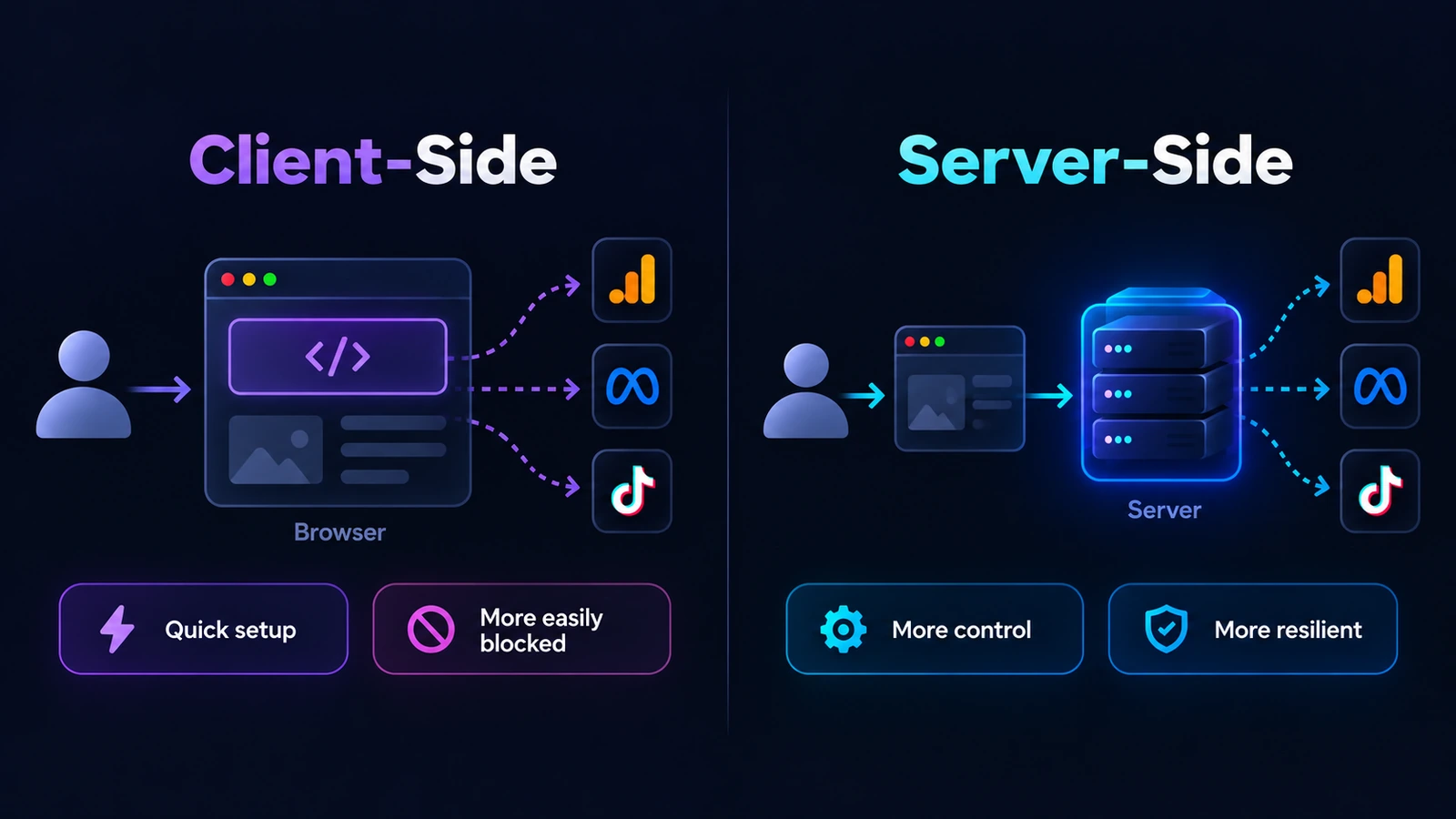
Server-side tracking is a data collection method where events are processed and sent from a server you control, rather than directly from the user's browser. When someone clicks an ad, submits a lead, or buys something, that event is handed to your server first.Your server then forwards it to its destination, such as an ad platform, an analytics tool, or a tracker.The contrast is with traditional client-side tracking, where tags and pixels run inside the browser and send data straight to third-party platforms. Client-side collection has become unreliable because ad blockers, Safari's Intelligent Tracking Prevention, and shrinking cookie lifespans all interfere with it.Server-side tracking moves the important part of the process out of reach of browser-level blocking, which is why accuracy holds up even when a visitor blocks scripts or switches devices.
Server-Side vs. Client-Side Tracking
The quickest way to understand server-side tracking is to put it next to the client-side model it improves on. Both can run at the same time, and most mature setups use a blend.The table below breaks down where they differ.
Aspect
Client-Side Tracking
Server-Side Tracking
Where data is processed
In the user's browser
On a server you control
Blocked by ad blockers
Often, scripts and pixels can be stopped
Rarely, requests happen server to server
Reliance on third-party cookies
High
Low, favors first-party and server context
Data control
Limited, data leaves through many third-party scripts
High, you decide what is sent and can filter or hash it
Impact on page speed
Adds scripts that slow the page
Moves processing off the page
Best for
Quick setup, basic on-page events
Accurate attribution and conversions in privacy-restricted environments
How Does Server-Side Tracking Work?
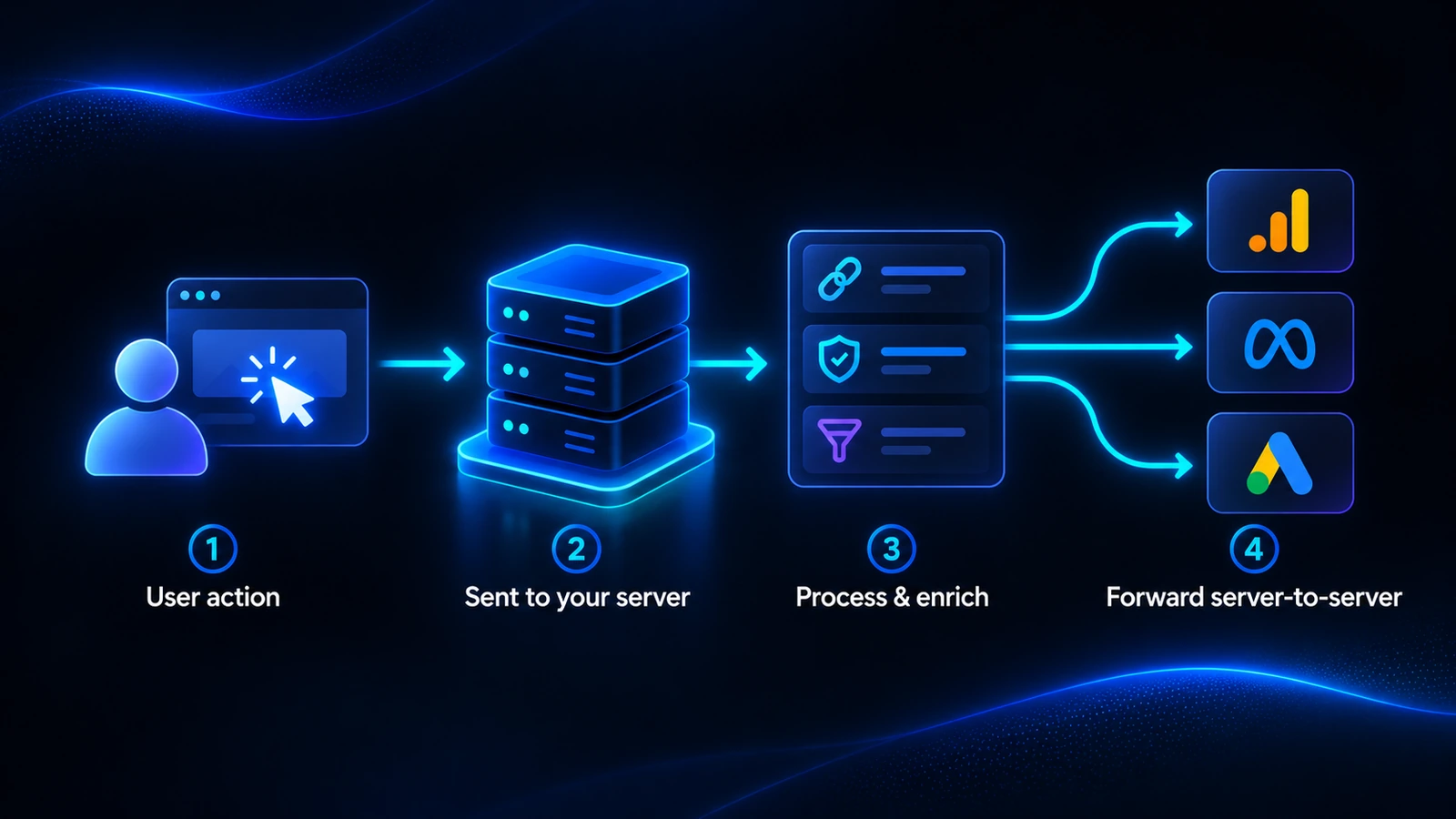
At a high level, server-side tracking follows a simple four-step flow. The key idea is that your server sits in the middle, between the user action and the platform that needs to hear about it.
A user takes an action. Someone clicks an ad, submits a form, or completes a purchase. This is the raw event you want to measure.
The event goes to your server. Instead of firing straight to an ad or analytics platform from the browser, the event is sent to a server you control, often with a lightweight client-side hook or a server-to-server call.
Your server processes and enriches it. It attaches identifiers like a click ID, hashes customer data for privacy, filters out noise, and shapes the event into the format each destination expects.
The clean event is forwarded on. Your server sends the finished event to its destination over a server-to-server connection, so the conversion is recorded accurately regardless of what the browser allowed.
Because the browser is no longer the thing responsible for delivering the data, the usual points of failure, blocked scripts, cleared cookies, and short attribution windows, stop costing you conversions.
Why Server-Side Tracking Matters in 2026
Server-side tracking used to be a nice-to-have for large advertisers. With third-party cookies fading and privacy rules tightening, it has become the baseline for anyone who needs measurement they can trust.Here is what you actually gain:
Higher data accuracy. You capture conversions that browser-based tracking loses to ad blockers, privacy settings, and failed pixel fires, so your reports reflect what really happened.
More durable, first-party data. Collecting events in your own server context is far more resilient than relying on third-party cookies that browsers increasingly restrict or delete.
Better site performance. Moving tracking off the page reduces the number of scripts running in the browser, which helps load times and the user experience.
Control over what leaves your server. You decide which fields to send, and you can filter or anonymize data before it reaches any third party.
Stronger ad-platform signal. Feeding complete, enriched conversions back to platforms like Meta and Google helps their algorithms optimize toward the people most likely to convert, which lowers your cost per result over time.
That last point is why mismatched numbers are such a common headache. If Meta shows 40 conversions, your network shows 55, and your tracker shows 52 for the same campaign, incomplete browser-side data is usually the culprit, and server-side tracking is how you close the gap.
The Main Server-Side Tracking Methods
"Server-side tracking" is an umbrella term. In practice, it's delivered through three main methods, and plenty of setups combine all three.
Server-Side Tag Managers (sGTM)
A server-side tag manager moves your tag processing from the browser into a server container that you host, most commonly server-side Google Tag Manager running on a cloud instance. The container receives event data, processes it with tags and triggers, and forwards it to your analytics and marketing tools.You can read Google's own introduction to server-side tagging for the technical setup.It is powerful for general web analytics, though it does require server infrastructure to run and maintain, and many configurations still begin with a client-side event.
Conversion APIs (CAPI)
A Conversion API sends conversion events straight from your server to an ad platform's server, such as Meta, Google, TikTok, or Snapchat, bypassing the browser entirely. This is the method most focused on improving ad performance, since it feeds platforms the complete conversion data their algorithms need.One important detail: CAPI does not replace your pixel, it works alongside it and still uses a Pixel ID as the identifier that ties events together.For a full walkthrough, see our guide on what CAPI tracking is and how it works.
Server-to-Server (S2S) Postbacks
Postback tracking passes conversion data directly from one server to another using a unique click ID, with no cookie or browser involved. When a visitor clicks, a click ID is generated and stored, and when they convert, the network's server fires that click ID back to your tracker to record the conversion.It is the standard for affiliate offers and privacy-restricted environments.Our postback tracking guide explains the full flow, and our guide to postback URLs shows exactly what one looks like and how to set it up.
Does Server-Side Tracking Mean No Cookies or Pixels?
No, and this is one of the most common misconceptions. Server-side tracking does not automatically mean cookieless, and it does not make pixels obsolete.It still needs an identifier to connect an action back to its source. CAPI relies on a Pixel ID, postbacks rely on a click ID, and many server-side setups still set a first-party cookie on your own domain.The real shift is where the data is processed and how durable that identifier is, not the removal of identifiers altogether.Pixels still have a place too, usually as a client-side companion or a backup method. If you want the full picture on that side of the equation, our guide on what a tracking pixel is covers where pixels still help and where they fall short.
Server-Side Tracking and Privacy
Moving data collection to your server does not remove your privacy obligations. Server-side tracking still involves personal data, so it needs a valid legal basis, and under regulations like the GDPR, non-essential tracking generally requires explicit, informed consent before it happens.You can read the full requirements in GDPR.eu's guide to cookies and consent.What server-side tracking does give you is more control over compliance. Because data passes through your own server first, you can decide exactly what gets forwarded, strip or hash sensitive fields, and keep a cleaner record of what you collect and why.It is a way to track more responsibly, not a way to skip consent.
How to Set Up Server-Side Tracking
The exact steps depend on which method fits your goals, but the overall path is consistent. Here is how a practical server-side tracking setup comes together:
Pick the method for the job. Use a server-side tag manager for broad web analytics, CAPI to feed ad platforms, and S2S postbacks for affiliate and conversion attribution. Many advertisers run more than one.
Stand up the server layer. That means a server container of your own, or a tracking platform that already handles the server-side infrastructure for you so you don't have to build and maintain it.
Pass the right identifiers. Add a click ID token to your tracking links and connect your Pixel IDs for CAPI, so every event can be matched back to its original click.
Forward events to their destinations. Configure where clean events should go, whether that is your analytics tool, your ad platforms, or both.
Test before you scale. Fire test conversions, confirm they arrive with the correct click ID and payout, and only then push live traffic through.
How ClickFlare Handles Server-Side Tracking
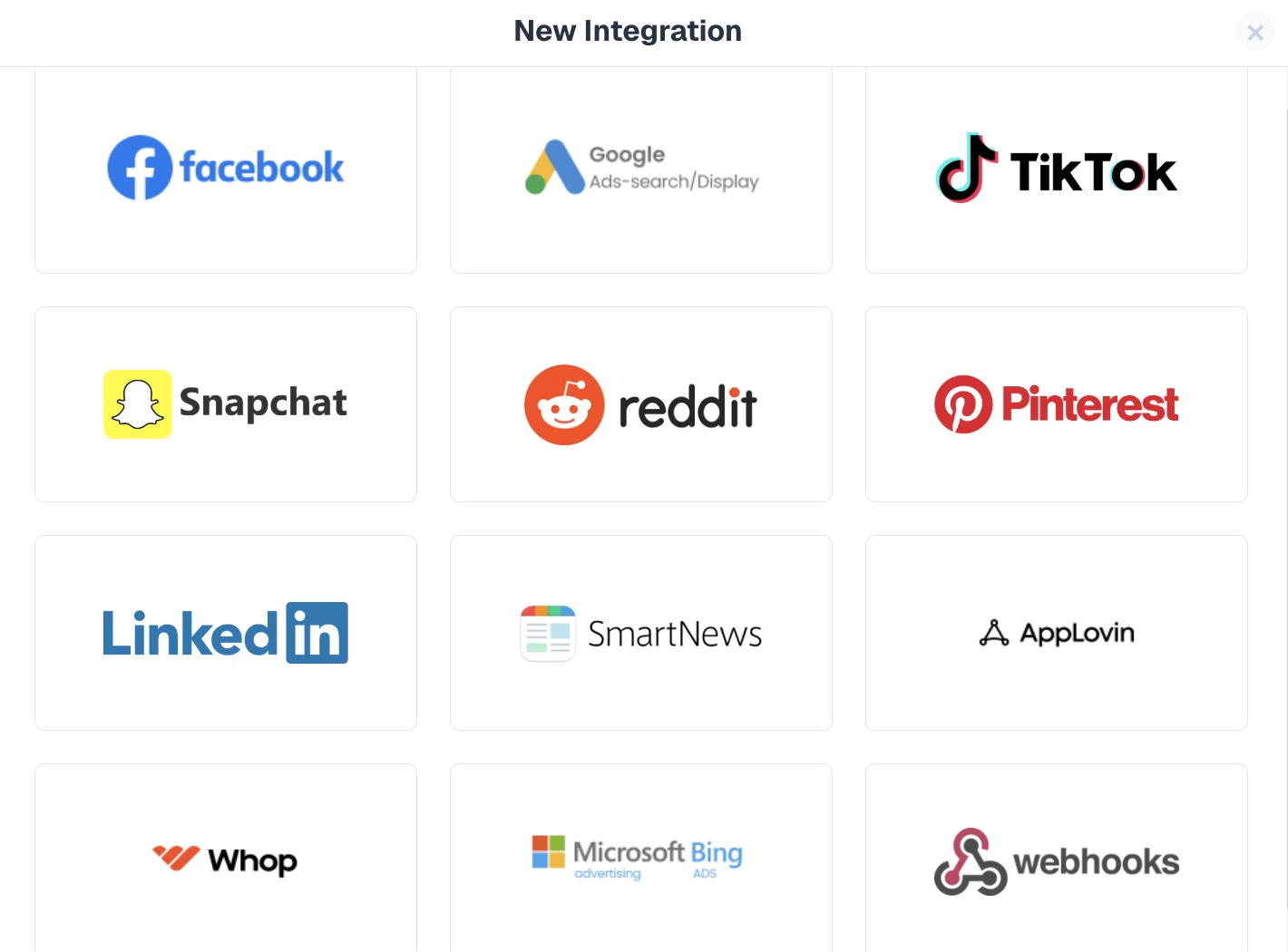
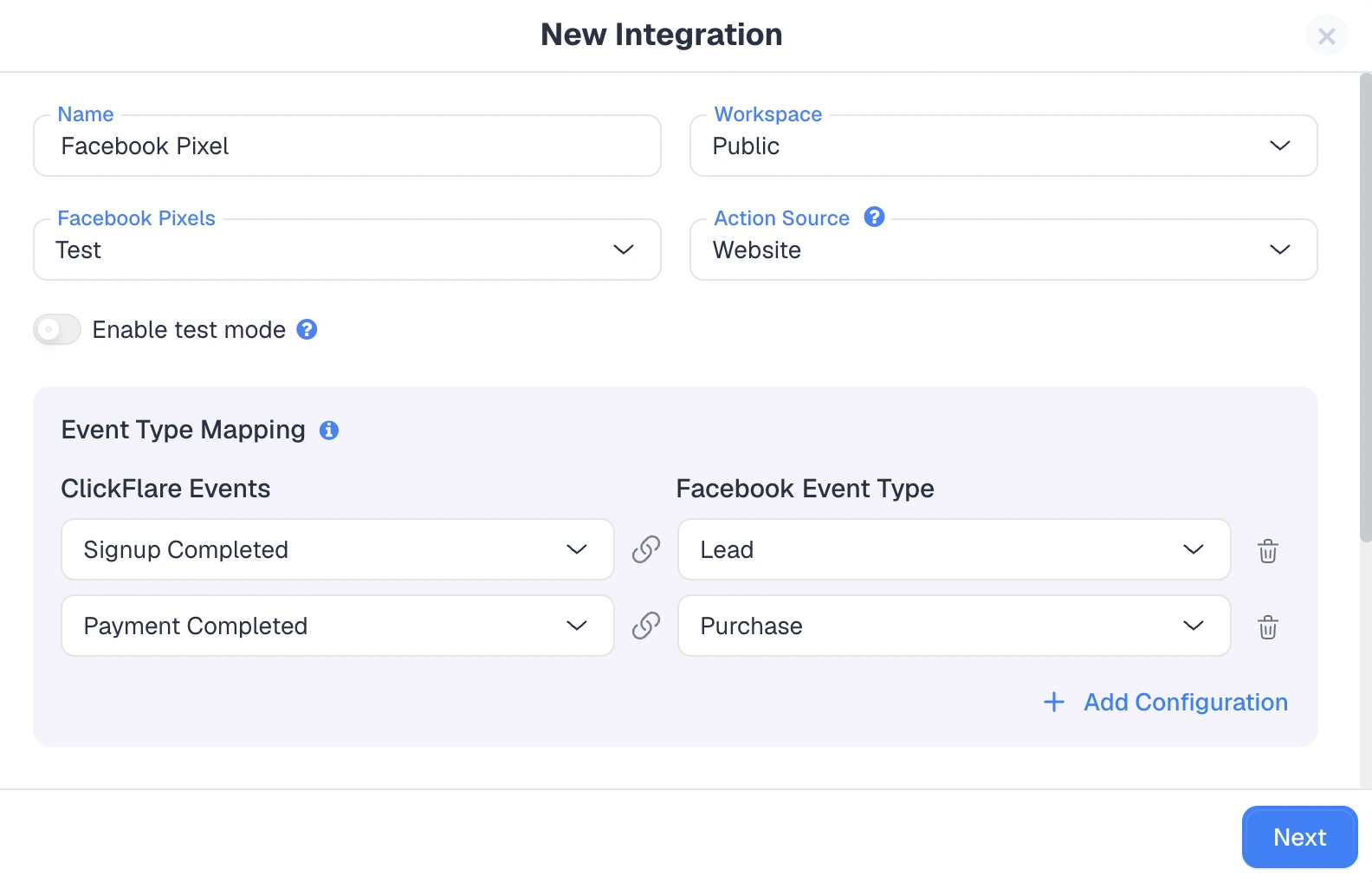
ClickFlare is built around server-side tracking for media buyers and affiliates, so you don't have to assemble the infrastructure yourself.Conversions come into ClickFlare primarily through server-to-server postbacks, the most reliable method. A cookie-based conversion pixel and a thank-you-page script are available as backups when a postback is not an option.From there, ClickFlare sends those conversions back out to your ad platforms through its Conversion API integrations, server-side. You can connect CAPI integrations for Facebook, Google Ads, TikTok, Snapchat, Reddit, Pinterest, LinkedIn, Microsoft Bing, and more from a single screen.
From there, you map your ClickFlare conversion events to each platform's event types. A completed signup can register as a lead, and a completed payment can register as a purchase.
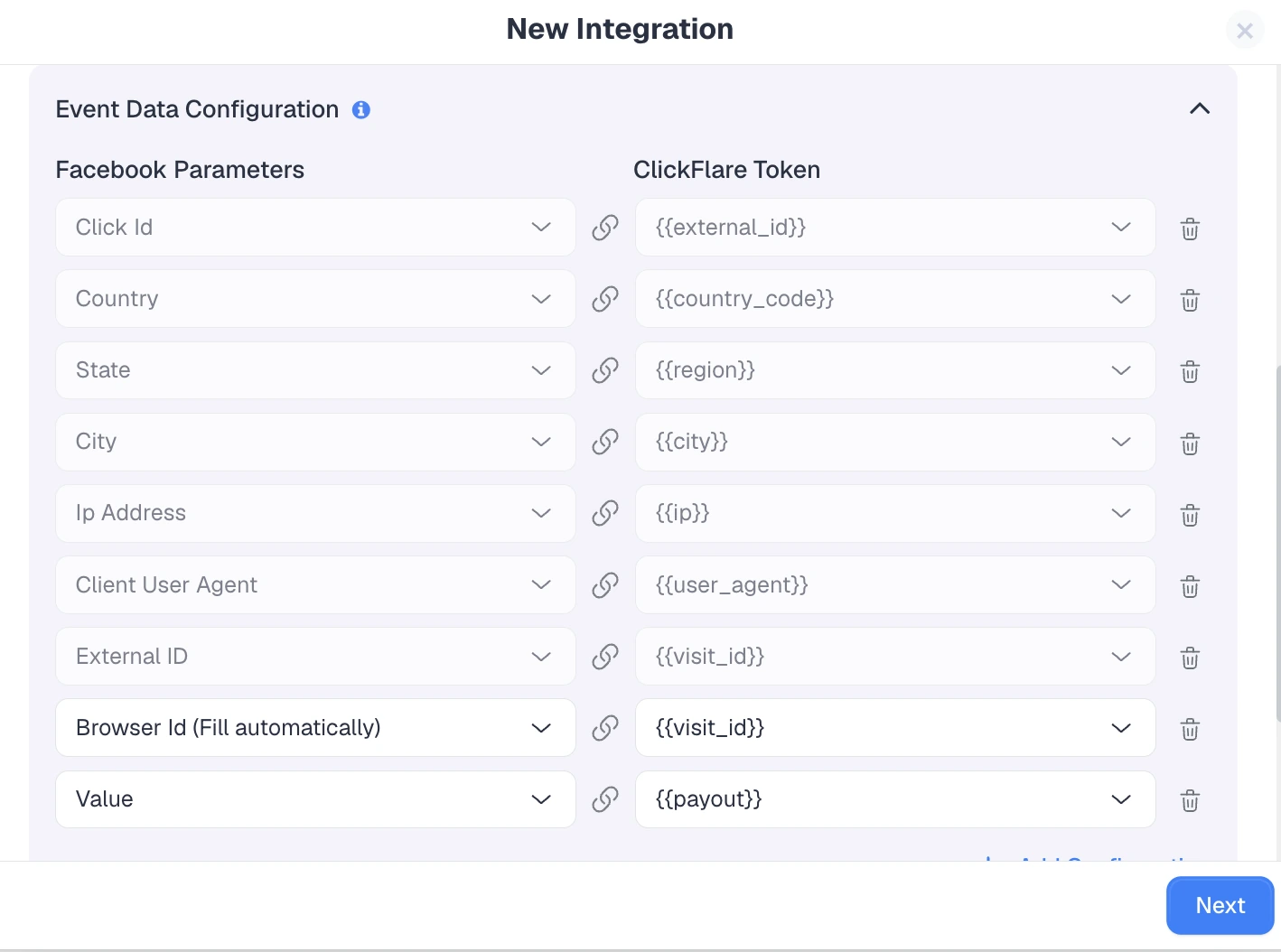
You also control the event data that gets sent, mapping tokens like click ID, location, device, and payout to each platform's parameters. That enriched data, with customer details hashed, is what lets the platform match the conversion and credit the right click.
Those CAPI integrations still use a Pixel ID as the identifier, so your pixel and your server-side data work together rather than one replacing the other. Richer event data lifts match rates and helps lower your cost per result.Because ClickFlare also pulls direct cost data from more than 18 ad platforms, you get clicks, spend, and revenue in one dashboard, with the server-side accuracy needed to keep it trustworthy as browser and privacy restrictions tighten.
Final Thoughts on Server-Side Tracking
Server-side tracking is no longer an advanced extra, it is how accurate measurement works in a world of ad blockers, cookie limits, and tightening privacy rules.By collecting and sending data from a server you control, you capture the conversions browser-based tracking misses, protect your setup against future browser changes, and feed cleaner signals back to your ad platforms.Whether you lean on a server-side tag manager, a Conversion API, S2S postbacks, or a combination, the payoff is the same: data you can actually make decisions on.
Frequently Asked Questions
What Is Server-Side Tracking in Simple Terms?
Server-side tracking means your website sends event data to a server you control, which then forwards it to analytics or ad platforms. Because the server handles the request instead of the browser, ad blockers and cookie restrictions can't interfere, so the data is more accurate.
Is Server-Side Tracking Better Than Client-Side Tracking?
For accuracy and durability, yes. Server-side tracking captures conversions that client-side methods lose to ad blockers and privacy settings. Most setups still run both, using client-side for quick on-page events and server-side for reliable conversion and attribution data.
Does Server-Side Tracking Work Without Cookies?
Not entirely. Server-side tracking reduces reliance on third-party cookies, but it still needs an identifier such as a click ID or a Pixel ID to match events to their source. Many setups also set a durable first-party cookie on your own domain.
Is Server-Side Tracking GDPR Compliant?
It can be, but it is not automatically exempt. Server-side tracking still processes personal data, so non-essential tracking needs a valid legal basis and usually explicit consent. It gives you more control over what you collect, not a way around consent rules.
How Do I Set Up Server-Side Tracking?
Choose a method (server-side tag manager, CAPI, or S2S postback), run a server layer or use a platform that handles it, pass identifiers like a click ID and Pixel ID, forward events to their destinations, and test with sample conversions before sending live traffic.
Need a hand with server-side tracking?
Try out ClickFlare for free and book a call with one of our tracking specialists who will guide you through the entire process.