Black Friday came early. Early-access prices until Nov 8.Black Friday: early-access prices until Nov 8.Early-access price ends in0d00h00m00sClaim the deal



Running traffic on SmartNews but only trusting the pixel in the browser? That is where SmartNews Ads tracking quietly starts leaking. Privacy frameworks, ad blockers, and in-app sessions all chip away at browser-based signals, so a share of your real conversions never makes it back to SmartNews or your reports. The fix is to pair the SmartNews Pixel with the Conversion API (CAPI) so events are also sent server-side, and to pull your SmartNews spend in alongside them. In this guide, we will break down how SmartNews conversion tracking works and how to set up accurate CAPI tracking and cost data in ClickFlare.
Quick Summary
SmartNews Ads tracking is the process of recording what happens after someone sees or clicks your SmartNews ad, from a page view to a lead or a purchase, and tying that action back to the campaign that drove it. It works through two mechanisms that complement each other.
The first is the SmartNews Pixel, a snippet you create in Event Manager that fires in the user's browser when a page loads or an action happens. The second is the Conversion API (CAPI), which sends those same conversion events to SmartNews server-side, without depending on the browser.
Why does this matter beyond cleaner reports? SmartNews uses your conversion signals to optimize delivery. The more complete and accurate the events it receives, the better it can find people likely to convert. Weak or missing signals lead to weaker optimization and wasted spend.
A pixel on its own used to be enough. It is not anymore. Browsers restrict third-party cookies, privacy frameworks limit what scripts can store, and ad blockers stop many pixels from firing at all. On top of that, a good chunk of SmartNews traffic happens inside the app, where browser-based tracking is even shakier.
Every one of those gaps is a conversion that happened but never got recorded. You end up underreporting results and feeding SmartNews incomplete data to optimize on.
Server-side tracking closes those gaps. Because the Conversion API sends events directly from a server rather than the browser, it is not affected by cookie restrictions, blockers, or the browser-versus-app divide in the same way. If you want the full picture of how this works, our guide on what CAPI tracking is covers the concept end to end, and our complete guide to postback URLs explains the server-to-server method behind it.
The Pixel and the Conversion API are not competing options. They do related jobs, and the strongest setup runs both together so one can back up the other. Here is how they compare.
| SmartNews Pixel | Conversion API (CAPI) | |
|---|---|---|
| Where it fires | In the user's browser | On the server, sent directly to SmartNews |
| Affected by cookie and ad blockers | Yes | No |
| Data reliability | Partial, drops signals under privacy limits | High, captures events the pixel misses |
| Key you need | Pixel Tag ID from Event Manager | Partner Name and Access Token |
| Best used | As the browser-level baseline | As the server-side layer that keeps data accurate |
You can send conversions to SmartNews, but SmartNews only shows you SmartNews. The moment you run more than one traffic source or affiliate offer, you need a layer that sits in the middle and sees everything in one place.
That is what a tracker like ClickFlare does. It captures the click, records the conversion, deduplicates events so a single sale is not double counted, and sends the event back to SmartNews through the Conversion API. At the same time, it pulls your SmartNews spend in so you can see cost, revenue, and ROI side by side instead of stitching numbers together by hand.
If you have ever seen different conversion counts in SmartNews, your affiliate network, and your tracker, our breakdown of why conversions don't match across platforms explains what usually causes it.
Setup goes quickly once you have the right accounts and credentials ready. Before you begin, make sure you have:
With your credentials ready, connecting SmartNews conversion tracking in ClickFlare takes five steps.
Log in to SmartNews Business Manager and select the business that will use the Conversion API. Open the Conversion API option under the Developer Apps tab, then follow the on-screen instructions to download your credentials file.
From that file, copy your Partner Name and Access Token. Then grab the Pixel Tag ID from the pixel you set up in Event Manager. Keep these three values handy for the next step. You can review the full requirements in SmartNews's own Conversion API documentation if you need them.

In ClickFlare, go to Integrations > Conversion API Integrations, click Add Integration, and select SmartNews. Click Add a new Pixel and enter your Account name, Partner Name, Pixel Tag ID, and Access Token, then click Save.
This is the connection that lets ClickFlare send events to SmartNews server-side, the same way a postback works.
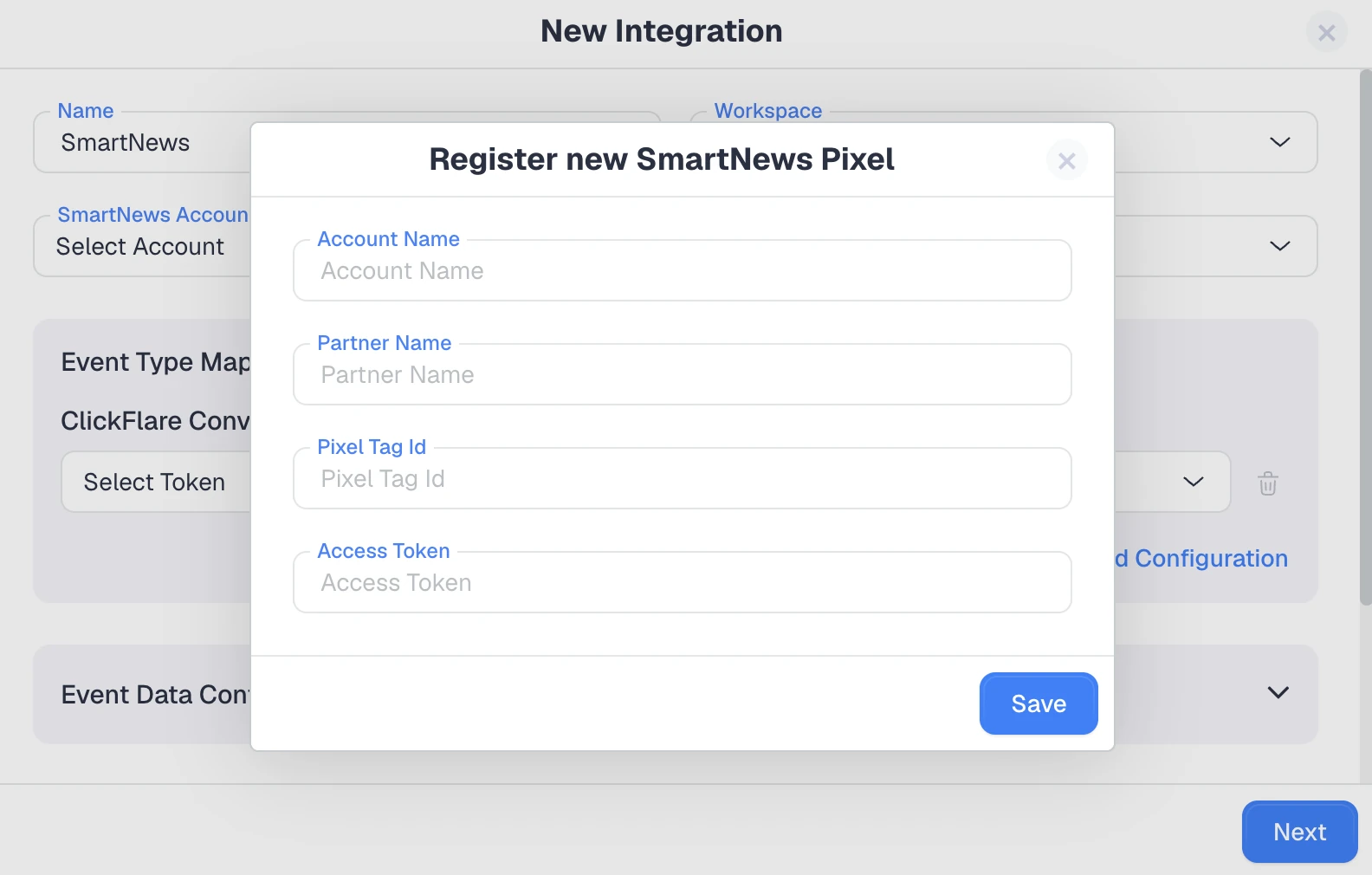
Next, decide which ClickFlare conversion events you want to send to SmartNews and map each one to a SmartNews standard event. Map only the events that are relevant to your funnel so SmartNews receives clean, meaningful signals.
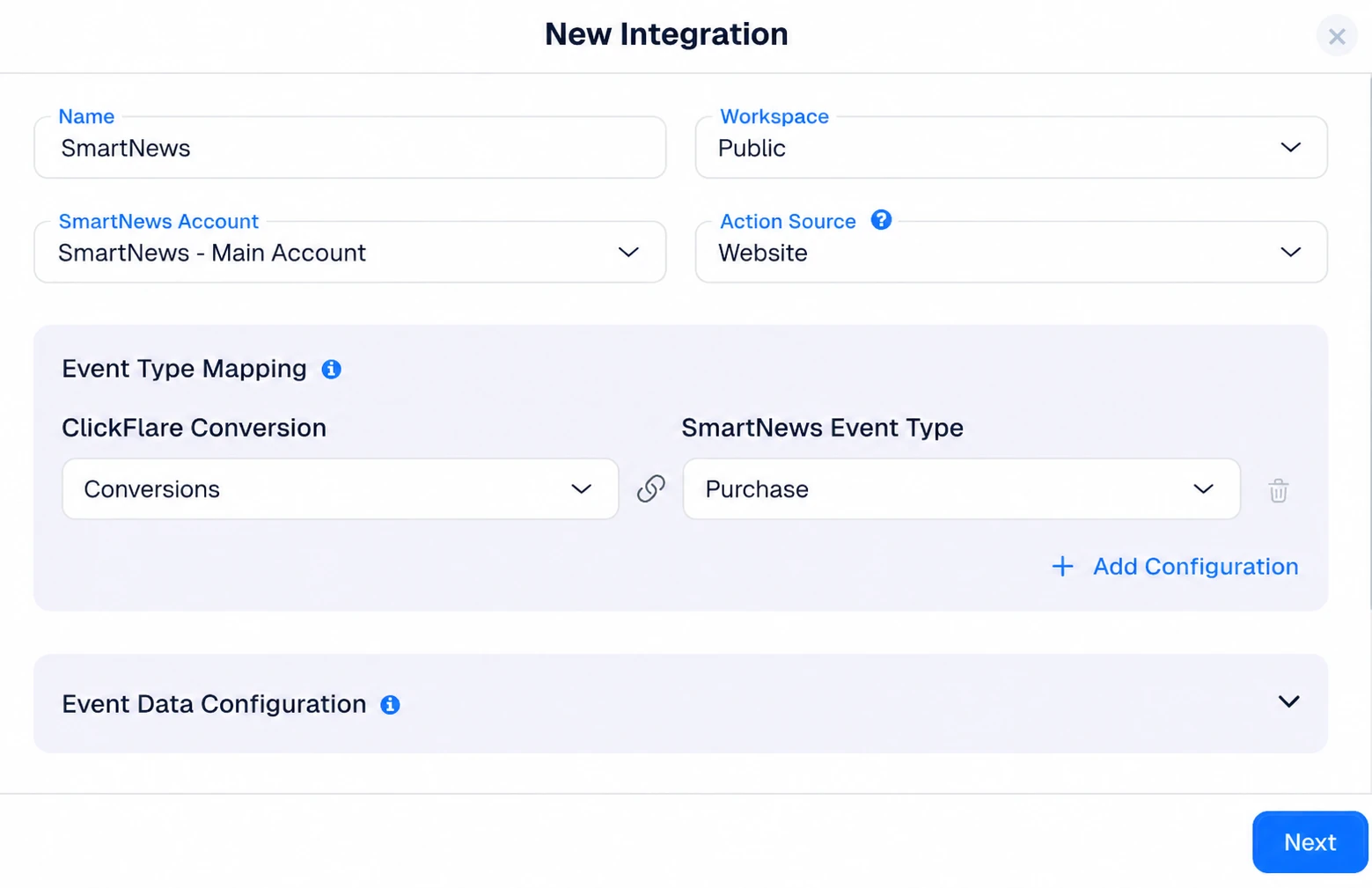
SmartNews supports the following standard events:
| SmartNews Event | Typical Use |
|---|---|
| Page Visit / View Content | A landing page or product page view |
| Search | An on-site search action |
| Add To Cart | A product added to the cart |
| Checkout | A checkout started |
| Lead | A form fill or lead submission |
| Signup | An account or newsletter signup |
| Purchase History | A completed purchase |
| Custom | Any event outside the standard set |
If you need an event that is not in the standard list, you can create custom conversions in ClickFlare and map them here. When your mapping is done, click Save.
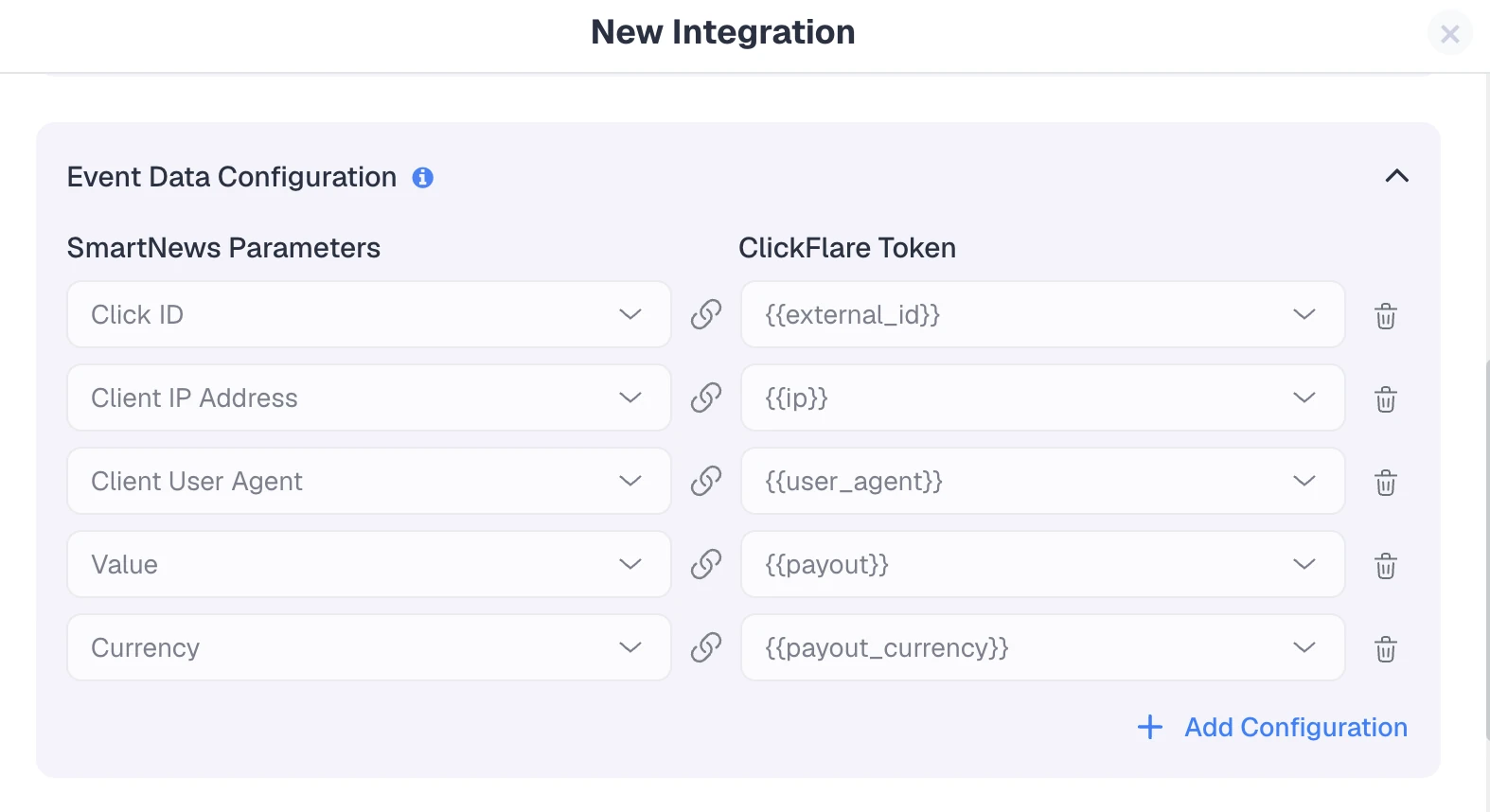
ClickFlare automatically includes the data SmartNews needs to attribute each event. That means the SmartNews click ID (when it is tracked properly), the client IP address, the client user agent, and the value and currency for purchase-related events.
You can optionally add extra match keys to enrich your events and improve matching. A few fields are required for attribution and cannot be removed, so review the mapping rather than stripping it down. If you use the SmartNews Traffic Source template, ClickFlare appends the required parameters, including the click ID, automatically.
Saving the integration is not the final step. To actually send events, open each SmartNews campaign in ClickFlare and select your SmartNews integration under Use Integrations. Only campaigns with the integration attached will pass conversions back to SmartNews.
This is the step people most often forget, so double-check it on every campaign you want tracked.
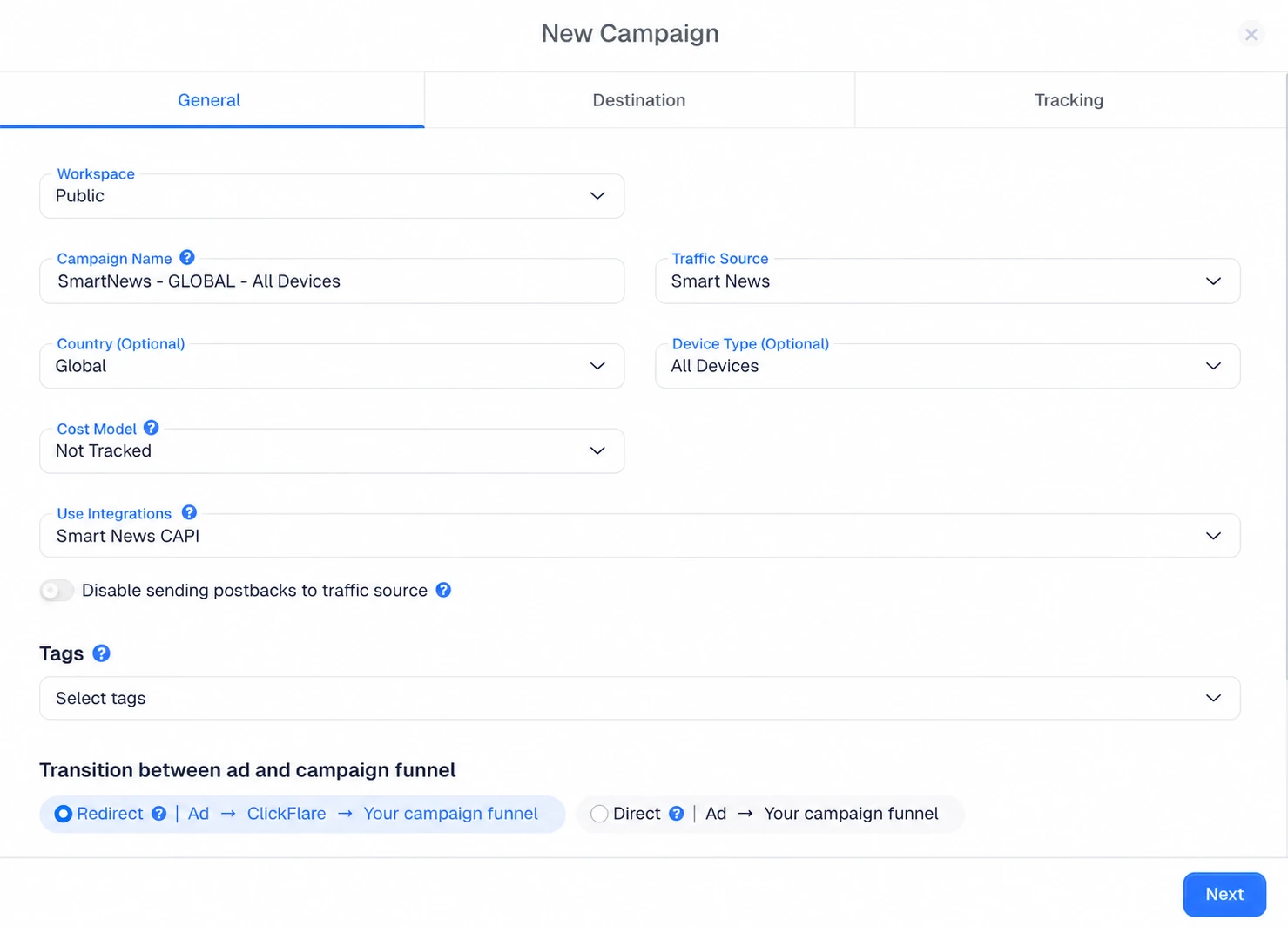
Conversion tracking tells you what is converting. Cost tracking tells you whether it is profitable. The SmartNews cost integration pulls your ad spend into ClickFlare so you can see ROI without exporting spreadsheets from SmartNews Ads Manager.
The cost integration uses a different set of credentials than the Conversion API. You will need a Client ID and Client Secret, generated in SmartNews Business Manager under Developer App Management. Here is the flow:
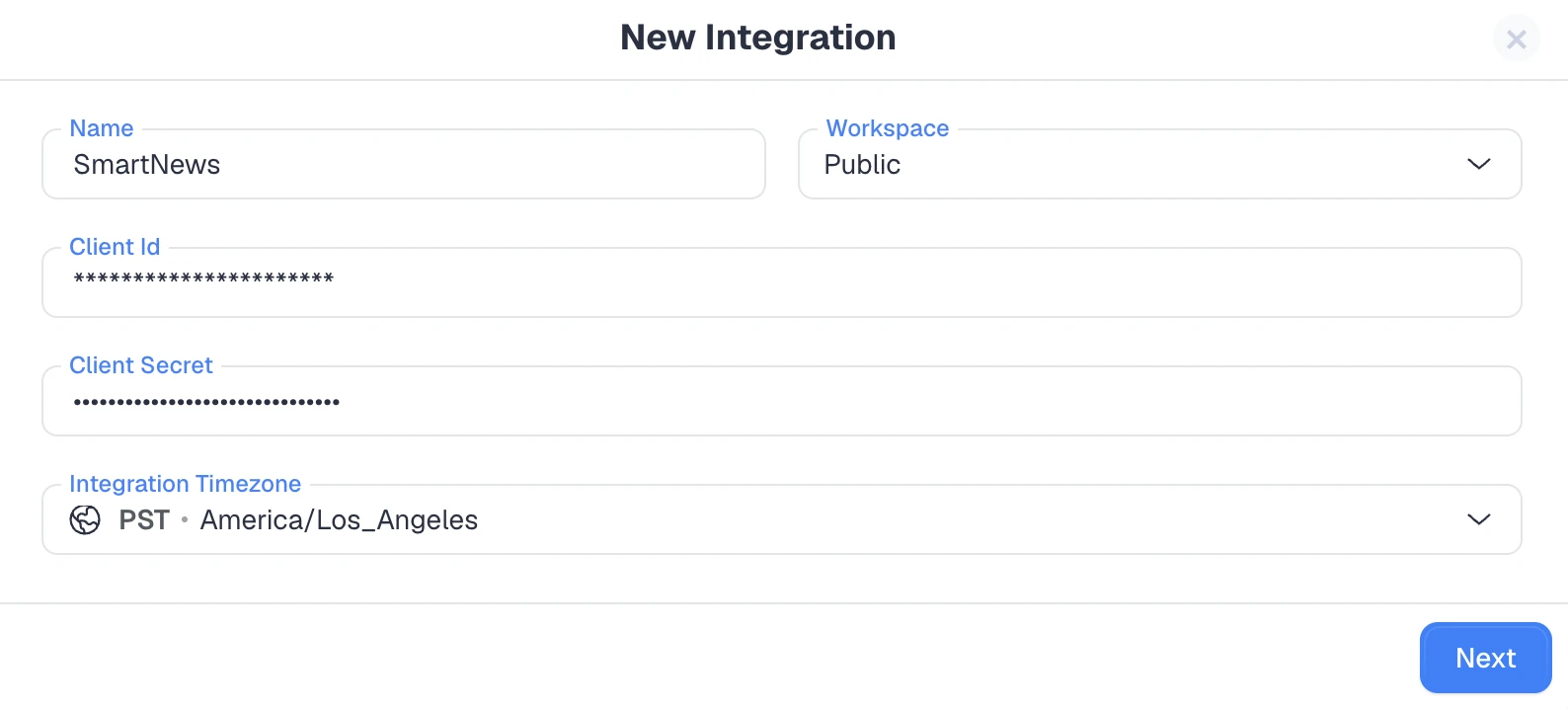
The cost integration pulls spend only, at the campaign, ad group, and ad levels. ClickFlare tracks clicks and conversions itself through your tracking URLs, then calculates CPC, CPM, CTR, and ROI from the two data sets combined. Depending on your plan, cost data refreshes anywhere from every 60 minutes down to every few minutes.
Once both integrations are live, each conversion sent to SmartNews carries the detail needed for accurate attribution and optimization:
Layer the cost data on top of that, and you get cost, revenue, and ROI for every SmartNews campaign in one dashboard.
Before you scale spend, confirm the setup end to end. Run a test conversion through one of your SmartNews campaigns, then check that it shows up in your ClickFlare reports and is passed back to SmartNews.
If the conversion appears in ClickFlare but not in SmartNews, recheck that the integration is attached at the campaign level and that your events are mapped. If cost data is missing, open an active campaign in your ClickFlare reports, check the Cost column, and compare it with SmartNews Ads Manager after the sync delay. A mismatched traffic source template is the usual culprit when spend does not line up.
Accurate SmartNews Ads tracking comes down to one principle: do not trust the browser alone. Pair the SmartNews Pixel with the Conversion API so events are captured server-side, map your events carefully, and connect the integration at the campaign level so conversions actually flow. Add the cost integration on top, and you move from guessing at results to seeing real cost, revenue, and ROI for every SmartNews campaign. For media buyers running SmartNews alongside other native sources like NewsBreak, a dedicated tracker like ClickFlare is what keeps that whole picture accurate and in one place.
SmartNews Ads tracking records what users do after seeing or clicking a SmartNews ad, from page views to leads and purchases, and ties each action back to the campaign that drove it. It works through the SmartNews Pixel in the browser and the Conversion API server-side.
The SmartNews Pixel fires in the user's browser and is affected by cookie limits and ad blockers. The Conversion API sends the same events from a server directly to SmartNews, so it captures conversions the pixel misses. Running both gives the most accurate data.
Yes, for the most reliable tracking. The pixel is the browser-level baseline, and CAPI is the server-side layer that recovers conversions lost to privacy rules, blockers, and in-app traffic. Together they reduce data loss and feed SmartNews cleaner optimization signals.
For conversions, you need your Partner Name, Access Token, Pixel Tag ID, and account name from SmartNews Business Manager and Event Manager. For cost tracking, you need a separate Client ID and Client Secret generated under Developer App Management.
The most common cause is a missing or mismatched SmartNews Traffic Source template, which stops spend from matching your campaigns. Confirm the template is assigned, the correct ad accounts are selected, and allow for the sync delay before comparing against SmartNews Ads Manager.
Need a hand with SmartNews ads tracking?
Try out ClickFlare for free and book a call with one of our tracking specialists who will guide you through the entire process.