




If you have ever run an affiliate offer and wondered whether you really need to build a landing page first, you have already thought about direct linking. So, what is direct linking, exactly? In affiliate marketing, direct linking means sending your traffic straight to the offer with nothing in between, no landing page, no pre-sell, just your tracking link pointing at the affiliate offer page. It is the fastest, easiest way to get a click from an ad to an offer, and it is a favorite for testing new campaigns quickly.
In this guide, we will break down how direct linking works, its pros and cons, when to use it, and how to track it accurately in ClickFlare without touching a line of code.
Quick Summary
Direct linking is the practice of sending paid traffic directly to an affiliate offer, using only your tracking link, without routing visitors through a landing page or pre-sell page first. The moment someone clicks your ad, they are taken straight to the affiliate offer page where the conversion happens.
In a typical affiliate funnel, you send traffic from an ad to your own landing page, warm the visitor up, and then pass them to the offer. Direct linking removes that middle step entirely. Your ad points at a single tracking link, and that link leads to the offer. There is no page to design, host, or maintain, which is exactly why it appeals to affiliates who want to launch fast or test a batch of offers without much setup.
It is worth clearing up one point of confusion early. The term “direct linking” is used slightly differently across the industry. Some define it as an affiliate link with no extra URL parameters, others as encoding an ad ID directly into a destination URL. For this guide, we are using the most common affiliate marketing definition: sending traffic directly to the offer with only your tracking link, and no landing page in the middle.
Even though there is no landing page, direct linking still relies on tracking to make sure you get credited for every click and conversion. Here is the flow from ad to payout:
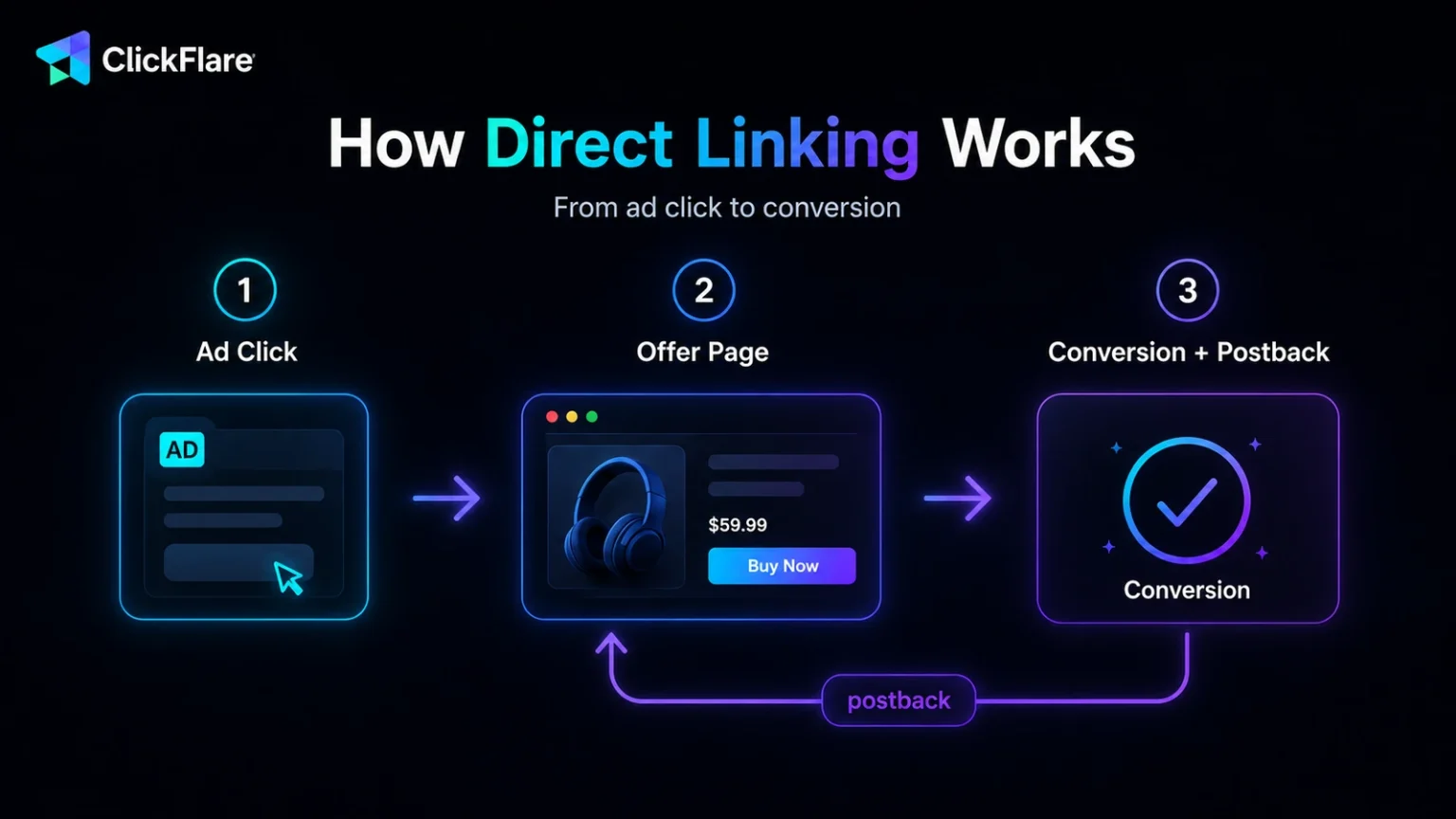
That click ID is the thread that ties the whole journey together. Without it, you would see clicks going out and conversions coming in, but no way to connect the two. This is why setting up your tracking correctly matters just as much in direct linking as it does in a full funnel.
The core trade-off in direct linking is speed and simplicity against control. A landing page lets you warm up, educate, and pre-qualify a visitor before they ever see the offer. Direct linking skips all of that in exchange for a shorter path and a lighter setup.
Here is how the two compare side by side:
Neither approach is universally better. A well-known product with an obvious value proposition often converts fine on direct linking, while a complex or higher-priced offer usually needs a landing page to do the persuading first.
Direct linking is a tool, not a rule. It works in some situations and falls flat in others. Here is an honest look at both sides before you commit budget to it.
The biggest draw is speed. With no page to design, write, or host, you can take an offer live in minutes, which makes direct linking perfect for testing. If you want to run five new offers this week to see which one has legs, you can do it without building five landing pages first. It also cuts overhead: no page hosting, no design work, and fewer moving parts to break.
There is a conversion argument too. By removing a step, you reduce friction between the click and the offer. For products that are already familiar or trending, that shorter path can actually lift conversion rates, since the visitor does not need to be convinced, they just need to reach the buy button.
The flip side of simplicity is a loss of control. With no landing page, you cannot warm up cold traffic, handle objections, or build trust before the offer. For complex or high-value products that need explaining, that missing pre-sell often means lower conversion rates.
You also give up data. A landing page tells you where people scroll, what they click, and where they drop off. Direct linking leaves you with clicks and conversions and little in between, which makes optimization harder. On top of that, many affiliates are sending traffic to the exact same offer URLs, so competition is fierce and it is tough to stand out.
Finally, there are the rules. Some traffic sources restrict or discourage direct linking. Google Ads, for example, enforces strict destination requirements and tends to disapprove destinations that offer no unique value, and some affiliate programs prohibit direct linking outright. Always check both the traffic source’s policies and your affiliate program’s terms before you run it.
Direct linking is not an all-purpose strategy, but it fits a handful of scenarios well:
If an offer needs education, has a higher price point, or lives on a traffic source with strict destination rules, a landing page will usually serve you better.
The one thing you cannot skip in direct linking is tracking. Without it, you have no way to know which ad, campaign, or source produced a conversion. The good news is that ClickFlare makes this simple, and for a standard direct linking setup you do not need to touch any code. The whole thing runs on your tracking link, a click ID token in the offer URL, and a postback on the affiliate network side.
Here is how it works, step by step.
In ClickFlare, add the affiliate network you are promoting through. Many networks have a ready-made template, which pre-fills the correct tracking parameters and postback format for you, so you have less to configure manually.
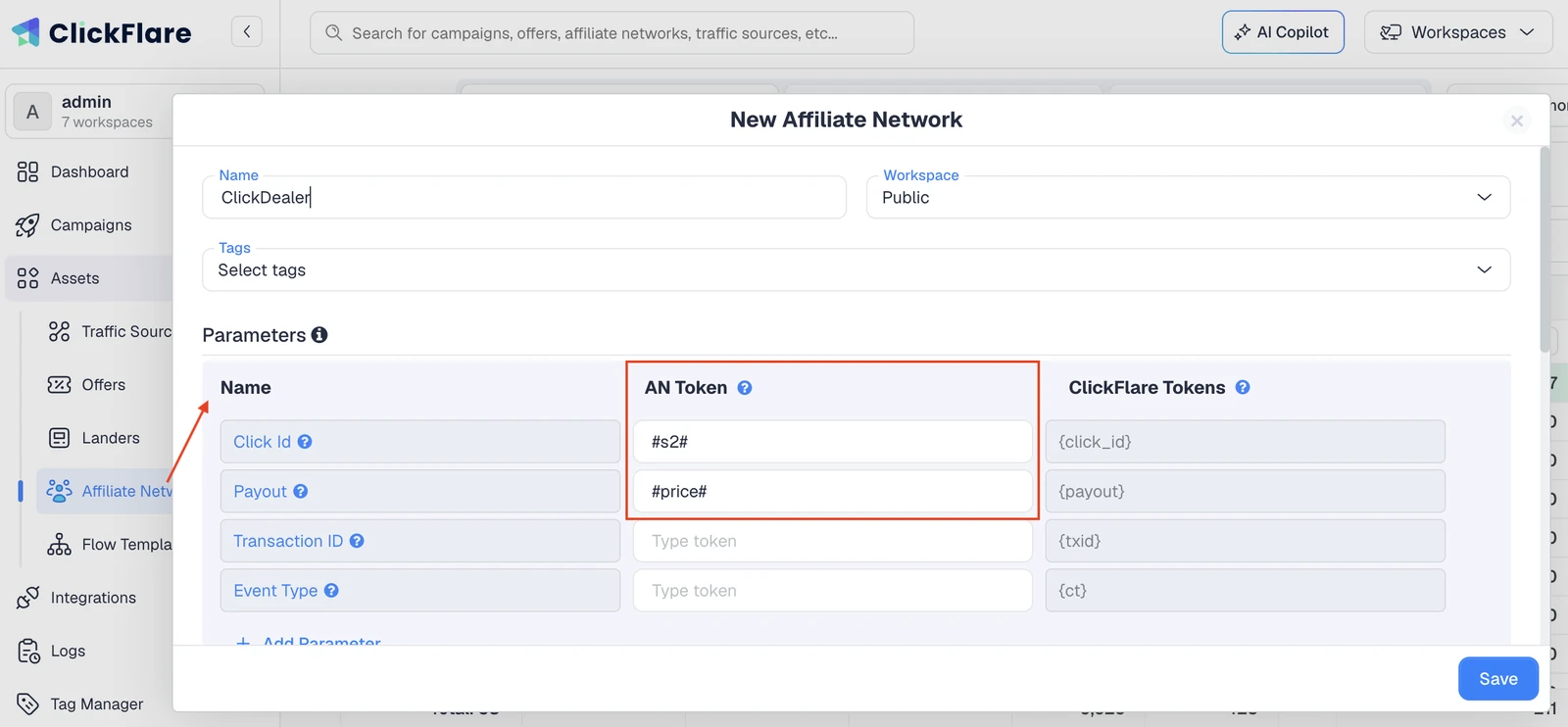
Create a new offer and paste in your offer URL. To make sure conversions can be attributed back to you, append ClickFlare’s click ID token, {cf_click_id}, to the offer URL using the parameter your network uses to store it.
When someone clicks, ClickFlare replaces that token with a unique click ID for the visit. If you added your network from a template, ClickFlare can append the click ID for you automatically. You simply need to turn on the toggle for “Append Click ID to Offer URL”.
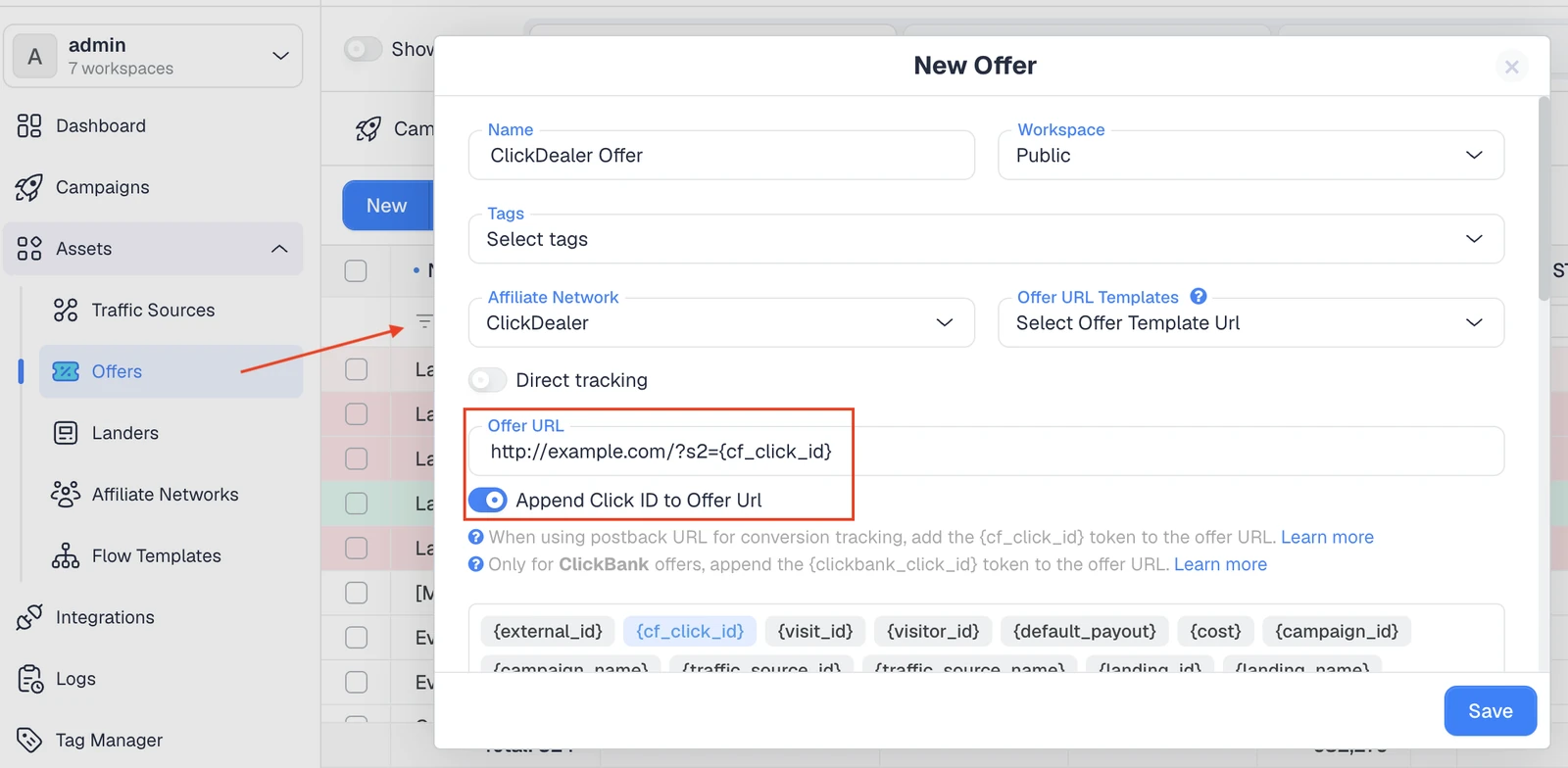
Note that {click_id} works interchangeably with {cf_click_id}, so either one is fine.
This is the piece that closes the loop, and it requires no code. In ClickFlare, you can copy the postback URL and place it in your affiliate network to receive conversions. The postback URL template looks something like this:
https://your-clickflare-domain.com/cf/cv?click_id={click_id}&payout={payout}
Replace the click ID placeholder with the token your affiliate network uses to pass the click ID back, then paste that finished postback URL into the postback field inside your affiliate network’s dashboard. That is it. ClickFlare usually provides ready-made postback templates for each affiliate network. Continuing the example we started above, here is what the postback URL would look like for ClickDealer:

When a conversion happens, the network fires this postback, sends the click ID back to ClickFlare, and ClickFlare matches it to the original click. No scripts, no editing pages, no developer needed. If you want the full background on how this mechanism works, our guide on what a postback URL is explains it in plain language.
Now create a campaign, choose your traffic source and the offer you just set up, and keep the funnel set to the offer only, with no landing page. ClickFlare generates a campaign tracking link for you.
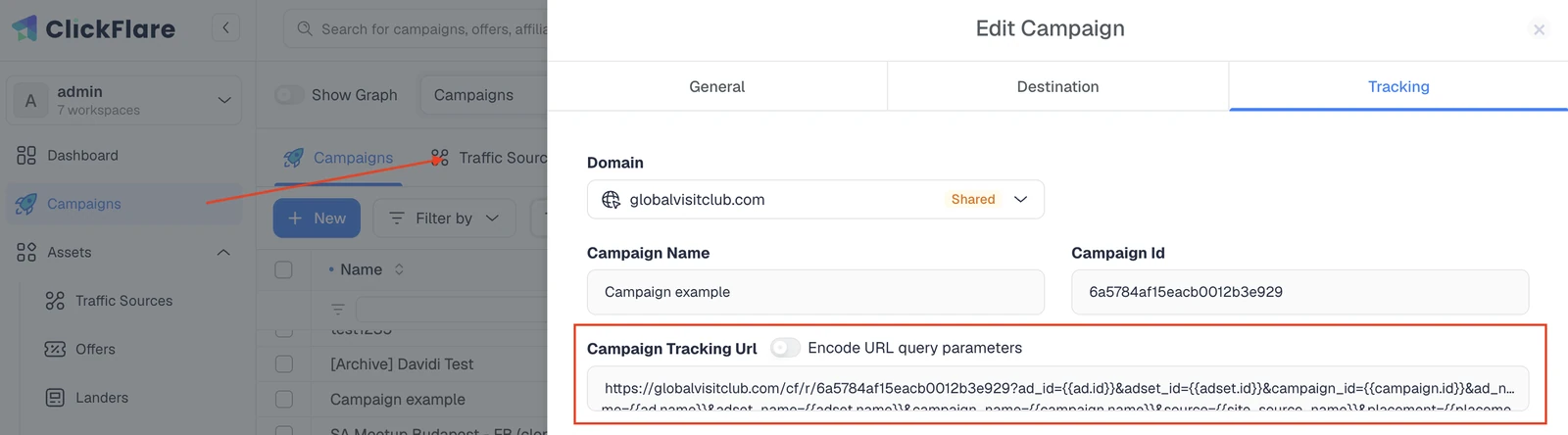
Drop that link into your ad as the destination, and you are done. Traffic clicks the ad, ClickFlare assigns a click ID and redirects straight to the offer, and every conversion flows back through your postback, attributed to the exact ad, campaign, and source that produced it.
One quick note: the setup above uses a redirect, which needs no code. If you are running on a source that does not allow redirects (such as Google Ads), ClickFlare also offers a script based direct tracking method. That one does require adding a small tracking script to your page, so it sits outside the classic no-code direct linking flow described here.
Because everything runs server to server through the postback, your conversion data holds up even when cookies are blocked or cleared, which is one of the main reasons serious affiliates rely on postback tracking. If you are still deciding which tracker to build this on, our roundup of the best ad tracking software in 2026 walks through the options.
So, what is direct linking in the end? It is the leanest way to run an affiliate offer: send traffic straight to the offer with only your tracking link, and skip the landing page entirely. That makes it fast, cheap, and perfect for testing, but it also means giving up pre-sell control, collecting less data, and staying mindful of traffic source rules. Used on the right offers, with clean tracking behind it, direct linking is a genuinely useful play. And with ClickFlare handling the click ID and postback, you get accurate, code-free attribution on every campaign you run.
Direct linking means sending traffic straight to an affiliate offer using only your tracking link, with no landing page in between. The visitor clicks your ad and is redirected directly to the merchant’s page, while your tracker records the click and later matches the conversion.
No. The whole point of direct linking is that there is no landing page. Traffic goes from your ad straight to the offer through your tracking link. You still need a tracker to attribute conversions, but you do not need to build, design, or host any page of your own.
It depends on the platform and the offer. Google Ads enforces strict destination requirements and often disapproves pages that add no unique value, and some networks restrict direct linking. Always check both the traffic source’s policies and your affiliate program’s terms before running it.
You use a tracker with a click ID and a postback. In ClickFlare, you append the {cf_click_id} token to your offer URL, then paste ClickFlare’s postback URL into your affiliate network’s dashboard. When a conversion fires, the network sends the click ID back and ClickFlare attributes it.
Neither is universally better. Direct linking is faster and cheaper and works well for simple or familiar offers. Landing pages give you room to pre-sell, collect data, and convert complex or high-value products. The right choice depends on the offer, the traffic, and the platform’s rules.






