

At a glance
How it works
1
AdStyle sends the click
A visitor clicks your ad in an AdStyle widget. AdStyle opens your ClickFlare campaign URL and fills in its macros: the click ID in
click_id, plus the campaign, widget, ad, location, OS, browser and device.2
ClickFlare records the visit
ClickFlare saves the value of
click_id as the visit’s External ID, applies the cost from your Cost Model, and redirects the visitor to your lander or offer.3
The conversion reaches ClickFlare
Your affiliate network or store posts the conversion back to ClickFlare, matched on the ClickFlare click ID. Your ROI by widget, ad and campaign is complete in ClickFlare.
4
AdStyle learns about the conversion
AdStyle’s conversion pixel on your thank-you page tells AdStyle the visitor converted. AdStyle uses that data to optimize targeting.
The mirror to keep straight: in the campaign URL you write ClickFlare’s parameter (
click_id) and AdStyle’s macro ({click_id}). The template does this for you. If AdStyle gives you an S2S postback URL, you would write AdStyle’s click ID parameter and ClickFlare’s token ({external_id}). See Server-to-server postback.Before you start
- Set up your own tracking domain. Run the campaign on your own custom domain. Shared domains get flagged by networks and blocked by browsers. See Custom Domains.
- Have an offer ready in ClickFlare, and its affiliate network set up to post conversions back to ClickFlare. See Creating an Offer and Adding an Affiliate Network.
- Check you can place a pixel on the conversion page. AdStyle’s conversion tracking is a pixel. You need access to the thank-you page, or an advertiser or affiliate network willing to place it for you.
- Know your CPC bids. AdStyle doesn’t pass cost in the URL, so ClickFlare calculates it from the bid you enter.
Step 1 – Create the campaign and the AdStyle traffic source
- Go to Campaigns and click New.
- In Traffic Source, open the dropdown and click + New Traffic Source.
- Type
ad.stylein the search box and select the Ad.Style template. - Enter a Name, for example
AdStyle. - Leave Cost currency on USD unless your AdStyle account is billed in another currency.
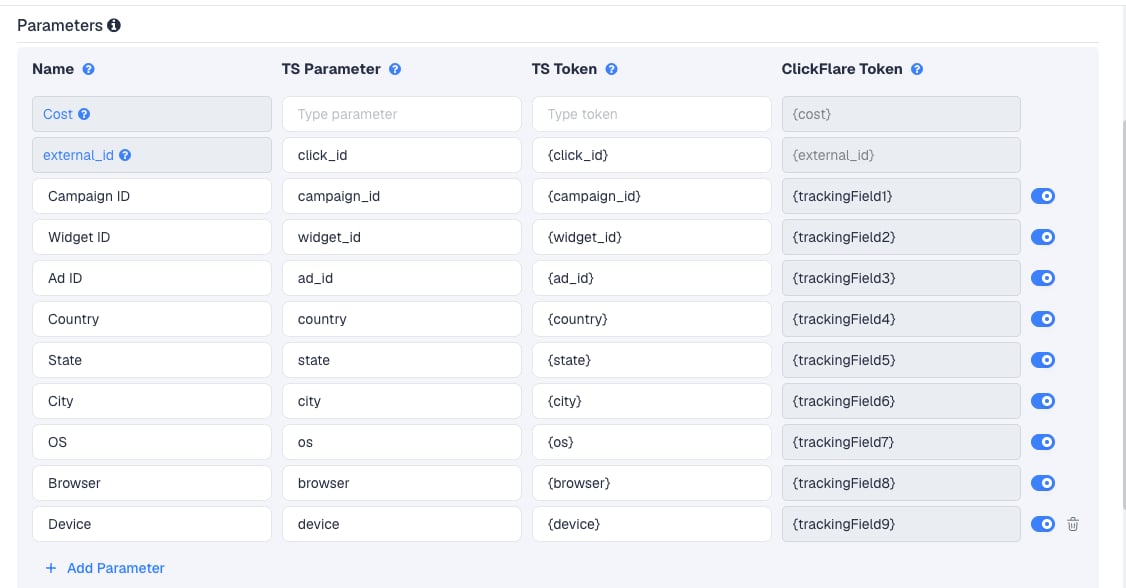
widget_id is the one you will use most: it is AdStyle’s placement, so it shows which publisher widgets convert. ad_id tells you which ad item wins. device matters because you bid separately per device in AdStyle.
To pass more data, click Add Parameter, give it a name and parameter, and enter the AdStyle macro as the TS Token. ClickFlare assigns the next free tracking field.
Step 2 – Set up conversion tracking
AdStyle publishes no S2S postback URL format, and the ClickFlare template has no postback URL. Leave Traffic source postback URL off on the traffic source for now, and click Save. You are back in the campaign editor with the AdStyle traffic source selected. ClickFlare still tracks every conversion through your affiliate network’s postback. What’s missing is AdStyle learning about them. AdStyle’s own route for that is its conversion pixel.AdStyle says that without a conversion pixel, it won’t optimize your campaigns to their full potential. With the pixel installed, its algorithm targets users based on the conversions it sees. Install it even though ClickFlare already tracks your conversions.
Create the AdStyle conversion pixel
- In AdStyle, go to Campaigns and click Settings for the campaign.
- In the Conversion Pixel section, click Create a conversion pixel.
- Name the pixel and, optionally, enter the conversion value. AdStyle uses it to show what you earned in its reports.
- AdStyle offers an optional field for your postback URL, which AdStyle calls when it detects a conversion. You don’t need it for ClickFlare. Leave it empty.
- Save the pixel and copy the code.
- Click Update on the campaign settings to save the change.
Place the pixel
Place the pixel code on the page that confirms the conversion, such as the thank-you page after a purchase or sign-up.- Your own offer or store: add the code to the thank-you page.
- An affiliate offer: ask the affiliate network whether it can place the AdStyle pixel on the offer’s confirmation page. Many networks don’t accept third-party pixels. In that case, AdStyle only sees the clicks, and you rely on ClickFlare for conversions.
Server-to-server postback
AdStyle describes its{click_id} as needed “when you track conversions and pass those back to Ad.Style using server-to-server tracking”. It doesn’t publish the postback URL itself. If you need S2S, for example because you cannot place the pixel:
- Contact AdStyle support at
support@ad.styleand ask for the S2S conversion URL for your account. - On the AdStyle traffic source in ClickFlare, turn on Traffic source postback URL and paste the URL.
- Put ClickFlare’s
{external_id}in the parameter that should carry AdStyle’s click ID. If the URL takes a value, use{payout}there. - Keep Conversions in the event dropdown, or pick the custom conversion AdStyle should receive.
- Click Save.
{cf_click_id} for AdStyle’s click ID. AdStyle needs its own ID back, which ClickFlare stores as {external_id}. See How to Configure a Traffic Source S2S Postback URL.
Step 3 – Finish the campaign and copy its URL
- Name the campaign.
- Set the Cost Model to CPC and enter your AdStyle CPC bid. See Cost.
- Choose Redirect or Direct tracking. Redirect is the usual choice.
- Click Next and, on Destination, add your lander (optional) and your offer.
- Save, open Tracking, select your own tracking domain and copy the campaign URL.
click_id={click_id} and widget_id={widget_id}.
If you use a lander, its call-to-action must link to the ClickFlare click URL, not to the offer directly. Otherwise the visit reaches the offer without a ClickFlare click ID, and the conversion cannot be traced back to the AdStyle click.
See Creating a Campaign in ClickFlare.
Step 4 – Create the campaign in AdStyle
- Sign in to AdStyle, click Campaigns in the left menu, then New Campaign at the top.
- Name the campaign and select the countries or regions to target.
- Enter your CPC for Desktop, Tablet and/or Mobile. Use Advanced Bidding for a different CPC per country. A CPC of 0.00 excludes that device.
- Set a daily and total budget, and start and end dates, if you want them.
- Add the conversion pixel, as described in Step 2.
- Click Create.
- Create the ad items: headline, image and destination URL. Paste the ClickFlare campaign URL as the destination URL.
{...} macro when the ad is clicked. Your campaign launches once AdStyle approves the ad items, usually within a few hours to a day.
AdStyle headlines can use dynamic parameters too, such as
{city}, {country} or {device}, up to 65 characters in total. These are separate from the URL macros above.Step 5 – Test the integration
- Once the campaign is live, click one of your ads, or wait for the first clicks.
- In ClickFlare, open the campaign’s report. The visit should show an AdStyle click ID as its External ID, and values in the widget, ad and device columns.
- If you placed the pixel, complete the offer the way a real visitor would. The conversion should appear in ClickFlare from your affiliate network’s postback, and in AdStyle’s reports from the pixel.
- If you set up an S2S postback, go to Logs → Postback Status and filter by the campaign to confirm ClickFlare sent it.
Cost
The AdStyle template has no cost row. AdStyle doesn’t document a cost macro, so ClickFlare cannot read the price of each click from the URL. Set the campaign’s Cost Model to CPC and enter your AdStyle bid. AdStyle charges per click, so this matches how you pay.AdStyle bids are per device, and Advanced Bidding can set a different bid per country. One CPC in ClickFlare can’t mirror all of them. Use the bid of your main device, or your average CPC from AdStyle’s reports, and update it when you change bids.
Delayed revenue
If you run search arbitrage (RSOC or AFD) behind AdStyle, the feed reports revenue hours or days after the click. ClickFlare records it when it arrives. AdStyle’s pixel can’t carry that revenue. If AdStyle gives you an S2S postback, see Sending Delayed Revenue to Traffic Sources.Troubleshooting
Conversions show in ClickFlare but not in AdStyle
Conversions show in ClickFlare but not in AdStyle
- The pixel isn’t on the confirmation page, or the page didn’t load it. Check the page source after a test conversion.
- The conversion came through a different source. AdStyle only counts visitors who clicked an AdStyle ad all the way to the conversion.
- You are looking at the conversion date. AdStyle shows conversions on the date of the click.
- If you use an S2S postback: check Logs → Postback Status, and that Disable sending postbacks to traffic source is off in the campaign.
Cost in ClickFlare doesn't match AdStyle
Cost in ClickFlare doesn't match AdStyle
- The campaign’s Cost Model isn’t CPC, or the CPC entered is out of date.
- You bid differently per device or country. ClickFlare’s single CPC is an approximation. Correct it with a manual cost upload.
Widget or ad columns are empty
Widget or ad columns are empty
The macros were not replaced, usually because the URL was edited or pasted where AdStyle doesn’t process macros. Paste the campaign URL from ClickFlare unchanged as the ad item’s destination URL.
{state} is only filled where it applies. See Traffic Source Tokens Arriving Empty.No conversions in ClickFlare at all
No conversions in ClickFlare at all
This is not an AdStyle issue. ClickFlare receives conversions from your affiliate network’s postback. Check the offer’s postback and that your lander links to the ClickFlare click URL.
FREQUENTLY ASKED QUESTIONS
Q1: Why is there no postback URL on the AdStyle template?A1: AdStyle doesn’t publish an S2S postback format. Its documented conversion tracking is the conversion pixel on your thank-you page. If AdStyle gives you an S2S URL, you can add it to the traffic source yourself.
Q2: Do I need the AdStyle pixel if ClickFlare already tracks conversions?A2: For your own reporting, no. For AdStyle’s optimization, yes. AdStyle’s algorithm only learns from conversions it sees, and without them it won’t optimize your campaigns to their full potential.
Q3: Can I use the same AdStyle traffic source for all my AdStyle campaigns?A3: Yes. The parameters are the same for every campaign. The pixel is set per AdStyle campaign, in AdStyle.
Q4: Should I use Redirect or Direct tracking with AdStyle?A4: Redirect is the usual choice. Use Direct only if AdStyle must see your lander’s domain as the destination. See Direct Campaign Tracking.
Q5: How long should I run a campaign before optimizing?A5: AdStyle suggests at least two weeks, to collect enough conversions. In ClickFlare, group by
widget_id to see which placements convert before you change bids.
Related
Traffic source postbacks
Every token you can use in a postback.
Cost models
How CPC, CPA and RevShare costs are calculated.
Manual cost upload
Correct spend with AdStyle’s reported figures.
Conversions not showing
The general checklist when conversions don’t arrive.