

- The offer URL sends the ClickFlare click ID to CAKE in
s2. - The postback URL sends it back to ClickFlare with every conversion, together with the payout and a unique conversion ID.
#leadid# rather than #tid#, what happens with events and pending conversions, and how to check that it all works.
How the data flows
Offer URL = their parameter + your token. Postback URL = your parameter + their token. CAKE writes the click ID into
s2 on the way in and reads it back with the #s2# token on the way out. CAKE tokens are wrapped in #, not braces.What you’ll need
- An active ClickFlare account with your own tracking domain set up. Shared domains get flagged by networks and blocked by browsers. See Tracking domains.
- An affiliate account on the network’s CAKE portal, approved for the offer you want to run. CAKE only shows the tracking tab for offers you’re approved on.
- If the network reviews affiliate pixels: a few hours for them to approve your postback. CAKE’s default is that affiliate pixels wait for approval.
What the CAKE template contains
ClickFlare has a Cake (getCAKE.com) affiliate network template. It fills in the CAKE tokens ClickFlare needs.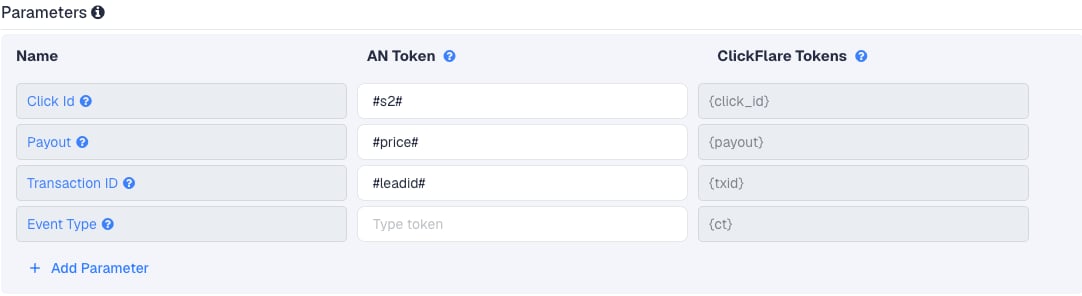
Setup
Everything in ClickFlare is done from inside the campaign editor. Create the offer and the affiliate network inline as you go.1
Set up your own tracking domain
Add a custom tracking domain before anything else, for example
trk.yourdomain.com. The postback URL is built on this domain, so changing it later means updating the postback in every CAKE offer too. See Tracking domains.2
Report conversions by postback time
Go to Settings → General Settings and set Conversion registration time reporting to Postback Timestamp.CAKE reports a conversion on the day it happened. With the default Visit Timestamp, ClickFlare reports it on the day of the original click, so a conversion that comes in days later lands on a different date in each platform. See Conversion registration time.
This is an account-wide setting. It changes the date conversions are reported on for every campaign.
3
Create the campaign
Go to Campaigns → New Campaign, choose Redirect tracking, pick your traffic source and select your tracking domain. See Creating a campaign.
4
Create the CAKE affiliate network
While creating the offer for the campaign, create a new affiliate network in its Affiliate Network field. You can also create it first under Affiliate Networks → + New. Either way:
- Search for Cake and pick the Cake (getCAKE.com) template.
- Name it after the network, for example “CAKE - ClickDealer”. Each CAKE network has its own portal and its own postbacks, so create one affiliate network per CAKE network.
- Change Transaction ID from
#tid#to#leadid#. - Leave Event Type empty.
- Under Conversion tracking, select your own Tracking Domain and keep S2S Postback URL as the tracking method.
- Set Payout currency to the currency the network pays you in.
5
Get the offer's tracking link from CAKE
In the CAKE portal, go to Offers, click the offer’s name and open the Creatives tab. Click Get Link next to the creative you want. The link looks like this:
a is your affiliate ID and c identifies the creative and the campaign. Some portals let you fill in sub IDs before copying. If yours does, type {cf_click_id} in s2. If not, you’ll add it in ClickFlare in the next step.Use
s2, not s1. CAKE reserves s1 for values that repeat, such as a sub-affiliate or placement ID, and limits it to 50 characters. A different value on every click in s1 triggers CAKE’s “Excessive Unique Sub ID” alert. s2 to s5 take up to 100 characters each.6
Create the offer in ClickFlare
In the offer form: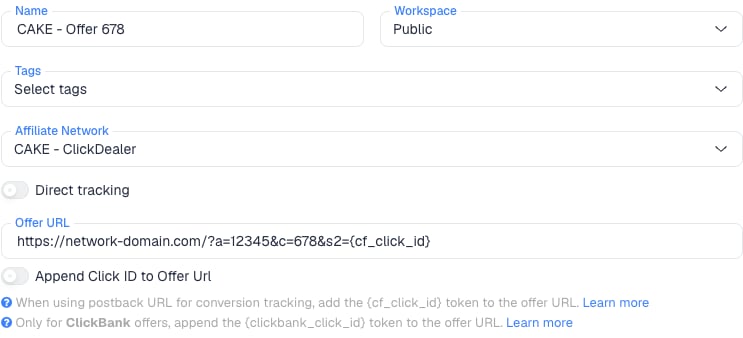
- Name the offer.
- Select the CAKE affiliate network you just created.
- Paste the CAKE link into Offer URL with
&s2={cf_click_id}at the end:
s2, turn on Append Click ID to Offer Url instead. ClickFlare then adds s2={cf_click_id} from the template. Use one or the other, not both.Set the payout to Auto so ClickFlare uses the payout value from the postback.7
Add the postback in CAKE
Back in the CAKE portal, open the same offer and go to its Testing & Tracking tab. You’ll see these fields:If the network reviews pixels, the postback waits for their approval and doesn’t fire until then. Ask your affiliate manager to approve it.
Click Save. The Tokens section on the same tab lists every token this network supports, so you can check
#s2#, #price# and #leadid# are there.The postback is set per offer. CAKE’s account-wide (“global”) affiliate pixel can only be placed by the network, so if you want one postback for all your offers, send the URL to your affiliate manager. If an offer has both, CAKE fires only the offer’s postback.
8
Add a lander (optional)
If you send traffic through a lander before the offer, the lander’s CTA must use the ClickFlare click URL, not the CAKE link. ClickFlare then adds the click ID when it redirects to the offer. See Paths with landers and offers.
9
Save the campaign and launch
Save the campaign, copy the campaign URL from the Tracking tab and use it in your ads. Before you spend money on traffic, run the checks in Verify the setup.
Why the transaction ID matters
By default ClickFlare keeps one conversion per click ID. If several postbacks arrive with the same click ID and no transaction ID, ClickFlare treats them as the same conversion, and you only see one of them (the last one received). Thetxid parameter tells ClickFlare that each postback is a separate conversion, so its value has to be different on every conversion.
With
#leadid#, a sale that follows a lead on the same click, or a second purchase, arrives with its own transaction ID and counts as its own conversion. If CAKE resends the same conversion, it carries the same #leadid# and ClickFlare doesn’t count it twice.
Events and multi-step offers
Some CAKE offers pay on more than one step, for example a lead and then a sale. CAKE calls these events. What that means for you:- One postback covers all published events. CAKE fires your offer’s postback for the conversion and again for every event the network has published to affiliates. Unpublished events don’t fire your postback and pay you nothing.
- There is no per-event postback field in the affiliate portal, and CAKE sends no event name. Every event arrives in ClickFlare as the same conversion type.
#leadid#keeps them apart. Each event gets its own ID, so ClickFlare counts each one. The payout tells them apart in your reports: each event pays its own#price#.
Can I report CAKE events as separate custom conversions?
Can I report CAKE events as separate custom conversions?
Only if your network fills in the
#eid# (event ID) token in affiliate postbacks. That isn’t documented for the affiliate portal, so check the Tokens list on the offer, or ask your affiliate manager. If it works, you can map event IDs to custom conversions with the ct parameter. Otherwise, keep one conversion type and use the payout to tell the steps apart.Pending and rejected conversions
CAKE fires your postback when it records the conversion. If the network reviews conversions before paying, that includes conversions still waiting for review.- CAKE has no status token for affiliates, and it doesn’t send a second postback when a conversion is approved, rejected or scrubbed later.
- ClickFlare therefore counts what CAKE recorded, not what the network finally paid. Compare against the network’s conversion report before payday, and adjust in ClickFlare if the network scrubbed conversions.
Verify the setup
1
Click through the campaign
Open the ClickFlare campaign URL (with a lander, also click the CTA). When the offer loads, the first request goes to the network’s CAKE domain. In the address bar or your browser’s network tab, check that it has
s2= followed by a real ClickFlare click ID, not the literal text {cf_click_id}.2
Generate a test conversion
Ask your affiliate manager to fire a test conversion on your click, or complete the offer if that’s allowed. Don’t rely on CAKE’s Test Mode alone: it can suppress affiliate pixels, and a test fired from the network’s own tool without a real ClickFlare click has no click ID to match.
3
Check the conversion in ClickFlare
The conversion should appear on the campaign with the payout from CAKE. In Logs → Event Logs, check that it arrived with a
txid (CAKE’s lead ID). A conversion fired in Test Mode may arrive with a payout of 0.Troubleshooting
Conversions show in CAKE but not in ClickFlare
Conversions show in CAKE but not in ClickFlare
Work through these in order:
- The postback is waiting for approval. Ask your affiliate manager whether your pixel on that offer is approved.
- The postback is on another offer. CAKE postbacks are per offer. Check the Testing & Tracking tab of the offer you’re running.
- The postback is in Pixel HTML. A URL in the Pixel HTML field is loaded as a browser pixel, if at all. It must be in Postback URL.
- s2 is empty in CAKE. The offer URL is missing
s2={cf_click_id}, or the lander CTA links straight to CAKE instead of using the ClickFlare click URL. - The click ID went into another sub ID. If the offer URL uses
s1ors3but the postback reads#s2#, ClickFlare receives the wrong value. Both sides must use the same sub ID. - The postback uses http on an SSL offer. If the offer has SSL turned on, CAKE requires an
https://postback.
Only one of several conversions shows in ClickFlare
Only one of several conversions shows in ClickFlare
The postback has no
txid, or uses #tid# and the advertiser doesn’t send one. Change the transaction ID to #leadid# in the ClickFlare affiliate network and in the postback on each CAKE offer. Conversions that were already merged are not restored.ClickFlare receives a literal #s2# or cf_click_id
ClickFlare receives a literal #s2# or cf_click_id
- A literal
#s2#means CAKE didn’t replace the token. Check the spelling against the Tokens list on the offer. - A literal
cf_click_idmeans the offer URL in ClickFlare has the token without braces. It must be{cf_click_id}.
The payout is 0 or in the wrong currency
The payout is 0 or in the wrong currency
- Check that the postback has
payout=#price#and the offer’s payout is set to Auto in ClickFlare. - Test Mode conversions pay 0.
#price#has no currency. Set the affiliate network’s Payout currency in ClickFlare to the currency the network pays you in.
FAQ
Why s2 and not s1?
Why s2 and not s1?
CAKE reserves
s1 for recurring values and limits it to 50 characters, and every major tracker uses s2 for its click ID. Any of s2 to s5 works as long as the offer URL and the postback use the same one.My network's portal doesn't look like this
My network's portal doesn't look like this
Many networks customise their CAKE portal or run their own interface on top of CAKE. ClickDealer, for example, has a Tools → Global postback page. The tokens stay the same: if the portal lists
#s2#, #price# and #leadid#, this guide applies.Can I pass more data to CAKE?
Can I pass more data to CAKE?
Yes. Use the other sub IDs in the offer URL, for example
s3={campaign_id}&s4={trackingField1}. CAKE shows them in its reports. Keep s2 for the click ID.Can I send the conversion back to my traffic source?
Can I send the conversion back to my traffic source?
Yes. Once ClickFlare records the CAKE conversion, it can send it to the traffic source through the traffic source’s postback or conversion API integration. Nothing changes on the CAKE side.
Related
Macro reference
Every network’s values
Postback parameters
click_id, txid, ct
Postback issues
Troubleshoot S2S