

- The offer URL sends the ClickFlare click ID to Digistore24 in
cid. - The postback URL sends it back to ClickFlare with every payment, together with your commission and a unique transaction ID.
How the data flows
Offer URL = their parameter + your token. Postback URL = your parameter + their placeholder. Digistore24 stores the click ID from
cid on the way in and returns it with the {cid} placeholder on the way out. Digistore24 placeholders use curly braces and are lowercase.What you’ll need
- An active ClickFlare account with your own tracking domain set up. Shared domains get flagged by networks and blocked by browsers. See Tracking domains.
- A Digistore24 account. Some vendors approve affiliates before you can promote their product, so check that you can get a promolink for it.
What the Digistore24 template contains
ClickFlare has a Digistore24 affiliate network template. It fills in the Digistore24 placeholders ClickFlare needs.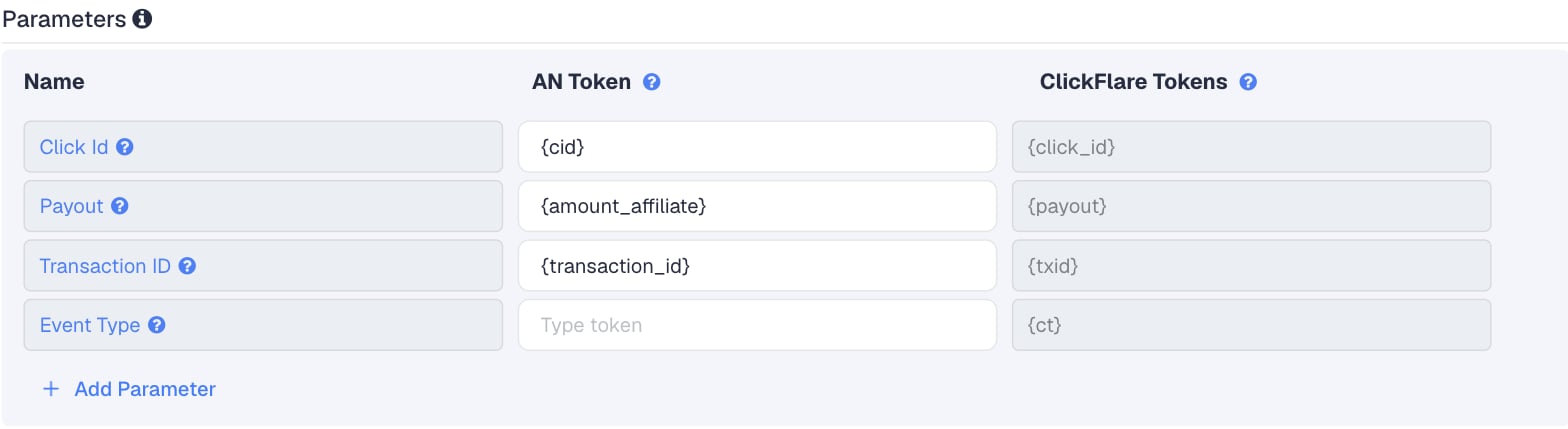
Setup
Everything in ClickFlare is done from inside the campaign editor. Create the offer and the affiliate network inline as you go.1
Set up your own tracking domain
Add a custom tracking domain before anything else, for example
trk.yourdomain.com. The postback URL is built on this domain, so changing it later means updating the postback in Digistore24 too. See Tracking domains.2
Report conversions by postback time
Go to Settings → General Settings and set Conversion registration time reporting to Postback Timestamp.Digistore24 reports a sale on the day it happened, and rebills come in weeks or months after the click. With the default Visit Timestamp, ClickFlare reports each payment on the day of the original click. See Conversion registration time.
This is an account-wide setting. It changes the date conversions are reported on for every campaign.
3
Create the campaign
Go to Campaigns → New Campaign, choose Redirect tracking, pick your traffic source and select your tracking domain. See Creating a campaign.
4
Create the Digistore24 affiliate network
While creating the offer for the campaign, create a new affiliate network in its Affiliate Network field. You can also create it first under Affiliate Networks → + New. Either way:
- Search for Digistore24 and pick the template.
- Keep the name “Digistore24”, or add your account name if you run more than one.
- Check that Click Id is
{cid}, Payout is{amount_affiliate}and Transaction ID is{transaction_id}. - Leave Event Type empty.
- Under Conversion tracking, select your own Tracking Domain and keep S2S Postback URL as the tracking method.
- Set Payout currency to the currency you will pick in the Digistore24 postback connection (see below).
5
Get the promolink from Digistore24
In Digistore24, open the Marketplace, find the product and click Promote now. Copy the promolink. It looks like this:
123456 is the product ID and youraffname is your affiliate name. Older promolinks start with www.digistore24.com/redir/ and work the same way.Use
cid for the click ID. The optional third path segment, the campaign key, is for a short, fixed campaign name (up to 23 characters), not a per-click value. There is no aff parameter: your affiliate name is already in the path.6
Create the offer in ClickFlare
In the offer form: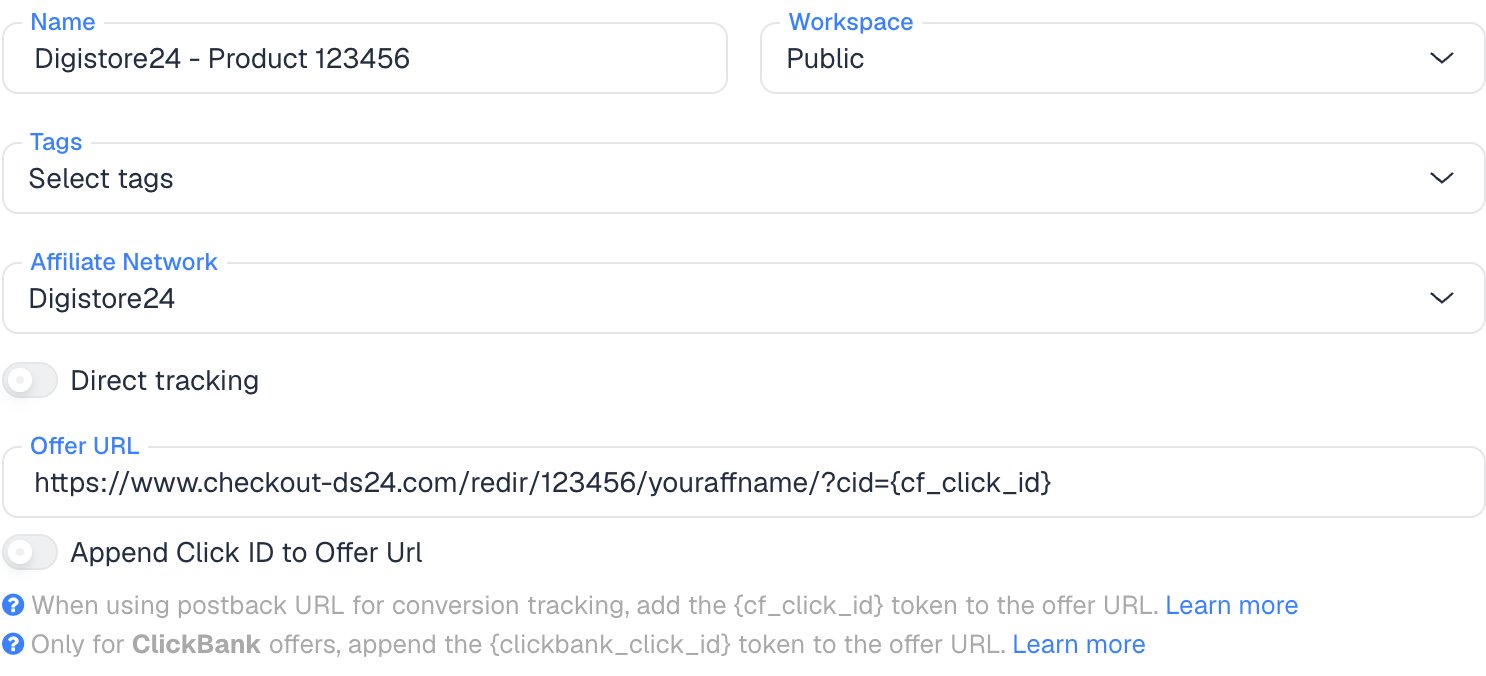
- Name the offer.
- Select the Digistore24 affiliate network you just created.
- Paste the promolink into Offer URL with
?cid={cf_click_id}at the end:
?. If your link already has a ? in it, add &cid={cf_click_id} instead.If you pasted the link without cid, you can turn on Append Click ID to Offer Url instead. ClickFlare then adds cid={cf_click_id} from the template. Use one or the other, not both.Set the payout to Auto so ClickFlare uses the payout value from the postback.7
Add the S2S postback in Digistore24
In Digistore24, go to Sales & partners → Integrations, click Add new connection and choose S2S postback. Older guides and menus call this Account → S2S postback or Settings → Integration (IPN). Then set:
Save the connection.
The connection applies to your whole account, limited by the products you select, and you can add more than one. The Tracking page in the account settings is a different feature for browser pixels. For ClickFlare, use the S2S postback.
8
Add a lander (optional)
If you send traffic through a lander before the offer, the lander’s CTA must use the ClickFlare click URL, not the promolink. ClickFlare then adds the click ID when it redirects to the offer. See Paths with landers and offers.
9
Save the campaign and launch
Save the campaign, copy the campaign URL from the Tracking tab and use it in your ads. Before you spend money on traffic, run the checks in Verify the setup.
Why the transaction ID matters
By default ClickFlare keeps one conversion per click ID. If several postbacks arrive with the same click ID and no transaction ID, ClickFlare treats them as the same conversion, and you only see one of them (the last one received). Thetxid parameter tells ClickFlare that each postback is a separate conversion, so its value has to be different on every conversion.
In Digistore24, a transaction is a single payment, refund or chargeback, and it gets its own ID. An order is the initial sale plus up to three upsells, and all of them share one order ID.
With
{transaction_id}, the main sale, each upsell and each rebill arrive as separate conversions, and a resent transaction keeps its ID, so it isn’t counted twice.
Upsells, rebills and refunds
Digistore24 sends one postback per transaction. What that means for you:- Upsells. Each upsell is its own transaction, with its own
{transaction_id}and{amount_affiliate}. A main product plus two upsells means three postbacks and three conversions on the same click. - Rebills. On subscriptions and installment plans, each recurring payment is a new payment transaction with a new
{transaction_id}. It fires the postback again, often weeks after the click. - Refunds and chargebacks. These are also separate transactions with their own IDs. If the connection fires on them, ClickFlare counts each refund or chargeback as a new conversion, not as a reversal of the sale.
Track refunds separately
If you want to see refunds in ClickFlare, add a second S2S postback connection that fires only on the refund event (and, if you want, the chargeback event), with&ct=refund at the end of the URL:
refund first. Refunds then land in their own column instead of adding to your sales. Digistore24’s documentation doesn’t say whether {amount_affiliate} is negative on a refund, so check the amount on the first refund you receive. Digistore24 sends no postback for partial refunds.
Split front-end sales and upsells
{order_type} tells you whether a payment is the main sale (initial_sale) or an upsell. To report them as separate columns, set Event Type to {order_type} in the ClickFlare affiliate network, or add &ct={order_type} to the postback URL:
¶m1={order_type}¶m2={upsell_no}¶m3={billing_type}. {upsell_no} is 0 for the main product and the upsell’s number otherwise. {billing_type} is single_payment, subscription or installment. See Postback parameters.
Verify the setup
1
Click through the campaign
Open the ClickFlare campaign URL (with a lander, also click the CTA). When the offer loads, the first request goes to the Digistore24 promolink. Check that it has
cid= followed by a real ClickFlare click ID, not the literal text {cf_click_id}.2
Make a test purchase
A test without a real ClickFlare click has nothing to match. After your click, buy the product or ask the vendor for a test order. Test orders have
{is_test} = 1: add ¶m4={is_test} to spot them.3
Check the connection's log
In Sales & partners → Integrations, open the Log tab. It shows each call Digistore24 sent and the response it got.
4
Check the conversion in ClickFlare
The conversion should appear on the campaign with your commission as the payout. In Logs → Event Logs, check that it has a
txid.Troubleshooting
Sales show in Digistore24 but not in ClickFlare
Sales show in Digistore24 but not in ClickFlare
Work through these in order:
- The connection doesn’t cover the product. Check the products selected in the S2S postback connection. A product you started promoting later may not be included.
- The payment event isn’t ticked. The connection must fire on payments.
- The connection isn’t active. Check its status.
- cid is missing. The offer URL doesn’t have
cid={cf_click_id}, uses&on a link with no?, or the lander CTA links straight to the promolink instead of using the ClickFlare click URL. - You set up a tracking pixel instead. A pixel on the Tracking page isn’t an S2S postback.
Conversions or revenue go up after refunds
Conversions or revenue go up after refunds
The connection fires on refund or chargeback events, so each one arrives as a new conversion. Untick those events in the sales connection. If you want refunds in ClickFlare, send them through a separate connection with
&ct=refund, as in Track refunds separately.Upsells or rebills don't show as separate conversions
Upsells or rebills don't show as separate conversions
The transaction ID is
{order_id} or missing. Every upsell and rebill shares the order ID, so ClickFlare keeps only the last one. Change the transaction ID to {transaction_id} in the ClickFlare affiliate network and in the Digistore24 postback URL. Conversions that were already merged are not restored.ClickFlare receives a literal {cid} or cf_click_id
ClickFlare receives a literal {cid} or cf_click_id
- A literal
{cid}means Digistore24 didn’t replace the placeholder. Check the spelling: Digistore24 placeholders are lowercase. - A literal
cf_click_idmeans the offer URL in ClickFlare has the token without braces. It must be{cf_click_id}.
The payout is wrong or in the wrong currency
The payout is wrong or in the wrong currency
- Check that the postback has
payout={amount_affiliate}, not{amount_vendor}or{amount_brutto}, and the offer’s payout is set to Auto in ClickFlare. - Amounts follow the currency set in the S2S postback connection, which may default to EUR. Set the same currency as Payout currency in the ClickFlare affiliate network.
FAQ
Can I pass more data to Digistore24?
Can I pass more data to Digistore24?
Yes. Add
sid1 to sid5 to the offer URL, for example &sid1={campaign_id}&sid2={trackingField1}. Digistore24 returns them in the {sid1} to {sid5} placeholders. Keep cid for the click ID.Can I send the conversion back to my traffic source?
Can I send the conversion back to my traffic source?
Yes. Once ClickFlare records the Digistore24 conversion, it can send it to the traffic source through the traffic source’s postback or conversion API integration. Nothing changes on the Digistore24 side.
Related
Macro reference
Every network’s values
Custom conversions
Split sales and refunds
ClickBank
A similar marketplace