

- The offer URL sends the ClickFlare click ID to CrakRevenue in
aff_sub. - The postback URL sends it back to ClickFlare with every conversion, together with the payout and a transaction ID.
How the data flows
Offer URL = their parameter + your token. Postback URL = your parameter + their macro. CrakRevenue writes the click ID into
aff_sub on the way in and reads it back with the {aff_sub} macro on the way out. If you put the click ID in another sub ID, such as aff_sub2, the postback has to read that same one.What you’ll need
- An active ClickFlare account with your own tracking domain set up. Shared domains get flagged by networks and blocked by browsers. See Tracking domains.
- A CrakRevenue affiliate account, with the offer’s terms accepted. CrakRevenue only gives you a tracking link after you click Agree on the offer.
- For a global postback: a message to CrakRevenue support or your affiliate manager. Offer postbacks you add yourself.
What the CrakRevenue template contains
ClickFlare has a CrakRevenue affiliate network template. It fills in the CrakRevenue macros ClickFlare needs.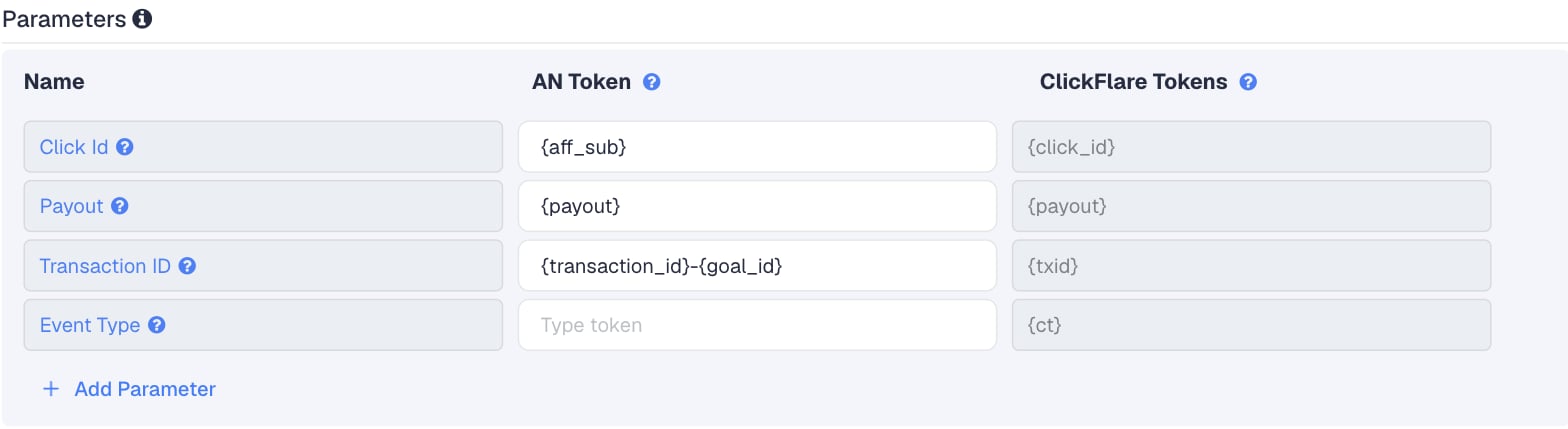
Setup
Everything in ClickFlare is done from inside the campaign editor. Create the offer and the affiliate network inline as you go.1
Set up your own tracking domain
Add a custom tracking domain before anything else, for example
trk.yourdomain.com. The postback URL is built on this domain, so changing it later means updating the postback on every CrakRevenue offer too, or asking support to change your global postback. See Tracking domains.2
Report conversions by postback time
Go to Settings → General Settings and set Conversion registration time reporting to Postback Timestamp.CrakRevenue reports a conversion on the day it happened. With the default Visit Timestamp, ClickFlare reports it on the day of the original click, so a DOI or a sale that comes in days later lands on a different date in each platform. See Conversion registration time.
This is an account-wide setting. It changes the date conversions are reported on for every campaign.
3
Create the campaign
Go to Campaigns → New Campaign, choose Redirect tracking, pick your traffic source and select your tracking domain. See Creating a campaign.
4
Create the CrakRevenue affiliate network
While creating the offer for the campaign, create a new affiliate network in its Affiliate Network field. You can also create it first under Affiliate Networks → + New. Either way:
- Search for CrakRevenue and pick the CrakRevenue template.
- Keep the name, or add your account to it if you run more than one.
- Check that Transaction ID is
{transaction_id}-{goal_id}. - Leave Event Type empty.
- Under Conversion tracking, select your own Tracking Domain and keep S2S Postback URL as the tracking method.
- Set Payout currency to the currency your CrakRevenue account is paid in.
5
Get the offer's tracking link from CrakRevenue
In CrakRevenue, go to Offers, find the offer and open it. Accept its terms with Agree. The link generator, Link Customization, then builds your tracking link. In it you can:
- pick an auto-optimized landing page or choose one yourself,
- pick creatives,
- add a source and Sub IDs. Values you type there appear in the link.
{cf_click_id} into the first Sub ID field, or leave the sub IDs empty and add the click ID in ClickFlare in the next step. If you type it here, check that the generated link contains aff_sub={cf_click_id}. If the value lands in another parameter, such as aff_sub2, change the template’s Click Id to match, for example {aff_sub2}.6
Create the offer in ClickFlare
In the offer form: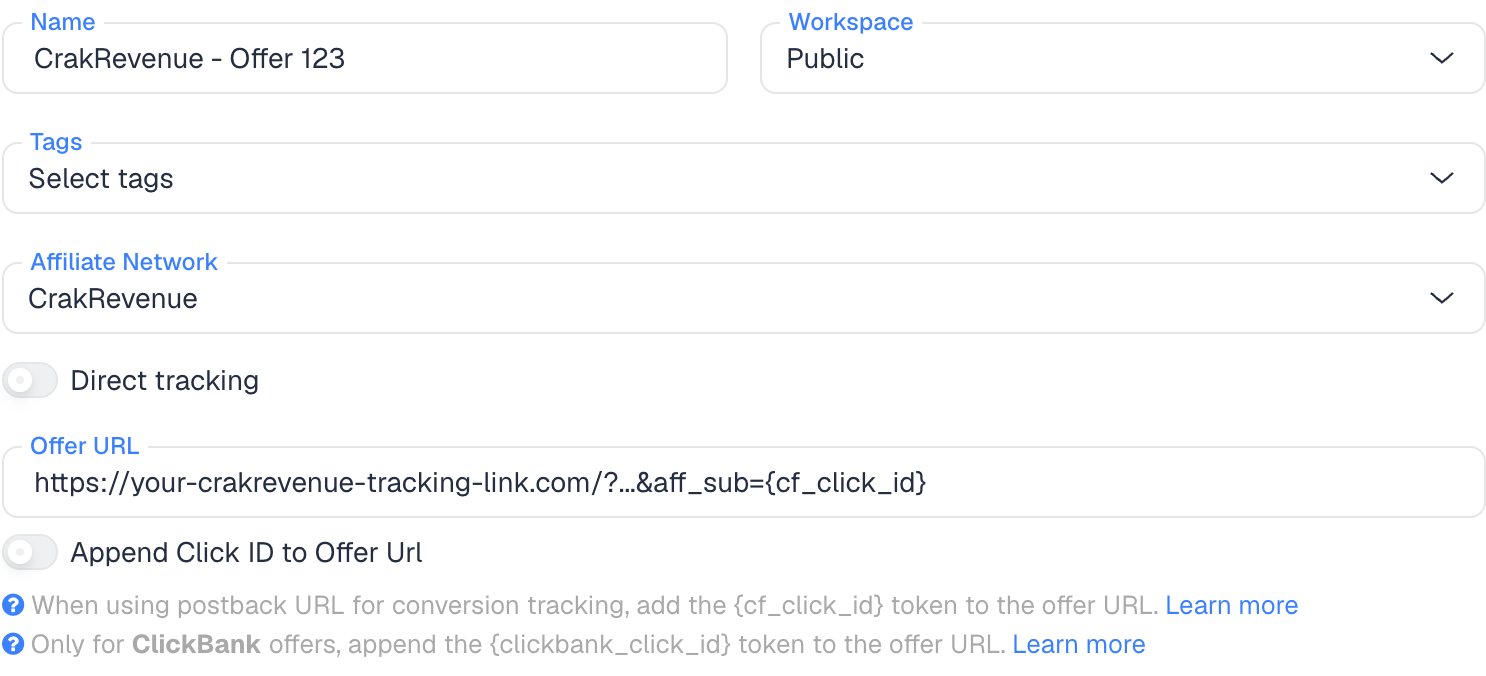
- Name the offer.
- Select the CrakRevenue affiliate network you just created.
- Paste the CrakRevenue link into Offer URL. If it doesn’t have
aff_subyet, add&aff_sub={cf_click_id}at the end, or?aff_sub={cf_click_id}if the link has no?:
aff_sub, you can turn on Append Click ID to Offer Url instead. ClickFlare then adds aff_sub={cf_click_id} from the template. Use one or the other, not both, and leave the toggle off if the link already has aff_sub from the Sub ID field.Set the payout to Auto so ClickFlare uses the payout value from the postback. Payouts differ per goal on Multi-CPA offers and per sale on RevShare, so a fixed payout would be wrong.7
Add the postback in CrakRevenue
Back in CrakRevenue, open the same offer and expand Postbacks options. Then:
- Leave Goal on Default. On offers with several goals, see Offers with several goals first.
- Choose https if your tracking domain has SSL, otherwise http.
- In Type your postback URL here, paste the rest of the ClickFlare postback URL, without the
https://part. Add Optional Variables inserts CrakRevenue macros if you want to add more, for example¶m1={offer_id}. - Click Create Postback.
8
Add a lander (optional)
If you send traffic through a lander before the offer, the lander’s CTA must use the ClickFlare click URL, not the CrakRevenue link. ClickFlare then adds the click ID when it redirects to the offer. See Paths with landers and offers.
9
Save the campaign and launch
Save the campaign, copy the campaign URL from the Tracking tab and use it in your ads. Before you spend money on traffic, run the checks in Verify the setup.
Offer postback or global postback
CrakRevenue has two ways to place your postback:
CrakRevenue calls the global postback its most reliable tracking option. To get one, send the ClickFlare postback URL to CrakRevenue support (chat or support@crakrevenue.com) or to your affiliate manager.
A global postback may only fire for an offer’s default goal. Ask support whether yours also fires for DOI and PPS goals on Multi-CPA offers. If it doesn’t, add offer postbacks only for the goals it doesn’t cover.
Why the transaction ID includes the goal
By default ClickFlare keeps one conversion per click ID. If several postbacks arrive with the same click ID and no transaction ID, ClickFlare treats them as the same conversion, and you only see one of them (the last one received). Thetxid parameter tells ClickFlare that each postback is a separate conversion, so its value has to be different on every conversion.
CrakRevenue’s macros follow TUNE’s. In TUNE, {transaction_id} is the ID of the click session, not of the conversion: a SOI, a DOI and a sale on the same click all carry the same value. Adding {goal_id} makes it unique per click and goal. The TUNE guide explains this in more detail.
CrakRevenue’s macro list has no conversion ID.
RevShare and repeat purchases
RevShare offers pay for as long as the user spends, including token and credit purchases. CrakRevenue doesn’t document whether each purchase or rebill fires your postback. If it does, every purchase on the same click and goal carries the same{transaction_id}-{goal_id}, and ClickFlare keeps only the last one received.
If you run RevShare offers and need each purchase in ClickFlare, ask your affiliate manager whether purchases fire the postback and whether any macro is unique per purchase. Until then, compare RevShare earnings with CrakRevenue’s own stats.
Offers with several goals
On a Multi-CPA offer, one offer pays on several goals: SOI (single opt-in), DOI (double opt-in) and PPS (a sale). Each goal has its own goal ID and its own payout. In Postbacks options, the Goal dropdown attaches a postback to one goal.- Start with Goal on Default, which is what CrakRevenue’s own instructions say. With
txid={transaction_id}-{goal_id}, each goal that fires arrives as its own conversion, and the payout tells them apart. - If DOI or PPS conversions don’t reach ClickFlare, the default postback isn’t firing for those goals. Add one postback per goal: open Postbacks options again, pick the goal in Goal, and paste the same URL.
- To report each goal as its own column in ClickFlare, give each goal’s postback its own
&ct=and a custom conversion parameter at the end:
Pending and rejected conversions
CrakRevenue has no status macro and doesn’t document a postback for rejected conversions or chargebacks. Treat ClickFlare’s numbers as recorded conversions, and compare them with CrakRevenue’s stats before payday.Verify the setup
1
Click through the campaign
Open the ClickFlare campaign URL (with a lander, also click the CTA). When the offer loads, the first request goes to the CrakRevenue tracking link. Check that it has
aff_sub= followed by a real ClickFlare click ID, not the literal text {cf_click_id}. The offer you land on can change with your country and device, because CrakRevenue applies the offer’s targeting.2
Test the postback
CrakRevenue doesn’t document a postback test tool for affiliates. Ask your affiliate manager to fire a test conversion on your click. To check the ClickFlare side on its own, open the postback URL in your browser with the click ID from the previous step and real values in place of the macros.
3
Check the conversion in ClickFlare
The conversion should appear on the campaign with the payout from CrakRevenue. In Logs → Event Logs, check that its
txid has the transaction ID and the goal. If you see {goal_id} literally, the macro wasn’t replaced: check the spelling in the postback.Troubleshooting
Conversions show in CrakRevenue but not in ClickFlare
Conversions show in CrakRevenue but not in ClickFlare
Work through these in order:
- The postback is on another offer or goal. Offer postbacks cover one offer and one goal. Open Postbacks options on the offer you’re running.
- aff_sub is empty in CrakRevenue. The offer URL is missing
aff_sub={cf_click_id}, or the lander CTA links straight to CrakRevenue instead of using the ClickFlare click URL. - The sub ID doesn’t match. The click ID went into
aff_sub2but the postback reads{aff_sub}, or the other way around. - You’re waiting for a global postback. Check with support that it was set up, and on which goals.
A SOI shows but the DOI or sale doesn't
A SOI shows but the DOI or sale doesn't
Either the postback isn’t attached to that goal, or the transaction ID has no goal in it. Check that the ClickFlare network and the CrakRevenue postback both use
{transaction_id}-{goal_id}, then add a postback for the missing goal. Conversions that were already merged are not restored.Conversions are counted twice
Conversions are counted twice
You have a global postback and an offer postback for the same offer, or two postbacks on the same goal. Remove the extra one. CrakRevenue warns against keeping offer postbacks next to a global one.
ClickFlare receives a literal macro
ClickFlare receives a literal macro
- A literal
{transactionid}or similar means the macro is misspelled. Use CrakRevenue’s own spelling from Add Optional Variables:{transaction_id}, with an underscore. Some tracker guides write{transactionid}, which CrakRevenue’s list doesn’t have. - A literal
cf_click_idmeans the offer URL in ClickFlare has the token without braces. It must be{cf_click_id}.
The payout is 0 or in the wrong currency
The payout is 0 or in the wrong currency
- Check that the postback has
payout={payout}and the offer’s payout is set to Auto in ClickFlare. - Use
{payout}, not{sale_amount}:{sale_amount}is what the advertiser earned. - Set the affiliate network’s Payout currency to your account’s currency. To check what CrakRevenue sends, add
¶m1={currency}to the postback: it returns a 3-letter currency code.
FAQ
Does this work with CrakRevenue's Smartlink?
Does this work with CrakRevenue's Smartlink?
The Smartlink routes each visitor to one of hundreds of offers and supports custom Sub IDs. CrakRevenue doesn’t document whether Smartlink conversions use the same postback macros. Pass
{cf_click_id} in aff_sub the same way, and ask your affiliate manager which postback, offer or global, covers Smartlink conversions.Can I pass more data to CrakRevenue?
Can I pass more data to CrakRevenue?
Yes. Use
aff_sub2 to aff_sub5 and source in the offer URL, for example aff_sub2={campaign_id}&source={trackingField1}. CrakRevenue shows them in its stats. Keep aff_sub for the click ID.Can I send the conversion back to my traffic source?
Can I send the conversion back to my traffic source?
Yes. Once ClickFlare records the CrakRevenue conversion, it can send it to the traffic source through the traffic source’s postback or conversion API integration. Nothing changes on the CrakRevenue side.
Related
Macro reference
Every network’s values
TUNE guide
Same macro set
Custom conversions
Report each goal