

- The offer URL sends the ClickFlare click ID to Dr.Cash in
sub1. - The postback URL sends it back to ClickFlare with the payout and the lead’s ID.
How the data flows
Offer URL = their parameter + your token. Postback URL = your parameter + their macro. Dr.Cash writes the click ID into
sub1 on the way in and reads it back with the {sub1} macro on the way out. The parameter is lowercase sub1.What you’ll need
- An active ClickFlare account with your own tracking domain set up. Shared domains get flagged by networks and blocked by browsers. See Tracking domains.
- A Dr.Cash affiliate account with access to the offer you want to run.
What the Dr.Cash template contains
ClickFlare has a Dr.Cash affiliate network template. It fills in the Dr.Cash macros ClickFlare needs.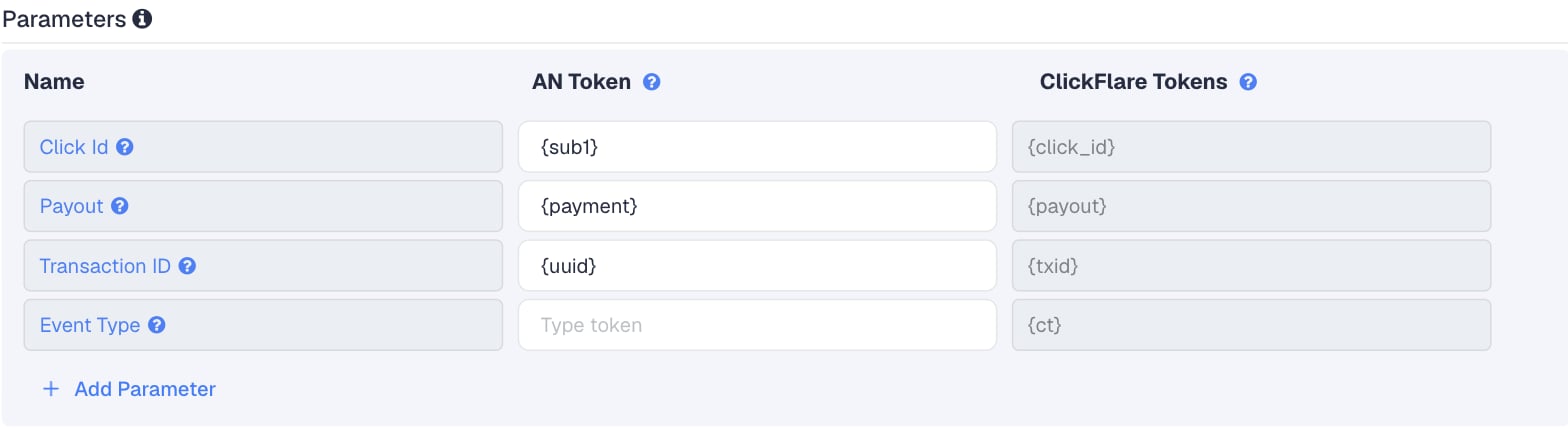
The Transaction ID field was added to the template in October 2026. If you created your Dr.Cash network in ClickFlare before that, add
{uuid} to Transaction ID, then copy the new postback URL into Dr.Cash.Setup
Everything in ClickFlare is done from inside the campaign editor. Create the offer and the affiliate network inline as you go.1
Set up your own tracking domain
Add a custom tracking domain before anything else, for example
trk.yourdomain.com. The postback URL is built on this domain, so changing it later means updating the postback in Dr.Cash too. See Tracking domains.2
Report conversions by postback time
Go to Settings → General Settings and set Conversion registration time reporting to Postback Timestamp.On COD offers, the approval comes in long after the click. With the default Visit Timestamp, ClickFlare reports the conversion on the day of the original click, so yesterday’s numbers keep changing as approvals arrive, and the dates don’t match Dr.Cash’s. See Conversion registration time.
This is an account-wide setting. It changes the date conversions are reported on for every campaign.
3
Create the campaign
Go to Campaigns → New Campaign, choose Redirect tracking, pick your traffic source and select your tracking domain. See Creating a campaign.
4
Create the Dr.Cash affiliate network
While creating the offer for the campaign, create a new affiliate network in its Affiliate Network field. You can also create it first under Affiliate Networks → + New. Either way:
- Search for Dr.Cash and pick the template.
- Check that Click Id is
{sub1}, Payout is{payment}and Transaction ID is{uuid}. - Leave Event Type empty.
- Under Conversion tracking, select your own Tracking Domain and keep S2S Postback URL as the tracking method.
- Set Payout currency to the currency Dr.Cash pays you in.
5
Create a campaign (stream) in Dr.Cash
In Dr.Cash, a tracking link belongs to a campaign, also called a stream or flow. You create one per offer:
- Go to Offers and select the offer.
- Click Create Campaign.
- Enter a name and choose the landing and prelanding pages Dr.Cash should use.
- In the sub1 field, type
{cf_click_id}. Or leave it empty and addsub1in ClickFlare in the next step. - If the form has a Global Postback toggle, make sure it’s on. Otherwise this campaign won’t fire your global postback.
- Create the campaign and copy the Campaign URL.
6
Create the offer in ClickFlare
In the offer form: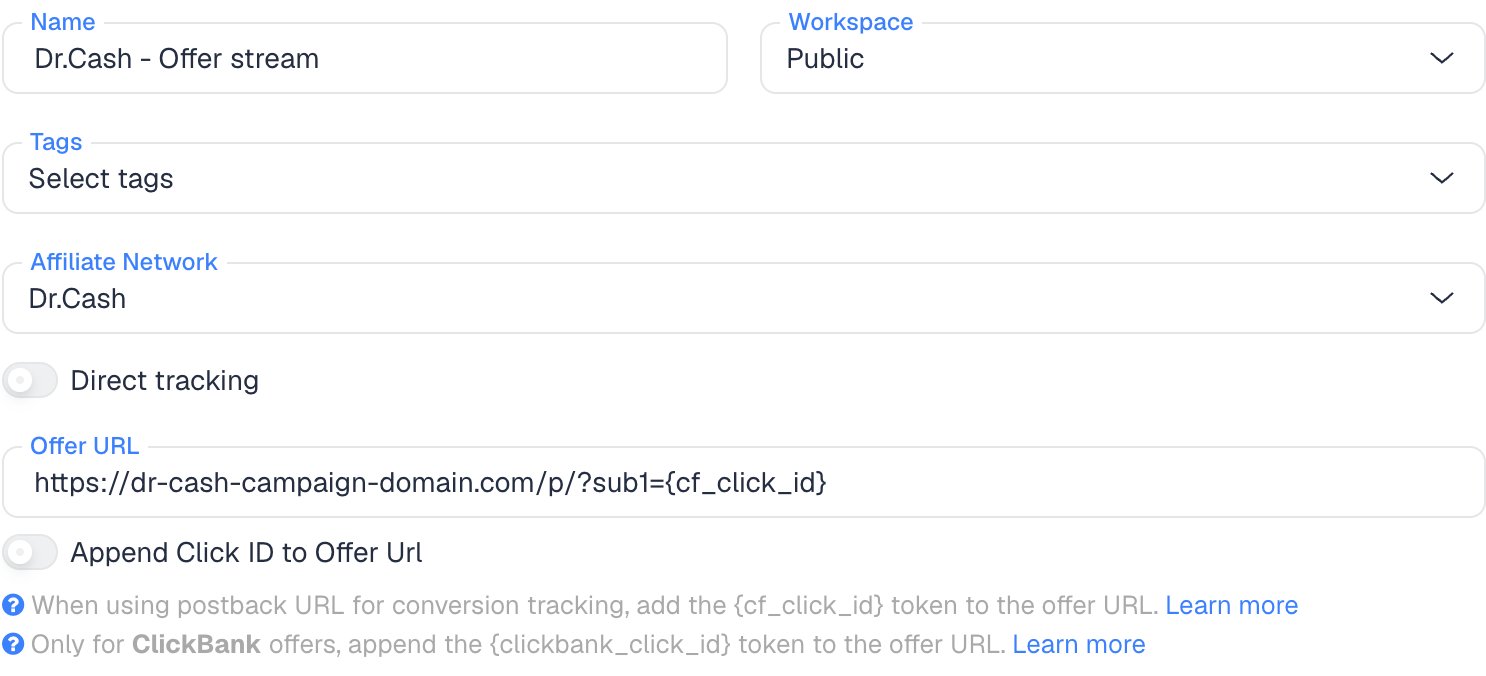
- Name the offer.
- Select the Dr.Cash affiliate network you just created.
- Paste the Campaign URL into Offer URL. If it doesn’t have
sub1yet, add&sub1={cf_click_id}at the end, or?sub1={cf_click_id}if the URL has no?yet:
sub1, you can turn on Append Click ID to Offer Url instead. ClickFlare then adds sub1={cf_click_id} from the template. Use one way only: don’t fill the sub1 field in Dr.Cash, add it to the URL and turn on the toggle all at once.Set the payout to Auto so ClickFlare uses the payout value from the postback.7
Add the global postback in Dr.Cash
In Dr.Cash, go to Settings → Global postback (some guides call it Tools → Global Postback). Then:
- Paste the ClickFlare postback URL into the URL field.
- Tick Conversion confirmation only. Leave New conversion unticked. See Which statuses to tick.
- Click Save changes.
8
Add a lander (optional)
Dr.Cash offers often come with their own prelanders, picked when you create the campaign. If you use your own lander instead, its CTA must use the ClickFlare click URL, not the Dr.Cash link. ClickFlare then adds the click ID when it redirects to the offer. See Paths with landers and offers.
9
Save the campaign and launch
Save the campaign, copy the campaign URL from the Tracking tab and use it in your ads. Before you spend money on traffic, run the checks in Verify the setup.
Which statuses to tick
A Dr.Cash lead has one of four statuses:
The Global postback page has a checkbox per event. The two that matter are New conversion, which fires when the lead is created, and Conversion confirmation, which fires when the lead is approved.
Recommended: Conversion confirmation only
Tick only Conversion confirmation. ClickFlare then receives a postback only for approved leads, so every conversion in your reports is one Dr.Cash pays you for, with the right payout. The trade-off is timing: conversions show up only after the call, hours or days after the click. Judge a campaign on yesterday’s or last week’s numbers, not the last hour. This matters on COD because approval rates are low: approved leads are often a minority of leads. If ClickFlare counted every new lead with its payout, your reported revenue would be several times what you’re paid.Alternative: New conversion and Conversion confirmation
You can also tick New conversion to see leads as soon as they come in. Know what ClickFlare does with them first:- Both postbacks are the same conversion. The lead postback and the later approval carry the same click ID and the same
{uuid}. ClickFlare keeps one conversion per click ID and transaction ID, and the last postback received replaces the earlier one. So an approved lead is counted once, not twice. - Leads that are never approved stay counted. A lead that is rejected after the call never gets a confirmation postback, so the lead postback stays in ClickFlare as a conversion. Dr.Cash most likely sends the offer payout with the lead postback as well, so these leads also count as revenue. Check a lead postback in Dr.Cash’s postback log to see what it sends.
- You don’t get a lead column and an approval column. Adding
&ct={status}to the URL tags each conversion with its latest status (holdorapproved), as long as you create matching custom conversions with the parametersholdandapproved. Because the approval replaces the lead, you see each lead’s current status, not a count of leads next to a count of approvals.
ct values and different transaction IDs. Dr.Cash lets you set a separate postback URL per status inside a campaign (stream), which overrides the global postback. Whether Dr.Cash accepts text after a macro, such as txid={uuid}-lead, isn’t documented, so check it in the postback log before relying on it, or ask your Dr.Cash manager.
Why the transaction ID matters
By default ClickFlare keeps one conversion per click ID. If several postbacks arrive with the same click ID and no transaction ID, ClickFlare treats them as the same conversion, and you only see one of them (the last one received). Thetxid parameter tells ClickFlare which postbacks belong to the same conversion and which are different ones.
{uuid} is Dr.Cash’s ID for the lead:
- Two leads from the same click (for example a visitor who orders twice) have different
{uuid}values, so ClickFlare counts both. - A resent postback for the same lead carries the same
{uuid}, so ClickFlare doesn’t count it twice. - Status updates for one lead are expected to carry the same
{uuid}, so an approval replaces the lead postback instead of adding a second conversion. Dr.Cash doesn’t document this. If you tick both events, compare the two postbacks for one lead in Dr.Cash’s postback log.
Verify the setup
1
Click through the campaign
Open the ClickFlare campaign URL (with a lander, also click the CTA). When the offer loads, the first request goes to the Dr.Cash campaign domain. Check that it has
sub1= followed by a real ClickFlare click ID, not the literal text {cf_click_id}.2
Check the click in Dr.Cash
In Dr.Cash’s statistics, check that the click is recorded and that sub1 shows the ClickFlare click ID. If sub1 is empty there, no postback can be matched.
3
Check the postback
We found no test button for affiliates in Dr.Cash, and on the recommended setup a postback only fires after a real call-center approval. Don’t submit fake orders: they waste the call center’s time and end up as trash. Instead:
- Wait for the first approved lead, then open the postback log in Dr.Cash and check that the ClickFlare URL was sent with
{sub1},{payment}and{uuid}filled in. - To check the URL itself right away, copy it, replace the macros with a real ClickFlare click ID from your test click, a payout and any test ID, and open it in your browser. This records a test conversion in ClickFlare.
4
Check the conversion in ClickFlare
The conversion should appear on the campaign with the payout from Dr.Cash. In Logs → Event Logs, check that it arrived with a
txid.Troubleshooting
Approved leads show in Dr.Cash but not in ClickFlare
Approved leads show in Dr.Cash but not in ClickFlare
Work through these in order:
- The campaign has its own postback. A postback inside the campaign (stream) overrides the global one. Remove it or replace it with the ClickFlare URL.
- The campaign’s global postback toggle is off. Open the campaign in Dr.Cash and turn it on.
- Conversion confirmation isn’t ticked, or the global postback wasn’t saved with Save changes.
- sub1 is empty in Dr.Cash. The offer URL is missing
sub1={cf_click_id}, or your lander’s CTA links straight to Dr.Cash instead of using the ClickFlare click URL. - The approval hasn’t happened yet. Check the lead’s status in Dr.Cash. A lead on hold fires nothing on the recommended setup.
ClickFlare shows far more revenue than Dr.Cash pays
ClickFlare shows far more revenue than Dr.Cash pays
New conversion is ticked, so every lead arrives with a payout, including the ones the call center later rejects. Untick it and keep only Conversion confirmation. Leads already recorded stay in ClickFlare, so adjust past days by hand.
Two orders from the same click show as one conversion
Two orders from the same click show as one conversion
The postback has no
txid. This happens with Dr.Cash networks created in ClickFlare before {uuid} was added to the template. Add {uuid} to Transaction ID and paste the new URL into Dr.Cash. Conversions that were already merged are not restored.ClickFlare receives a literal macro or cf_click_id
ClickFlare receives a literal macro or cf_click_id
- A literal
{sub1}means Dr.Cash didn’t replace the macro. Check the spelling: Dr.Cash macros are lowercase. - A literal
cf_click_idmeans the offer URL in ClickFlare has the token without braces. It must be{cf_click_id}.
FAQ
Why sub1?
Why sub1?
sub1 is the ClickFlare template’s default and what other trackers use for Dr.Cash. Dr.Cash also has sub2 to sub5. Another one works as long as the offer URL and the postback use the same one.Can I pass more data to Dr.Cash?
Can I pass more data to Dr.Cash?
Yes. Use the other subs in the offer URL, for example
sub2={campaign_id}&sub3={trackingField1}, and see them in Dr.Cash’s statistics. Keep sub1 for the click ID.Can I send the conversion back to my traffic source?
Can I send the conversion back to my traffic source?
Yes. Once ClickFlare records the Dr.Cash conversion, it can send it to the traffic source through the traffic source’s postback or conversion API integration. With Conversion confirmation only, the traffic source optimizes for approved leads, which is usually what you want on COD.
Related
Macro reference
Every network’s values
Custom conversions
Report leads by status
Postback issues
Troubleshoot S2S