

- The offer URL sends the ClickFlare click ID to MyLead in
ml_sub1. - The postback URL sends it back to ClickFlare with every conversion, together with the payout and a unique transaction ID.
[payout_decimal] and not [payout], which lead status should fire the postback, and how to check that it all works.
How the data flows
Offer URL = their parameter + your token. Postback URL = your parameter + their macro. MyLead writes the click ID into
ml_sub1 on the way in and reads it back with the [ml_sub1] macro on the way out. MyLead macros are wrapped in square brackets, not braces.What you’ll need
- An active ClickFlare account with your own tracking domain set up. Shared domains get flagged by networks and blocked by browsers. See Tracking domains.
- A MyLead account with at least one traffic source added. MyLead won’t let you request a campaign without one.
- A campaign that MyLead has verified for you. Verification can take some time, so request it before you plan to launch.
What the MyLead template contains
ClickFlare has a MyLead affiliate network template. It fills in the MyLead macros ClickFlare needs.![The MyLead template in ClickFlare: Click Id is [ml_sub1], Payout is [payout_decimal] and Transaction ID is [transaction_id]](https://mintcdn.com/clickflare/PKYGC-ZYZsK7Zcur/images/integrations/mylead/clickflare-mylead-template-parameters.png?fit=max&auto=format&n=PKYGC-ZYZsK7Zcur&q=85&s=5d22e7db572eb6e0bd97419b40d485ff)
Payout: decimal, not cents
MyLead has two payout macros:[payout] sends your commission in cents. ClickFlare reads the payout parameter as a regular amount, so a 4.00 commission becomes 400.00 in your reports: 100 times too high.
Setup
Everything in ClickFlare is done from inside the campaign editor. Create the offer and the affiliate network inline as you go.1
Set up your own tracking domain
Add a custom tracking domain before anything else, for example
trk.yourdomain.com. The postback URL is built on this domain, so changing it later means updating the postback in MyLead too. See Tracking domains.2
Report conversions by postback time
Go to Settings → General Settings and set Conversion registration time reporting to Postback Timestamp.MyLead reports a conversion on the day it happened. With the default Visit Timestamp, ClickFlare reports it on the day of the original click, so a conversion that comes in days later lands on a different date in each platform. See Conversion registration time.
This is an account-wide setting. It changes the date conversions are reported on for every campaign.
3
Create the campaign
Go to Campaigns → New Campaign, choose Redirect tracking, pick your traffic source and select your tracking domain. See Creating a campaign.
4
Create the MyLead affiliate network
While creating the offer for the campaign, create a new affiliate network in its Affiliate Network field. You can also create it first under Affiliate Networks → + New. Either way:![The Conversion tracking section of the MyLead network in ClickFlare, with the generated postback URL: click_id=[ml_sub1], payout=[payout_decimal] and txid=[transaction_id]](https://mintcdn.com/clickflare/PKYGC-ZYZsK7Zcur/images/integrations/mylead/clickflare-mylead-postback-url.png?fit=max&auto=format&n=PKYGC-ZYZsK7Zcur&q=85&s=d1ea694f6e475a35d39da14355aeb0c3)
- Search for MyLead and pick the template.
- Check that Click Id is
[ml_sub1], Payout is[payout_decimal]and Transaction ID is[transaction_id]. - Leave Event Type empty.
- Under Conversion tracking, select your own Tracking Domain and keep S2S Postback URL as the tracking method.
- Set Payout currency to the currency your MyLead commissions are paid in.
5
Get the campaign's tracking link from MyLead
MyLead gives you a link only after it verifies you for the campaign:
- If you haven’t yet, add a traffic source under Traffic sources → New traffic source (in the Affiliate marketing menu).
- Go to Campaigns → List of campaigns and pick the offer.
- Choose your traffic source, describe how you’ll promote the offer and click Send for verification.
- Once MyLead accepts it, open the offer and copy its URL address.
6
Create the offer in ClickFlare
In the offer form: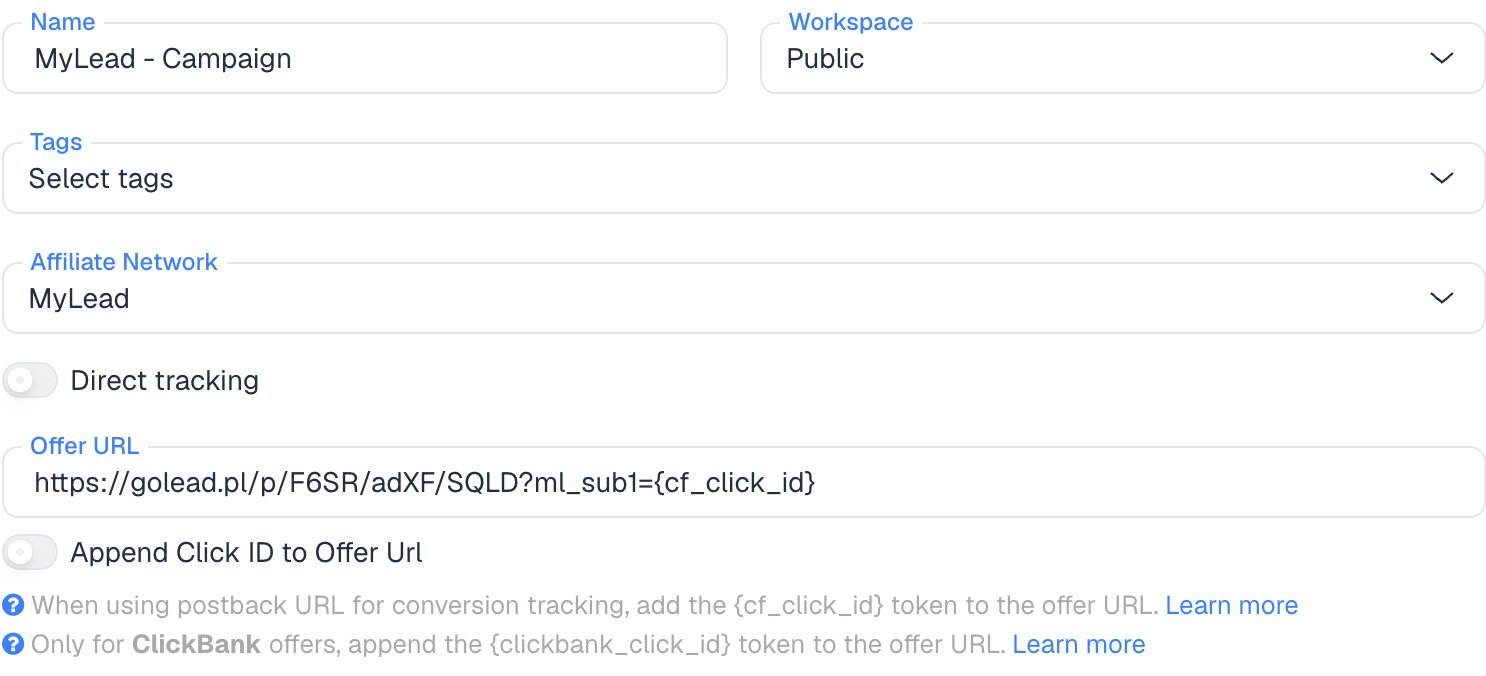
- Name the offer.
- Select the MyLead affiliate network you just created.
- Paste the MyLead link into Offer URL with
?ml_sub1={cf_click_id}at the end. If the link already has a?, use&ml_sub1={cf_click_id}:
ml_sub1, you can turn on Append Click ID to Offer Url instead. ClickFlare then adds ml_sub1={cf_click_id} from the template. Use one or the other, not both.Set the payout to Auto so ClickFlare uses the payout value from the postback.7
Add the postback in MyLead
In MyLead, open Postback and API in the left menu, just below the statistics and reports. Older guides call it For Webmasters → Postback or Manage → Postback and API. Then:
- Click Add a new Postback URL.
- In Lead status that activates postback, pick Available to pay or Accepted. Not Any. See Which lead status to pick.
- Paste the ClickFlare postback URL into Postback URL.
- Save it. Depending on the panel version, the button says Create postback URL or Generate.
[ml_sub1], [payout_decimal] or [transaction_id] isn’t green, check its spelling.MyLead’s guides show this postback as account-wide, so it covers all your campaigns. None of them describe a postback for a single program.8
Add a lander (optional)
If you send traffic through a lander before the offer, the lander’s CTA must use the ClickFlare click URL, not the MyLead link. ClickFlare then adds the click ID when it redirects to the offer. See Paths with landers and offers.
9
Save the campaign and launch
Save the campaign, copy the campaign URL from the Tracking tab and use it in your ads. Before you spend money on traffic, run the checks in Verify the setup.
Which lead status to pick
A MyLead lead moves through statuses as the advertiser reviews it. Lead status that activates postback decides which of them fire your postback:
The labels differ slightly between panel versions and languages. Some show Approved instead of Available to pay and Pre-approved instead of Accepted.
Why not Any
MyLead calls Any the most common choice, and says that with it you must add[status] to the URL, or the statistics don’t count correctly. That advice is for trackers that read the status. ClickFlare doesn’t.
With Any, one lead can reach ClickFlare as pending, then accepted, then rejected, each time with the same click ID and [transaction_id]. ClickFlare treats them as one conversion and keeps the last one received. A lead MyLead rejected stays in your numbers as a conversion with a payout.
If you still want to see each lead’s status, add ¶m1=[status] to the postback URL. ClickFlare stores it as an extra value on the conversion, so you can tell the statuses apart in reports. It doesn’t stop rejected leads from counting.
A narrow status has a cost too: nothing reaches ClickFlare until the lead gets that status. If conversions show in MyLead’s statistics but not in ClickFlare, check the lead’s status before anything else.
Why the transaction ID matters
By default ClickFlare keeps one conversion per click ID. If several postbacks arrive with the same click ID and no transaction ID, ClickFlare treats them as the same conversion, and you only see one of them (the last one received). Thetxid parameter tells ClickFlare that each postback is a separate conversion, so its value has to be different on every conversion.
MyLead describes [transaction_id] as a unique transaction identifier:
- Two conversions on the same click, for example two sales on a CPS offer, should each be their own transaction with their own
[transaction_id], so ClickFlare counts both. - A resent postback for the same conversion carries the same
[transaction_id], so ClickFlare doesn’t count it twice. - A status change on the same lead is expected to keep its
[transaction_id], so it replaces the earlier conversion instead of adding one. That’s why the status you pick matters.
Verify the setup
1
Click through the campaign
Open the ClickFlare campaign URL (with a lander, also click the CTA). When the offer loads, the first request goes to the MyLead link. Check that it has
ml_sub1= followed by a real ClickFlare click ID, not the literal text {cf_click_id}.2
Check the sub ID in MyLead
MyLead shows your sub IDs under Statistics → Leads. Once a lead comes in, check that its
ml_sub1 holds the ClickFlare click ID.3
Check the conversion in ClickFlare
We found no postback test button for MyLead affiliates, so the first real conversion with your chosen status is your test. It should appear on the campaign with the payout as a decimal, for example
4.00, not 400. In Logs → Event Logs, check that it arrived with a txid.Troubleshooting
Conversions show in MyLead but not in ClickFlare
Conversions show in MyLead but not in ClickFlare
Work through these in order:
- The lead doesn’t have the status yet. A postback on Available to pay fires only when the advertiser approves the lead. Check the lead’s status under Statistics → Leads.
- ml_sub1 is empty in MyLead. The offer URL is missing
ml_sub1={cf_click_id}, or your lander’s CTA links straight to MyLead instead of using the ClickFlare click URL. - The sub IDs don’t match. The offer URL uses
ml_sub2but the postback reads[ml_sub1], or the other way around. - A macro isn’t recognised. If MyLead didn’t mark it green when you saved, it’s misspelled. MyLead macros use square brackets and lowercase.
The payout is 100 times too high
The payout is 100 times too high
The postback uses
[payout], which MyLead sends in cents. Change Payout to [payout_decimal] in the ClickFlare affiliate network and paste the new URL into MyLead. See Payout: decimal, not cents.Rejected leads still count in ClickFlare
Rejected leads still count in ClickFlare
The postback fires on Any or Pending, so the lead reached ClickFlare before it was rejected. Switch to Available to pay or Accepted, and adjust the conversions already recorded.
The payout is in the wrong currency
The payout is in the wrong currency
[payout_decimal] has no currency. Set the affiliate network’s Payout currency in ClickFlare to the currency of your MyLead commissions. To see the currency MyLead sends with each conversion, add ¶m2=[currency] to the postback URL.FAQ
Why ml_sub1?
Why ml_sub1?
ml_sub1 is the ClickFlare template’s default and what MyLead’s own guide uses for the tracker’s click ID. MyLead has ml_sub1 to ml_sub5, and other trackers use different ones. Any of them works as long as the offer URL and the postback use the same one: for example ml_sub2={cf_click_id} in the offer URL and click_id=[ml_sub2] in the postback.Can I pass more data to MyLead?
Can I pass more data to MyLead?
Yes. Use the other sub IDs in the offer URL, for example
ml_sub2={campaign_id}&ml_sub3={trackingField1}. MyLead shows them under Statistics → Leads. Keep ml_sub1 for the click ID.Does this work for MyLead's OfferWall?
Does this work for MyLead's OfferWall?
OfferWall postbacks are set up per OfferWall configuration and send different values, such as points. This guide covers regular campaigns only.
Can I send the conversion back to my traffic source?
Can I send the conversion back to my traffic source?
Yes. Once ClickFlare records the MyLead conversion, it can send it to the traffic source through the traffic source’s postback or conversion API integration. Nothing changes on the MyLead side.
Related
Macro reference
Every network’s values
Postback parameters
click_id, txid, param1
Postback issues
Troubleshoot S2S