




Google ads optimization has two halves. One is feeding Google's automation clean data, the other is acting fast on the campaigns that are winning or losing you money. The second half is where most of your time goes, and until now it meant living inside the Google Ads interface.
ClickFlare's Ads Manager now covers Google Ads the same way it covers Meta. You get the familiar Campaigns, Ad groups, Ads view, with your real profit on every row, and you can pause, scale, and change budgets and bids right there, without switching tabs.
This guide walks through the moves that matter: the hands-on actions you take on your campaigns, plus the Google-specific inputs that decide how well the automation performs.
Quick Summary
Google ads optimization is the ongoing work of improving the return on your Google Ads spend. The difference today is that Smart Bidding sets your bids and Performance Max decides where your ads show, both automatically, so you are no longer adjusting bids by hand all day.
What is left for you is the part that actually moves profit: feeding the automation accurate data, and deciding which campaigns deserve more budget and which should be paused. That second part is a set of concrete actions, and it is where ClickFlare Ads Manager comes in.
Put simply, you control the inputs, the data quality, budgets, targets, and which campaigns get funded, while Google controls delivery, who sees the ad and the exact bid in each auction. Optimizing your side well is what makes Google's side work in your favor.
The first four moves are the hands-on actions you take on your campaigns, all from inside ClickFlare. The last three are the Google-specific inputs that decide how well those actions pay off.
Optimization starts with an honest number. Open the Google Ads tab in ClickFlare Ads Manager and you get the Campaigns, Ad groups, Ads view you already know, except every row shows your real ClickFlare profit, ROI, and ROAS rather than Google's reported-only metrics.
That matters because Google's own numbers tend to flatter. Branded searches get absorbed into campaigns that did not really earn them, and Performance Max has a habit of claiming credit that belongs elsewhere.
Picture a table where most campaigns sit comfortably in the green, but one, say a Debt Relief search campaign, is quietly in the red at a negative ROI. Google may still report conversions for it, so it looks active, but the real profit on the row is what tells you to pause it. That gap between looking active and being profitable is the whole game.
When profit sits on the same row as the campaign, the ranking you act on is the true one. If you have ever wondered why your Google numbers and your real numbers disagree, our guide on the Google Ads attribution issue explains the usual causes.
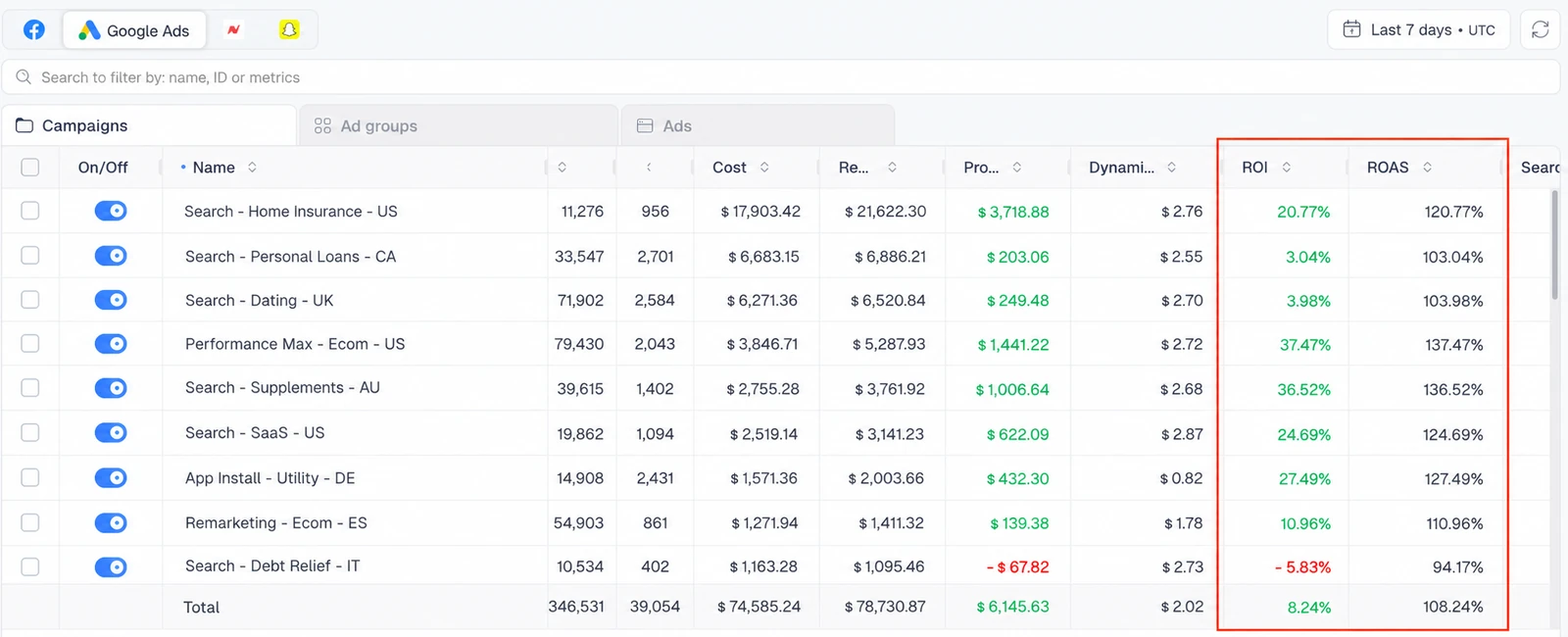
The quickest way to lift ROI is to cut what is losing money, and in Ads Manager that is a single action across Google just like it is on Meta. Sort by profit, tick every campaign in the red, and pause them in one click, or drop into a campaign and pause individual ad groups or ads the same way.
Set a simple line for what counts as a loser, usually negative ROI or a ROAS below your real break-even, and give each campaign a little spend before you judge it so you are not reacting to a handful of clicks. This works across both Search and Performance Max campaigns.
Make it a weekly habit rather than a quarterly audit. The sooner an unprofitable campaign is paused, the less budget it burns before you notice.
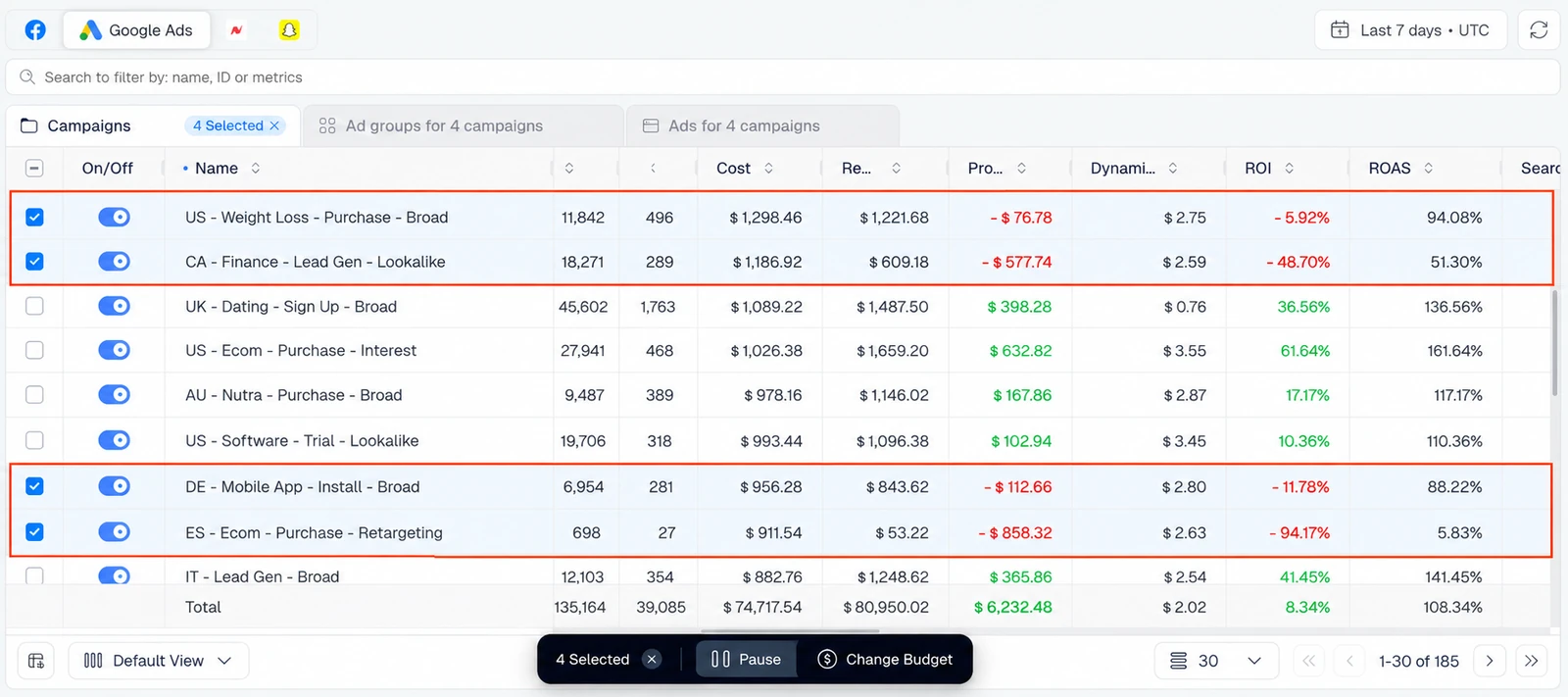
The controls are identical to the Meta side, so if you want the full step-by-step of how pausing and bulk edits work, our Facebook ads optimization guide walks through them in detail.
When a campaign is genuinely profitable on real data, give it more room. Edit the budget right in the table the moment ClickFlare confirms the profit, no need to open Google Ads to do it.
Scale in steady steps rather than one big jump. Smart Bidding relearns when you change a budget sharply, so raising it by around 20 percent at a time and letting delivery settle between moves protects the performance you are trying to grow.
Pick the right winners first. Aim at campaigns that are clearly profitable with margin to spare and have enough conversions behind them to trust, not one good day, so you are scaling a real trend rather than noise.
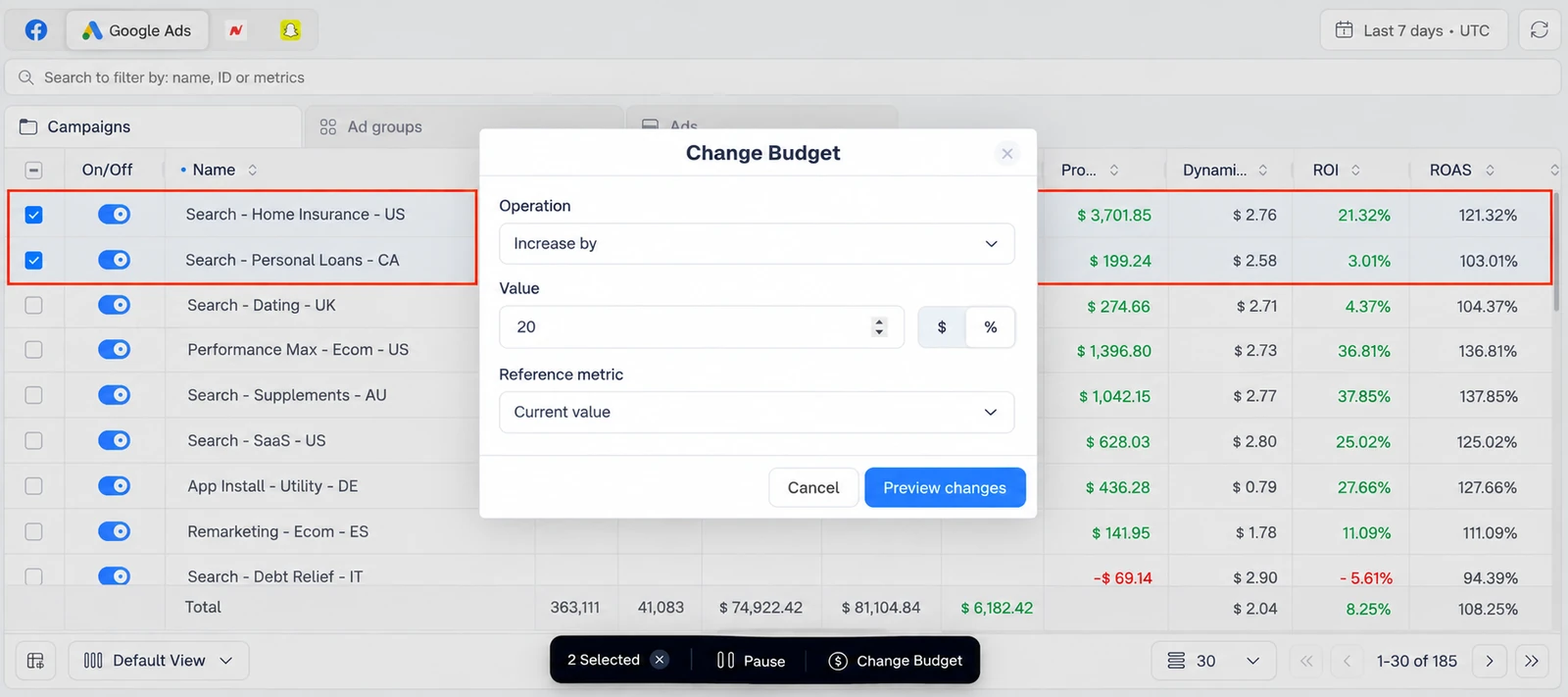
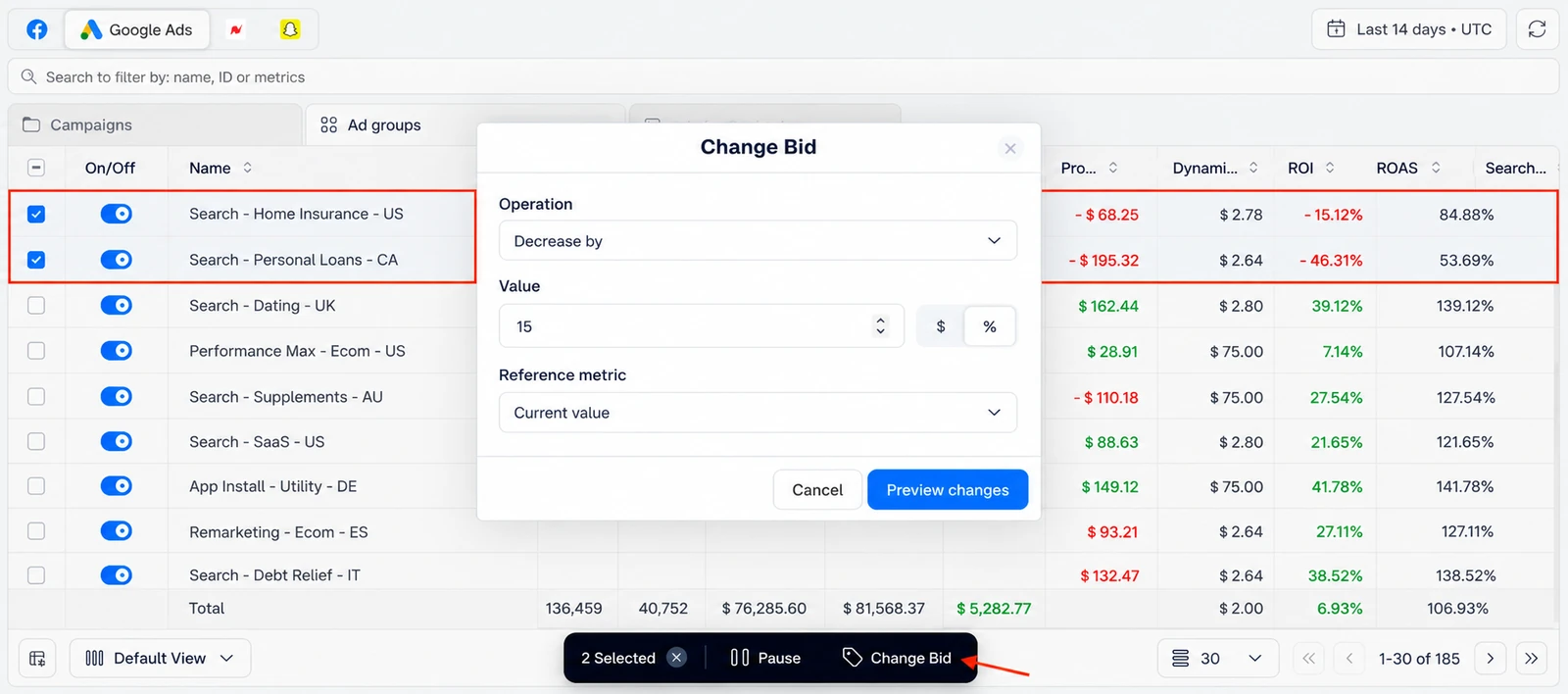
Optimization is rarely one campaign at a time. Select the campaigns or ad groups you want and change their budgets or bids together, by a set amount or by a percentage, in a single edit instead of a dozen.
Because you are working from your real ROI and ROAS, every change is made on the full picture, not Google's partial view. Pull back a group of underperformers by a percentage, or add budget to your best performers before the weekend, without ever leaving ClickFlare.
For example, lower the bids on a group of underperformers by 15 percent, or add a fixed amount to your top performers, in a single pass. Doing it in one edit keeps the change consistent across the group, which makes the results easier to read when you review them.
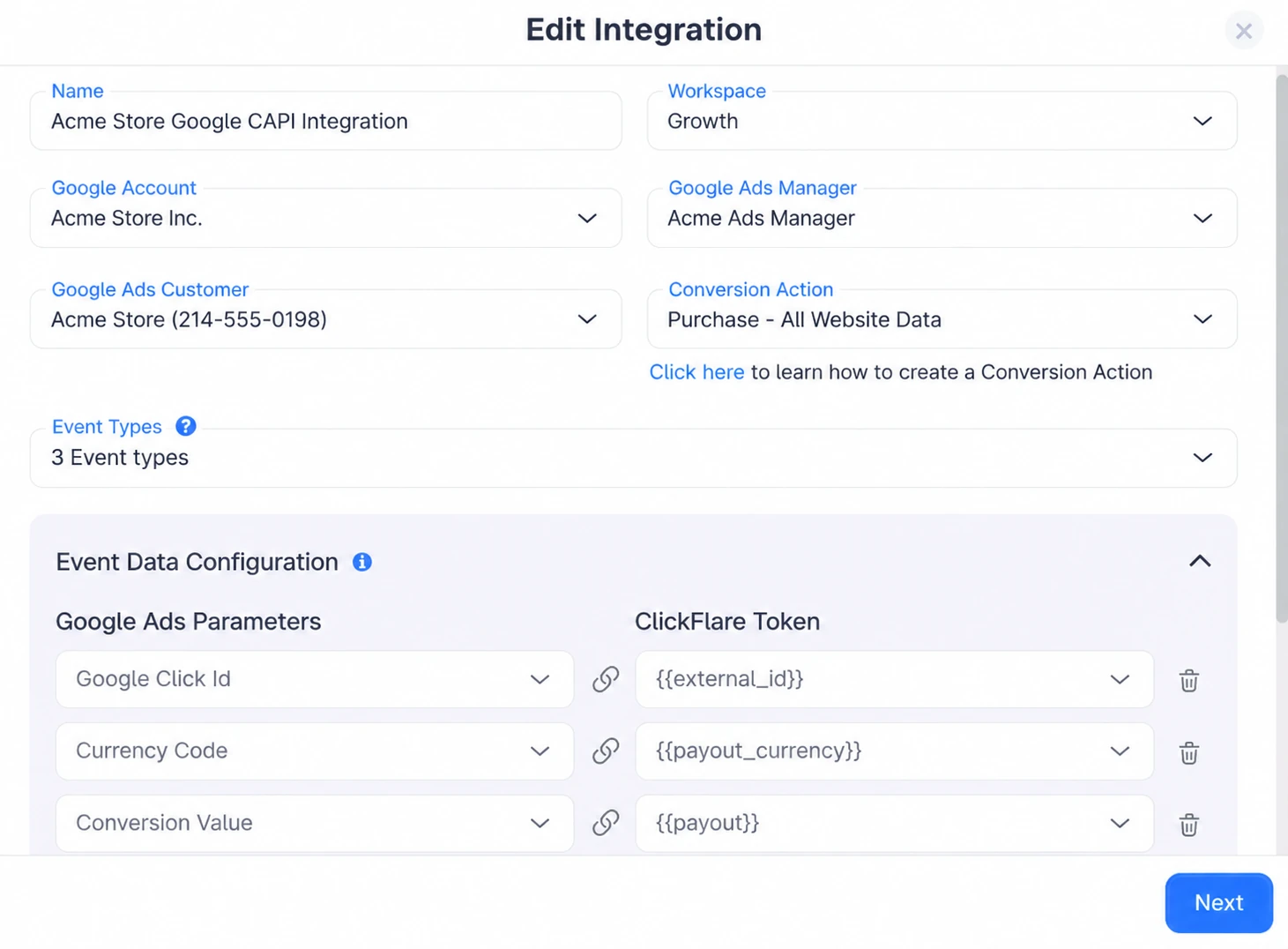
Here is the input that makes everything above work better. Smart Bidding is only as smart as the conversions it can see, and if a browser pixel is your only way of reporting them, ad blockers and cookie limits quietly drop a share. Google then bids down on the exact clicks that convert, because as far as it knows, they never did.
ClickFlare captures the GCLID server-side and posts your real conversions back through Google Enhanced Conversions, including events the pixel missed and conversions that happen offline through your CRM. ClickFlare reports this recovers roughly 30 to 40 percent more conversions than pixel tracking alone, and the full setup is in our GCLID tracking guide.
With that data flowing, pick a bid strategy that matches your goal and set a realistic target from your real history. Google's own notes on Smart Bidding are worth a read, and the strategies break down like this:
| Strategy | Optimizes For | Best When |
|---|---|---|
| Target CPA (tCPA) | A set cost per conversion | Lead gen with a known acceptable cost per lead |
| Target ROAS (tROAS) | A set return on ad spend | Ecommerce and value goals with enough conversion value data |
| Maximize Conversions | The most conversions in budget | Early on, when you care about volume over a strict cost |
| Maximize Conversion Value | The most revenue in budget | Value-based accounts without a firm ROAS target yet |
Whatever you choose, give it enough conversions to learn from, often around twenty to thirty a month per campaign, and avoid switching strategies too often, since each change resets the learning period.
Search is the one place Google still hands you direct control, so use it. Pull the search terms report on a schedule, add the irrelevant queries as negative keywords, and keep brand and non-brand in separate campaigns so cheap brand clicks do not mask weak non-brand performance.
It is also worth lifting Quality Score where the volume justifies it. Tighter relevance from keyword to ad to landing page, plus a fast, on-message page, tends to lower your cost for the same bid and compounds over time.
Performance Max is the opposite, a black box that runs across Search, Display, YouTube, Gmail, Discover, and Maps at once. You cannot pause a single placement, so you optimize its inputs instead: the budget, the tROAS or tCPA target, the asset groups, audience signals, and brand or placement exclusions. Google's Performance Max overview covers how those inputs fit together.
Where Ads Manager helps most with Performance Max is at the campaign level, which is exactly where Google does give you control. You can see each PMax campaign's true profit next to your Search campaigns, pause one that is unprofitable on real data, and rebalance budget between them, all on the same screen.
Google shows an Optimization Score with a tidy list of recommendations, and it is easy to treat hitting 100 percent as the goal. It is not. Many of those recommendations push you toward more spend, broader match, or auto-applied changes that serve Google's objectives as much as yours.
Treat the score as suggestions, not instructions. Apply the ones that fit your profit goals, dismiss the ones that do not, and turn off auto-apply so nothing changes your account without you deciding it should.
Run every recommendation through the same test you use for everything else: does it improve real profit? A suggestion to broaden match or raise budgets might genuinely help, or it might just spend more for thinner results, and only your own numbers can tell you which.
Google ads optimization comes down to two things you fully control: the quality of the data you feed the automation, and the speed and honesty with which you act on real profit. The first keeps Smart Bidding pointed at real buyers. The second is the daily work of pausing losers and funding winners.
ClickFlare Ads Manager is built for that second half, giving you the Campaigns, Ad groups, Ads view with real profit on every row and the controls to act on it, for Google exactly as it does for Meta. See the truth, then act on it, in one place.
Google ads optimization is the ongoing process of improving the return on your Google Ads spend. Today that means guiding Google's automation with accurate conversion data and acting on real profit, pausing losers and funding winners, rather than adjusting bids by hand.
Yes. ClickFlare Ads Manager lets you pause campaigns, ad groups, and ads, scale winners, and change budgets and bids for your Google Ads campaigns directly inside ClickFlare, using your real profit numbers, the same way it works for Meta.
It depends on your goal. Target ROAS suits ecommerce and value-based accounts, Target CPA suits lead generation with a known cost per lead, and Maximize Conversion Value works well when you want revenue but do not have a firm ROAS target yet.
Yes, at the input and campaign level. You cannot touch its internal placements, so you optimize the budget, the target, asset groups, and signals, and in ClickFlare you can judge each PMax campaign on real profit, pause it, or rebalance its budget against Search.
Enhanced Conversions send server-side conversion data back to Google, recovering conversions a browser pixel misses. With a fuller, more accurate picture of what converted, Smart Bidding optimizes toward real buyers instead of an incomplete sample.
Need a hand with Google Ads optimization?
Try out ClickFlare for free and book a call with one of our tracking specialists who will guide you through the entire process.





