




If you've ever set up tracking for an affiliate offer, you've probably been asked to paste in a "postback URL" and moved on without fully knowing what it does. It's one of those terms that gets used constantly in affiliate marketing and ad tracking, but rarely gets explained in plain language.
In this guide, we'll answer what is a postback URL, break down exactly how it works, show you what one actually looks like, and walk through how to set one up so your conversions get tracked accurately every time.
A postback URL is a web address that a tracking platform generates so an affiliate network or advertiser's server can send it conversion data automatically. When someone converts, for example by completing a purchase, filling out a lead form, or generating a qualified call, the affiliate network's server "calls" this URL and passes along details like the click ID, the payout, and the type of conversion.
Because this entire exchange happens server-to-server (S2S), a postback URL doesn't rely on a browser, a cookie, or a tracking pixel firing on a "thank you" page. It's also called a callback URL, and depending on the platform you're using, you may see it referred to as an S2S pixel, a server-side pixel, or cookieless tracking. They all point to the same mechanism: a direct, backend request that carries conversion data from one server to another.
If you want the full picture of how this fits into a broader tracking setup, including pixels and Conversion API, we cover that in our postback tracking guide.
A postback URL follows a simple, four-step flow:
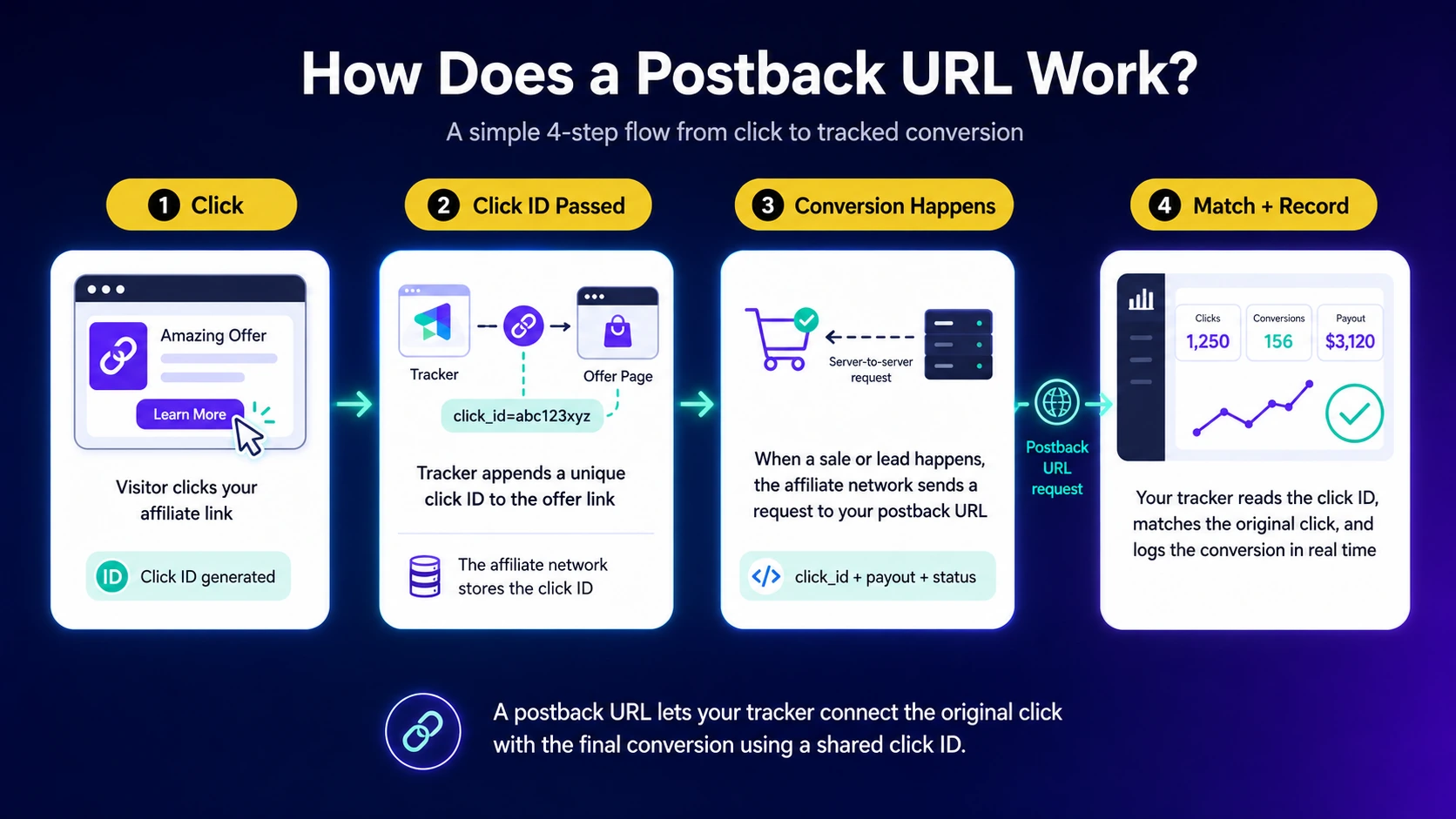
Because the click ID is what ties everything together, most tracking systems will reject a conversion that arrives without one. It's the single most important parameter in the entire process.
A postback URL is just a base URL followed by a query string, the part after the "?" that carries the actual data as a series of parameter=value pairs separated by "&". A generic example looks like this:
https://yourtracker.com/postback?click_id={click_id}&payout={payout}&event={event_type}
The most common parameters you'll see passed through a postback URL are:
In ClickFlare specifically, the click ID is passed to the affiliate network by adding the {cf_click_id} token to your offer URL. Once a visitor clicks, that token is automatically replaced with a unique value, and the network sends it back through your ClickFlare postback URL, which looks something like this:
https://your_clickflare_domain.com/cf/cv?click_id=#s2#&payout=#price#
You can find the full setup walkthrough, including how to test it before going live, in our help doc on tracking conversions using S2S postback.
Seeing the parameters listed out is one thing, watching them move through an actual conversion is more useful. Here's a simplified walkthrough:
https://www.offer-link.com?s2={cf_click_id}. Your tracker replaces the token, so the visitor is actually sent to https://www.offer-link.com?s2=67da9261-3e4b-4053.67da9261-3e4b-4053) alongside the visitor's session.https://your_clickflare_domain.com/cf/cv?click_id=67da9261-3e4b-4053&payout=12.50.No cookie, browser, or "thank you" page pixel was involved anywhere in that chain, which is exactly why this method holds up even when a visitor blocks trackers or switches devices between the click and the conversion.
A postback URL isn't the only way to track a conversion, and it helps to know how it compares to the other two common methods:
Most affiliates end up using more than one of these together: a postback URL to receive the conversion from the affiliate network, and a Conversion API integration to pass that same event on to an ad platform like Meta or Google for optimization. We break this down in more detail in our Conversion API guide.
The main reason postback URLs are considered the gold standard of conversion tracking is that they don't depend on a visitor's browser. Pixel-based tracking can miss conversions when cookies are blocked, ad blockers are active, or a script simply fails to load. A postback URL bypasses all of that because the data moves directly from server to server.
This matters more every year as browsers restrict third-party cookies by default. Safari's Intelligent Tracking Prevention and the broader industry shift described in Google's Privacy Sandbox initiative are both pushing tracking toward server-side methods, which is exactly the gap postback URLs and Conversion API integrations are built to close. Postback tracking also holds up across devices, so a click on mobile followed by a conversion on desktop still gets attributed correctly.
Depending on the affiliate network, a postback URL can be set up in one of two ways:
Not every network supports the global option, so it's worth checking your network's documentation, or your tracker's ready-made template for that network, before assuming which setup you need.
ClickFlare generates your postback URL for you, so you don't need to build one from scratch. At a high level, the setup looks like this:
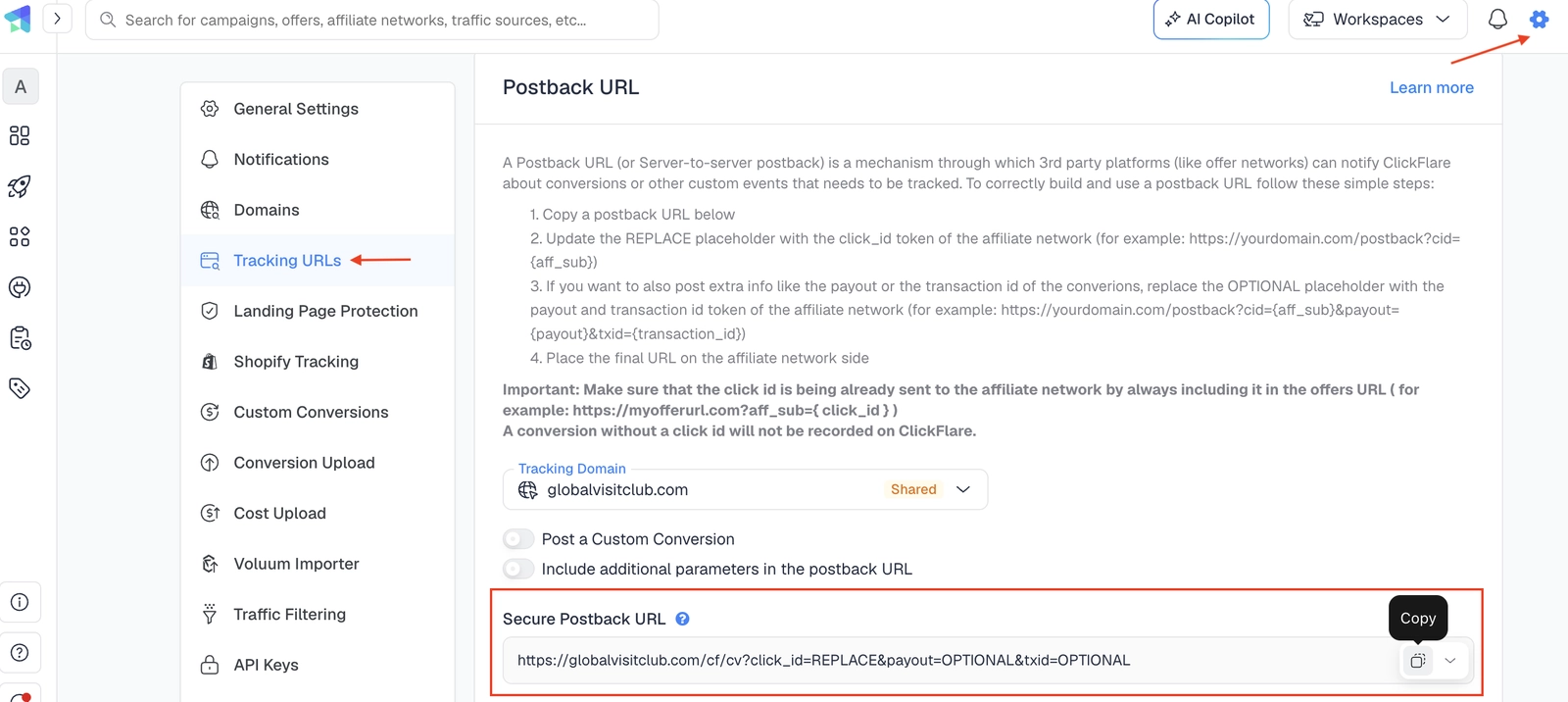
For the full step-by-step, including screenshots, see the S2S postback setup guide in our knowledge base.
So, what is a postback URL? At its core, it's a simple but essential piece of infrastructure: a server-to-server link that lets an affiliate network tell your tracker exactly when, and how, a conversion happened, without ever touching a browser or a cookie. Once you have it set up correctly, it runs quietly in the background for every offer you promote, giving you attribution you can actually trust.
A postback URL is a link that an affiliate network's server calls whenever a conversion happens, sending your tracker details like the click ID and payout so the conversion gets recorded and attributed correctly.
Yes. Callback URL is simply another name for the same mechanism. Different platforms use different terms, including S2S pixel and server-side pixel, but they all describe the same server-to-server conversion notification.
A pixel fires in the visitor's browser and can be blocked by cookie restrictions or ad blockers. A postback URL fires directly from the advertiser's server, so it isn't affected by browser-side limitations at all.
Most established affiliate networks support postback tracking, since it's considered the most reliable attribution method available. If a specific network doesn't list it, check their documentation or ask your account manager directly.
Yes, and you should always do this. Firing a test conversion lets you confirm the click ID and other parameters are being received and matched correctly before you launch real traffic.
Yes. ClickFlare automatically generates your postback URL and offers 150+ ready-made templates for popular affiliate networks, so in most cases you just copy the URL and paste it into your network's settings.
Need a hand with postback tracking?
Try out ClickFlare for free and book a call with one of our tracking specialists who will guide you through the entire setup.






