

ChatGPT Ads is new. As of October 2026 the self-serve tool is Ads Manager Beta, and access depends on where the advertiser’s legal entity is based: the US, the UK, Canada, Australia, most of the EU and many countries in Latin America, the Middle East, Africa and Asia. Ads are not shown to ChatGPT Plus, Pro or Business users, or to accounts identified as under 18. Check OpenAI’s Ads Manager Availability page before you launch. Menus may change during the beta.
At a glance
How it works
1
ChatGPT sends the click
A user clicks your ad. ChatGPT opens your ClickFlare campaign URL with the campaign, ad group, ad and account IDs filled in, and adds its click reference as
oppref.2
ClickFlare stores the click reference
ClickFlare saves the value of
oppref as the visit’s External ID, stores the IDs in tracking fields, and redirects the visitor to your lander or offer.3
The conversion reaches ClickFlare
Your affiliate network or store posts the conversion back to ClickFlare, matched on the ClickFlare click ID.
4
OpenAI learns about it separately
ClickFlare does not post the conversion to OpenAI. If the OpenAI Pixel fires on your conversion page, or you send the event through OpenAI’s Conversions API with the stored
oppref, OpenAI attributes it to the ad.With most networks there is a mirror: the network’s macro in the campaign URL, ClickFlare’s token in the postback. With ChatGPT Ads only the first half exists. The template writes ClickFlare’s parameters (
campaign_id, ad_group_id…) with OpenAI’s macros ({campaign_id}, {ad_group_id}…), and reads the oppref that ChatGPT adds itself. There is no postback to send it back in.Before you start
- Set up your own tracking domain. Run the campaign on your own custom domain. Shared domains get flagged by networks and blocked by browsers. See Custom Domains.
- Have an offer ready in ClickFlare, and its affiliate network set up to post conversions back to ClickFlare. See Creating an Offer and Adding an Affiliate Network.
- Check OpenAI’s Ads Policies. OpenAI reviews the ad, the image and the landing page. Its review crawlers (
OAI-AdsBot) must be able to reach the landing page, so don’t block them in your bot filters. - Decide how OpenAI will see conversions. If you own the conversion page, you can install the OpenAI Pixel there. If you send traffic to an affiliate offer you don’t control, OpenAI only sees what the pixel catches on your lander, unless you build a Conversions API connection. Plan this before you launch. See Step 2 below.
Step 1 – Create the campaign and the ChatGPT Ads traffic source
- Go to Campaigns and click New.
- In Traffic Source, open the dropdown and click + New Traffic Source.
- Type
chatgptin the search box and select the ChatGPT Ads template. - Enter a Name, for example
ChatGPT Ads. - Leave Cost currency on USD unless your Ads Manager account is billed in another currency.
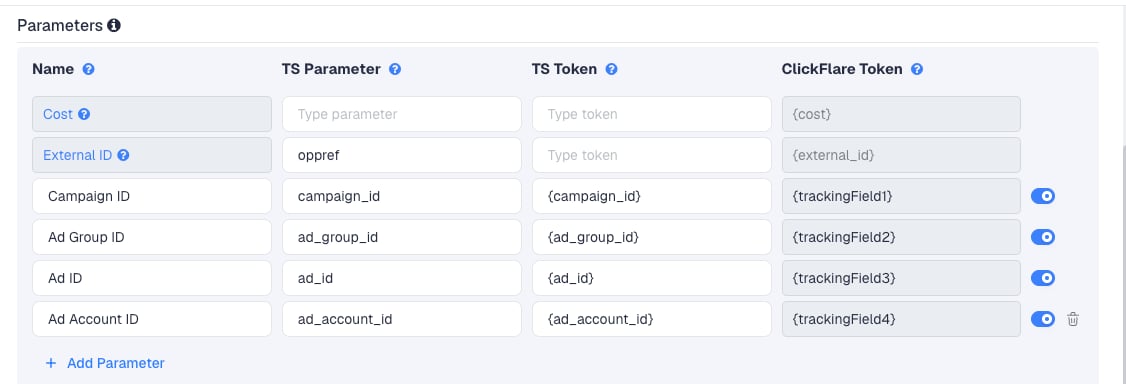
oppref to the end of the landing page URL by itself, in the form ?oppref=gAAAAAb123, the same way Facebook adds fbclid. ClickFlare reads it from the incoming click.
The four macros are the ones OpenAI documents. Ads Manager fills them in only when they are set in its Landing page query parameters field. See Step 4. Use ad_group_id and ad_id to find the ad groups and ads that convert.
To pass more data, click Add Parameter, give it a name and parameter, and enter a value as the TS Token. ClickFlare assigns the next free tracking field. Use only macros OpenAI documents.
Step 2 – Decide how OpenAI learns about conversions
There is no postback to configure for OpenAI itself. In the New Traffic Source form, leave Traffic source postback URL off and click Save, unless you use the relay in Option C. You are back in the campaign editor with the ChatGPT Ads traffic source selected. OpenAI still needs conversion data, to report results and to run Conversions campaigns. In Ads Manager, conversion events go into a data source, which has a Pixel ID. Create it first. RedTrack’s guide places it under Tools → Conversions → Create → Data Source. Then pick one of the options below.Option A – The OpenAI Pixel on your conversion page
Use this when you own the page where the conversion happens, for example your own store or lead form.- Install the OpenAI Pixel snippet near the top of the
<head>on every page you want to track, with your Pixel ID. Google Tag Manager works too, as long as it loads the pixel before the event calls. - On the conversion page, fire the matching standard event, for example
order_createdfor a purchase orlead_createdfor a lead. - In Ads Manager, attach that conversion event to the campaign before traffic starts.
oppref from the landing page URL and stores it in a first-party cookie, __oppref, for 30 days. Later conversion events on the same site are linked to the click through that cookie.
That only works if oppref reaches the page where the pixel runs. With Redirect tracking, ChatGPT adds oppref to the ClickFlare campaign URL, not to your lander. Pass it on yourself: add oppref={external_id} to your lander’s URL in ClickFlare, for example https://yourlander.com/page?oppref={external_id}. With Direct tracking, ChatGPT adds oppref straight to your lander URL, and the pixel sees it without any change.
Option B – The pixel on your lander only
Use this when you send traffic to an affiliate offer you don’t control. Install the pixel on your lander, passoppref to it as in Option A, and fire an event on the action you can see, for example a custom event when the visitor clicks through to the offer.
OpenAI then reports lander engagement, not the sale. Custom events can’t be the goal of a Conversions campaign, so this helps reporting, not conversion optimization. Your real conversions stay in ClickFlare. Judge campaigns there.
Option C – OpenAI’s Conversions API, from your own system
OpenAI’s Conversions API takes events from your server: aPOST to https://bzr.openai.com/v1/events?pid=PIXEL_ID, with a Conversions API key in the Authorization header and a JSON body. Each event carries an id, a type such as order_created, a timestamp_ms and, when you have it, the original oppref. Events must be no older than 7 days. Web events also need a source_url.
ClickFlare can’t make that request: its postback is a plain URL call. But it stores what the API needs, the oppref, as the External ID. If you or your developer run a small relay, ClickFlare’s postback can feed it:
- Host an endpoint that accepts a URL like
https://relay.yourdomain.com/openai?oppref={external_id}&value={payout}&id={cf_click_id}and sends the event to the Conversions API. - On the ChatGPT Ads traffic source, turn on Traffic source postback URL and enter that URL.
- In the dropdown on the left, keep Conversions, or choose the custom conversion that should count.
- Click Save.
oppref exactly as received. If the pixel also sends the same conversion, use the same event ID on both sides so OpenAI deduplicates it. See OpenAI’s Conversions API documentation for the full request format.
Whichever option you use, ClickFlare remains your source of truth for revenue. OpenAI’s conversion numbers will differ from ClickFlare’s. They come from a different data path, take 24 to 48 hours to appear in Ads Manager, may include modeled conversions, and follow the click-through (7, 14 or 30 days) and view-through (0 or 1 day) windows you choose for reporting.
Step 3 – Finish the campaign and copy its URL
- Name the campaign.
- Set the Cost Model to CPC and enter your expected cost per click. See Cost.
- Choose Redirect or Direct tracking. If the OpenAI Pixel sits on your lander, Direct keeps
opprefon the lander without extra setup. See Direct Campaign Tracking. - Click Next and, on Destination, add your lander (optional) and your offer.
- Save, open Tracking, select your own tracking domain and copy the campaign URL.
campaign_id={campaign_id}&ad_group_id={ad_group_id}. Check it for an empty oppref=. Because the External ID row has no TS Token, the URL may contain oppref= with nothing after it. If it does, delete that part, so the only oppref in the click is the one ChatGPT adds.
If you use a lander, its call-to-action must link to the ClickFlare click URL, not to the offer directly. Otherwise the visit reaches the offer without a ClickFlare click ID, and the conversion cannot be traced back to the ChatGPT click.
See Creating a Campaign in ClickFlare.
Step 4 – Create the campaign in Ads Manager
Ads Manager fills in its macros only when they are in the Landing page query parameters field. Macros left in the ad’s destination URL are not replaced. Split the ClickFlare URL in two:- Create the campaign, ad group and ad in Ads Manager as usual. Choose the objective: Reach (CPM), Clicks (CPC) or Conversions.
- In the ad’s destination URL, paste the ClickFlare campaign URL without the template’s parameters. Keep the part up to the
?, plus any fixed parameters. - Open the three-dot menu on the Campaigns, Ad groups or Ads page and choose Edit campaign, Edit ad group or Edit ad.
- In Landing page query parameters, add the four parameters with their macros:
campaign_id={campaign_id},ad_group_id={ad_group_id},ad_id={ad_id}andad_account_id={ad_account_id}. - Save, and submit the ad for review.
oppref to the query parameters. ChatGPT adds it on every click.
Step 5 – Test the integration
- Click your live ad in ChatGPT, so the visit comes from ChatGPT Ads. In ChatGPT’s iOS in-app browser, use Share to copy the full link and see its parameters.
- In ClickFlare, open the campaign’s report and check that the visit has an External ID. That is the
oppref. - Check the tracking-field columns. They should show IDs, not
{campaign_id}or other raw macros. - Complete the offer the way a real visitor would and check that the conversion appears in ClickFlare.
- If you use the OpenAI Pixel, turn on its debug mode, or open your browser’s developer tools (F12), and check that the pixel and your conversion event fire on the right page. If you passed
opprefto the lander, check that the lander URL contains it.
validate_only option checks events without saving them. Otherwise there is nothing to check under Logs → Postback Status.
Cost
The template doesn’t pass cost. Its Cost row is empty, OpenAI publishes no cost macro, and ClickFlare has no cost integration for ChatGPT Ads. Set the campaign’s Cost Model to CPC and enter your expected cost per click. For Clicks campaigns, use your average CPC from Ads Manager. OpenAI suggests starting bids at 3 to 5 USD, and its auction is second-price, so your average is usually below your bid. For Reach campaigns, bought on CPM, don’t enter your CPM divided by 1,000: an impression below a ChatGPT answer is not a click, so that would understate your cost many times over. Enter your effective CPC instead, the spend divided by the clicks, both from Ads Manager. CPA with your target is an alternative for Conversions campaigns.Don’t use Not Tracked with this template. It records cost only when the URL or a cost integration provides it, and neither does here, so your cost would show as zero.
Troubleshooting
The External ID is empty
The External ID is empty
- The click didn’t come from ChatGPT, for example a direct visit or an OpenAI review crawler (
OAI-AdsBot). Crawler visits arrive with your tracking parameters but nooppref. They are not billed. - The campaign URL in Ads Manager contains an empty
oppref=as well as ChatGPT’s own. Delete the empty one. - The External ID row was removed or renamed. Its TS Parameter must be
oppref.
Columns show raw macros
Columns show raw macros
The macros were left in the ad’s destination URL. Ads Manager only replaces macros set in Landing page query parameters. Remove them from the URL and add them there. See Traffic Source Tokens Arriving Empty.
Ads Manager shows no conversions
Ads Manager shows no conversions
- ClickFlare sends nothing to OpenAI. Conversions come only from the pixel or the Conversions API.
- With the pixel and Redirect tracking, check that
oppref={external_id}is on your lander URL in ClickFlare. - The event you send doesn’t match the conversion event attached to the campaign. For custom events, the event name must match exactly.
- Attributed conversions take 24 to 48 hours to appear.
Cost is zero in ClickFlare
Cost is zero in ClickFlare
The Cost Model is Not Tracked. The template passes no cost, so switch to CPC, or upload costs.
ClickFlare and Ads Manager conversion counts don't match
ClickFlare and Ads Manager conversion counts don't match
Expected. The two counts come from different data paths and attribution rules. See the note at the end of Step 2. Optimize on ClickFlare’s numbers.
FREQUENTLY ASKED QUESTIONS
Q1: Why is there no postback in the ChatGPT Ads template?A1: OpenAI doesn’t take conversions by postback URL. It takes them from its pixel or through its Conversions API, which needs an authenticated server request with a JSON body. ClickFlare’s traffic source postback can’t make that request on its own.
Q2: Does ClickFlare integrate with OpenAI’s Conversions API?A2: No. ClickFlare stores OpenAI’s
oppref as the External ID, so you can send it to the Conversions API from your own system, or through a relay that ClickFlare’s postback calls.
Q3: Should I use Redirect or Direct tracking?A3: Both capture the click. Direct is the simpler fit if the OpenAI Pixel sits on your lander, because ChatGPT then adds
oppref to the lander URL itself. With Redirect, pass oppref={external_id} to the lander. See Direct Campaign Tracking.
Related
Direct campaign tracking
Track without a redirect, with your lander as the destination.
Traffic source postbacks
Every token you can use in a postback, including for a relay.
Manual cost upload
Correct your ChatGPT Ads spend in ClickFlare.
Conversions not showing
The general checklist when conversions don’t arrive.