

At a glance
How it works
1
Quora sends the click
A visitor clicks your ad. Quora opens your ClickFlare campaign URL with its campaign, ad set and ad IDs and names filled in, and adds its click ID as
qclid.2
ClickFlare stores the Quora click ID
ClickFlare saves the value of
qclid as the visit’s External ID, stores the IDs and names in tracking fields, and redirects the visitor to your lander or offer.3
The conversion reaches ClickFlare
Your affiliate network or store posts the conversion back to ClickFlare, matched on the ClickFlare click ID.
4
Quora learns about it separately
ClickFlare does not post the conversion to Quora. If the Quora Pixel fires on your conversion page, or you send the event through Quora’s Conversion API with the stored
qclid, Quora attributes it to the ad.With most networks there is a mirror: the network’s macro in the campaign URL, ClickFlare’s token in the postback. With Quora only the first half exists. The template writes ClickFlare’s parameters (
campaign_id, ad_id…) with Quora’s variables ({{campaign.id}}, {{ad.id}}…), and reads the qclid that Quora adds itself. There is no postback to send it back in.Before you start
- Set up your own tracking domain. Run the campaign on your own custom domain. Shared domains get flagged by networks and blocked by browsers. See Custom Domains.
- Have an offer ready in ClickFlare, and its affiliate network set up to post conversions back to ClickFlare. See Creating an Offer and Adding an Affiliate Network.
- Decide how Quora will see conversions. If you own the conversion page, you can install the Quora Pixel there. If you send traffic to an affiliate offer you don’t control, Quora only sees what the pixel catches on your lander, unless you build a Conversion API connection. Quora’s conversion-optimized (oCPM) bidding needs these events. See Step 2 below.
Step 1 – Create the campaign and the Quora Ads traffic source
- Go to Campaigns and click New.
- In Traffic Source, open the dropdown and click + New Traffic Source.
- Type
quorain the search box and select the Quora Ads template. - Enter a Name, for example
Quora Ads. - Leave Cost currency on USD unless your Quora Ads account is billed in another currency.
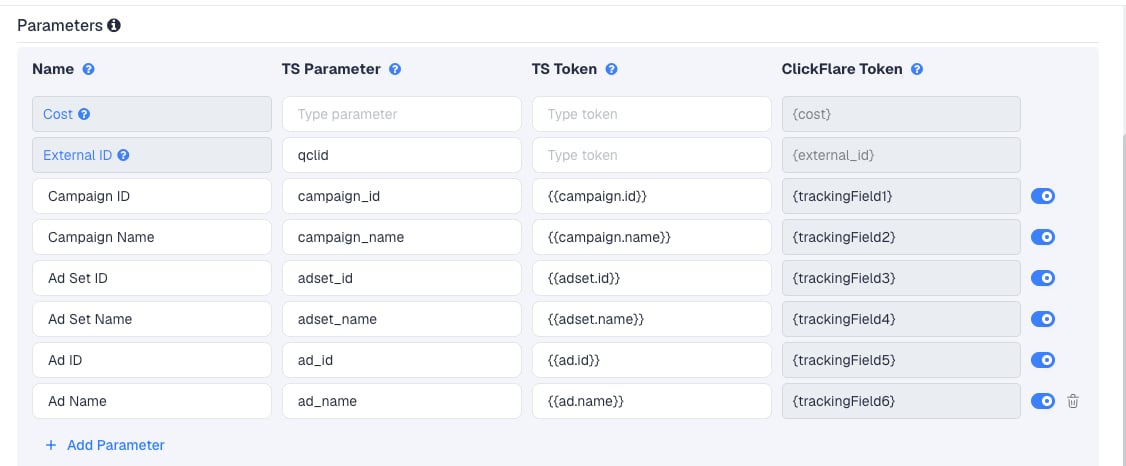
/ or & in a name arrive as %2F or %26. If you rename a campaign, ad set or ad, the new name flows through on later clicks.
The External ID row has no TS Token on purpose. Quora has no variable for its click ID. Quora generates qclid when someone clicks the ad and appends it to the URL, the same way Facebook adds fbclid. ClickFlare reads it from the incoming click.
To pass more data, click Add Parameter, give it a name and parameter, and enter a fixed value as the TS Token. ClickFlare assigns the next free tracking field. Quora has no other variables to add.
Step 2 – Decide how Quora learns about conversions
There is no postback to configure for Quora itself. In the New Traffic Source form, leave Traffic source postback URL off and click Save, unless you use the relay in Option C. You are back in the campaign editor with the Quora Ads traffic source selected. Quora recommends using both the pixel and the Conversion API, with a sharedevent_id so the same conversion is counted once. Pick what fits your funnel.
Option A – The Quora Pixel on your conversion page
Use this when you own the page where the conversion happens, for example your own store or lead form.- In Quora Ads Manager, open the Pixels & Events tab.
- Click Setup Pixel, then Next. Install Manually is the default.
- Click the Base Pixel Code to copy it, and paste it between the
<head></head>tags on every page of your site. - Click Next. Under Event, choose the conversion type, for example Purchase or Lead.
- Copy the Event Pixel code. For a thank-you page, use the code under For Page Load Events and paste it right after the base code. For a button, use For Inline Action Events inside its click handler. Don’t alter the code.
- To pass a value, use the code under For events with conversion value and replace the sample value with the real one.
qclid first, then hashed contact data, cookies, and finally IP and user agent. Quora’s advice is to preserve qclid on your landing pages. With Redirect tracking, Quora adds qclid to the ClickFlare campaign URL, not to your lander. Pass it on yourself: add qclid={external_id} to your lander’s URL in ClickFlare, for example https://yourlander.com/page?qclid={external_id}. With Direct tracking, the lander is the destination and keeps qclid itself.
Option B – The pixel on your lander only
Use this when you send traffic to an affiliate offer you don’t control. Install the Quora Pixel on your lander, passqclid to it as in Option A, and fire an event on the action you can see, for example a Generic event when the visitor clicks through to the offer.
Quora then reports and optimizes on lander engagement, not on the sale. Your real conversions and revenue stay in ClickFlare. Judge campaigns there.
Option C – Quora’s Conversion API, from your own system
Quora’s Conversion API takes events from your server. Each request carries an API token, your ad account ID and theqclid. The click ID is required: without it, Quora can’t attribute the event to an ad. Generate the token in the Conversion API tab of Quora Ads Manager with Generate Token. One token works for one ad account and all its campaigns.
ClickFlare can’t make that request: its postback is a plain URL call, without the token and the request body. But it stores what the API needs, the qclid, as the External ID. If you or your developer run a small relay, ClickFlare’s postback can feed it:
- Host an endpoint that accepts a URL like
https://relay.yourdomain.com/quora?qclid={external_id}&value={payout}&event_id={cf_click_id}and sends the event to Quora’s Conversion API. - On the Quora Ads traffic source, turn on Traffic source postback URL and enter that URL.
- In the dropdown on the left, keep Conversions, or choose the custom conversion that should count.
- Click Save.
event_id in both so Quora counts it once. See Quora’s Conversion API Schema and Setup documentation for the request format.
Whichever option you use, ClickFlare remains your source of truth for revenue. Quora’s numbers will differ from ClickFlare’s. Quora counts a conversion on the day it fires, credits clicks and views within the attribution windows set on the ad set, and includes modeled conversions matched on IP and user agent, with no separate column for them.
Step 3 – Finish the campaign and copy its URL
- Name the campaign.
- Set the Cost Model to CPC and enter your expected cost per click. See Cost.
- Choose Redirect or Direct tracking. If the Quora Pixel sits on your lander, Direct keeps
qclidon the lander without extra setup. See Direct Campaign Tracking. - Click Next and, on Destination, add your lander (optional) and your offer.
- Save, open Tracking, select your own tracking domain and copy the campaign URL.
campaign_id={{campaign.id}}&ad_id={{ad.id}}. Check it for an empty qclid=. Because the External ID row has no TS Token, the URL may contain qclid= with nothing after it. If it does, delete that part, so the only qclid in the click is the one Quora adds.
If you use a lander, its call-to-action must link to the ClickFlare click URL, not to the offer directly. Otherwise the visit reaches the offer without a ClickFlare click ID, and the conversion cannot be traced back to the Quora click.
See Creating a Campaign in ClickFlare.
Step 4 – Create the campaign in Quora Ads Manager
- In Quora Ads Manager, create the campaign and ad set, with your targeting and bid as usual.
- At the ad level, paste the ClickFlare campaign URL into the Landing page url field.
- Check the list under the URL. Variables Quora recognizes show in grey. Any in red are misspelled or unsupported. They don’t block the ad, but they won’t be filled in.
- Save the ad, reopen it and click the ad preview. The destination opens with the variables replaced.
{{ad.id}}and{{ad.name}}only get values after the ad is saved. - Launch the ad.
Step 5 – Test the integration
- Click your live ad on Quora, so the visit comes from Quora with a real
qclid. The ad preview fills in the variables, but Quora saysqclidisn’t visible during setup and testing. - In ClickFlare, open the campaign’s report and check that the visit has an External ID. That is the
qclid. - Check the tracking-field columns. They should show IDs and names, not
{{campaign.id}}or other raw variables. - Complete the offer the way a real visitor would and check that the conversion appears in ClickFlare.
- If you use the Quora Pixel, trigger the conversion page and wait at least 2 minutes. On the Pixels & Events tab, Occurrences in Past 15 Minutes should show a non-zero value for the event. For a conversion value, filter your browser’s network tab by
q.quora.comand look for&v=with your value.
Cost
The template doesn’t pass cost. Its Cost row is empty, Quora has no cost variable, and ClickFlare has no cost integration for Quora Ads. Set the campaign’s Cost Model to CPC and enter your expected cost per click. Most Quora advertisers bid on CPC. If you bid on CPM, or use oCPM, where Quora turns your target CPA into a per-impression bid, you pay per impression. Don’t enter your CPM divided by 1,000: an ad impression on Quora is not a click, so that would understate your cost many times over. Enter your effective CPC instead, the spend divided by the clicks, both from Quora Ads Manager. CPA with your target is an alternative for oCPM campaigns.Don’t use Not Tracked with this template. It records cost only when the URL or a cost integration provides it, and neither does here, so your cost would show as zero.
Troubleshooting
The External ID is empty
The External ID is empty
- The click didn’t come from a live Quora ad, for example a direct visit or the ad preview.
- Quora didn’t append
qclidto this click. Check the URL that reaches ClickFlare after a real ad click. - The campaign URL in Quora contains an empty
qclid=as well as Quora’s own. Delete the empty one. - The External ID row was removed or renamed. Its TS Parameter must be
qclid.
Columns show raw variables
Columns show raw variables
- A variable is misspelled, wrongly capitalized or has single brackets. Quora lists it in red under the URL.
{{ad.id}}and{{ad.name}}stay empty until the ad is saved. Save, reopen and preview again.- See Traffic Source Tokens Arriving Empty.
Quora shows no conversions
Quora shows no conversions
- ClickFlare sends nothing to Quora. Conversions come only from the pixel or the Conversion API.
- The Event Pixel is missing from the conversion page, or was edited. Check Pixels & Events.
- With the pixel and Redirect tracking, check that
qclid={external_id}is on your lander URL in ClickFlare.
Cost is zero in ClickFlare
Cost is zero in ClickFlare
The Cost Model is Not Tracked. The template passes no cost, so switch to CPC, or upload costs.
ClickFlare and Quora conversion counts don't match
ClickFlare and Quora conversion counts don't match
Expected. The two counts come from different data paths and attribution rules, and Quora includes modeled conversions. See the note at the end of Step 2. Optimize on ClickFlare’s numbers.
FREQUENTLY ASKED QUESTIONS
Q1: Why is there no postback in the Quora Ads template?A1: Quora doesn’t take conversions by postback URL. It takes them from its pixel or through its Conversion API, which needs an authenticated server request. ClickFlare’s traffic source postback can’t make that request on its own.
Q2: Does ClickFlare integrate with Quora’s Conversion API?A2: No. ClickFlare stores Quora’s
qclid as the External ID, so you can send it to the Conversion API from your own system, or through a relay that ClickFlare’s postback calls.
Q3: Quora’s examples useA3: No. Quora replaces its variables in any parameter value. The template uses its own names, such asutm_campaignandutm_content. Do I need UTM names?
campaign_id, so each value lands in its own ClickFlare column. Check with the ad preview that every variable is replaced.
Q4: Should I use Redirect or Direct tracking?A4: Both capture the click. Direct is the simpler fit if the Quora Pixel sits on your lander, because the lander then receives
qclid itself. With Redirect, pass qclid={external_id} to the lander. See Direct Campaign Tracking.
Related
Direct campaign tracking
Track without a redirect, with your lander as the destination.
Traffic source postbacks
Every token you can use in a postback, including for a relay.
Manual cost upload
Correct your Quora spend in ClickFlare.
Conversions not showing
The general checklist when conversions don’t arrive.