

https://brand.sjv.io/c/111111/222222/33344, where the path holds your partner ID, the ad ID and the program ID.
To track Impact.com offers in ClickFlare, two links have to carry the ClickFlare click ID in both directions:
- The offer URL sends the ClickFlare click ID to Impact in
subId1. - The postback URL sends it back to ClickFlare with every action, together with the payout and Impact’s action ID.
How the data flows
Offer URL = their parameter + your token. Postback URL = your parameter + their macro. Impact writes the click ID into Sub ID 1 on the way in and reads it back with
{SubId1} on the way out. Postback macros are case-sensitive: {subid1} and {SubID1} don’t work. Impact calls postbacks event notifications.What you’ll need
- An active ClickFlare account with your own tracking domain set up. Shared domains get flagged by networks and blocked by browsers. See Tracking domains.
- An Impact.com partner account, accepted into the brand’s program. Some brands turn off the link generator or deep linking. Postbacks need no approval.
What the Impact.com template contains
ClickFlare has an Impact.com affiliate network template. It fills in the Impact macros ClickFlare needs.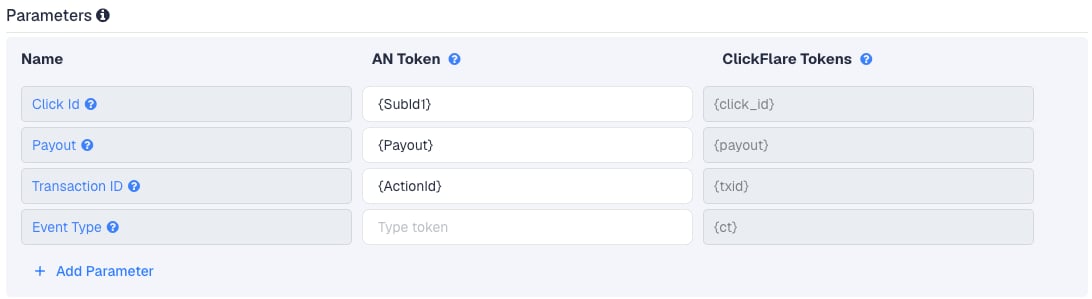
Setup
Everything in ClickFlare is done from inside the campaign editor. Create the offer and the affiliate network inline as you go.1
Set up your own tracking domain
Add a custom tracking domain before anything else, for example
trk.yourdomain.com. The postback URL is built on this domain, so changing it later means updating the postback in Impact too. See Tracking domains.2
Report conversions by postback time
Go to Settings → General Settings and set Conversion registration time reporting to Postback Timestamp.Impact reports an action on the day it happened. With the default Visit Timestamp, ClickFlare reports it on the day of the original click, so a sale that comes in days later lands on a different date in each platform. See Conversion registration time.
This is an account-wide setting. It changes the date conversions are reported on for every campaign.
3
Create the campaign
Go to Campaigns → New Campaign, choose Redirect tracking, pick your traffic source and select your tracking domain. See Creating a campaign.
4
Create the Impact.com affiliate network
While creating the offer for the campaign, create a new affiliate network in its Affiliate Network field. You can also create it first under Affiliate Networks → + New. Either way:
- Search for Impact and pick the Impact.com template.
- Keep the name. One global postback in Impact covers every brand you work with, so one affiliate network in ClickFlare is enough.
- Leave Event Type empty.
- Under Conversion tracking, select your own Tracking Domain and keep S2S Postback URL as the tracking method.
- Set Payout currency to the currency your brands pay in. See Payout and currency.
5
Get the brand's tracking link from Impact
In Impact, you can copy a brand’s tracking link in several places:Brands use different tracking domains, such as
- Dashboard: in the Create a link widget, search for the brand or paste a landing page URL, then click Copy Link.
- Manage → My Brands → My Brands: hover over the program and click Copy Link.
- Manage → Brand Creatives: select an ad, click Get Tracking Link, then Copy Tracking Link.
*.sjv.io, *.pxf.io or their own. Deep links add the target page as a percent-encoded u parameter, if the brand allows deep linking.Don’t use a short link or a vanity link as the offer URL. Parameters added to a short link don’t appear in the shareable version, and Sub IDs on a vanity link are fixed when you create it, so they can’t carry a new click ID on every click.6
Create the offer in ClickFlare
In the offer form: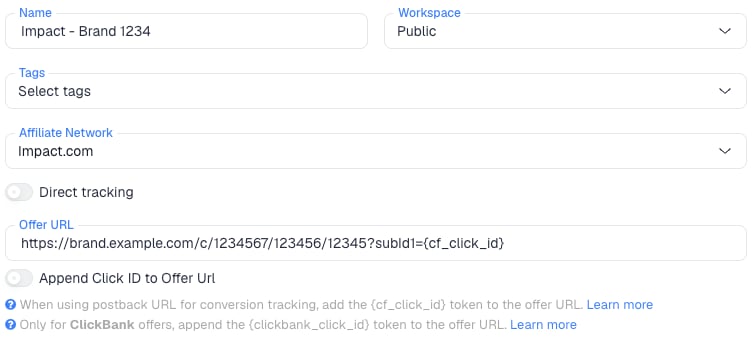
- Name the offer, for example after the brand.
- Select the Impact.com affiliate network you just created.
- Paste the Impact link into Offer URL and add
?subId1={cf_click_id}at the end. If the link already has a?, use&subId1={cf_click_id}instead:
payout value from the postback. Create one offer per brand, all on the same Impact.com affiliate network.7
Add the global postback in Impact
Back in Impact:
- In the top navigation, open your user profile menu and choose Settings.
- Under Technical, select Event Notifications.
- Next to Action Life Cycle Events, click Edit.
- Paste the ClickFlare postback URL.
- Choose GET as the HTTP method.
- Leave the optional settings as they are and click Save.
8
Add a lander (optional)
If you send traffic through a lander before the offer, the lander’s CTA must use the ClickFlare click URL, not the Impact link. ClickFlare then adds the click ID when it redirects to the offer. See Paths with landers and offers.
9
Save the campaign and launch
Save the campaign, copy the campaign URL from the Tracking tab and use it in your ads. Before you spend money on traffic, run the checks in Verify the setup.
Global postback or event-level postback
Impact has two places for a postback. They don’t behave the same way:
Use the global postback. Impact warns that event-level postbacks never fire for modifications or reversals, so ClickFlare would never hear about a cut commission or a reversed sale. With the global postback you don’t need event-level ones, except briefly for the Test button (see Verify the setup).
Modifications and reversals
After Impact tracks an action, the brand can still change it:
ClickFlare keeps one conversion per click ID and transaction ID.
{ActionId} stays the same when the brand modifies or reverses the action, so each later postback replaces the earlier one (the last one received). Impact retries a failed postback up to 15 times with the same {ActionId}, so retries can’t double count either.
Impact doesn’t list approval as a trigger, so don’t expect a postback when a pending action is approved.
Why ActionId is the transaction ID
By default ClickFlare keeps one conversion per click ID. If several postbacks arrive with the same click ID and no transaction ID, ClickFlare treats them as the same conversion, and you only see one of them (the last one received). Thetxid value has to be different on every conversion, but the same for every update of one conversion.
With
{ActionId}, a second sale on the same click, or a lead followed by a sale, arrives with its own ID and counts as its own conversion.
Brands with several event types
Each brand defines its own event types (formerly action trackers), such as a lead, a sale or a subscription. The global postback fires for all of them, and withtxid={ActionId} each one is a separate conversion.
To report each event type as its own column in ClickFlare, add &ct={ActionTrackerName} to the postback and create a custom conversion for every event type name the brand uses:
{ActionTrackerId} sends the numeric ID instead, which differs per brand. There is no {EventTypeId} macro.
Payout and currency
{Payout} is your commission, a decimal such as 18.40, in the brand’s currency. {Amount} is the sale amount. ClickFlare reads the number in the affiliate network’s Payout currency, so a EUR payout on a network set to USD is read as USD. Add ¶m2={Currency} to the postback to see each brand’s 3-letter currency code, and if your brands pay in different currencies, compare revenue per brand with Impact’s reports.
Verify the setup
1
Click through the campaign
Open the ClickFlare campaign URL (with a lander, also click the CTA). Check that the request to the brand’s Impact tracking domain has
subId1= followed by a real ClickFlare click ID, not the literal text {cf_click_id} or an encoded %257Bcf_click_id%257D.2
Test the postback
The global postback has no test button. You have two options:
- Real conversion. Complete the action through your campaign if the brand allows it, wait about 15 minutes, and check Impact’s Pending Actions screen. Asking the brand to reverse it afterwards also tests the reversal postback.
- Event-level test. Under Discover → Brands → brand → More → Tracking Integration, add an event-level postback with
{SubId1}replaced by the real click ID from the previous step. Open Actions → Launch Test and click Start test. Delete that postback afterwards.
3
Check the conversion in ClickFlare
The conversion should appear on the campaign with the payout from Impact. In Logs → Event Logs, check that it arrived with a numeric
txid (Impact’s action ID). If you see {SubId1} or another macro literally, Impact didn’t replace it: check the spelling and case.Troubleshooting
Actions show in Impact but not in ClickFlare
Actions show in Impact but not in ClickFlare
Work through these in order:
- The postback isn’t saved as Action Life Cycle Events. Check Settings → Technical → Event Notifications.
- The postback is still on its way. Impact processes actions for about 15 minutes before it sends the postback.
- Sub ID 1 is empty or encoded. The offer URL is missing
subId1={cf_click_id}, the click ID was typed into Impact’s Sub ID field and got encoded, or the lander CTA links straight to Impact instead of using the ClickFlare click URL. - The offer URL is a short or vanity link. Use the regular long link.
- The macro case is wrong.
{SubId1},{Payout},{ActionId}, exactly as written.
Reversed or reduced sales still show in ClickFlare
Reversed or reduced sales still show in ClickFlare
Event-level postbacks never fire for modifications or reversals: use the global one. Even then a reversed conversion still counts, because ClickFlare doesn’t read Impact’s status. See Modifications and reversals.
The payout is 0 or in the wrong currency
The payout is 0 or in the wrong currency
- Check that the postback has
payout={Payout}and the offer’s payout is set to Auto in ClickFlare. {Payout}is in the brand’s currency. See Payout and currency.
FAQ
Can I send the conversion back to my traffic source?
Can I send the conversion back to my traffic source?
Yes. Once ClickFlare records the Impact conversion, it can send it to the traffic source through the traffic source’s postback or conversion API integration. Nothing changes on the Impact side.
Related
Macro reference
Every network’s values
Custom conversions
Report each event type
Postback issues
Troubleshoot S2S