

- The offer URL is your smartlink, with the ClickFlare click ID in the
cidparameter. - The postback URL sends the click ID back to ClickFlare with every conversion, together with the payout. Los Pollos has one global postback for your whole account.
How the data flows
Offer URL = their parameter + your token. Postback URL = your parameter + their macro. Los Pollos writes the click ID into
cid on the way in and reads it back with the {cid} macro on the way out. The parameter is lowercase cid.What you’ll need
- An active ClickFlare account with your own tracking domain set up. Shared domains get flagged by networks and blocked by browsers. See Tracking domains.
- A Los Pollos affiliate account. For a vertical other than Dating, ask your account manager to enable that smartlink first. For CPA Marketplace offers, your account manager approves them and hands them over.
What the LosPollos template contains
ClickFlare has a LosPollos affiliate network template. Search for it as one word. It fills in the two Los Pollos macros ClickFlare needs.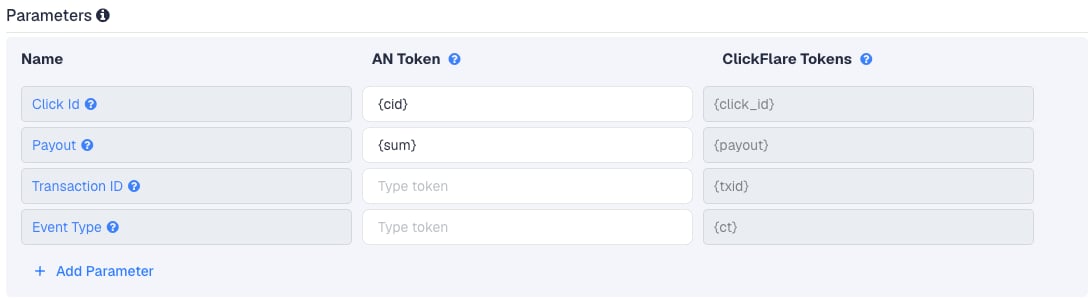
{cid} and {sum} are the only two macros Los Pollos documents for the postback. Tracker guides often show tokens such as {clickid}, {click_id} or {clickId} next to Los Pollos. Those are the trackers’ own tokens, not Los Pollos macros.
Setup
Everything in ClickFlare is done from inside the campaign editor. Create the offer and the affiliate network inline as you go.1
Set up your own tracking domain
Add a custom tracking domain before anything else, for example
trk.yourdomain.com. The postback URL is built on this domain, so changing it later means updating your Los Pollos global postback too. See Tracking domains.2
Report conversions by postback time
Go to Settings → General Settings and set Conversion registration time reporting to Postback Timestamp.With the default Visit Timestamp, ClickFlare reports a conversion on the day of the original click. A DOI or deposit that comes in a day later then lands on a different date than in Los Pollos’s statistics. See Conversion registration time.
This is an account-wide setting. It changes the date conversions are reported on for every campaign.
3
Create the campaign
Go to Campaigns → New Campaign, choose Redirect tracking, pick your traffic source and select your tracking domain. See Creating a campaign.
4
Create the Los Pollos affiliate network
While creating the offer for the campaign, create a new affiliate network in its Affiliate Network field. You can also create it first under Affiliate Networks → + New. Either way:
- Search for LosPollos and pick the template.
- Check that Click Id is
{cid}and Payout is{sum}. - Leave Transaction ID and Event Type empty.
- Under Conversion tracking, select your own Tracking Domain and keep S2S Postback URL as the tracking method.
- Set Payout currency to the currency Los Pollos pays you in. Its payment terms are quoted in US dollars.
5
Get your smartlink from Los Pollos
In Los Pollos, go to Smartlinks and open the smartlink for your vertical. Then pick one of the two ways to add the click ID:
- Click ID field: type
{cf_click_id}into the smartlink’s Click ID field. Los Pollos updates the direct link automatically and adds&cid={cf_click_id}to it. - Append Click ID in ClickFlare: leave the Click ID field empty and let ClickFlare add
cidin the next step.
cid={cf_click_id}, braces included.6
Create the offer in ClickFlare
In the offer form: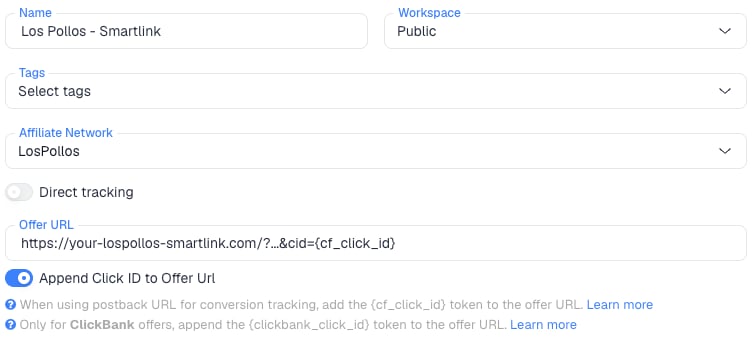
- Name the offer.
- Select the Los Pollos affiliate network you just created.
- Paste the smartlink into Offer URL.
- If the link already has
cid={cf_click_id}from the Click ID field, leave Append Click ID to Offer Url off. If you left the field empty, turn the toggle on. ClickFlare then addscid={cf_click_id}, built from the template’s{cid}macro.
payout value from the postback. A smartlink routes each visitor to a different offer, so a fixed payout would be wrong.7
Add the global postback in Los Pollos
Los Pollos says you add the postback in the Settings section. Guides word the exact path in different ways: Settings → Global postback with a plus icon, or Settings → Postback with a Global Postback URL field. Then:
- Paste the ClickFlare postback URL.
- Save.
8
Add a lander (optional)
If you send traffic through a lander before the offer, the lander’s CTA must use the ClickFlare click URL, not the Los Pollos smartlink. ClickFlare then adds the click ID when it redirects to the offer. See Paths with landers and offers.
9
Save the campaign and launch
Save the campaign, copy the campaign URL from the Tracking tab and use it in your ads. Before you spend money on traffic, run the checks in Verify the setup.
Click ID field or cid: one method only
The smartlink’s Click ID field and thecid URL parameter are the same thing. Whatever you type into the field, Los Pollos writes into the link as &cid=.... Tracker guides show it both ways: some fill the field, others append cid= to the link. At least one well-known tracker guide does both, which risks a duplicate cid in the link.
So pick one:
If you ever see
cid= twice in the offer URL, remove one. With two values, you can’t be sure which one Los Pollos stores and returns in {cid}.
No transaction ID: one conversion per click
Los Pollos documents no macro for a conversion or transaction ID. That’s why the template’s Transaction ID field is empty and the postback has notxid.
Here’s what that means. ClickFlare keeps one conversion per click ID unless the txid differs. Without a txid, every postback for the same click is the same conversion, and the last one received replaces the earlier one:
- A smartlink conversion is normally one conversion per click: an SOI, a DOI or a deposit, depending on the vertical. That works fine with one conversion per click.
- A resent postback for the same click doesn’t count twice. It replaces the first one.
- A second paid event on the same click, such as an SOI followed by a DOI, or a RevShare rebill, would replace the first conversion instead of adding a second one. You’d see one conversion with the payout of the last postback.
&txid= with that macro to the URL) and paste the new postback URL into Los Pollos.
Los Pollos also documents no status macro, and doesn’t say whether rejected or reversed conversions send a postback. Compare ClickFlare with Los Pollos’s statistics before payday.
Smartlink link format and CPA offers
Old and New link formats. Since August 2024, smartlinks come in an Old and a New format. The New format gives each smartlink its own subdomain. You switch it on the Smartlinks page by choosing the vertical and changing Old to New, and then you have to replace the link wherever you placed it. In ClickFlare, that means pasting the new link into the offer’s Offer URL and checking thatcid is still there.
Your own domain. Los Pollos lets you run smartlinks on your own domain through a CNAME record. Ask your account manager to set it up. Use the link they give you in the ClickFlare offer, with cid added the same way.
CPA Marketplace offers. Your account manager hands over the links. How the marketplace link builder works isn’t public. Most likely it takes cid like the smartlink, but check with your account manager and run a test click.
Verify the setup
1
Click through the campaign
Open the ClickFlare campaign URL (with a lander, also click the CTA). When the offer loads, the first request goes to the Los Pollos smartlink. Check that it has exactly one
cid= followed by a real ClickFlare click ID, not the literal text {cf_click_id}.2
Check the click in Los Pollos
Open Statistics in Los Pollos. It can be sorted by tracker, so you can see clicks and conversions per tracker click ID. Check that your test click shows the ClickFlare click ID.
3
Test the postback
Ask your account manager to help you test the postback. Los Pollos says it will show you how. To check the ClickFlare side on its own, copy the postback URL, replace
{cid} with the real click ID from your test click and {sum} with a test payout, and open it in your browser.4
Check the conversion in ClickFlare
The conversion should appear on the campaign with the payout from Los Pollos. In Logs → Event Logs, check that it arrived with the right click ID and payout. Once real conversions come in, compare them with Los Pollos’s statistics.
Troubleshooting
Conversions show in Los Pollos but not in ClickFlare
Conversions show in Los Pollos but not in ClickFlare
Work through these in order:
- The global postback is empty, unsaved or points elsewhere. Check it in Settings.
- The click ID didn’t reach Los Pollos. The offer URL has no
cid, or your lander’s CTA links straight to Los Pollos instead of using the ClickFlare click URL. A conversion without a valid click ID can’t be registered. cidis in the link twice. You filled the Click ID field and also turned on Append Click ID to Offer Url. Use one.- You switched to the New link format and the ClickFlare offer still has the old link, or the new link lost
cid. Paste the new link and add the click ID again.
Fewer conversions in ClickFlare than in Los Pollos
Fewer conversions in ClickFlare than in Los Pollos
Check whether those conversions share a click. Without a transaction ID, two postbacks on the same click merge into one in ClickFlare. Ask your account manager for a conversion ID macro, as in No transaction ID. Conversions that were already merged are not restored.
ClickFlare receives a literal macro or cf_click_id
ClickFlare receives a literal macro or cf_click_id
- A literal
{cid}or{sum}means Los Pollos didn’t replace the macro. Check the spelling: both are lowercase. - A literal
cf_click_idmeans the offer URL or the Click ID field has the token without braces. It must be{cf_click_id}.
The payout is 0 or in the wrong currency
The payout is 0 or in the wrong currency
- Check that the postback has
payout={sum}and the offer’s payout is set to Auto in ClickFlare. - Check that the affiliate network’s Payout currency matches what Los Pollos pays you in.
FAQ
Why is the template called LosPollos?
Why is the template called LosPollos?
That’s how it’s named in ClickFlare’s template list. Search for LosPollos as one word.
Can I have more than one global postback?
Can I have more than one global postback?
Possibly. One guide describes a plus icon for adding a global postback, which suggests more than one is allowed. Per-smartlink or per-offer postbacks aren’t documented. Ask your account manager if you need to send different smartlinks to different trackers.
Can I pass more data to Los Pollos?
Can I pass more data to Los Pollos?
Los Pollos doesn’t document other sub ID parameters publicly. Ask your account manager which extra parameters a smartlink accepts. Keep
cid for the ClickFlare click ID.Can I send the conversion back to my traffic source?
Can I send the conversion back to my traffic source?
Yes. Once ClickFlare records the Los Pollos conversion, it can send it to the traffic source through the traffic source’s postback or conversion API integration. Nothing changes on the Los Pollos side.
Related
Macro reference
Every network’s values
Monetizer
Another smartlink setup
Postback issues
Troubleshoot S2S