


m4trix.network and a manager approves the account. You may also see it listed as “Mediapartners (M4trix)” in older directories. The network calls itself M4trix Network today, and the Mediapartners domain no longer hosts a network site.
To track M4trix offers in ClickFlare, two links have to carry the ClickFlare click ID in both directions:
- The offer URL sends the ClickFlare click ID to M4trix in
cid. - The postback URL sends it back to ClickFlare with every conversion, together with the payout and an order ID.
At a glance
To set up M4trix Network with ClickFlare:- Set the domain and reporting time.
- Create the M4trix affiliate network.
- Add the postback in M4trix.
- Create the offer with cid.
How the data flows
Offer URL = their parameter + your token. Postback URL = your parameter + their token. M4trix writes the click ID into
cid on the way in and reads it back with the {cid} macro on the way out.What you’ll need
- An active ClickFlare account with your own tracking domain set up. Shared domains get flagged by networks and blocked by browsers. See Tracking domains.
- An approved M4trix Network affiliate account, and access to the offer you want to run.
- A way to reach your M4trix manager. Since M4trix doesn’t publish its macros, your manager is the one who can confirm them.
What the M4TRIX NETWORK template contains
ClickFlare has an M4TRIX NETWORK affiliate network template. It fills in the M4trix macros ClickFlare needs.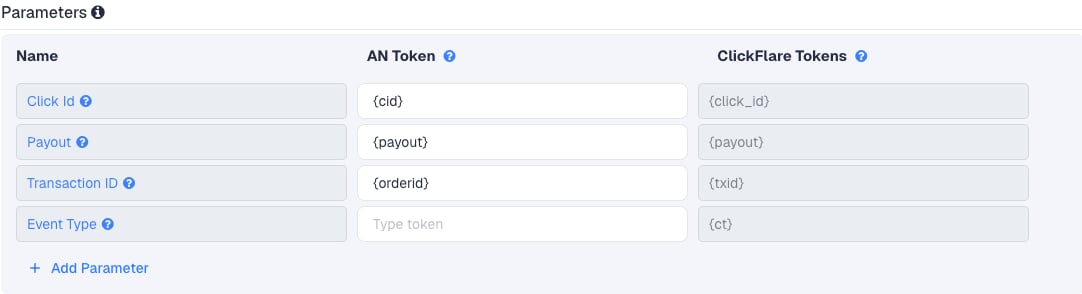
Setup
Everything in ClickFlare is done from inside the campaign editor. Create the offer and the affiliate network inline as you go.1
Set up your own tracking domain
Add a custom tracking domain before anything else, for example
trk.yourdomain.com. The postback URL is built on this domain, so changing it later means updating the postback in M4trix too. See Tracking domains.2
Report conversions by postback time
Go to Settings → General Settings and set Conversion registration time reporting to Postback Timestamp.M4trix reports a conversion on the day it happened. With the default Visit Timestamp, ClickFlare reports it on the day of the original click, so a conversion that comes in days later lands on a different date in each platform. See Conversion registration time.
This is an account-wide setting. It changes the date conversions are reported on for every campaign.
3
Create the campaign
Go to Campaigns → New Campaign, choose Redirect tracking, pick your traffic source and select your tracking domain. See Creating a campaign.
4
Create the M4trix affiliate network
While creating the offer for the campaign, create a new affiliate network in its Affiliate Network field. You can also create it first under Affiliate Networks → + New. Either way:
- Search for M4trix and pick the M4TRIX NETWORK template.
- Name it, for example “M4trix Network”.
- Keep Click Id
{cid}, Payout{payout}and Transaction ID{orderid}, unless your manager gave you other macros. - Leave Event Type empty.
- Under Conversion tracking, select your own Tracking Domain and keep S2S Postback URL as the tracking method.
- Set Payout currency to the currency M4trix pays you in.
5
Add the postback in M4trix
In your M4trix account:
- Go to Account settings and open the Tracking tab.
- Click Edit, then Add Post Back.
- Paste the ClickFlare postback URL.
- Click Submit.
6
Get the offer's tracking link from M4trix
In M4trix, go to Offers, find the offer and open its Tracking links tab. Copy the link to the order page you want. It looks like this:The link ends with placeholders in braces that are meant for a tracker to fill in. Delete
aff={AFFID}&sid={SUBID}&cid={CLICKID}, so the link ends after net=12345:7
Create the offer in ClickFlare
In the offer form:
- Name the offer.
- Select the M4trix affiliate network you just created.
- Paste the cleaned link into Offer URL with
&cid={cf_click_id}at the end:
cid, you can turn on Append Click ID to Offer Url instead. ClickFlare then adds cid={cf_click_id} from the template. Use one or the other, not both.Set the payout to Auto so ClickFlare uses the payout value from the postback.8
Add a lander (optional)
M4trix offers often run behind an advertorial. If you send traffic through your own lander before the offer, the lander’s CTA must use the ClickFlare click URL, not the M4trix link. ClickFlare then adds the click ID when it redirects to the offer. See Paths with landers and offers.If M4trix hosts the advertorial for you, ask your manager how the click ID gets from the advertorial to the order page. The
cid value has to survive that step.9
Save the campaign and launch
Save the campaign, copy the campaign URL from the Tracking tab and use it in your ads. Before you spend money on traffic, run the checks in Verify the setup.
Transaction ID
By default ClickFlare keeps one conversion per click ID. If several postbacks arrive with the same click ID and no transaction ID, ClickFlare treats them as the same conversion, and you only see one of them (the last one received). Thetxid parameter tells ClickFlare that each postback is a separate conversion.
The template sends txid={orderid}, the ID of the order on M4trix’s side. With it, two orders from the same click count as two conversions, and a postback that M4trix resends for the same order replaces the first one instead of adding a second.
If {orderid} arrives empty or as the literal text {orderid}, your account doesn’t support that macro. Ask your manager for the macro of the order or conversion ID, and use it in Transaction ID instead. Don’t use a random value: a resent postback would then count twice.
Approved, pending and rejected orders
ClickFlare doesn’t read a status from the postback. It records a conversion for every postback it receives. So what you see in ClickFlare depends on when M4trix fires the postback:- If it fires when the order is placed, ClickFlare counts orders that M4trix may reject later.
- If it fires only on approval, ClickFlare counts only paid orders, but they arrive later.
Verify the setup
1
Click through the campaign
Open the ClickFlare campaign URL (with a lander, also click the CTA). When the order page loads, check the address bar or your browser’s network tab. It must have
cid= followed by a real ClickFlare click ID, not the literal text {cf_click_id}, and no leftover {CLICKID}.2
Generate a test conversion
Ask your M4trix manager to fire a test conversion on your click. M4trix doesn’t document a postback tester for affiliates, and a test fired without a real ClickFlare click has no click ID to match.
3
Check the conversion in ClickFlare
The conversion should appear on the campaign with the payout from M4trix. In Logs → Event Logs, check that it arrived with a
txid (M4trix’s order ID).Troubleshooting
Conversions show in M4trix but not in ClickFlare
Conversions show in M4trix but not in ClickFlare
Work through these in order:
- The postback isn’t saved. Check the Tracking tab in your M4trix account settings, or ask your manager to confirm it’s active.
- cid is empty in M4trix. The offer URL is missing
cid={cf_click_id}, or the lander CTA links straight to M4trix instead of using the ClickFlare click URL. - The link still has the placeholders. If
cid={CLICKID}is still in the link, M4trix may read that instead of your value. Removeaff={AFFID}&sid={SUBID}&cid={CLICKID}. - The macro name differs on your account. Ask your manager which macro returns the
cidvalue and update Click Id in ClickFlare.
ClickFlare receives a literal macro or cf_click_id
ClickFlare receives a literal macro or cf_click_id
- A literal
{cid}means M4trix didn’t replace the macro. Ask your manager for the correct name. - A literal
cf_click_idmeans the offer URL in ClickFlare has the token without braces. It must be{cf_click_id}.
Only one of several orders shows in ClickFlare
Only one of several orders shows in ClickFlare
The postback has no
txid, or {orderid} arrives empty. Ask your manager for a working order ID macro and put it in Transaction ID.The payout is 0 or in the wrong currency
The payout is 0 or in the wrong currency
- Check that the postback has
payout={payout}and the offer’s payout is set to Auto in ClickFlare. - Set the affiliate network’s Payout currency in ClickFlare to the currency M4trix pays you in.
FAQ
Does ClickFlare integrate with M4trix Network?
Does ClickFlare integrate with M4trix Network?
Yes. ClickFlare has an M4TRIX NETWORK template. You pass the click ID in cid, and M4trix fires ClickFlare’s S2S postback with the click ID, payout and order ID.
Are Mediapartners and M4trix the same network?
Are Mediapartners and M4trix the same network?
Some directories list the network as “Mediapartners (M4trix)”. The Mediapartners domain no longer hosts a network site, and the network operates as M4trix Network on
m4trix.network. In ClickFlare, use the M4TRIX NETWORK template.Can I pass more data to M4trix?
Can I pass more data to M4trix?
The
sid placeholder in M4trix links suggests a sub ID field for your own labels, but M4trix doesn’t document it. Ask your manager before you use it, and keep cid for the click ID.How often does M4trix pay?
How often does M4trix pay?
M4trix says it pays weekly, Net 4, with a $1,000 threshold. Your terms may differ: check them with your manager.
Can I send the conversion back to my traffic source?
Can I send the conversion back to my traffic source?
Yes. Once ClickFlare records the M4trix conversion, it can send it to the traffic source through the traffic source’s postback or conversion API integration. Nothing changes on the M4trix side.
Related
Macro reference
Every network’s values
Postback parameters
click_id, txid, param1–20
Postback issues
Troubleshoot S2S