


At a glance
To set up ShareASale with ClickFlare:- Join the programs on Awin.
- Create the Awin affiliate network.
- Create the offer with an Awin link.
- Turn on Transaction Notifications.
What happened to ShareASale
- Awin has owned ShareASale since 2017. Awin says it is “bringing everything onto one platform”, and new customers launch directly on Awin.
- The ShareASale platform closed on October 6, 2025, according to Awin’s help center. Advertisers were moved (“upgraded”) to Awin.
- shareasale.com now redirects to Awin. The home page and the old
account.shareasale.comlogin both send you to an Awin page headed “ShareASale is now part of Awin”.
How the data flows
The link parameter is lowercase (
clickref2); the macro is camel case (!!!clickRef2!!!). Use ClickRef2 rather than ClickRef1: only ClickRef1 is visible to advertisers.Setup essentials
The full walkthrough is in the Awin guide. In short:1
Join the programs on Awin
Log in to Awin with your publisher account and check you’re approved in the former ShareASale programs you want to run. Your old ShareASale login now leads to Awin.
2
Create the Awin affiliate network in ClickFlare
In the campaign editor, create the affiliate network from the offer’s Affiliate Network field (or under Affiliate Networks → + New). Pick the AWIN template. It fills in Click Id 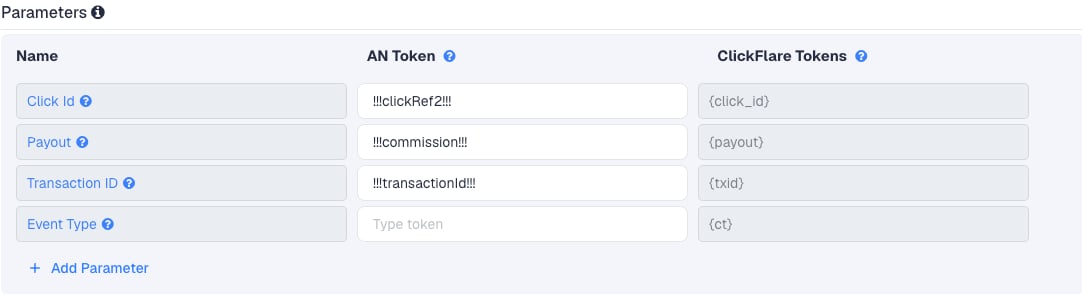

!!!clickRef2!!!, Payout !!!commission!!! and Transaction ID !!!transactionId!!!. Select your own Tracking Domain, keep S2S Postback URL, set Payout currency, and copy the postback URL:3
Create the offer with an Awin link
Build the link in Awin’s Link Builder and type 
{cf_click_id} in ClickRef2, or add clickref2={cf_click_id} by hand before the destination URL. Paste it into Offer URL and set the payout to Auto.clickref2={cf_click_id} at the end of the link, after the destination URL. Awin asks for ClickRefs before it, so add the parameter yourself and leave the toggle off.4
Turn on Transaction Notifications
In Awin, go to Toolbox → Transaction Notifications. Paste the ClickFlare URL as the Call-back URL, choose GET as the Call-back method and click Submit. If the menu item is missing, raise a support ticket with Awin to request access.
Moving existing ShareASale offers
If you have ClickFlare offers that still point to ShareASale tracking links:- Create the Awin affiliate network as above. One network covers all your Awin programs.
- For each offer, build a new Awin link for the same advertiser and replace the old URL in Offer URL, with
clickref2={cf_click_id}in it. - Switch the offer’s Affiliate Network to the Awin network.
Locking is now validation
On ShareASale, sales locked on the 20th of each month. On Awin, a tracked sale starts as a pending commission. The advertiser approves, amends or declines it during the program’s validation period, and anything not reviewed in time is approved automatically. Awin sends the Transaction Notification when it records the sale, so ClickFlare shows the commission as it was first tracked. Awin’s documentation doesn’t say whether a second notification follows when a commission is approved or declined. Compare ClickFlare with Awin’s transaction report before you judge a program, especially one with many returns.Troubleshooting
Awin transactions don't reach ClickFlare
Awin transactions don't reach ClickFlare
Check that Transaction Notifications are saved with the GET method, that the offer URL carries
clickref2={cf_click_id}, and that the lander CTA uses the ClickFlare click URL. The Awin guide has the full checklist, and Troubleshooting S2S postbacks covers the general checks.FAQ
Is the payout my commission or the order value?
Is the payout my commission or the order value?
Your commission. The template uses
!!!commission!!!. !!!transactionAmount!!! is the total sale amount, which isn’t what you earn.Did my commission rates carry over?
Did my commission rates carry over?
Awin’s help center says advertisers’ commission rates and custom rates carried over in the upgrade. Check the program terms on Awin to be sure, since the advertiser manages them.
Related
Macro reference
Every network’s values
Awin guide
The full setup
Postback issues
Troubleshoot S2S